Zonka Feedback alternatives are worth comparing for a simple reason: you cannot see what it costs.
Zonka earns its 4.8 rating with polished surveys across the web, email, SMS, WhatsApp, and offline, but it publishes no pricing. Every plan is quote-only, so a team cannot tell what it will spend, or how that compares with a lighter tool, until after a sales call.
For a team that mostly wants to ask visitors a smart question and understand the answers, that is a lot of unknowns for a job that may not need the whole platform.
I looked at ten tools through that lens, Qualaroo among them. For each one I checked whether pricing is published, which channels it reaches, and how much effort it asks of the team running it.
Why Are Teams Looking for Zonka Feedback Alternatives?
Zonka’s rating is strong, so the complaints are not about quality. They come from not being able to see what the platform costs or how much of it a team needs.
Pricing Is Quote-Only
Zonka does not publish its prices, so every plan starts with a sales conversation. Buyers cannot see a number to budget against, or to compare with tools that list their prices openly.
There Is No Way to Benchmark Value
Without published tiers, a team cannot see what AI analysis, extra channels, or case management add to the bill. Judging value for money has to wait for a quote, which is hard to do while comparing several vendors.
The Scope Is Broader Than Many Teams Need
Zonka covers a centralized inbox, case management, and reputation tools on top of surveys. A team that mainly wants contextual website or in-app feedback pays for scope it may never use.
A High Rating Rests on a Modest Sample
Zonka’s 4.8 on Capterra comes from 68 reviews. That is a strong score, but a thin base for a platform pitched at larger programs, so there is less independent evidence to lean on than for tools with hundreds of reviews.
The Top 10 Zonka Feedback Alternatives
Here is the whole field in one table, followed by the individual write-ups.
| Tool | Best For | Starting Price | Capterra Rating |
| Qualaroo | Capturing Real-Time User Insights In-App & on Your Website Using Contextual, AI-Powered Micro-Surveys | Free plan; from $19.99/mo | 4.7/5 |
| Survicate | Multichannel surveys with a centralized research hub | Free plan; from $114/mo | 4.6/5 |
| SurveyMonkey | Professional surveys with AI-assisted survey building | $30/mo | 4.6/5 |
| Qualtrics (XM for CX) | Enterprise experience-management platform | Quote-only | 4.6/5 |
| Medallia | Enterprise customer experience programs | Quote-only | 4.5/5 |
| InMoment | Closed-loop CES and customer experience programs | Quote-only | 4.4/5 |
| AskNicely | NPS programs with frontline coaching workflows | Quote-only | 4.6/5 |
| QuestionPro | Customer experience management with journey tracking | Free plan; from $83/mo | 4.8/5 |
| Jotform | Highly customizable forms with kiosk surveys | Free plan; from $34/mo | 4.7/5 |
| SurveySparrow | Conversational, chat-style surveys | Quote-only | 4.4/5 |
The breakdowns below show where each one fits and where it falls short of Zonka.
1. Qualaroo: Best for Capturing Real-Time User Insights In-App & on Your Website Using Contextual, AI-Powered Micro-Surveys
Zonka Feedback alternatives rarely include AI analysis in a free plan, which makes Qualaroo the first tool I would put on the shortlist. The Customer Feedback Analysis AI suite comes built in rather than as an upgrade, free plan included.
AI Sentiment Analysis scores the mood behind written answers, Automated Tagging sorts them into themes, and the AI Response Summarizer condenses a long comment list into a quick read. Nudges can target by time spent in the app, pages visited, traffic source, or exit intent, and the
Identify API reaches a specific named user. Skip logic and branching then reshape the questions around how each person answers.
The AI Survey Creator writes a first draft from a short prompt, while Heatmaps and Session Recordings add a view of what the visitor was doing just before replying. Website, mobile, email, and link surveys all run from one account.
Pros:
- AI Survey Creator drafts a full Nudge from a prompt, no manual setup required
- Question branching and skip logic so respondents only see relevant follow-ups
- Native AI Customer Feedback Analysis, including AI Sentiment Analysis and word cloud generation for open-text responses
- Heatmaps and Session Recordings show what a user was doing right before they responded
- Advanced targeting by behavior, URL, exit intent, and custom user properties
- Identify API ties responses back to a real user by email or customer ID
- Nudge for Prototype works on Figma, Adobe XD, and InVision before a product ships
- Multilingual surveys in 100+ languages
- iOS and Android SDK for native in-app surveys
- Salesforce, HubSpot, and Slack integrations for CRM-connected feedback workflows
Cons:
- There are quite a few targeting and survey options to work through, so getting the setup exactly right can take some time
- The reporting could also be a little more straightforward when reviewing larger amounts of feedback
How Qualaroo Compares to Zonka Feedback: Qualaroo includes native AI analysis from the free plan up and publishes every price it charges, where Zonka Feedback is quote-only. Zonka reaches more channels, including SMS, WhatsApp, and offline, and adds closed-loop case management that Qualaroo does not attempt.
Pricing: Free plan available, up to 50 responses with all premium features. Essentials at $19.99/month, Business at $49.99/month, and Enterprise from $149.99/month.
User Rating: 4.7/5 (Capterra)
KingsPoint offers a useful example. The company used Qualaroo to find a $60,000 problem that its behavioral data had not explained. Asking the right visitor a direct question at the right moment did the work, with no premium analysis tier involved.

2. Survicate: Best for Multichannel Reach With Published Pricing
A colleague pointed me to Survicate a while back, and I kept using it. It makes the most sense for teams that want several channels and a published starting price.
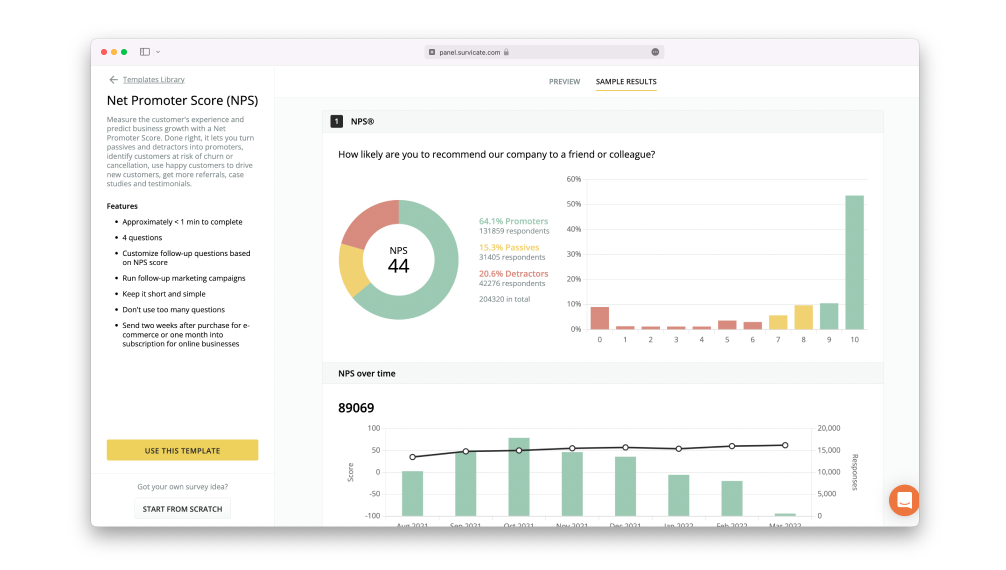
My first project was a set of rating-scale surveys on feature satisfaction, and the live results showed quickly which features drove the scores.
One Research Hub gathers answers from the website, the product, email, shareable links, and mobile, and prebuilt connections to tools like Smartlook, Productboard, and BigQuery pass the data along. Paying for the first time is a big jump from the free plan, and a few features take some getting used to.
Pros:
- A single hub collects answers from the website, the product, email, links, and mobile apps
- The Research Hub keeps responses and analysis together
- Prebuilt connections to tools like Smartlook, Productboard, and BigQuery
- Matrix survey templates for structured questions
Cons:
- A large price step separates the free plan from the paid tiers
- Some features take time to learn
How Survicate Compares to Zonka Feedback: Survicate pairs multichannel surveys with AI-assisted analysis and a published starting price, though its closed-loop and case-handling tools are lighter than Zonka’s.
Pricing: Free plan available. Paid plans start at $114/month.
User Rating: 4.6/5 (Capterra)
3. SurveyMonkey: Best for AI-Assisted Survey Building at a Published Price
I used SurveyMonkey recently, and its AI-powered Genius assistant was the highlight. Once my questions were drafted, it graded the survey and recommended trims, plainer wording, and skip logic.
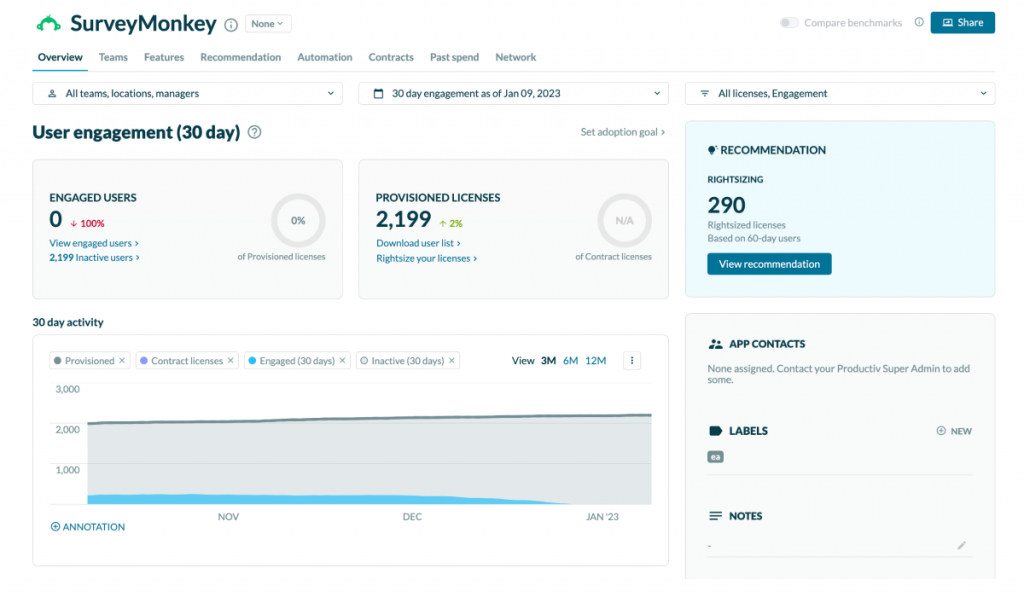
After launch it helped weed out low-quality responses, summarize open-ended answers, and point to the biggest trends. A deep bank of expert-written questions, logic that hides irrelevant questions, and recurring sends make ongoing programs easy to run, and NPS comes built in.
Survey reminders nudge non-responders, and periodic sends keep feedback flowing without rebuilding anything. At a published $30 a month it is one of the cheapest places to start on this list, and its review count on Capterra, comfortably above ten thousand, dwarfs every other tool here.
Pros:
- SurveyMonkey Genius grades drafts and suggests improvements before launch
- Large bank of expert-written questions to draw from
- Logic that hides questions a respondent does not need to see
- Recurring surveys and NPS measurement without extra tools
Cons:
- Setting up survey logic can be challenging for beginners
- Advanced reporting and visualizations are reserved for upper plans
How SurveyMonkey Compares to Zonka Feedback: SurveyMonkey brings a familiar interface, AI-assisted building, and a published price, though as a general-purpose platform it lacks Zonka’s omnichannel closed-loop workflows.
Pricing: Paid plans start at $30/month.
User Rating: 4.6/5 (Capterra)
4. Qualtrics (XM for CX): Best for Enterprise-Wide Experience Programs
Qualtrics is the move for a team that wants a bigger platform than Zonka, not a smaller one. Its predictive tools flag customers who look likely to leave, and built-in ticketing and alerts turn that signal into a task for someone on the team.
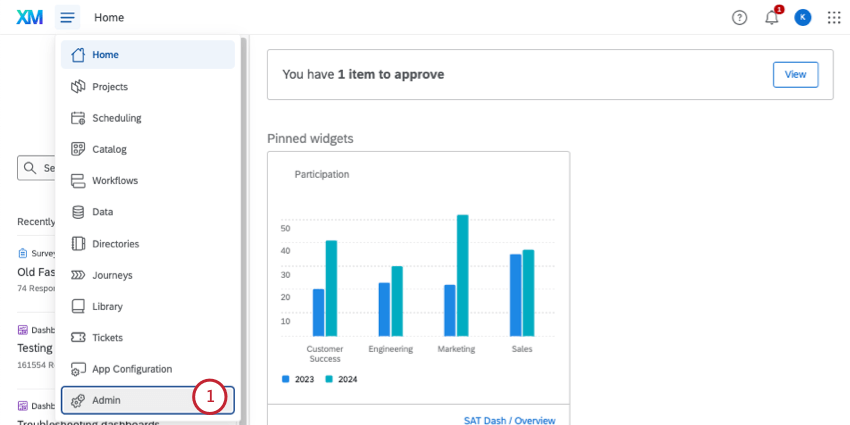
ExpertReview audits questions and suggests fixes, collaboration features let several people build in one workspace, and branching aims each question at the right audience. About 30 chart types cover most reporting needs, and multimedia content can keep long surveys lively.
The price of all this is effort and cost, since setup takes time, advanced reporting can call for training, and pricing is quote-based, just as it does with Zonka.
Pros:
- Predictive intelligence that helps flag customers at risk of churn
- Ticket creation and alerts so teams can act on insights
- ExpertReview audits surveys for potential design issues
- About 30 chart types to present findings clearly
Cons:
- Implementation takes real time, and pricing requires a quote
- More platform than a team running only website or in-app surveys would use
How Qualtrics Compares to Zonka Feedback: Qualtrics sits a full tier above Zonka, with predictive analytics and cross-department reporting. It pays off for organizations whose feedback programs already stretch beyond customer surveys.
Pricing: Quote-only, contact vendor for pricing.
User Rating: 4.6/5 (Capterra)
5. Medallia: Best for Enterprise Customer Experience Programs
Medallia is built for large organizations running customer experience as a formal program. Real-time feedback capture, journey-wide experience management, mobile surveys, and action-oriented analytics sit in one platform, and benchmarking data shows how a company stacks up against industry standards.
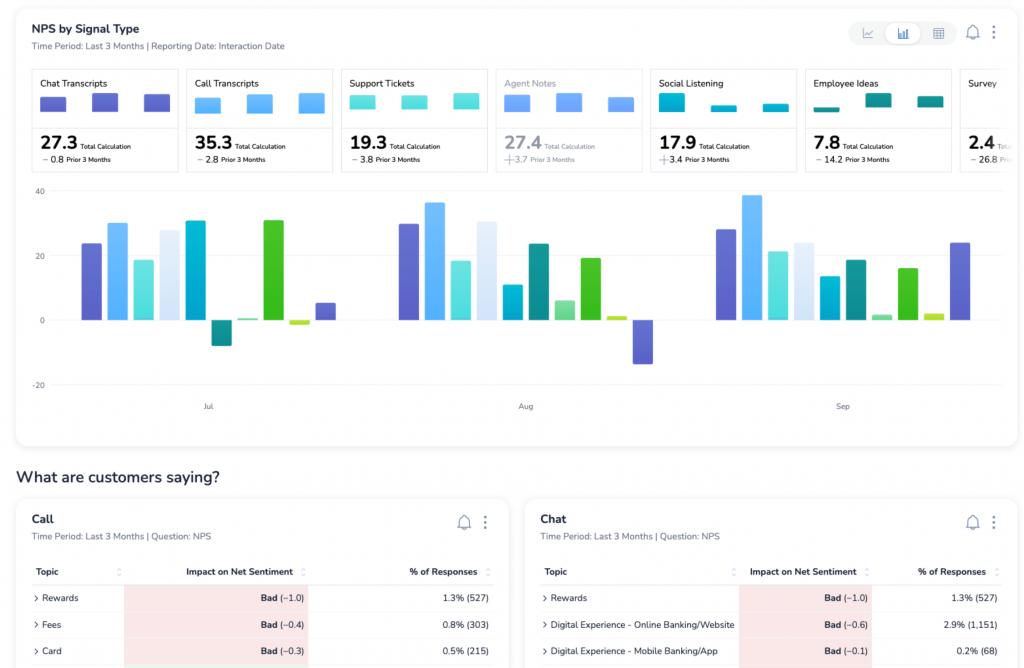
AI-powered insights help surface hidden patterns, even when data is limited, and the platform assumes dedicated owners for programs, dashboards, and follow-up.
But scope and services push total cost well above lighter tools, and pricing is quote-based. For a team put off by Zonka’s quote-only pricing, this is no escape, since Medallia is quote-based too and aimed at enterprise scale.
Pros:
- Real-time feedback capture across the customer journey
- Action-oriented analytics to identify what motivates customers
- Benchmarking data against industry standards
- AI-powered insights that surface hidden patterns
Cons:
- Pricing is quote-based, with total cost shaped by scope and services
- More platform than a team running contextual surveys needs
How Medallia Compares to Zonka Feedback: Medallia is a heavier enterprise platform with deeper benchmarking and journey analytics, with quote-only pricing and a bigger commitment than Zonka.
Pricing: Quote-only, contact vendor for pricing.
User Rating: 4.5/5 (Capterra)
6. InMoment: Best for Closed-Loop CES and Customer Experience Programs
InMoment is the pick for closed-loop customer experience programs at larger organizations. Microsurveys can run in multiple languages, including CES surveys, and dashboards show how a metric moves over time and across customer segments.
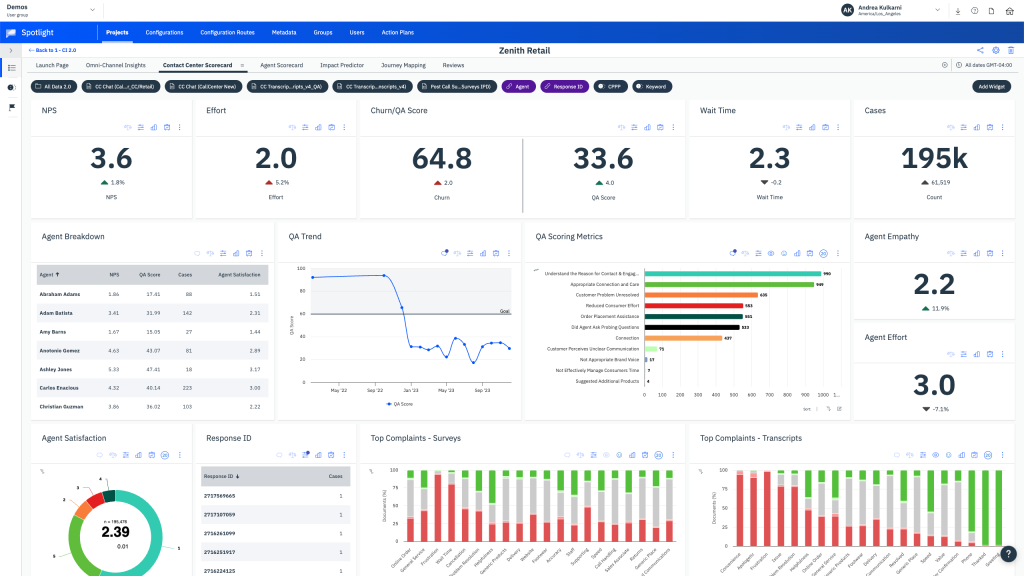
Auto-route reporting sends feedback to the right team, case management tracks follow-up from creation to closure, and automated real-time alerts flag opportunities in the customer journey. Location-specific recommendations help multi-site businesses act on feedback, and customizable dashboards display the metrics each team cares about.
Pricing is quote-based, and the Capterra rating of 4.4 rests on a modest review base. Advanced configuration takes training, so it suits teams with dedicated CX staff more than a lean product team.
Pros:
- Microsurveys in multiple languages, including CES surveys
- Case management that tracks follow-up from creation to closure
- Auto-route reporting sends feedback to the right team
- Location-specific recommendations for multi-site businesses
Cons:
- Pricing is quote-based, with no published starting point
- Advanced configuration takes training
How InMoment Compares to Zonka Feedback: InMoment matches Zonka’s closed-loop case management and goes deeper on location-level recommendations, but it is priced and configured for larger CX teams.
Pricing: Quote-only, contact vendor for pricing.
User Rating: 4.4/5 (Capterra)
7. AskNicely: Best for NPS Programs With Frontline Coaching Workflows
AskNicely puts its energy into the follow-up after a score arrives. Event-triggered surveys go out after a purchase or interaction, daily scheduling automates delivery, and custom response alerts flag specific keywords the moment they appear.
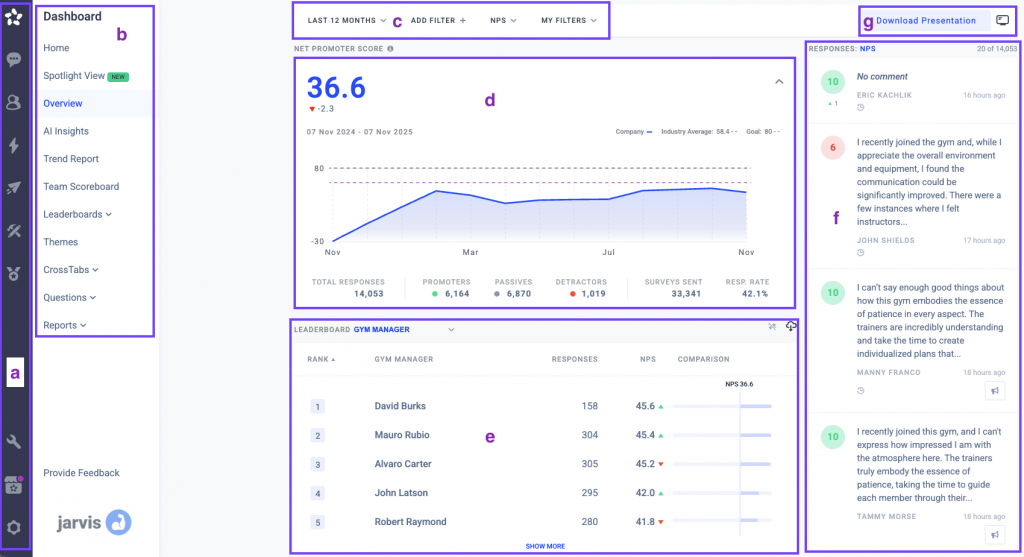
Automated reporting turns responses into trends in the dashboard, teams control the goal, audience, and frequency of each survey, and integrations with Zendesk, HubSpot, and Salesforce keep follow-up in the systems teams already use.
Its Learn, Grow, and Transform tiers scale with response volume, and dollar pricing requires a sales quote. It is priced for mid-market teams and above, so it does not solve a pricing complaint on its own, and it is more service-focused than product-focused.
Pros:
- Event-triggered surveys and daily scheduling for automated delivery
- Custom response alerts for specific keywords
- Automated reporting that turns responses into trends
- Integrations with Zendesk, HubSpot, and Salesforce
Cons:
- Pricing scales with response volume and requires a sales quote
- More service-focused than product-focused
How AskNicely Compares to Zonka Feedback: AskNicely matches Zonka’s closed-loop follow-up with a stronger frontline coaching focus, though neither publishes pricing and AskNicely has less omnichannel reach.
Pricing: Quote-only, contact vendor for pricing.
User Rating: 4.6/5 (Capterra)
8. QuestionPro: Best for Journey Tracking and Churn Analysis
QuestionPro CX comes closest on this list to Zonka’s customer experience scope. NPS, CSAT, and CES measurement sit beside customer journey tracking, churn risk analysis, and automated actions that fire for promoters and detractors alike.
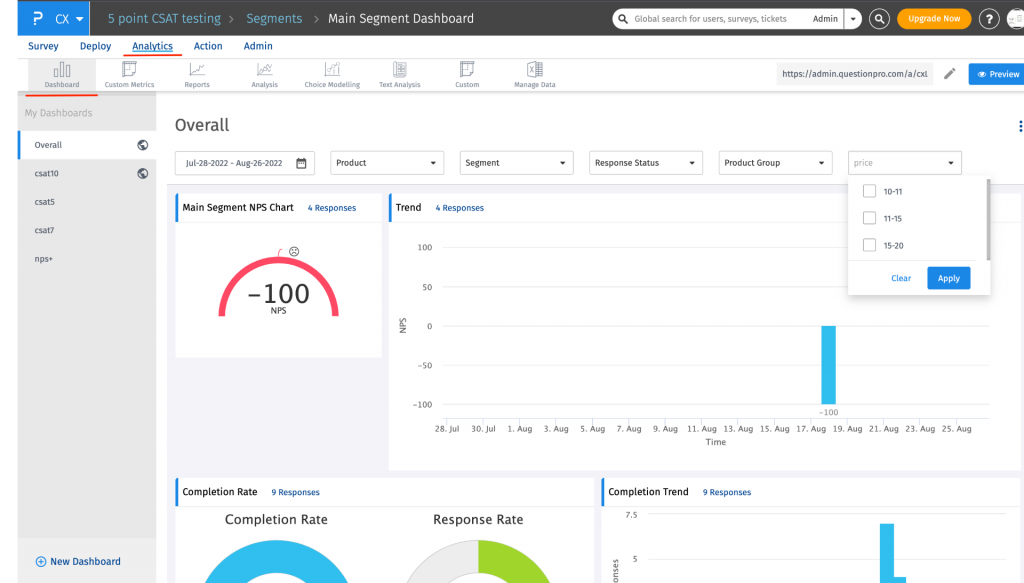
Real-time dashboards can be shared across a team or customized around a single question, and sentiment analysis explains the emotion behind a score instead of leaving it as a bare number. Distribution reaches customers through email, SMS, and web forms.
Two things to weigh: per-user billing means the bill rises as the team grows, and wiring it into existing systems can take real effort. Capterra gives it a 4.8, among the highest ratings here, on more than five hundred reviews.
Pros:
- NPS, CSAT, and CES measurement with automated actions for promoters and detractors
- Customer journey mapping and churn risk analysis
- Real-time dashboards that can be shared or customized
- Sentiment analysis that explains the emotion behind feedback
Cons:
- Per-user billing means the bill rises as the team grows
- Connecting it to existing systems can take real effort
How QuestionPro Compares to Zonka Feedback: QuestionPro matches Zonka on closed-loop automation and adds journey mapping and churn analysis, with a higher Capterra rating on a far larger review base, though it bills per user and takes more effort to connect to existing systems.
Pricing: Free plan available. Paid plans start at $83/month per user.
User Rating: 4.8/5 (Capterra)
9. Jotform: Best for Kiosk Surveys and Customizable Forms
I reach for Jotform when a team wants polished forms and surveys without writing code, and for Zonka users the Kiosk feature is the draw.
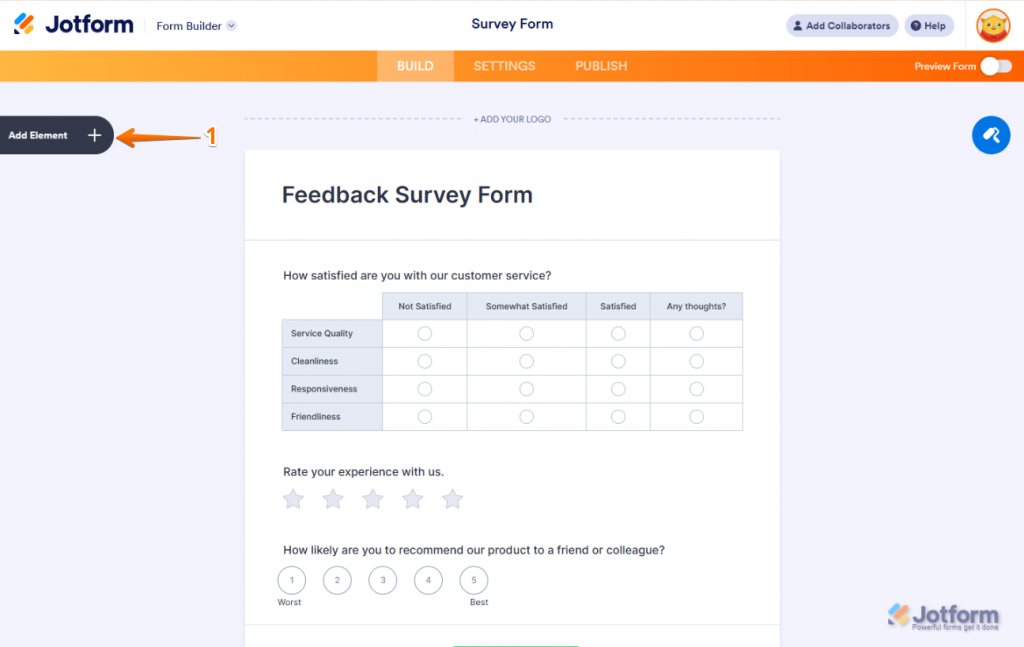
Touchless kiosk surveys let participants leave feedback on a device installed in a location, and the interface is simple enough for people who are not tech-savvy, which covers part of what Zonka’s offline mode does.
CRM integrations with Square, Salesforce, and Zapier close the loop, Google Analytics tracking adds depth, and ready-made templates save time. Jotform is a forms builder first, so it has no triggers tied to in-product behavior.
Pros:
- Touchless kiosk surveys for on-site feedback collection
- Conditional logic and answer piping to personalize surveys
- CRM integrations with Square, Salesforce, and Zapier
- Survey translation and Google Analytics tracking
Cons:
- The free plan limits forms and submissions, and dropping Jotform branding requires a paid plan
- A forms builder first, with no behavior-triggered in-product surveys
How Jotform Compares to Zonka Feedback: Jotform offers kiosk collection and deeper form customization at a published price, but it lacks Zonka’s AI analysis and closed-loop case management.
Pricing: Free plan available. Paid plans start at $34/month.
User Rating: 4.7/5 (Capterra)
10. SurveySparrow: Best for Chat-Style Surveys With Workflow Automation
SurveySparrow is built for teams whose response rate hinges on how a survey feels to answer. Its chat-style format asks one question at a time and can include images, GIFs, and video.
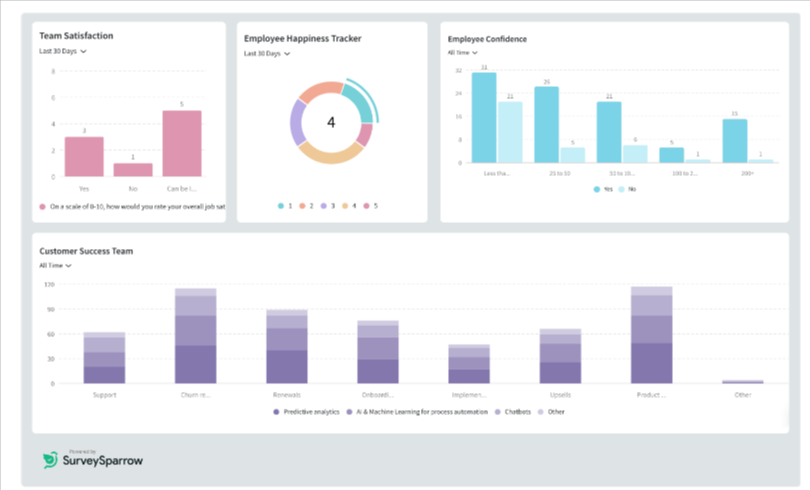
Embedded chatbots invite site visitors into a survey, and a library of ready-made templates covers most use cases. Visual Workflows trigger actions from survey responses, which echoes part of Zonka’s closed-loop tooling, and surveys can run offline, in-app, by email, and in several languages.
Real-time reports track results as they come in, and pre-built templates for satisfaction, feedback analysis, and experience optimization mean few surveys start from a blank page.
Pros:
- Chat-style surveys that can include images, GIFs, and video
- Visual Workflows that trigger actions from survey responses
- Chatbots that invite site visitors into a survey
- Offline, in-app, email, and multi-language options
Cons:
- Linking it with outside analysis tools can be awkward
- Customization is somewhat narrower than on other tools
How SurveySparrow Compares to Zonka Feedback: SurveySparrow comes nearest to Zonka on offline collection and workflow automation and feels more conversational, though its Capterra rating is lower and, like Zonka, it does not publish pricing.
Pricing: Free trial available. Pricing requires contacting the vendor.
User Rating: 4.4/5 (Capterra)
Which Zonka Feedback Alternative Should Be Your Top Pick?
Short on time? These three picks cover most of the situations behind a Zonka search.
1. Qualaroo: Best Overall for AI Analysis Without a Separate Tier
Qualaroo comes first because analysis is part of the product rather than a premium add-on. Sentiment scoring, automatic tagging, and the AI Response Summarizer turn piles of written answers into themes without anyone sorting them by hand, and that applies from the free plan onward.
Nudges can fire on time spent in the app, pages visited, traffic source, or exit intent, and the Identify API reaches a specific named user, while skip logic reshapes each question around the previous answer.
The AI Survey Creator drafts a survey from a prompt, Heatmaps and Session Recordings supply behavioral context, and the iOS and Android SDK handles native in-app surveys.
CRM and chat integrations with Salesforce, HubSpot, and Slack route responses to the systems a team already runs. Surveys translate into 100-plus languages for global audiences.
2. Survicate: Best if You Want Multichannel Reach With Published Pricing
When Zonka’s channel reach is the attraction but its quote-only pricing is not, Survicate is the first tool I would try. One hub collects answers from the website, the product, email, shareable links, and mobile, so the program no longer lives in separate tools.
Partial responses are still captured, targeting by attributes, events, traffic segment, and location suits most programs, and AI-assisted analysis groups themes across channels. Prebuilt connections pass the data to tools the team already uses, a chat-style layout tends to raise response rates, and design settings keep surveys on-brand.
Matrix templates handle structured questions well, and fewer moving parts to configure means a first survey can realistically go live the same day.
There are trade-offs: closed-loop and case-handling tools are lighter than Zonka’s, and paying for the first time means a sharp price step, so check the tier fit before committing.
3. SurveyMonkey: Best if You Want a Familiar, Deep Survey Platform
SurveyMonkey fits a team that wants a familiar interface with AI help built into the survey-writing process. The Genius assistant grades a draft and suggests fixes, then helps filter weak responses and surface trends once the survey is live.
A large bank of expert-written questions speeds up the build, logic hides questions a respondent does not need, and recurring sends keep a program running with little upkeep, and question suggestions trim the time it takes to write a good survey from scratch.
NPS measurement is included, reminders lift participation, and a team already using SurveyMonkey for other surveys can add customer feedback in a small step. More than ten thousand Capterra reviews give it more social proof than any other tool here.
The compromise is scope: it is a general-purpose platform without Zonka’s omnichannel closed-loop workflows, and deeper analytics sit on higher plans.
How Did I Evaluate These Zonka Feedback Alternatives?
My evaluation centered on a team that cannot see Zonka’s price and needs three things: analysis that does not sit behind a premium plan, a published starting price that suits a lean program, and reach that matches the channels it actually uses.
Six factors carried the weight:
User Reviews and Ratings
Ratings come straight from Capterra, and I read each one next to its review count instead of trusting the average alone. Zonka’s 4.8 rests on 68 reviews, a modest base, so tools with similarly small samples, such as InMoment and Medallia, got extra scrutiny. A high score from a few reviews counts for less here than a steady pattern across hundreds.
Essential Features and Functionality
Native AI analysis, closed-loop follow-up, and channel reach decided more than the length of a feature list. I asked what a team could realistically accomplish with each tool in an ordinary week. Capabilities that get used outweighed a long list of add-ons nobody opens.
Ease of Use
The question was how much work separates signup from a first live survey, because a heavy setup needs depth to justify it. A tool that had a survey live by the end of the afternoon earned credit. Platforms that expect dedicated CX staff were judged on what they return for that investment.
Customer Support
I looked at whether meaningful help comes with the entry plan or only with larger contracts, since a live survey that breaks needs a fast answer. Vendors that respond reliably only at enterprise scale lost points even when their features were strong. For quote-only vendors, I considered whether support is bundled or priced separately.
Value for Money
I compared what each tool charges to unlock real analysis, since Zonka’s quote-only model is what sends most buyers searching. A published, predictable price outweighed a feature set that reveals its cost only after a sales call. Flat-rate plans earned extra credit for removing the exact uncertainty behind this search.
Personal Experience and Experts’ Opinions
Hands-on use shapes the entries for tools I have tried myself, including small details a pricing page never shows. For the rest, I relied on patterns that recur across independent research instead of any single source. Shutdowns and acquisitions were checked before a tool earned a spot.
How Do You Choose the Right Zonka Feedback Alternative for Your Team?
Begin with the exact reason Zonka is falling short for you, then find the closest fit in the table below.
| If Your Main Zonka Feedback Frustration Is… | Consider This Alternative |
| You want AI analysis without a premium tier | Qualaroo or Survicate |
| You want multichannel reach with published pricing | Survicate or SurveyMonkey |
| You need closed-loop follow-up and coaching | AskNicely or InMoment |
| You want enterprise-scale CX programs | Qualtrics (XM for CX) or Medallia |
| You need kiosk or offline-style collection | Jotform or SurveySparrow |
| You want conversational, chat-style surveys | SurveySparrow |
| You only need website and in-app feedback | Qualaroo |
| You need a platform with room to grow into other departments | Qualtrics (XM for CX) or Medallia |
FREE. All Features. FOREVER!
Try our Forever FREE account with all premium features!
Pay for the Analysis You Will Actually Use
Every platform here can field a survey and collect answers, and Zonka Feedback earns its 4.8 rating by doing it elegantly.
The sticking point is the pricing model: no published prices, so every conversation starts with a quote.
Which tool fits depends on what you are replacing.
For a lean program that wants AI analysis without a premium plan, Qualaroo is where I would begin. On the free plan you can launch a live Nudge on your site and test the AI analysis against real responses before spending a cent.
Frequently Asked Questions
Is there a free alternative to Zonka Feedback worth trying?
Yes. Qualaroo's free plan comes with 50 responses and every premium feature, sentiment analysis included, which is plenty for judging the AI on your own data. Survicate and Jotform have free plans too, but each limits something different, such as responses or forms, so match the cap to how your team actually collects feedback.
Is Qualaroo cheaper than Zonka Feedback?
Qualaroo's pricing is public and starts at $19.99 a month, with a free plan, so you can budget today. Zonka is quote-only, so the comparison needs a quote from its sales team. Qualaroo bundles native AI analysis into every plan, while Zonka reaches more channels, including SMS and WhatsApp, adds closed-loop case management, and suits larger programs.
Does Zonka Feedback publish its pricing?
No. Zonka Feedback is quote-only, so every plan means contacting its sales team for a number. That makes it hard to compare against tools that list prices, such as Qualaroo from $19.99 a month, SurveyMonkey from $30, and Jotform from $34. When you request a quote, ask for volume, channel, and AI features in writing.
Which tools match Zonka's omnichannel reach?
Survicate gathers answers from the web, product, email, links, and mobile in one Research Hub, SurveySparrow adds offline and conversational surveys, and Jotform's kiosk surveys cover on-site collection. None offers Zonka's full channel list, including SMS and WhatsApp, so confirm which channels you really use. Survicate and Jotform both start cheaper than Zonka.
Where can I get closed-loop follow-up?
AskNicely and InMoment lead here. AskNicely routes feedback to the frontline employee involved and flags keywords with custom alerts, while InMoment adds case management that tracks follow-up from creation to closure. Both are quote-based and aimed at larger teams, so expect a sales conversation and a longer evaluation before you see a number.
Which tools suit enterprise-scale programs?
Qualtrics and Medallia are built for that. Qualtrics adds predictive intelligence and cross-department reporting, and Medallia adds journey-wide experience management plus industry benchmarking. Both are quote-based, and scope and services shape the total cost, so they fit teams whose programs already span several departments and have a dedicated owner. Neither is a light option.
Which alternatives analyze written responses with AI?
Qualaroo, Survicate, SurveyMonkey, and Qualtrics all analyze open-text answers inside the product. Qualaroo combines sentiment scoring, automatic tagging, and a response summarizer, SurveyMonkey Genius works through open-ended answers, and Qualtrics layers on predictive intelligence. Depth varies by plan tier, and Qualaroo includes it from the free plan up, so testing it costs nothing.
What else should I weigh besides price?
Check whether pricing is published, whether native AI analysis comes with the entry plan or a premium tier, and which channels the tool really reaches. Then weigh whether closed-loop follow-up is built in, how pricing scales as you grow, and whether the vendor's roadmap looks stable, since GetFeedback Direct's closure shows how quickly that can change.
FREE. All Features. FOREVER!
Try our Forever FREE account with all premium features!

 We'd love your feedback!
What did you like & how can we make it even better?
 Thanks for your feedback!
 Ask Your Question
Have a question? Get expert help to make your decision easier.