
Alternatives to InMoment became a real search for me after I had used the platform long enough to know exactly where it pinched. It does a lot, and I was hooked for a while by how many features and how usable its functions were.
But a platform that does everything also asks you to learn everything, price every feature separately, and read a dashboard that shows it all at once.
The pricing is the part I could never plan around. Capterra lists InMoment’s pricing model as per feature, with the figure available only by contacting the vendor, and its 4.4 rests on just 28 reviews. That is a lot of platform to commit to on thin, private information.
So I compared ten tools against that experience, Qualaroo among them. For each one, I looked at how soon a new team member can launch a survey, what the price looks like before a sales call, and what happens to written answers afterward.
One shortcut I would offer: list the features of your current platform that you actually switched on, because that list is usually much shorter than the contract.
Why Are Teams Looking for InMoment Alternatives?
InMoment is a capable platform, and I am not arguing otherwise. The points below are where my time with it, plus its Capterra listing, suggested that certain teams would be happier with something lighter.
All of them concern fit: how much of the platform a program uses, what you can see before buying, and how long it takes a newcomer to become useful.
Pricing Is Per Feature and Not Published
Capterra lists InMoment’s pricing model by feature and tells buyers to contact the vendor for details, with a free trial as the only publicly available entry point. Per-feature pricing means modules are priced separately, so the total depends on which parts of the platform you switch on. I could never get a number I trusted before a sales conversation. Alida, another enterprise option, is just as opaque, so shopping around does not always fix it.
A Broad Platform Takes Time to Learn
Capterra counts 114 features on InMoment’s listing, and that breadth shows up as training time. The initial setup took me a while, and a dashboard that displays an abundance of information at once can feel complex when you only want one answer. New team members need a guided tour before they can build anything useful. A program that mostly runs a few surveys pays for the learning cost every time someone joins.
Survey Design and Customization Feel Limited
In my experience, survey design was not the platform’s most flexible or attractive corner, and customization was never its strong suit. Multi-question surveys can only be added as web forms, with no way to trigger them through sample settings, which matters to teams that want surveys fired by behavior. You tend to find limits like that after the contract is signed.
The Review Base Is Thin
Capterra’s 4.4 for InMoment comes from just 28 reviews, which is little evidence for a platform of this size. A small sample can swing on a handful of experiences, good or bad. Hundreds or thousands of reviews provide a steadier picture of how a product holds up, which is why I factored in review volume when comparing the options below.
The Top 10 InMoment Alternatives
Below are all contenders with their entry prices and Capterra ratings; my notes follow. Start with the ones closest to the part of InMoment you actually use, since a few are enterprise suites and the rest are focused survey tools.
| Tool | Best For | Starting Price | Capterra Rating |
| Qualaroo | Capturing Real-Time User Insights In-App & on Your Website Using Contextual, AI-Powered Micro-Surveys | Free plan; from $19.99/mo | 4.7/5 |
| Qualtrics (XM for CX) | Experience management across departments | Quote-only | 4.6/5 |
| Medallia | Enterprise customer experience programs | Quote-only | 4.5/5 |
| QuestionPro | Enterprise-level feedback with journey mapping | Free plan; from $83/user/mo | 4.8/5 |
| Zonka Feedback | Omnichannel CX with native AI feedback intelligence | Quote-only | 4.8/5 |
| AskNicely | Real-time NPS and frontline follow-up | Quote-only | 4.6/5 |
| Retently | Focused NPS, CSAT, and CES programs | $99/mo | 4.9/5 |
| Survicate | Multichannel surveys with a centralized research hub | Free plan; from $114/mo | 4.6/5 |
| SurveyMonkey | Quick, easy surveys for occasional needs | $30/mo per user | 4.6/5 |
| Typeform | Conversational surveys with a large template library | $28/mo | 4.7/5 |
1. Qualaroo: Best for Capturing Real-Time User Insights In-App & on Your Website Using Contextual, AI-Powered Micro-Surveys
InMoment alternatives that boil a program down to the one question I need answered are what I was after, and Qualaroo is the tool I use today. It captures insight in real time across a website, mobile app, product, and prototype, and it shows me the why behind what users do because it asks while they are still doing it.
Targeting is where it pays off for me: popups reach the right people at the right moment, even a single named person through the Identify API, and one survey can run on my website and on Android and iOS apps without extra setup. Matching surveys to my branding is easy, and cloning on-site and in-app surveys saves me from having to rebuild them.
When responses land, AI Customer Feedback Analysis, alongside AI Sentiment Analysis, digs into the emotions and behavior behind them. Advanced reporting with several filters handles the slicing, and the NPS score is calculated automatically and shown on the dashboard. More than 25 sales and marketing integrations, including HubSpot and Mailchimp, carry the results forward.
Pros
- AI Survey Creator drafts a full Nudge from a prompt, no manual setup required
- Question branching and skip logic so respondents only see relevant follow-ups
- Native AI Customer Feedback Analysis, including AI Sentiment Analysis and word cloud generation for open-text responses
- Heatmaps and Session Recordings show what a user was doing right before they responded
- Advanced targeting by behavior, URL, exit intent, and custom user properties
- Identify API ties responses back to a real user by email or customer ID
- Nudge for Prototype works on Figma, Adobe XD, and InVision before a product ships
- Multilingual surveys in 100+ languages
- iOS and Android SDK for native in-app surveys
- Salesforce, HubSpot, and Slack integrations for CRM-connected feedback workflows
Cons
- Onboarding help and a named account manager come with the paid plans rather than the free tier
- Qualaroo is cloud-only, so there is no offline use and no self-hosted or downloadable version
How Qualaroo Compares to InMoment: InMoment is a broad experience-management platform that prices by feature. Qualaroo is a focused, in-context survey tool with native AI analysis and a posted price list that starts at free, and it has no case management, journey mapping, or enterprise program tooling.
Pricing: Free plan available, up to 50 responses with all premium features. Essentials at $19.99/month, Business at $49.99/month, and Enterprise from $149.99/month.
User Rating: 4.7/5 (Capterra)
Belron uses Qualaroo to track how customers feel across a large, spread-out customer base, showing that steady listening can run without a full experience platform.

2. Qualtrics (XM for CX): Best for Experience Management Across Departments
Qualtrics surprised me on day one. I expected a heavy enterprise tool and found an interface that even a newcomer to feedback management could navigate, which counts for a lot if the learning curve is why you are leaving InMoment.
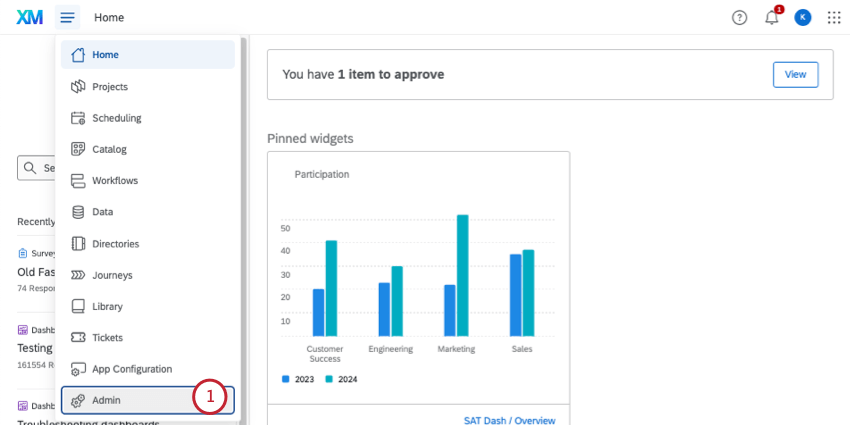
Its real strength is connecting feedback across departments. Hence, customer pain points, employee satisfaction, and brand perception appear in a single view, spanning from a small business to a global enterprise.
It ships with roughly 30 chart types, predictive intelligence for reports, interactive multimedia, and compliance and certification tooling, plus connections to Canvs, Thematic, and Segment. The cost is paid in time and money: setup is slow, beginners can feel buried by the feature range, and the price is quote-based and leans toward larger teams.
Pros
- One view across customer, employee, and brand feedback
- About 30 chart types for survey data
- Predictive intelligence for report analysis
- Links to Canvs, Thematic, and Segment
Cons
- A slow, time-consuming initial setup
- A quote-based price that leans toward larger teams
How Qualtrics Compares to InMoment: Qualtrics matches InMoment’s range and adds predictive analytics, with the same heavy setup and an unlisted price.
Pricing: Quote-only, contact vendor for pricing.
User Rating: 4.6/5 (Capterra)
3. Medallia: Best for Enterprise Customer Experience Programs
Medallia is the one I would point to if InMoment’s size is not the issue and its price opacity is. It is an experience cloud for improving customer experience at scale, with in-app and on-site surveys that can also go out by email.
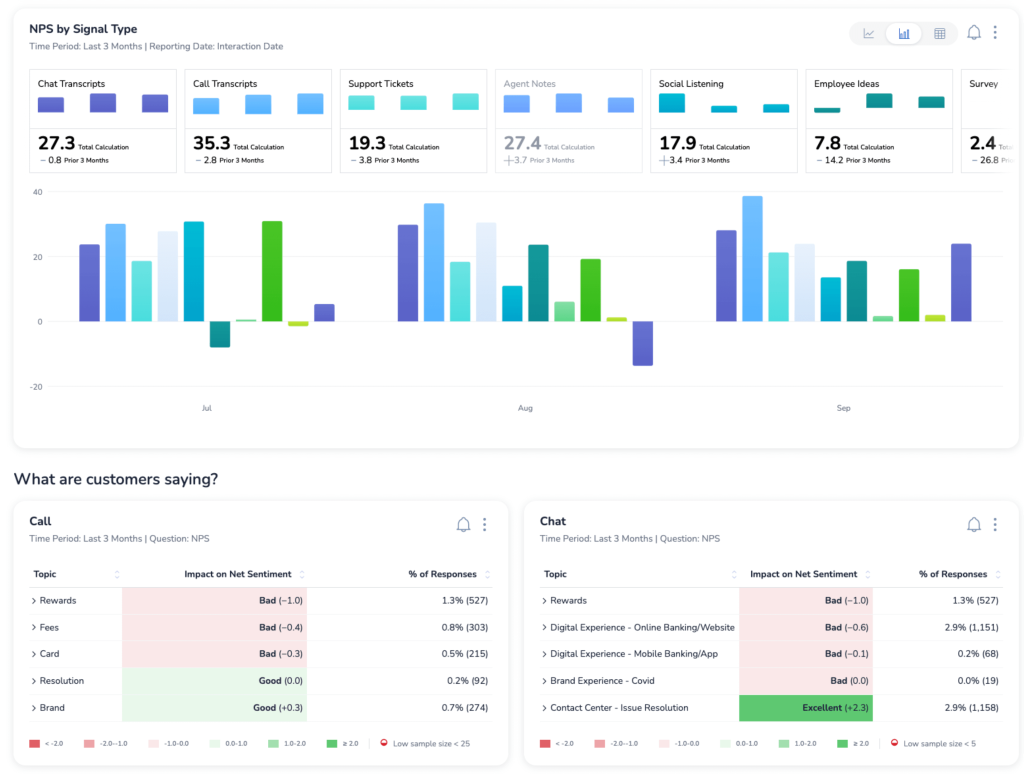
It flags reviews by timing, score, and keywords, pulls Google reviews into a single dashboard, benchmarks performance against competitors, and reads comments using text analysis. At the same time, role-based access decides who can view and share what.
Four Seasons used Medallia to pull guest comments from cards and web surveys into a single place, which ended data silos between its hotels and exposed trends it had been missing. The price comes only through a quote, and Capterra’s 4.5 is built on 33 reviews, so it carries the same thin-evidence risk as InMoment, and the word cloud is uneven.
Pros
- Review alerts based on timing, score, and keywords
- Google review analysis in the same dashboard
- Competitive benchmarking
- Role-based sharing and access
Cons
- Pricing arrives only through a quote
- An inconsistent word cloud
How Medallia Compares to InMoment: Medallia is closest in scale and ambition, with strong benchmarking, and it shares InMoment’s unpublished price and thin review base.
Pricing: Quote-only, contact vendor for pricing.
User Rating: 4.5/5 (Capterra)
4. QuestionPro: Best for Enterprise-Level Feedback With Journey Mapping
What I love about QuestionPro is how much I can customize, from the design to the distribution, and how it lets me collect data online or offline. It is built with enterprises in mind and integrates with a wide range of enterprise systems.
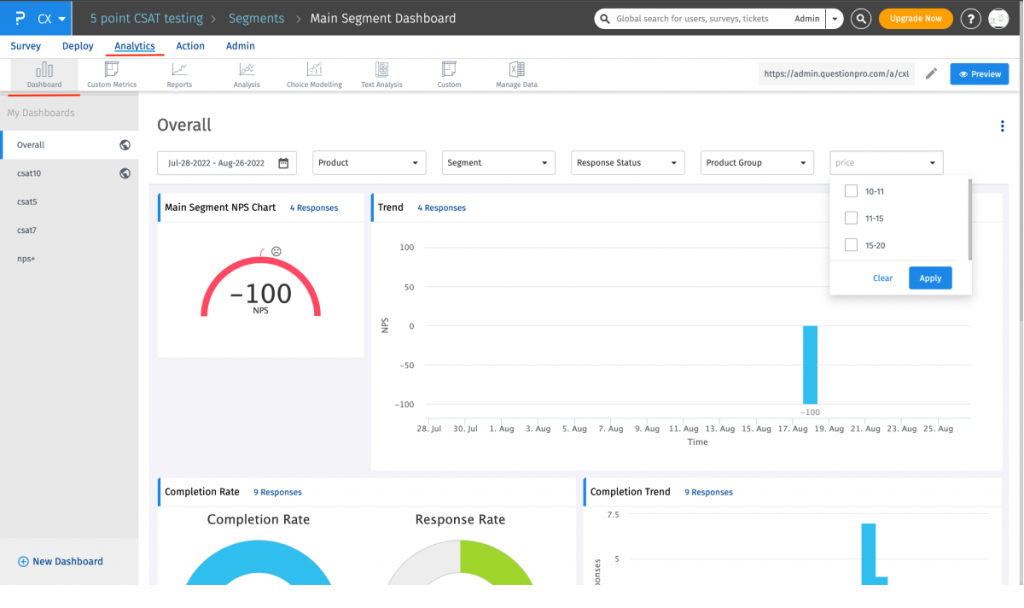
When I wanted to measure customer satisfaction, I built a survey with NPS+, sentiment analysis, and a web link, which made sharing easy. A customer journey mapping tool points out where to improve; real-time dashboards can be shared and customized; and GDPR, ISO 27001, and HIPAA compliance cover security.
Billing is per user: Team Edition at $83 per user per month requires at least 5 seats; Advanced is $99, and both bill annually, with a free version to test. Small teams may find it pricey, spam limits, email formatting, and media handling can be awkward, and it sometimes drags when data loads. Capterra rates it 4.8 based on 533 reviews.
Pros
- Wide customization of design and distribution
- NPS+ and sentiment analysis in one survey
- Journey mapping and shareable real-time dashboards
- GDPR, ISO 27001, and HIPAA compliance
Cons
- Pricey for small businesses and startups
- Spam limits, email formatting, and media handling can be awkward
How QuestionPro Compares to InMoment: QuestionPro offers similar enterprise depth with a larger review base and published per-user prices, but it can feel slow and costly for small teams.
Pricing: Free plan available. Paid plans start at $83/user/month, billed annually.
User Rating: 4.8/5 (Capterra)
5. Zonka Feedback: Best for Reach Without the Sprawl
Zonka Feedback suits a team that wants the reach of an experience platform without its sprawl. A survey can arrive by email, SMS, tablet, kiosk, web page, or offline device, and the moment an unhappy customer replies, an alert goes out.
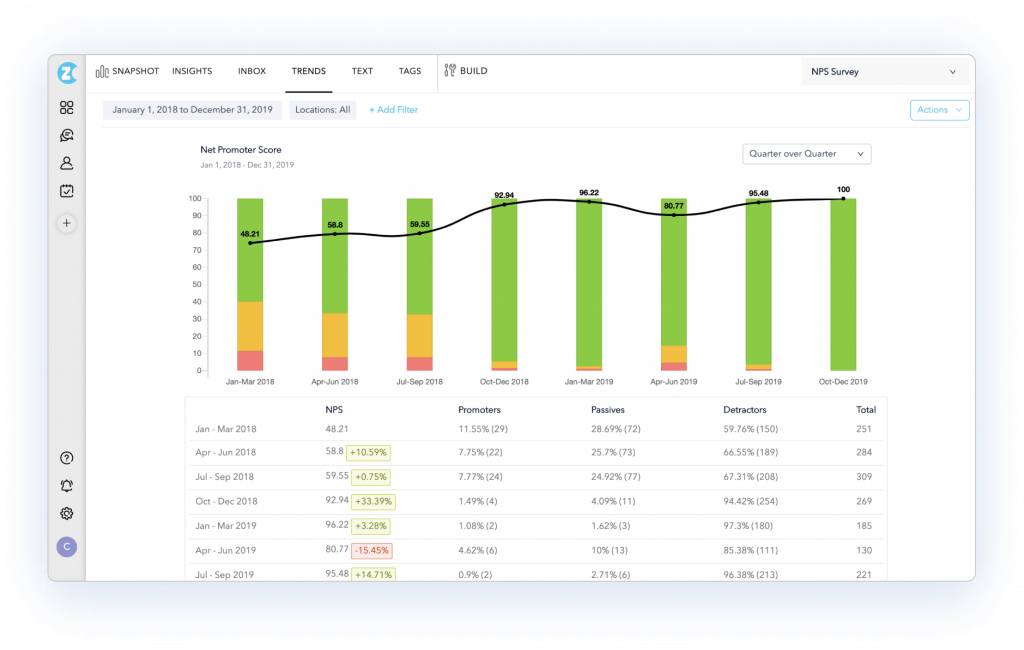
Its AI reads comments for themes, mood, and trends; closed-loop routing hands negative answers to a named owner; and data can be hosted in a chosen region to comply with residency rules.
Its price is available only through a quote, and the 4.8 on Capterra is built from just 68 reviews, a slim sample behind such a strong score. The platform is leaner than the biggest suites, but a team running a handful of surveys a quarter will still pay for far more than it uses, so I would only shortlist it for a true program.
Pros
- Delivery through email, SMS, tablets, kiosks, web pages, and offline devices
- Instant alerts when a customer is unhappy
- Comment analysis for recurring themes, mood, and trends
- Regional hosting for residency rules
Cons
- Pricing comes only by quote
- Heavier than a few simple surveys require
How Zonka Feedback Compares to InMoment: Zonka covers the same omnichannel ground in a lighter package, with AI analysis, though it also keeps its pricing behind a quote.
Pricing: Quote-only, contact vendor for pricing.
User Rating: 4.8/5 (Capterra)
6. AskNicely: Best for Teams That Coach Frontline Staff on NPS
AskNicely reduces a customer experience program to a single loop: collect the score, show it to the team, and ensure someone follows up. Live dashboards, leaderboards, and automated reminders keep results in front of the people who can act on them.
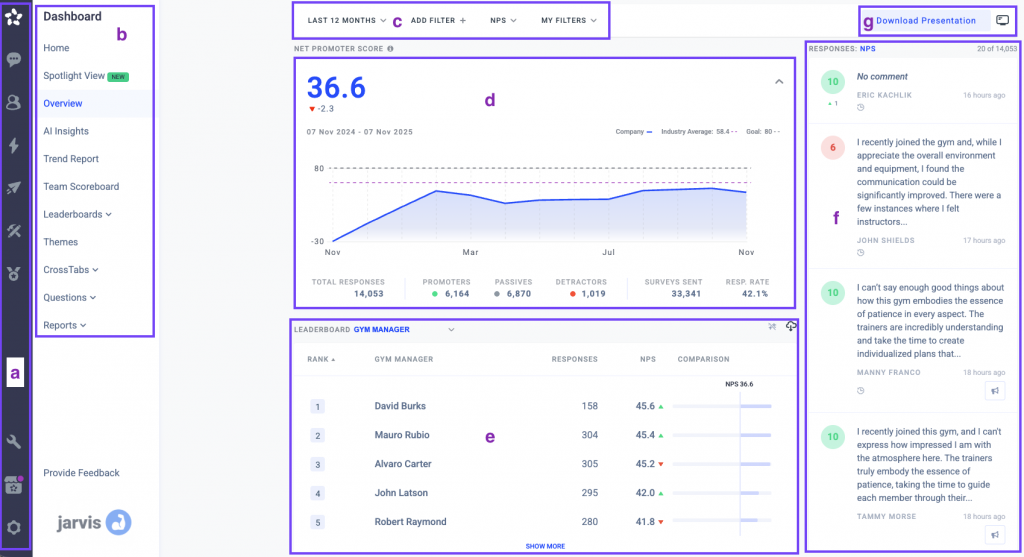
NPS and CSAT tracking cuts across segments and channels, and HubSpot and Salesforce integrations keep the numbers within the tools a team already uses, which is the coaching-angle service teams buy it for.
The Learn tier starts at $449 a month on annual billing and climbs with response volume. It leans hard on NPS, and in-app and mobile delivery wait on higher tiers, so it is a sharp tool for a focused program and a poor fit for broad research. Capterra rates it 4.6.
Pros
- Live dashboards and leaderboards
- NPS and CSAT tracking across segments
- Automated reminders for low scores
- HubSpot and Salesforce connections
Cons
- Leans hard on NPS
- In-app and mobile delivery sit on higher tiers
How AskNicely Compares to InMoment: AskNicely is far more focused and easier to start, with a published entry price, but it lacks InMoment’s journey and case-management breadth.
Pricing: Quote-only, contact vendor for pricing.
User Rating: 4.6/5 (Capterra)
7. Retently: Best for Keeping Only the NPS Slice
When all you want from InMoment is its NPS side, Retently reduces the platform to exactly that. Surveys for NPS, CSAT, and CES can be sent by email or link, embedded on a page, shown in Intercom, run on a kiosk, or popped up on the web, with branching for follow-ups.
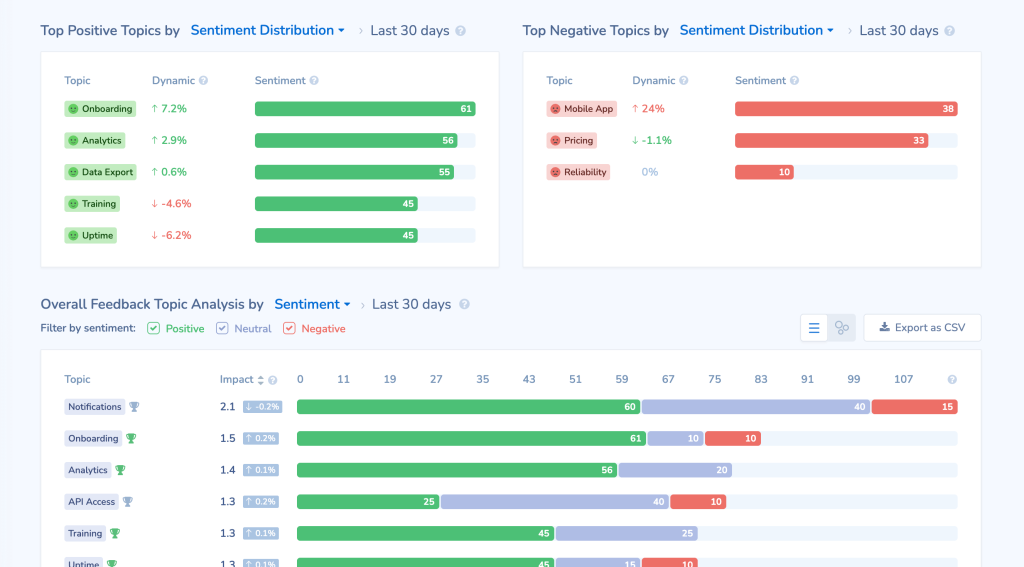
Because plans open at $99 a month and a 7-day trial is available, the cost is visible before any sales call, which is a different feeling from a per-feature quote.
Mind the meter: usage runs on survey credits spent on sends, opens, and reminders, so a busy month can stall a campaign, and in-app features are limited. Capterra’s 4.9 sits on 30 reviews, so I would call it promising rather than proven. Teams that want one focused metric will be happy, while anyone who needs journey tools or case routing will outgrow it quickly.
Pros
- NPS, CSAT, and CES in one focused tool
- A published entry price and a 7-day trial
- Branching for follow-up questions
- Delivery by email, link, embed, and kiosk
Cons
- Credits are consumed by sends, opens, and reminders
- Limited in-app features
How Retently Compares to InMoment: Retently covers only the NPS slice of InMoment’s platform, at a published price and with far less to learn.
Pricing: Paid plans start at $99/month, with a 7-day trial.
User Rating: 4.9/5 (Capterra)
8. Survicate: Best for a Handful of Surveys on a Site and in a Product
If the part of InMoment you really use is a few surveys on a site and in a product, Survicate fits that job without the weight. Surveys can sit on a page, in the product, in an email, or at the end of a link, and every reply collects in one Research Hub.
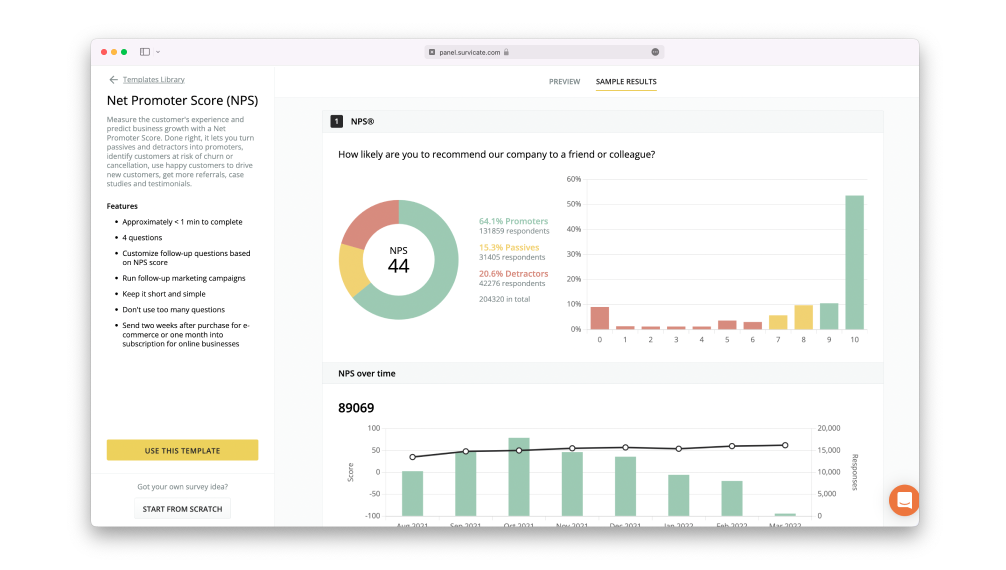
User attributes and in-product events decide who gets asked, partly finished surveys still save their answers, and AI-assisted analysis clusters comments into themes, with NPS, CSAT, and CES formats built in.
A permanent free plan allows 25 responses a month, paid plans start at $114, and the response volume you select drives most of the price. Moving between tiers is a visible jump, and there is no journey mapping or case management, so it suits programs that are really about asking questions.
Pros
- A single hub collecting replies from every channel
- AI-assisted grouping of comments by theme
- NPS, CSAT, and CES formats are ready-made
- A permanent free plan
Cons
- A visible jump between free and paid tiers
- No journey mapping or case management
How Survicate Compares to InMoment: Survicate is far lighter and cheaper to start, with a posted price list, but it has none of InMoment’s case management or journey tools.
Pricing: Free plan available, up to 25 responses a month. Paid plans start at $114/month.
User Rating: 4.6/5 (Capterra)
9. SurveyMonkey: Best for Quick, Easy Surveys
SurveyMonkey has consistently been my go-to for occasional survey needs, and its reputation for simplicity is genuinely deserved. Whether I needed feedback from customers, a bit of market research, or the pulse of my employees, it has been an invaluable asset.
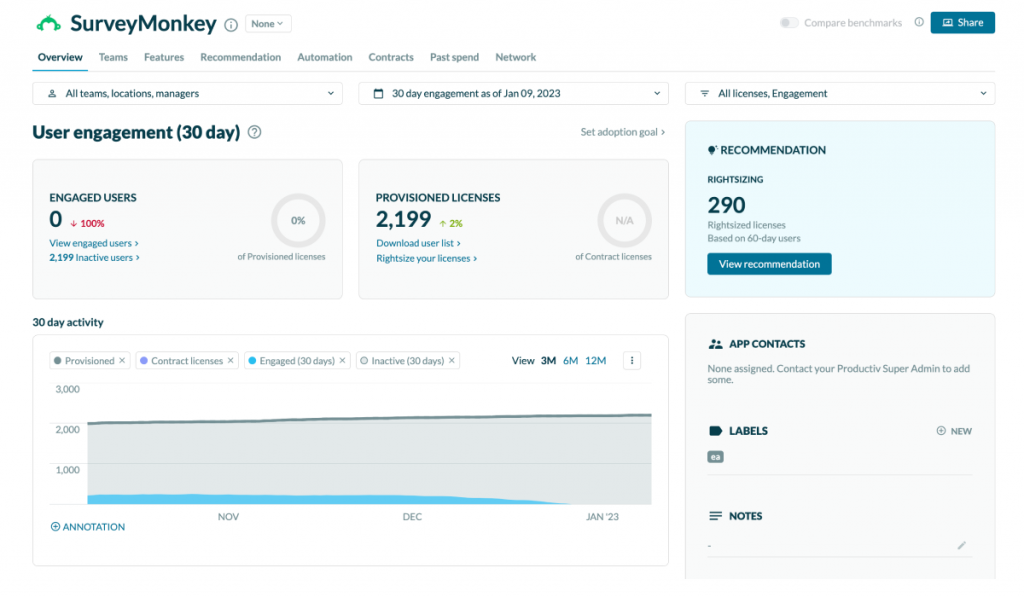
The interface is clean and straightforward, so even beginners can build a comprehensive survey, and question types run from multiple choice to open-ended. I have connected it with Tableau and Microsoft Power BI to streamline collection and analysis, and predesigned templates save time when I am in a rush.
A user-friendly dashboard gives real-time analytics, results export as PDF, Excel, or CSV, and surveys go out by email, social media, or website embed. Full capability needs a premium subscription, customization in the free version feels limited, and pricing starts at $30 per user per month.
Pros
- A clean interface that beginners can use
- A broad selection of predesigned templates
- Export to PDF, Excel, and CSV
- Tableau and Power BI integrations
Cons
- A premium subscription is needed for the full platform
- Customization in the free version is limited
How SurveyMonkey Compares to InMoment: SurveyMonkey is far simpler and faster to learn, with a much larger review base, but it lacks InMoment’s enterprise program depth.
Pricing: Paid plans start at $30/month per user.
User Rating: 4.6/5 (Capterra)
10. Typeform: Best for Fixing Survey Design Complaints
When survey design is the problem, Typeform is the tool I reach for. Showing one question at a time keeps people engaged, hundreds of templates cover most use cases, and branching, skip logic, and rich media make surveys feel like a conversation.
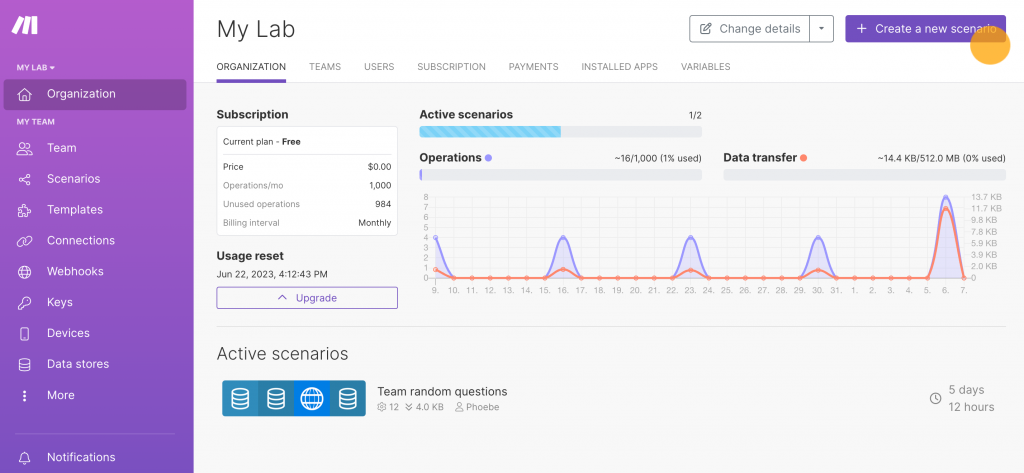
Live results tracking, email distribution, and integrations with Canva, Trello, and HubSpot fill in the rest, and HubSpot itself uses Typeform to run questionnaires that uncover customer personas.
Entry pricing is $28 a month, a sliver of an enterprise contract. The payment structure is rigid, analysis is shallower than a CX suite offers, and Capterra’s 4.7 spans nearly a thousand reviews. It answers a design complaint well, and a case-management need not at all.
Pros
- A one-question-at-a-time conversational format
- Hundreds of templates
- Live results tracking
- Rich media support
Cons
- A rigid payment structure
- Shallower analysis than a CX suite
How Typeform Compares to InMoment: Typeform wins on survey design and price, and loses on analysis depth and program features.
Pricing: Paid plans start at $28/month.
User Rating: 4.7/5 (Capterra)
Which InMoment Alternative Should Be Your Top Pick?
Short on time? These are my top three, each matched to a different way of leaving InMoment.
1. Qualaroo: Best for Real-Time, In-Context Feedback
I recommend Qualaroo first because it is the one I live in. It collects insight in real time across a website, mobile app, product, and prototype, and it asks while people are still engaged, so what comes back reflects what they are doing right now.
Targeting finds the right audience at the right moment, even a single named person through the Identify API, and surveys carry my own branding. NPS, exit-intent, CES, and CSAT surveys share one account, sentiment analysis explains the emotions behind answers, and reporting with multiple filters handles the slicing.
Cloning surveys across the site and the app saves rebuild time, more than 25 sales and marketing integrations carry results onward, and since every premium feature sits on the free plan, I tried all of it before spending a cent. Exit-intent surveys also show why visitors leave without converting, which a platform built around scores rarely explains.
2. SurveyMonkey: Best for Casual Surveyors Who Want to Start Quickly
SurveyMonkey is the pick for the casual surveyor who wants to start quickly from predesigned templates. The interface is clean enough that beginners assemble complete surveys without help, question types run from multiple choice to open-ended, and a user-friendly dashboard delivers real-time analytics.
I have tied it to Tableau and Microsoft Power BI to speed up collection and analysis, and exports in PDF, Excel, and CSV make reporting painless. Know the limits: the full platform requires a premium subscription, customization in the free version is limited, and it lacks the depth of an enterprise suite.
For a team whose real complaint about InMoment is complexity, that simplicity is the relief it needs, and the learning curve is nearly flat by comparison. Because it is so widely used, colleagues can usually pick it up without training, which matters when the reason for leaving a platform is how long it takes to learn.
3. Qualtrics: Best if You Want Breadth Without InMoment’s Learning Curve
Qualtrics is the closest step if you still want experience management without InMoment’s learning curve. Its interface was friendlier than I expected for people new to feedback management, and it consolidates feedback from different departments into a single view of customer pain points, employee satisfaction, and brand perception.
Roughly 30 chart types present results; predictive intelligence analyzes reports; and connections to Canvs, Thematic, and Segment broaden insight. It scales from small businesses to large enterprises. The costs are real: setup is slow, the range of features can swamp beginners, and the price is quote-based and leans toward larger teams.
Organizations that genuinely need this breadth will find the trade worthwhile, and the depth is hard to match elsewhere on this list. Its cross-department view is the thing I would pay for, because a single set of numbers ends arguments about whose data is right.
How Did I Evaluate These InMoment Alternatives?
I evaluated the InMoment alternatives in this list based on what a customer experience team needs once a broad platform stops paying for itself: a price I can see, a setup my team can learn, and a survey design that does not fight me.
Each tool faced one shared set of six checks, with small samples and quoted prices flagged. Because I used InMoment before switching to Qualaroo, I weighted pricing clarity and learning time most.
Six factors carried the weight:
User Reviews and Ratings
The number I keep in mind is InMoment’s 4.4 on 28 reviews, a thin base for a platform that large. On Capterra, I read review counts before scores, and I apply the same skepticism to small samples such as Retently’s 30 and Medallia’s 33. Thousands of reviews behind a tool earn my trust faster than a perfect score from a few.
Essential Features and Functionality
My first question is whether a tool can run a real program without a services engagement: targeting, surveys that fire on behavior or sampling, and analysis of open-text answers. InMoment’s limit that multi-question surveys exist only as web forms, with no sample-based triggers, is the sort of gap I hunt for, and so is a dashboard that dumps everything on one screen.
Ease of Use
InMoment took me a while to get comfortable with, and that became my yardstick. Could someone new to feedback management build and launch a survey on day one, and could the dashboard show what I needed without wading through the rest? Tools where the answer was yes made my shortlist.
Customer Support
With a platform this broad, I want to know who answers the phone. I looked at who gets real help on an entry plan, and whether quote-based vendors include training and onboarding or sell them as services. A steep learning curve with thin support is a combination I avoid.
Value for Money
A per-feature price list that does not exist makes budgeting hard, so I priced each alternative based on the features I would actually switch on, counting seats, response volume, and modules sold separately. Posted prices, free plans, and flat structures earned my trust faster than a figure that only appears after a sales call.
Personal Experience and Experts’ Opinions
The entries for tools I have used say so, and InMoment is one of them, since it was my platform before I moved to Qualaroo. For everything else, I lean on published customer stories and findings that recur across independent write-ups, after confirming each vendor is still operating, because a platform that changes hands can change its pricing overnight.
FREE. All Features. FOREVER!
Try our Forever FREE account with all premium features!
How Do You Choose the Right InMoment Alternative for Your Team?
Locate the row that describes your biggest InMoment headache. A row with several tools lists different cures, so skim my notes before choosing.
| If My Main InMoment Frustration Is… | Consider This Alternative |
| Pricing is per feature and not published | Qualaroo, Retently, SurveyMonkey, Typeform, or Survicate |
| The platform takes too long to learn | Qualaroo, SurveyMonkey, Typeform, or Survicate |
| I still need enterprise program depth | Qualtrics, Medallia, or QuestionPro |
| Survey design and customization feel limited | Typeform, SurveyMonkey, or QuestionPro |
| I want a closed-loop frontline follow-up | AskNicely or Zonka Feedback |
| I want in-context feedback on a site or app | Qualaroo or Survicate |
Match the Platform to the Program You Actually Run
Leaving a broad platform is rarely about one missing feature. It is about the gap between the size of the contract and the size of the program, and that gap shows up as a price you cannot see, a dashboard that takes weeks to master, and surveys that cannot be changed without help. Once those three are visible, the right replacement tends to be obvious.
Start by listing the features you switched on in the last year, then ask each vendor to price only those, in writing, along with seats, response volume, and training.
Put your two front-runners through a single real campaign and time how long a new colleague needs to launch a survey without help. The tool that makes that test boring is usually the right one.
In my own work, the change that mattered most was asking one question at the moment someone was using the product, with the answers analyzed for me. That idea is what Qualaroo is built around, and trying it on one real survey costs nothing on the free plan.
Frequently Asked Questions
What is InMoment used for?
InMoment is a broad experience-management platform used to collect and analyze customer and employee feedback, with surveys, text analytics, journey tools, case management, and dashboards. Capterra lists 114 features. Wootric's NPS product is now part of it, so some teams meet InMoment through simple NPS and end up in a far larger platform than they planned.
How much does InMoment cost?
Capterra lists InMoment's pricing model as per feature, with a free trial, and tells buyers to contact the vendor for pricing details. No public price list exists, so the total depends on which modules you enable. Get a written quote that names each feature, seat, and response allowance, and treat anything said on a sales call as an estimate.
Is InMoment the same as Wootric?
Not exactly. Wootric was an NPS, CSAT, and CES tool, and its product is now part of InMoment, though Capterra still keeps separate listings. Teams that came from Wootric often describe InMoment as a good place to start a customer experience program. If you only need the NPS slice, a focused tool such as Retently may be enough.
What is the cheapest InMoment alternative?
Qualaroo is the lowest-cost option, with a free plan and paid tiers starting at $19.99 per month. Typeform follows at $28 per user, SurveyMonkey at $30 per user, Retently at $99 per user, Survicate at $114 per user, and AskNicely at $449 per user, while QuestionPro bills per user from $83, and Qualtrics, Medallia, and Zonka Feedback quote, so budget for a sales conversation with each.
Which alternative is closest to InMoment?
Qualtrics and Medallia are the closest in scale and ambition, with experience management, benchmarking, and broad analytics, and QuestionPro adds journey mapping at published per-user prices. All three are heavier than a survey tool and need a real setup. Choose among them by pricing visibility and learning time, since those were the main complaints about InMoment.
Can Qualaroo replace InMoment?
For continuous listening in context, yes. Qualaroo surveys sites, apps, and prototypes and analyzes the replies with built-in AI, starting on the free plan. However, it has no case management, journey mapping, or enterprise program tooling, so teams relying on those should consider Qualtrics, Medallia, or QuestionPro. A short pilot will show which side matters more.
Which alternatives analyze open-text feedback?
Qualaroo includes sentiment scoring, theme tags, Word Clouds, and summaries on the free plan and above. Qualtrics brings predictive intelligence, Medallia text analysis, QuestionPro sentiment analysis; and Zonka Feedback, its AI Feedback Intelligence. Because capability shifts by plan, feed each tool the same batch of real replies and compare the results.
What should I check before switching from InMoment?
Export your survey data and list the features you actually use, including any multi-question surveys that depend on web forms. Ask each vendor to price those features in writing, with seats and response volume, and note what training is included. Pilot your top two on a single real campaign, because triggers and reporting differ from tool to tool.
FREE. All Features. FOREVER!
Try our Forever FREE account with all premium features!

 We'd love your feedback!
What did you like & how can we make it even better?
 Thanks for your feedback!
 Ask Your Question
Have a question? Get expert help to make your decision easier.