SurveySparrow alternatives usually come up after a team has already liked the product. The chat-style surveys feel modern, completion rates tend to be good, and the first few campaigns go smoothly.
Then the same few things start to chafe: reporting that stops short of segmentation, customizations that quietly require a developer, and a widget that some visitors never see because an ad blocker swallowed it.
Pricing adds its own friction. A third-party read of the pricing page puts Basic at $19 a month, but only on annual billing, with about 75 free responses a quarter, and extra seats and the CX suites charged on top of that. Capterra’s 4.4 rating from 121 reviews suggests the product is respected, so the question is whether it is a good fit.
I compared ten alternatives against those specific complaints. Qualaroo made the cut as well, and I am straightforward about its limits. One shortcut I would give anyone: name the thing that broke first on your current setup, because analytics, setup effort, and delivery each point to a different shortlist.
Why Are Teams Looking for SurveySparrow Alternatives?
SurveySparrow is a credible, polished platform, and nothing below says otherwise. These are the recurring points where teams I have read about, and my own comparison, found the fit starting to slip. Each one is about what the product hides, gates, or asks you to maintain once a program grows beyond its first few surveys.
Pricing Tiers Gate the Features That Matter
The headline rate is for annual billing, and the response allowance is counted per response, not per survey, so a busy quarter can arrive early. Extra seats and the separate CX, NPS, and 360 suites add to the total, which is why the advertised number is rarely the number on the invoice. Advanced analytics and automation are typically available only on the more expensive plans. A team that wants one of them ends up paying for the whole tier.
Reporting Stays Shallow for Segmentation and Trends
Reports are fine for response counts and completion rates, and they get thin the moment a team wants to cut results by segment or watch a trend over time. That is the point at which a program stops being a set of surveys and becomes a source of decisions. I would rather have the segmentation before the first leadership review than after it. Limited advanced reporting is the complaint I see most often.
Customizing Surveys Often Needs a Developer
A seemingly trivial change, such as a custom trigger or an unusual layout, can pull a developer into the work. That slows every iteration and makes a marketing or product team dependent on an engineering queue. The point of a survey tool is to let non-technical people ask questions quickly. When setup friction wins, the tool has quietly stopped doing that.
Ad-Blockers, Integrations, and Support Add Friction
Conversational widgets can be blocked by ad blockers, which lowers response rates in a way that is hard to see on a dashboard. Webhooks and custom workflows require upkeep, and teams report that support responsiveness is becoming a concern as usage scales. None of these is fatal on its own. Together, they explain why a tool that felt effortless at ten surveys feels heavy at a hundred.
The Top 10 SurveySparrow Alternatives
Below are all contenders with their entry prices and Capterra ratings; my notes follow. Begin with the one closest to the thing that broke for you, since a few are in-context feedback tools and the rest are full survey platforms.
| Tool | Best For | Starting Price | Capterra Rating |
| Qualaroo | Capturing Real-Time User Insights In-App & on Your Website Using Contextual, AI-Powered Micro-Surveys | Free plan; from $19.99/mo | 4.7/5 |
| Survicate | Event-based microsurveys for product-led teams | Free plan; from $114/mo | 4.6/5 |
| SurveyMonkey | General-purpose surveys with AI-assisted optimization | $30/mo per user | 4.6/5 |
| Typeform | One-question-at-a-time, design-led surveys | $28/mo | 4.7/5 |
| Alchemer | Advanced logic and custom scripting | Quote-only | 4.5/5 |
| Sogolytics | Reports, segmentation, and cross-tabs | Quote-only | 4.7/5 |
| Jotform | Forms and surveys with a free plan | Free plan; from $34/mo | 4.7/5 |
| Zonka Feedback | Omnichannel CX with native AI feedback intelligence | Quote-only | 4.8/5 |
| LimeSurvey | Open-source, self-hosted research | Free version; from $39/mo | 4.4/5 |
| Paperform | Forms with payments and workflow automation | Free version; from $49/mo | 4.8/5 |
1. Qualaroo: Best for Capturing Real-Time User Insights In-App & on Your Website Using Contextual, AI-Powered Micro-Surveys
SurveySparrow alternatives that ask in context, without a chat widget that an ad blocker can swallow, are what I was looking for, and Qualaroo is where I landed. A Nudge™ is light enough to avoid ad-blocker interference on most configurations, and it fires on user actions, scroll depth, or time on page without developer involvement.
The analysis is what I value once answers arrive. Themes surface through Customer Feedback Analysis AI and AI Sentiment Analysis, with no manual tagging, Automated Tagging, and the AI Response Summarizer handling sorting and shortening. At the same time, advanced reporting converts the output into segment views.
Survey types cover CSAT, exit intent, NPS, CES, and SUS, with templates, a large question library, question branching, and skip logic. Integrations include Salesforce, HubSpot, Zapier, and Mailchimp; the Identify API targets a named user; and brands such as Udemy and Twilio use it for experience insights.
Pros
- AI Survey Creator drafts a full Nudge from a prompt, no manual setup required
- Question branching and skip logic so respondents only see relevant follow-ups
- Native AI Customer Feedback Analysis, including AI Sentiment Analysis and word cloud generation for open-text responses
- Heatmaps and Session Recordings show what a user was doing right before they responded
- Advanced targeting by behavior, URL, exit intent, and custom user properties
- Identify API ties responses back to a real user by email or customer ID
- Nudge for Prototype works on Figma, Adobe XD, and InVision before a product ships
- Multilingual surveys in 100+ languages
- iOS and Android SDK for native in-app surveys
- Salesforce, HubSpot, and Slack integrations for CRM-connected feedback workflows
Cons
- The hands-on onboarding and account manager level of service is not part of the free plan
- Qualaroo is a cloud service only, so there is no downloadable build, no on-premise version, and no use without a connection
How Qualaroo Compares to SurveySparrow: SurveySparrow wins on chat-style presentation, offline surveys, and standalone survey campaigns. Qualaroo wins on in-context targeting that does not need a developer and on native AI analysis of written answers, from a free plan.
Pricing: Free plan available, up to 50 responses with all premium features. Essentials at $19.99/month, Business at $49.99/month, and Enterprise from $149.99/month.
User Rating: 4.7/5 (Capterra)
Surveys built with Qualaroo helped the University of Alberta grow its subscriber list by about 500 percent. The result came from putting the right question in front of visitors at the right moment, not from guessing.

2. Survicate: Best for Event-Based Microsurveys in Product-Led Teams
Survicate answers the developer problem by moving the trigger logic into the tool. Short, behavior-triggered surveys appear after something happens in the product, which keeps them relevant and reduces survey fatigue, and that is why SaaS teams following a product-led approach lean on it.
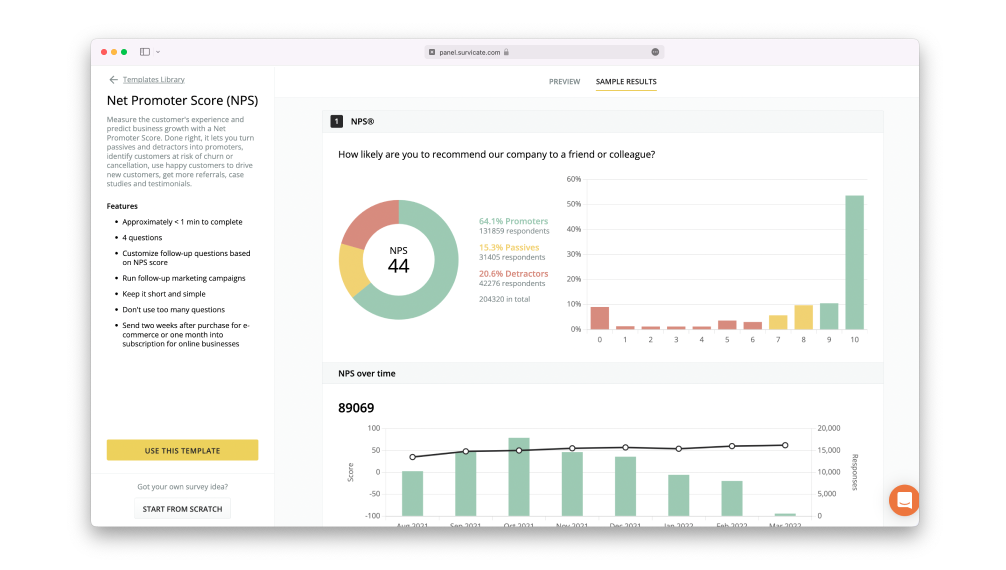
Surveys run on websites, mobile apps, chat, and web apps, with more than 125 templates, CSAT, CES, and NPS formats, and integrations including ActiveCampaign, Google Analytics, and HubSpot. A Feedback Hub keeps responses from several sources in one place, and surveys can be embedded in Intercom Messenger.
Brainly, among the largest peer-to-peer learning platforms, wanted to understand what students struggle with and how they feel about education, and has gathered more than 1.5 million survey responses. The free tier allows 25 responses a month, paid plans open at $114, and the entry plan trims some features, so read your tier carefully.
Pros
- Event-based triggers inside the product
- More than 125 ready-made templates
- A Feedback Hub for responses from several sources
- Intercom Messenger embedding
Cons
- Some question types are not optional
- The basic plan has limited features
How Survicate Compares to SurveySparrow: Survicate trades chat-style presentation for event-based triggers, volume-based pricing, and a free plan, with lighter reporting than the deepest survey platforms.
Pricing: Free plan available, up to 25 responses a month. Paid plans start at $114/month.
User Rating: 4.6/5 (Capterra)
3. SurveyMonkey: Best for AI-Assisted Surveys and Deeper Analytics
If reporting depth was your complaint, SurveyMonkey is the safest place to look first. A simple visual editor builds surveys with progress bars, question randomization, and scoring. Its Genius engine estimates the completion rate and shows how effective the survey is, so you can improve it before sending.
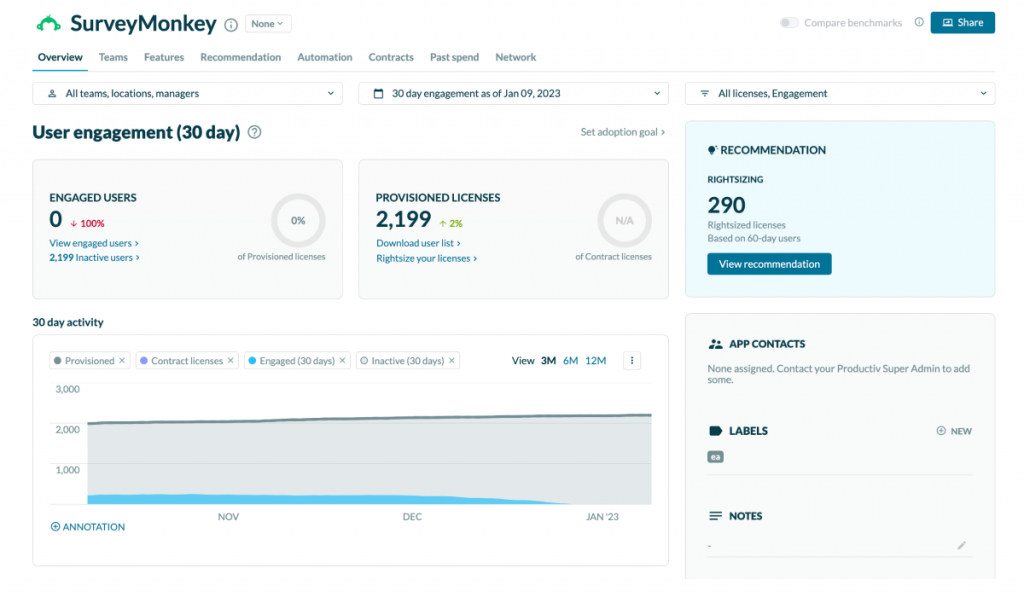
Charts, graphs, and written summaries are generated for you, sentiment analysis and a word cloud tool cover open-ended replies, and HubSpot, Salesforce, and Automate.io connections move the data along. App ratings can be collected in-app, and anonymous feedback is supported.
Audi Business Innovation runs the enterprise edition across several use cases, from staying close to users to building customer-centric prototypes and learning what drivers expect. It costs $30 per user per month to start; advanced features add to that, and customization remains limited, which suits teams that prize analysis over bespoke design.
Pros
- AI-assisted Genius optimization of survey design
- Automatic charts, graphs, and summaries
- Sentiment scoring and word clouds for open answers
- Anonymous feedback support
Cons
- Advanced functionality gets expensive
- Customization options are limited
How SurveyMonkey Compares to SurveySparrow: SurveyMonkey goes deeper on analytics and AI-assisted optimization, while SurveySparrow is friendlier and more conversational for respondents.
Pricing: Paid plans start at $30/user/month.
User Rating: 4.6/5 (Capterra)
4. Typeform: Best for Design-Led, One-Question-at-a-Time Surveys
Typeform is the closest in feel to SurveySparrow, making it the easiest switch for teams who loved the conversational format and only wanted to leave pricing and reporting behind. Its one-question-at-a-time flow is often treated as the benchmark for engaging surveys.
The feature set overlaps heavily: online polls, question branching, skip logic, rich media, live results tracking, and a library of pre-designed templates, with email distribution that supports response rates. It runs on websites and mobile apps, and HubSpot uses it for questionnaires that reveal customer personas the company had not realized it served.
Costs climb as response volumes grow, and native protection against bots and ad-blocker interference is limited, so it does not fix the delivery problem. Building a sophisticated survey takes a little effort, the payment structure cannot be changed, and plans start at $28 a month, which keeps the entry cost low even if the curve steepens later.
Pros
- A benchmark one-question-at-a-time experience
- Responsive design that works in every browser
- A library of pre-designed templates
- Live results tracking
Cons
- Sophisticated surveys are a little complicated to build
- The payment structure cannot be changed
How Typeform Compares to SurveySparrow: Typeform keeps the conversational feel at a lower entry price, but costs increase with response volume, and its reporting is less in-depth.
Pricing: Paid plans start at $28/month.
User Rating: 4.7/5 (Capterra)
5. Alchemer: Best for Advanced Logic and Custom Scripting
Formerly SurveyGizmo, Alchemer is the pick when a survey requires more logic than SurveySparrow offers. It offers more question types than most competitors, and teams treat it as a more agile alternative to heavyweight enterprise platforms because advanced logic and scripting arrive without long implementation cycles.
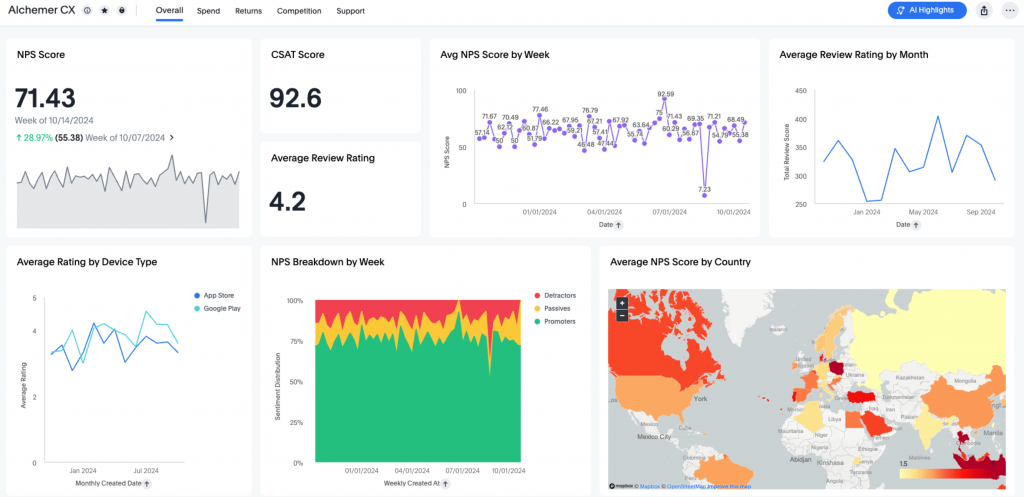
Setup does not need a developer, and there is no separate charge per response. A template library shortens the start, multilingual and multimedia surveys are supported, and branching, skip logic, and in-app mobile surveys sit alongside BI, Webhook, and Salesforce connections.
Reports can be downloaded in several formats, and export permissions control who can pull data. New users can get lost in the sub-menus, customization is limited, and only selected surveys can be made private. There is no price list, so the number comes up in a conversation, not from a lookup.
Pros
- More question types and advanced logic than most rivals
- No separate per-response charges
- Reports in several download formats
- BI, Webhooks, and Salesforce integrations
Cons
- A maze of sub-menus can confuse
- Limited customization
How Alchemer Compares to SurveySparrow: Alchemer offers far more flexibility in logic and scripting, with a simpler look and no published pricing.
Pricing: Quote-only, contact vendor for pricing.
User Rating: 4.5/5 (Capterra)
6. Sogolytics: Best for Reports, Segmentation, and Cross-Tabs
Sogolytics, formerly SoGoSurvey, aims to address the complaint of shallow reporting. It offers custom, segmentation, pivot table, and comparison reports, along with the enterprise-style reporting workflows that automation-heavy CX and EX programs expect.
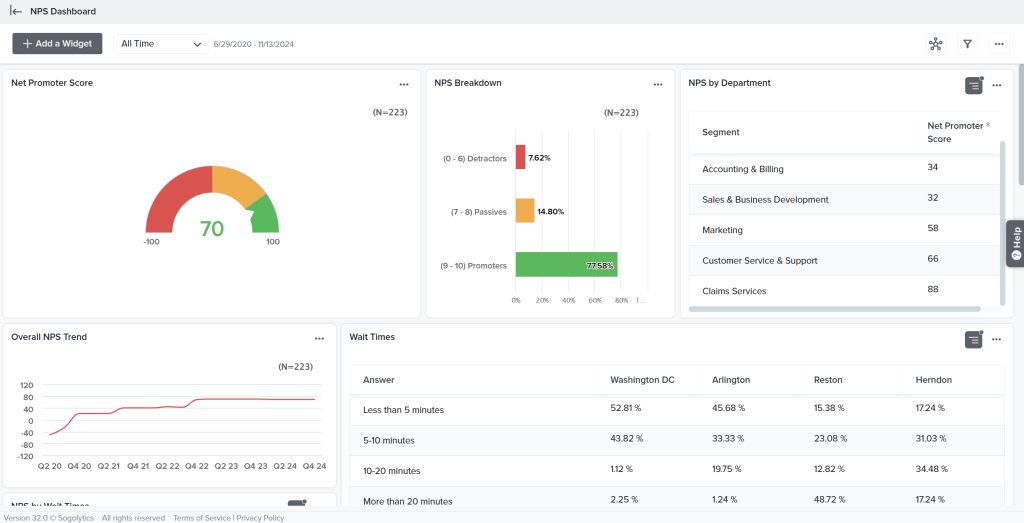
Surveys are built in a drag-and-drop editor with branching and skip logic, data collection and analysis are automated via APIs, and integrations include Zapier, Salesforce, and Google Analytics. A library of templates and response alerts keeps launches quick.
The Association for Utah Community Health had developers build its surveys, which was never their priority, and found Sogolytics well ahead of the competition in reporting, advanced question types, and ease of customization. Server errors and limited features in the basic version are the downsides, and pricing is quote-only.
Pros
- Custom, segmentation, pivot table, and comparison reports
- Automation of data collection through APIs
- Response alerts and ready-made templates
- Zapier, Salesforce, and Google Analytics integrations
Cons
- Occasional server and programming-related errors
- Limited features in the basic version
How Sogolytics Compares to SurveySparrow: Sogolytics goes much deeper on reports and automation, with quote-only pricing and a less conversational look.
Pricing: Quote-only, contact vendor for pricing.
User Rating: 4.7/5 (Capterra)
7. Jotform: Best for Budget Forms and Surveys With Room to Grow
Capterra lists Jotform among SurveySparrow’s alternatives, and it addresses the pricing complaint most directly. A free plan gets you started, paid tiers begin at $34 a month, and the same drag-and-drop builder turns out surveys, payment forms, sign-ups, and appointment forms.
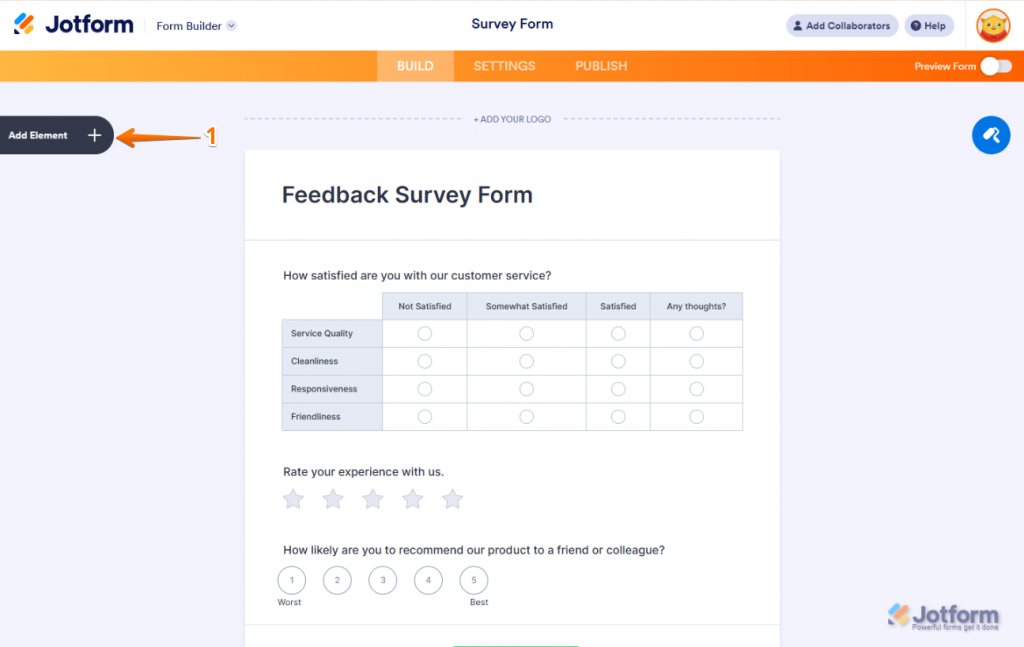
Few tools match its template library, so most use cases start with a head start. Multi-page and single-page layouts, autoresponders, conversation forms, a visual report builder, and team collaboration come bundled, and custom CSS allows precise styling.
The UK publisher Reach used Jotform Enterprise for polls and surveys that answer breaking news as it happens, and its monthly online submissions rose 325 percent year over year. Expect a learning curve, awkward picture sizing, and less contextual targeting than a feedback platform offers.
Pros
- A free plan with a low entry price
- One of the broadest template libraries
- A visual report builder and collaboration
- E-signature and payment forms
Cons
- A learning curve for new users
- Less contextual targeting than a feedback tool
How Jotform Compares to SurveySparrow: Jotform starts at a lower price and handles forms and payments, but it is not conversational and offers shallower feedback analysis.
Pricing: Free plan available. Paid plans start at $34/month.
User Rating: 4.7/5 (Capterra)
8. Zonka Feedback: Best for Surveys That Trigger Follow-Up
Zonka Feedback is for teams that want a survey answer to start something. Delivery runs through email, SMS, tablets, kiosks, web pages, and offline devices, and an alert fires as soon as an unhappy customer answers.
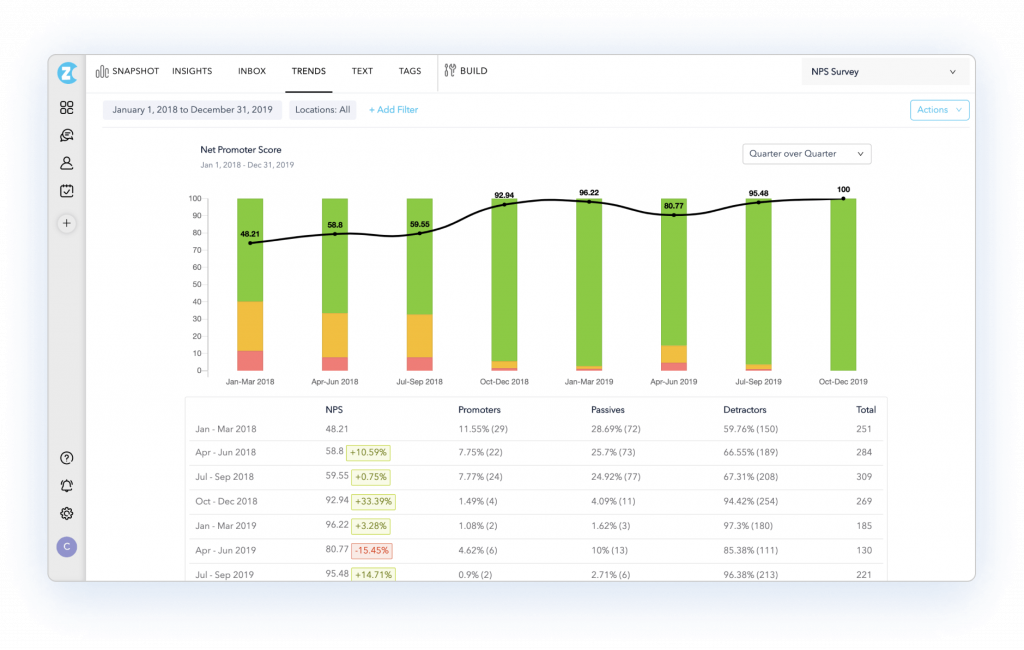
AI Feedback Intelligence looks for recurring themes, mood, and trends in comments, closed-loop workflows send negative feedback to a named owner, and regional hosting helps where residency rules apply. That goes further into customer experience than SurveySparrow’s own CX suite.
Prices are not listed, so a quote comes first, and Capterra’s 4.8 rests on only 68 reviews, a modest base for a score that high. It is more than a team wanting a few clean surveys to use, so I would shortlist it only for a genuine experience program.
Pros
- Delivery by email, SMS, kiosk, web, and offline
- An alert the moment an unhappy customer replies
- AI that looks for themes, mood, and trends in comments
- Closed-loop routing to a named owner
Cons
- No published price
- More platforms than a few simple surveys are needed
How Zonka Feedback Compares to SurveySparrow: Zonka layers closed-loop action and AI analysis across more channels, but it asks for a quote, whereas SurveySparrow lists tiers.
Pricing: Quote-only, contact vendor for pricing.
User Rating: 4.8/5 (Capterra)
9. LimeSurvey: Best for Open-Source, Self-Hosted Research
If data control is the real issue, LimeSurvey is unusual on this list because it is open source. The code is open for anyone to read and modify, and you can host it on its servers or run it yourself, which removes vendor lock-in for data-sensitive or academic work.
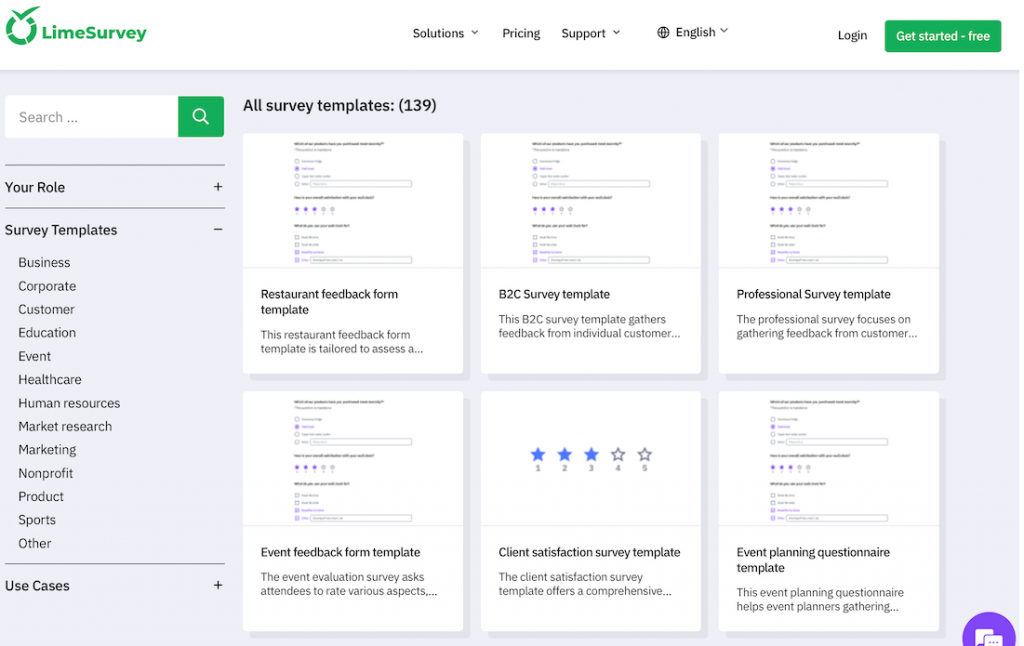
It covers market research, employee and customer satisfaction surveys, polls, and academic studies, with branching, skip logic, custom branding, custom URLs, and a large survey library. Results appear as bars, graphs, and charts, and the responsive interface makes navigation straightforward.
Capterra rates it 4.4 on 50 reviews, with 4.5 for value, which is a small base to lean on. Some features are complicated, training staff can be hard, and email handling is limited. A free version is available, and paid plans start at about $39 per month, so it suits teams that need technical support and have a strong reason to own their data.
Pros
- Open source with self-hosting
- Hosted option on its own servers
- Custom branding and custom survey URLs
- A large survey library
Cons
- Some features are complicated
- Hard to train employees, with limited email handling
How LimeSurvey Compares to SurveySparrow: LimeSurvey offers data control and a free version that SurveySparrow cannot match, with a plainer respondent experience and more setup effort.
Pricing: Free version available. Paid plans start at about $39/month.
User Rating: 4.4/5 (Capterra)
10. Paperform: Best for Forms With Payments and Workflow Automation
Paperform fits the team whose surveys are really forms that need to get things done. It takes payments, schedules appointments, builds product pages, and automates workflows, which is a lot for a tool that started as a form builder.
More than 28 advanced features include conditional logic, calculations, and matrix fields, templates run past 650, and e-signature and payment support come built in. Custom success, redirect, and partial-submission responses are tailored, and more than 3,000 integrations connect it to apps such as Mailchimp, Slack, and Trello.
Bold City Legal used it to build an intake system that saved more than 25 hours across client onboarding. Capterra rates it 4.8 on 106 reviews, a decent base for a score that high. The free version is limited, paid plans start at about $24 a month, and the top-tier plans are expensive for a form builder, so I would pick it only if payments, e-signatures, or intake workflows are the real requirement.
Pros
- Payments, e-signatures, and workflow automation
- More than 650 templates
- More than 3,000 integrations
- A drag-and-drop editor
Cons
- Limited features on the basic plans
- Top-tier plans are expensive for a form builder
How Paperform Compares to SurveySparrow: Paperform handles payments and workflows that SurveySparrow does not, but it is built for forms rather than conversational surveys.
Pricing: Free version available. Paid plans start at about $49/month.
User Rating: 4.8/5 (Capterra)
Which SurveySparrow Alternative Should Be Your Top Pick?
Short on time? These three picks match the three failures I hear about most, so start with the one that sounds like your team.
1. Qualaroo: Best for In-Context Feedback Without Developer Overhead
Qualaroo is my first suggestion when response rates and developer dependence are the problem. Nudges fire on a user action, scroll depth, or time on page without engineering help, and they are light enough to avoid ad-blocker interference on most configurations.
CSAT, exit-intent, NPS, CES, and SUS surveys run from a single account, with templates, a large question library, branching, and skip logic that keep each one relevant. Open-text replies are scored, tagged, and summarized for you, and advanced reporting turns them into segment views.
The Identify API targets a named user, connections to Salesforce, HubSpot, Zapier, and Mailchimp move results along, and surveys reach websites, apps, and prototypes. Because the free plan includes all premium features, I tested the entire tool before paying, and exit-intent surveys show why visitors leave. Reports also filter by location, device, and operating system, which makes it easy to see which group is dropping off.
2. SurveyMonkey: Best if Reporting Depth Was Your Complaint
SurveyMonkey is the dependable answer when reporting depth was the complaint. Its Genius engine predicts completion rates and shows how effective a survey is, charts and written summaries are produced automatically, and sentiment analysis with a word cloud tool covers open-ended replies.
Progress bars, randomization, and scoring add structure, and HubSpot, Salesforce, and Automate.io connections keep data moving. Audi Business Innovation relies on the enterprise edition to learn what customers expect. Weigh the costs honestly: pricing is per user, the advanced functions cost more, and customization is limited.
For a team that prizes analysis over bespoke design, those trade-offs are usually acceptable, and its enormous review base means most rough edges are already documented. Its mobile apps make it simple to monitor a campaign away from a desk, and the translation tools help when surveys have to reach several regions.
3. Survicate: Best if You Need Event-Based Triggers for a Product
Survicate is the one I would test if you run a product-led team and want surveys fired by behavior. Short, event-based surveys appear after an event in the product, keeping them relevant and reducing survey fatigue.
It covers websites, mobile apps, chat, and web apps, with more than 125 templates, CSAT, CES, and NPS formats, and a Feedback Hub that consolidates responses from multiple sources. Brainly has gathered more than 1.5 million responses. The compromises are clear: paid plans step up noticeably from the free tier, some question types are non-optional, and the entry plan limits features.
For teams that want triggers without developer work, it is a practical middle path, and the free plan makes it easy to run a pilot before anyone commits budget. Setup can happen without engineering, which is exactly what most teams leaving a developer-dependent tool want.
How Did I Evaluate These SurveySparrow Alternatives?
I evaluated the SurveySparrow alternatives in this list based on the specific complaints that push teams away: gated analytics, shallow reporting, a setup that requires a developer, delivery that gets blocked, and integrations that require upkeep.
Each candidate was evaluated against the same six factors, and anything based on a small sample or a quote is marked. Pricing clarity and setup friction shaped my weighting.
Six factors carried the weight:
User Reviews and Ratings
When I read ratings on Capterra, I look at the number of reviews before the score. SurveySparrow’s 4.4 on 121 reviews is respectable, but it is not a large sample, so a 4.8 from 68 reviews or a 4.4 from 50 doesn’t impress me much either. I trust the tools with thousands of reviews more, because a long record shows how a product behaves after the honeymoon is over.
Essential Features and Functionality
The first thing I try with any survey tool is a segment cut: can I take one question and break down the answers by who answered? That is where SurveySparrow’s reporting started to feel shallow to me, so I held every alternative to a higher bar. After that, I check triggers, meaning whether a survey can fire on an action, scroll depth, or time on page, and what happens to open-text answers once they arrive. A tool that can only count responses does not get past this step.
Ease of Use
For me, ease of use is measured in developer hours. If changing a trigger or a layout means filing a ticket, the tool has failed, however pleasant the editor looks. SurveySparrow’s chat-style editor is user-friendly, so I asked whether, for each alternative, a marketer or a product manager could ship a new survey alone in an afternoon. The ones where I could are the ones I kept.
Customer Support
I judge support by what happens when something breaks on a live campaign, because that is the only moment it matters. Responsiveness is one reason teams leave SurveySparrow as usage grows, so I looked at who actually gets help on an entry plan and who has to buy a bigger contract first. With quote-based vendors, I try to learn whether support is included or sold as an add-on. A slow answer in the middle of a campaign costs more than any feature is worth.
Value for Money
I no longer compare headline prices, and SurveySparrow is the reason. The advertised rate depends on annual billing, responses are counted, and seats and the CX suites add on top, so the number on the invoice looks nothing like the one on the pricing page. I price each alternative based on the seats and features I would really use, and I give extra marks to free plans, posted prices, and tools that do not impose a hard ceiling on responses.
Personal Experience and Experts’ Opinions
The tools I have used myself are marked in their entries, and I trust those most because I know where they pinch. For the rest, I lean on published customer stories like Brainly’s and Audi’s and on what independent write-ups agree on. I also check that a vendor is still operating before I recommend it, which is why one popular NPS tool is missing from this list.
FREE. All Features. FOREVER!
Try our Forever FREE account with all premium features!
How Do You Choose the Right SurveySparrow Alternative for Your Team?
Choose the row that describes what failed first. Where several tools share a row, each cures the problem a different way, so read my notes before you decide.
| If My Main SurveySparrow Frustration Is… | Consider This Alternative |
| Advanced analytics sit behind expensive tiers | Qualaroo, SurveyMonkey, or Sogolytics |
| Customizing surveys needs a developer | Qualaroo, Survicate, or Paperform |
| Ad-blockers hurt my response rates | Qualaroo or Survicate |
| I need open-source or self-hosted data control | LimeSurvey |
| I need advanced logic and scripting | Alchemer or LimeSurvey |
| I want a low-cost builder with a free plan | Jotform, LimeSurvey, or Paperform |
| I still want a conversational look | Typeform |
Fit Beats Feature Count When You Switch Survey Tools
The biggest differentiator between survey tools is rarely the number of features. It is how easily a tool fits the way your team already works: how quickly someone can launch a survey, how reliably integrations hold up, and whether insights are easy to act on without a technical detour. That is the lens worth carrying into any switch.
So before you commit to a replacement, list the three things that broke first on your current setup and rank them. Ask each vendor one question: how seats, responses, and advanced reports are counted. Get the reply in writing, and let your two front-runners handle one real campaign. A tool that survives that test is almost always the right one.
What taught me the most in my own work was asking while visitors were still on the page, with nothing for an ad-blocker to catch. Qualaroo is built around that idea, and its free plan makes it easy to test it with a single survey.
Frequently Asked Questions
Is SurveySparrow a good company?
SurveySparrow is generally viewed as a credible platform, with a strong focus on conversational surveys and multi-channel distribution, and Capterra rates it 4.4. Whether it is good for you depends on what you need next. Teams start looking at alternatives when pricing becomes restrictive, analytics feel limited, or scaling surveys takes more technical effort than expected.
Is SurveySparrow free?
It has a free plan, which a third-party read of its pricing page puts at about 75 responses a quarter. Paid plans carry the annual-billing rate, with extra seats and the CX suites on top. If you want more room for free, Qualaroo's plan allows 50 responses with every premium feature, and Survicate allows 25 a month.
What is the best free survey site?
Google Forms is free with no response limit; Jotform's free plan caps forms and responses; LimeSurvey's free version can be self-hosted; and Qualaroo's free plan includes every premium feature up to 50 responses. The best option depends on whether you need analysis, logic, or simply a way to collect answers.
Can ad-blockers block SurveySparrow's conversational surveys?
Conversational widgets can be blocked by ad blockers, which can lower response rates and make them appear less clearly in a dashboard. Lightweight formats such as Qualaroo's Nudge are designed to avoid that on most configurations, though no tool is immune on every browser. Test any candidate with a few common blockers enabled before you roll it out.
What is the best SurveySparrow alternative for privacy or self-hosting?
LimeSurvey is the clearest choice, because it is open source and can be hosted on your own servers, which removes vendor lock-in for data-sensitive or academic work. It is more complicated to run and train staff on than a hosted tool. Quote-based vendors such as Zonka Feedback offer regional hosting for teams with data residency requirements.
How is SurveySparrow different from tools like Qualaroo or Typeform?
SurveySparrow builds chat-style, multi-channel survey campaigns. Qualaroo puts short questions in front of people in context, on sites and in products, and analyzes the answers with built-in AI, whereas Typeform keeps a one-question-at-a-time look at a lower entry price. Each trades something different, so match the tool to your actual problem.
Which SurveySparrow alternative works best for small SaaS teams on a tight budget?
Qualaroo and Survicate both offer free plans and event-style triggers that suit product teams, while Typeform starts at $28 per month. Jotform is another low-cost route with a free plan. Whichever you choose, ask how responses and seats are counted, because that is where a small budget is usually caught off guard.
What should I check before migrating from SurveySparrow to another tool?
Start by exporting your responses, then catalog the surveys, triggers, and integrations you depend on, and, above all, the webhooks and custom workflows. Find out how each vendor counts seats and responses, because that is where costs move, and test your two best options on a single live campaign, noting who owns each survey.
FREE. All Features. FOREVER!
Try our Forever FREE account with all premium features!

 We'd love your feedback!
What did you like & how can we make it even better?
 Thanks for your feedback!
 Ask Your Question
Have a question? Get expert help to make your decision easier.