
I know how hard it is to pick replacement software. A new tool has to work with the systems you already run and match, or beat, what the current one does well, so Sogolytics alternatives are never a casual search. Sogolytics earns real respect for its reporting, and Capterra gives it 4.7 out of 5 based on 730 reviews.
Two things nudged me to look around. Pricing is quote-only and usage-based, so the real cost only becomes clear after a conversation, and some users say essential features are behind upgrades. It is also a platform for survey projects, which is not quite the same job as catching a visitor’s honest reaction while they are still on the page.
My list draws on firsthand experience, tips from peers who have stayed customers for years, and neutral third-party reviews, with Qualaroo among the ten. Before you start, decide whether you need deeper reporting or quicker feedback, since each requires a different approach.
Why Are Teams Looking for Sogolytics Alternatives?
Sogolytics has a lot going for it, and its 4.7 is no accident. The points below are where its model and a few limits pushed me to look at other tools. Each one concerns fit: how you pay, what is included, and what kind of feedback the platform is built to collect.
Pricing Is Quote-Only and Usage-Based
Capterra lists Sogolytics as usage-based, and the vendor asks you to get in touch for pricing, so no public figure exists. That rules out a quick side-by-side until you have sat through a conversation. Usage-based pricing can also shift as response volume grows, and I would rather see a number first and decide from there.
Some Essential Features Can Sit Behind Upgrades
Some users report that essential features are paywalled and that upgrading can feel cumbersome, even though many praise the value for students and nonprofits. A team on a lower tier can discover mid-project that a needed feature belongs to a bigger one. I like to know what is included before I build on a platform.
Styling and Collaboration Feel Limited
Styling options are limited, so matching a survey to a brand takes more effort than it should, and responses cannot carry internal comments for teammates. For a team that shares findings across departments, those gaps add friction. They are small on their own, but they show up in daily use.
It Is a Survey Platform, Not an In-Context Feedback Tool
Sogolytics sends surveys across the web, email, SMS, links, social media, and offline channels, which suits research and engagement programs. Catching a reaction at the moment a visitor hesitates is a different job. For that, I want targeting based on behavior and brief prompts that feel natural, not a survey that someone has to be invited to complete.
The Top 10 Sogolytics Alternatives
All ten tools are listed with entry prices, Capterra ratings, and my notes. Open with the one nearest your main need, because a few are research suites, a few serve support teams, and the rest are lighter feedback tools.
| Tool | Best For | Starting Price | Capterra Rating |
| Qualaroo | Capturing Real-Time User Insights In-App & on Your Website Using Contextual, AI-Powered Micro-Surveys | Free plan; from $19.99/mo | 4.7/5 |
| Zoho Survey | Mobile surveys and Zoho integrations | Free plan; from $7.42/mo | 4.6/5 |
| Qualtrics | Built-in intelligence and enterprise research | Quote-only | 4.7/5 |
| HubSpot | Custom feedback surveys inside a CRM suite | Free plan; from $7/mo per seat | 4.4/5 |
| Nicereply | Post-resolution email surveys for support teams | $59/mo, billed annually | 4.7/5 |
| UserTesting | Qualitative video and audio feedback | Quote-only | 4.5/5 |
| Mouseflow | Visual feedback with heatmaps and surveys | Free plan; paid from $25/mo | 4.7/5 |
| Swell | Automated patient and customer feedback | Quote-only | 4.6/5 |
| Medallia | Voice of the customer across channels | Quote-only | 4.5/5 |
| SurveyMonkey | Familiar surveys with fast analysis | $30/mo per user | 4.6/5 |
1. Qualaroo: Best for Capturing Real-Time User Insights In-App & on Your Website Using Contextual, AI-Powered Micro-Surveys
Sogolytics alternatives that engage visitors in real time were what I wanted, and my search ended with Qualaroo, my go-to for user research and customer feedback. What makes it my staple is the Nudges™ popup, which asks the right questions at exactly the right moment, in a way that feels natural rather than intrusive.
As a replacement, it is particularly strong at tracking NPS, CSAT, and CES, providing the metrics I need to plan and run customer engagement strategies with confidence. A sidebar widget invites people to speak up whenever they like, and the Identify API ties a score to a named person.
Analysis is where I save the most time: Customer Feedback Analysis AI and AI Sentiment Analysis surface sentiment in written answers automatically, so what I act on reflects what customers actually mean, not just what they say, and the AI Response Summarizer boils a large pile of replies into a short read.
Pros
- AI Survey Creator drafts a full Nudge from a prompt, no manual setup required
- Question branching and skip logic so respondents only see relevant follow-ups
- Native AI Customer Feedback Analysis, including AI Sentiment Analysis and word cloud generation for open-text responses
- Heatmaps and Session Recordings show what a user was doing right before they responded
- Advanced targeting by behavior, URL, exit intent, and custom user properties
- Identify API ties responses back to a real user by email or customer ID
- Nudge for Prototype works on Figma, Adobe XD, and InVision before a product ships
- Multilingual surveys in 100+ languages
- iOS and Android SDK for native in-app surveys
- Salesforce, HubSpot, and Slack integrations for CRM-connected feedback workflows
Cons
- Personal onboarding and an account manager belong to the paid plans
- It is a cloud service only, with no downloadable or on-premises edition and no offline access
How Qualaroo Compares to Sogolytics: Sogolytics provides deep reporting, cross-tabs, and panel services for survey programs, and its pricing is quote-only. Qualaroo asks website and app users questions in context, offers a free plan and listed pricing, but lacks Sogolytics’ reporting depth and panels.
Pricing: Free plan available, up to 50 responses with all premium features. Essentials at $19.99/month, Business at $49.99/month, and Enterprise from $149.99/month.
User Rating: 4.7/5 (Capterra)
Udemy turns to Qualaroo for the customer experience insights that keep its learners coming back. Short questions arrive in context, and the answers inform decisions without a separate research project.

2. Zoho Survey: Best for Mobile Surveys
Zoho Survey is a powerful questionnaire builder I have tried in the past, designed for businesses, researchers, and educators who want valuable insights and feedback. The core is a friendly drag-and-drop interface, a wide range of question types, advanced branching and logic, and real-time analytics.
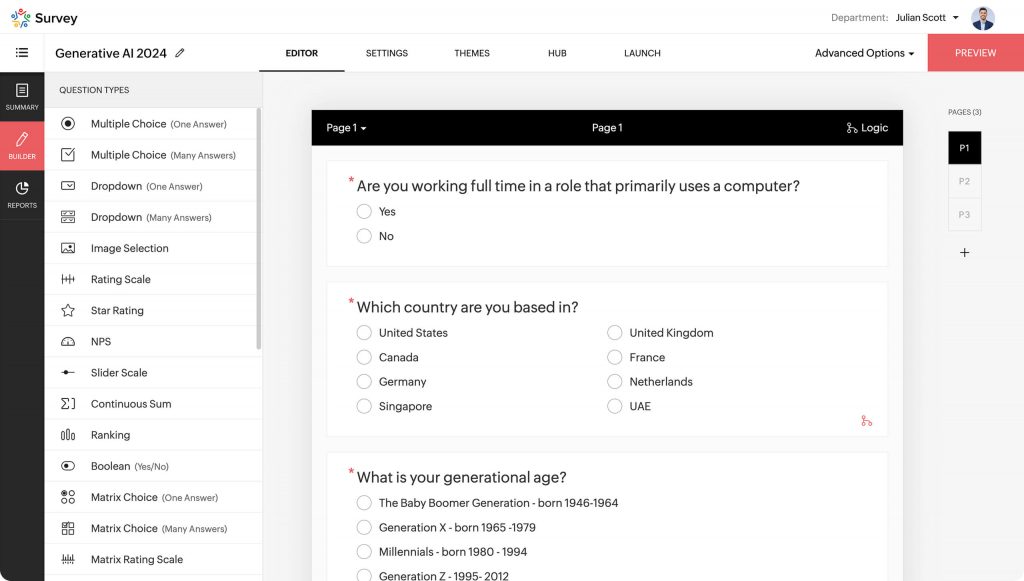
Every survey is automatically optimized for mobile, so I can build once and trust it on any screen. Launching from the mobile app at any location, reading reports on the go, and sharing insights with colleagues takes a single touch.
Responses can arrive offline, be purchased, be embedded in websites, or follow trigger emails, and Zoho CRM integration keeps workflows tidy. The free version limits the number of surveys, questions, and responses, and I found advanced logic slow to master. Capterra rates it 4.6 based on 453 reviews, with paid plans starting at $7.42 per month.
Pros
- A drag-and-drop interface that simplifies building surveys
- Conditional paths that change with respondents’ answers
- Offline collection, purchased responses, embeds, and trigger emails
- Integration with Zoho CRM and other Zoho apps
Cons
- The free version limits surveys, questions, and responses
- Advanced logic and integrations take time to master
How Zoho Survey Compares to Sogolytics: Zoho Survey is easier on the budget and strong on mobile, with less reporting depth than Sogolytics.
Pricing: Free plan available, limited to 10 questions per survey. Paid plans start at $7.42/month.
User Rating: 4.6/5 (Capterra)
3. Qualtrics: Best for Built-In Intelligence and Enterprise Research
For a sophisticated replacement, I put Qualtrics on my shortlist, and its built-in intelligence delights me most. It applies artificial intelligence and machine learning to open-text answers, predicts trends and respondent behavior, and performs statistical analysis.
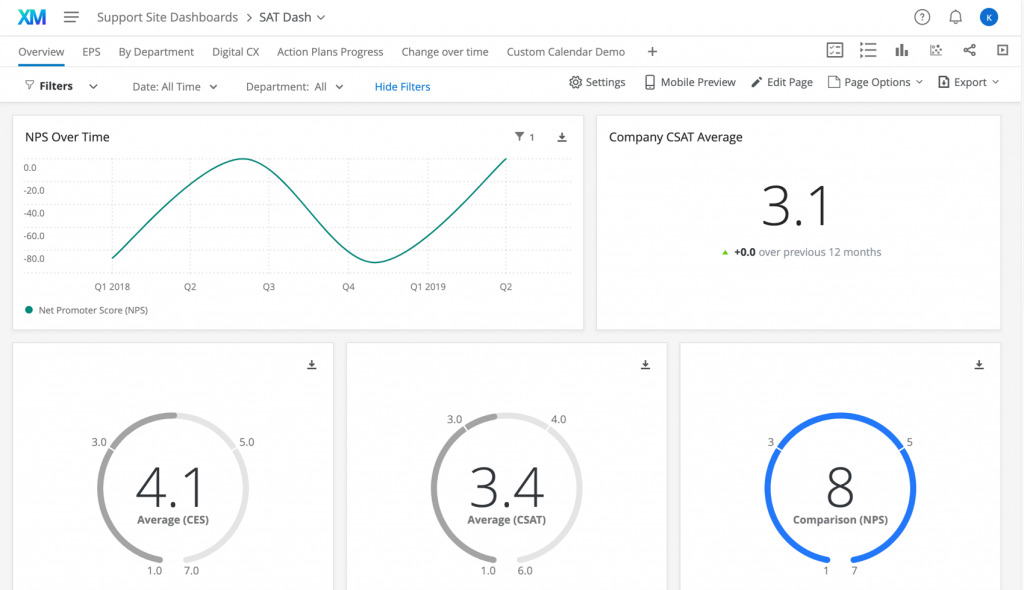
ExpertReview acts as a digital reviewer, checking each question in real time and offering personalized design advice based on PhD-designed best practices, so I trust that a question is sound before anyone sees it.
I can customize surveys with logos and corporate colors, distribute them via email, SMS, web, and social media, and comply with GDPR, ISO/IEC 27001, and HIPAA standards, with training and a community forum for support. It can feel heavy for simple surveys; small budgets may find it pricey, and pricing is quote-only.
Pros
- AI and machine learning for open-text analysis and prediction
- ExpertReview for real-time survey design guidance
- Distribution by email, SMS, web, and social media
- GDPR, ISO/IEC 27001, and HIPAA security standards
Cons
- Can feel too complex for simple surveys
- Often seen as expensive for small budgets
How Qualtrics Compares to Sogolytics: Qualtrics matches Sogolytics’ research orientation with built-in intelligence and a large review base, and it also prices on a quote-only basis.
Pricing: Quote-only; contact vendor for pricing.
User Rating: 4.7/5 (Capterra)
4. HubSpot: Best for Custom Feedback Surveys Inside a CRM Suite
As a leading system for inbound marketing, sales, and customer service, HubSpot had to make the cut in my list of Sogolytics alternatives. Beyond customer support and satisfaction surveys, I can use it to build custom feedback surveys and send them to my contacts, which is one feature I found genuinely helpful.

Surveys can include custom questions and options such as star ratings, single-line text fields, and radio selects. Customizable templates and a drag-and-drop editor let me tailor each one, and everything sits next to my contacts, so the answers land where my team already works.
I appreciate having marketing, sales, and service in one place, and the platform is friendly to navigate. A published survey cannot have its questions edited or deleted, and costs can climb as you need more advanced features or exceed limits. Capterra’s Service Hub listing shows a 4.4 rating from 190 reviews, and paid plans start at $7 per seat per month.
Pros
- Custom surveys with star ratings, text fields, and radio selects
- Templates and a drag-and-drop editor
- Marketing, sales, and service tools in one place
- Surveys sit next to CRM contacts
Cons
- Questions cannot be edited or deleted after publishing
- Costs can add up with advanced features or higher limits
How HubSpot Compares to Sogolytics: HubSpot keeps survey data within a CRM suite with a free entry point, and it offers fewer research reports than Sogolytics.
Pricing: Free plan available (limited). Paid plans start at $7/seat/month.
User Rating: 4.4/5 (Capterra)
5. Nicereply: Best for Post-Resolution Email Surveys
Nicereply stood out to me during a demo for one reason: its post-resolution email surveys. Once a ticket, conversation, chat, or deal closes, customers are automatically surveyed, and after setup, I do not have to touch it again.

It hones in on the moment right after a service issue is resolved, measuring satisfaction, NPS, and CES through email, so I can capture the customer’s voice at the point it matters most and feed it back into service and support.
Survey link URLs turn each interaction into a chance to learn, website pop-ups show what visitors express in real time, and in-signature surveys ask at the bottom of every email. I wish the graphs were more refined and that every survey exported. Capterra rates it 4.7 based on 283 reviews, and plans start at $59 per month on an annual plan, which I find easy to plan around.
Pros
- Automatic surveys after tickets, chats, or deals close
- Survey links, website pop-ups, and in-signature email surveys
- CSAT, CES, and NPS measured by email
- A strong rating on a solid review count
Cons
- Graphs and charts are fairly barebones
- No export option for every survey and statistic
How Nicereply Compares to Sogolytics: Nicereply is narrower, built around help desk and support surveys, with a posted starting price and no research reporting like Sogolytics’.
Pricing: Paid plans start at $59/month, billed annually.
User Rating: 4.7/5 (Capterra)
6. UserTesting: Best for Qualitative Insights From Real Users
I did not get to see UserTesting in action myself. A veteran industry colleague who knows these tools well suggested it, and what I learned is that it stands out for real-time, qualitative insight through video and audio feedback from a diverse panel of users.
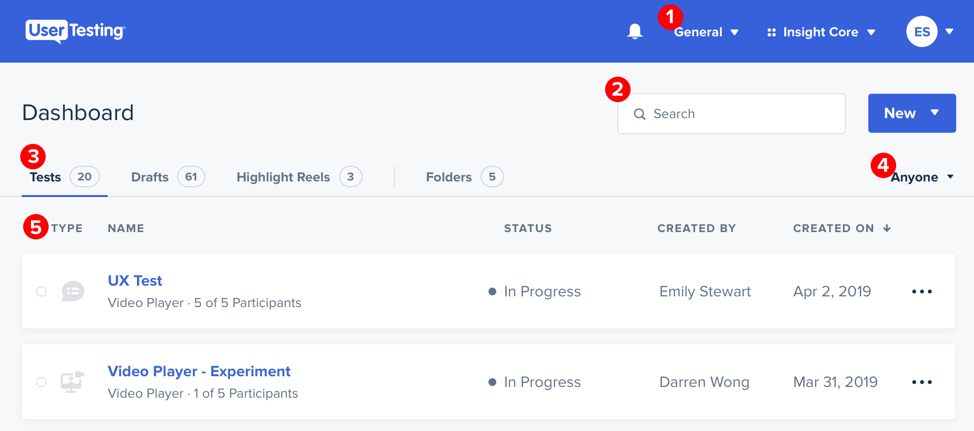
Sogolytics is excellent for statistics and trends, while UserTesting gives me a closer look at the experience itself: I can watch how real people interact with a website, app, product, or service, which goes beyond what quantitative methods alone capture.
Feedback comes from real users who match a target demographic, often within hours, across scenarios such as website navigation, mobile app usability, and customer journey mapping. I would plan around an app that can open slowly after a test arrives and collaboration that could be better for large teams. Capterra rates it 4.5 on 131 reviews.
Pros
- Feedback from users who match your target demographic
- Fast turnaround, often within hours
- Scenarios from navigation to mobile app usability
- Trends and issues that guide experience fixes
Cons
- The app can open slowly after a test arrives
- Collaboration across large teams could be better
How UserTesting Compares to Sogolytics: UserTesting adds video and audio insights where Sogolytics leads in statistics, and pricing is available via a demo.
Pricing: Quote-only; contact vendor for pricing.
User Rating: 4.5/5 (Capterra)
7. Mouseflow: Best for Visual Feedback With Heatmaps and Surveys
I came across Mouseflow relatively recently and was glad I did. Surveys are part of its feedback toolkit, so I can create and deploy custom surveys to collect targeted insight from website visitors, with content, design, and targeting all adjustable.
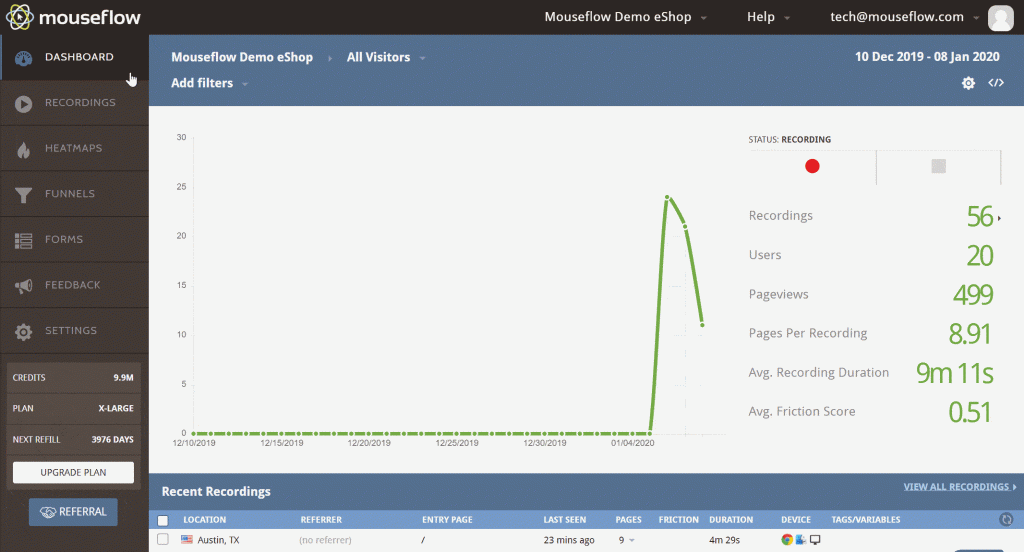
Visual feedback is the standout: visitors can leave text and attach screenshots, annotations, and contextual notes, turning a vague complaint into visible evidence I can show a designer.
Heatmaps show where people click, scroll, and interact, and feedback can be segmented by page URL, visitor demographics, or behavior. I would prefer billing tied to real usage, not fixed monthly recordings, and some heatmaps struggle with animations or overlays. Capterra rates it 4.7 on 122 reviews, and paid plans start at $25 a month.
Pros
- Real-time feedback straight from site visitors
- Heatmaps showing clicks, scrolls, and interaction
- Segmentation by page URL, demographics, or behavior
- Integrations that share insights across teams
Cons
- Billing follows fixed monthly recordings, not real usage
- Some heatmaps struggle with animations or overlays
How Mouseflow Compares to Sogolytics: Mouseflow focuses on website behavior and visual feedback, offers a free plan, and lacks Sogolytics’ survey programs and depth of reporting.
Pricing: Free plan available. Paid plans start at $25/month.
User Rating: 4.7/5 (Capterra)
8. Swell: Best for Automated Patient and Customer Feedback
Swell is a versatile platform for collecting feedback and managing interactions, especially in healthcare. It has earned rave reviews in that sector, and I realized its value through real customers who use it to keep a pulse on patients and earn reviews that grow their practices.
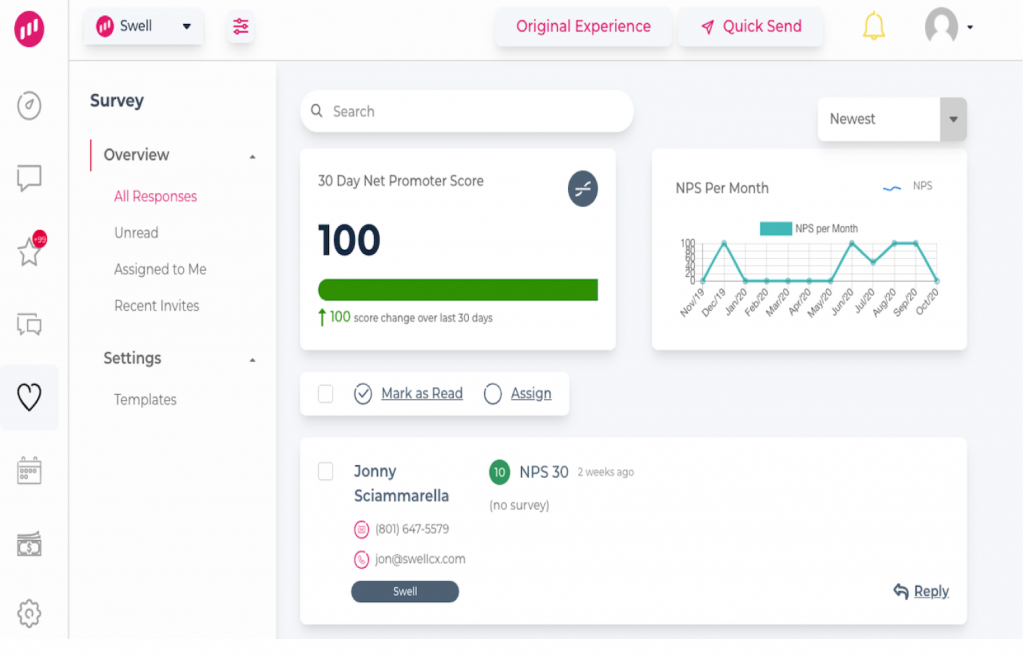
I like that it automates private and public feedback from patients and employees, which supports online reputation, better patient experiences, and employee satisfaction, and that quick surveys travel by text or email.
Templates cover custom questions, and short check-ins inside communication tools give a steady employee pulse. I would note that it is built mostly for healthcare and local-service practices, so other sectors fit less well, and pricing is quote-only. Capterra rates it 4.6 on 357 reviews, a healthy base.
Pros
- Automated private and public feedback from patients and employees
- Surveys by text or email that are easy to answer
- Templates for custom questions
- Short check-ins for a steady employee pulse
Cons
- Built mostly for healthcare and local-service practices
- Pricing is quote-only
How Swell Compares to Sogolytics: Swell automates feedback and reviews for practices with a lighter toolset, and it does not offer Sogolytics’ reporting depth.
Pricing: Quote-only; contact vendor for pricing.
User Rating: 4.6/5 (Capterra)
9. Medallia: Best for the Voice of the Customer Across Channels
I saved Medallia for last, and it is a comprehensive customer and employee experience platform that excels at capturing and interpreting the voice of the customer. It gathers feedback from online, in-person, and phone touchpoints into a single holistic view.
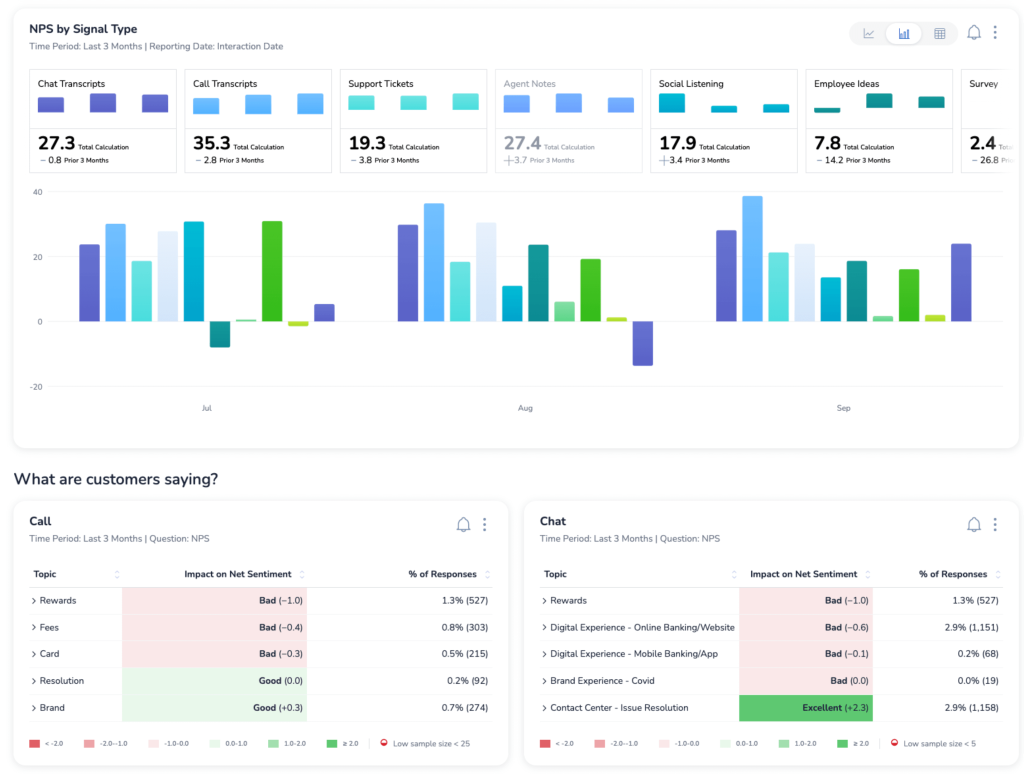
Advanced analytics and AI uncover patterns, trends, and insights, enabling companies to make data-driven decisions about satisfaction and loyalty, and I like that real-time feedback lets teams adapt quickly in a customer-centric market.
AI and machine learning prioritize actions and predict behavior at scale, DIY surveys and statistical analysis move from questions to insight in a few clicks, and security covers SOC 2 Type II, GDPR, CCPA, and HIPAA. I would watch for a rating scale that skews toward unhappy respondents and for confusing navigation. Capterra rates it 4.5 on only 33 reviews.
Pros
- AI and machine learning that prioritize actions and predict behavior
- DIY surveys with advanced statistical analysis
- Text and in-app messaging for customers and employees
- SOC 2 Type II, GDPR, CCPA, and HIPAA compliance
Cons
- A rating scale that can skew toward unhappy respondents
- Navigation and filters can feel confusing
How Medallia Compares to Sogolytics: Medallia delivers enterprise-scale experience analytics, with a thinner review base and quote-based pricing.
Pricing: Quote-only; contact vendor for pricing.
User Rating: 4.5/5 (Capterra)
10. SurveyMonkey: Best for Familiar Surveys With Fast Analysis
When a team asks me for a name everyone already knows, I point to SurveyMonkey. I like how quickly a survey comes together, with hundreds of customizable templates, many question types, and branding controls for fonts, colors, logos, and custom URLs.
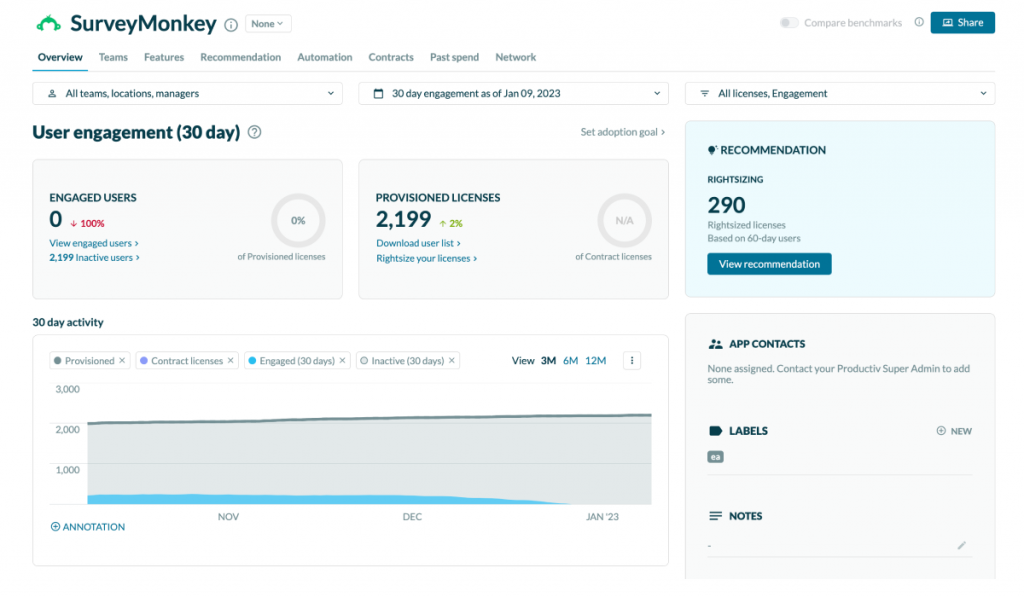
Reports and analysis arrive in real time, advanced logic and branching shape each experience, and email, social media, and website embeds handle distribution. Translation supports multilingual surveys, and integrations reach Google Sheets, Microsoft Excel, and Salesforce.
The starter plan skips white-labeling, and reaching customer service can be a challenge. Still, more than 10,000 Capterra reviews behind a 4.6 give it the strongest evidence base here, and at $30 per user per month, I think of it first as a dependable fallback for teams that want no surprises.
Pros
- Branding control over fonts, colors, logos, and URLs
- Hundreds of customizable templates
- Real-time reports and analysis
- A very large review base on Capterra
Cons
- White-labeling is missing from the starter plan
- Customer service can be hard to reach
How SurveyMonkey Compares to Sogolytics: SurveyMonkey starts faster with posted prices and a far bigger review base, and it offers less reporting depth.
Pricing: Paid plans start at $30/user/month.
User Rating: 4.6/5 (Capterra)
Which Sogolytics Alternative Should Be Your Top Pick?
Short on time? Match one of these three to your reason for leaving Sogolytics.
1. Qualaroo: Best for Timely, In-Context Feedback
Qualaroo is a top choice for me because of its in-demand features: instant feedback gathering, Nudges technology, and a vast collection of survey templates. Native AI Feedback Analysis provides deeper, more accurate insights into the user experience, and I can run online surveys on a website or in an app at exactly the right moment.
NPS, CSAT, and CES are tracked together, a sidebar widget invites opinions whenever someone wants to give one, and the Identify API ties a score to a named person. Behavior targeting lets me decide when visitors see a survey, and surveys are available in more than 100 languages.
Since the free plan includes all premium features, I tried the full product first. It integrates with Salesforce, Slack, and Hootsuite, so results reach the people who act on them. It remains a front-runner for me, and a small pilot is easy to run.
2. Qualtrics: Best for Built-In Intelligence and Enterprise Research
Qualtrics suits teams that want Sogolytics-style research depth with intelligence layered on top. Its AI and machine learning analyze text responses, predict trends and behavior, and run statistical analysis, while ExpertReview checks every question in real time with personalized design recommendations.
Distribution spans email, SMS, web, and social media, security covers GDPR, ISO/IEC 27001, and HIPAA, and support includes training and a community forum. Know the trade-offs: it can feel too complex for simple surveys, it is often seen as expensive for small budgets, and pricing is quote-only.
For organizations that want advanced analysis and strong governance, I would accept those costs, since the large review base documents both strengths and rough edges. A pilot on a real research project will quickly show whether the depth earns its place, and the training resources shorten the ramp-up for new colleagues, which matters on larger teams.
3. Nicereply: Best for Post-Resolution Support Surveys
Nicereply is the pick for support teams that want feedback at the right moment after a ticket closes. As a user-friendly satisfaction tool, it captures and analyzes feedback effortlessly, and surveys are sent straight to emails and support tickets.
It deploys CSAT, CES, and NPS, among others, and it supports unlimited active surveys, so I never ration questions. Survey link URLs, website pop-ups, and in-signature email surveys broaden the ways to ask, and once set up, they run without constant attention.
Know the limits: the graphs are fairly barebones, there is no export for every survey and statistic, and it is narrower than a research platform. For teams focused on service quality, I would accept those trade-offs, and its 4.7 on 283 reviews gives it solid credibility. It also pairs well with a broader survey tool when you need both support and research views.
How Did I Evaluate These Sogolytics Alternatives?
I evaluated the Sogolytics alternatives in this list based on what a team needs once survey projects are not the whole job: a price I can see, features I can count on, and feedback that arrives while the visitor is still there.
Every tool faced the same six checks, with small samples marked where they show up. Because Sogolytics sets a high bar for support and reporting, I counted those two most.
Six factors carried the weight:
User Reviews and Ratings
Sogolytics holds a 4.7 across 730 Capterra reviews, and I held every other tool up against it. Over on Capterra, the count comes first for me, so Medallia’s 4.5 on 33 reviews and Mouseflow’s 4.7 on 122 get a closer look, while SurveyMonkey’s 10,000-plus carry the most weight.
Essential Features and Functionality
I begin by asking whether the team wants deep reporting and panels or fast, in-context feedback. Sogolytics reports very well, so I checked what each alternative adds, such as behavior targeting, AI reading of written answers, or automation after a support ticket, and a feature serving neither job earned little.
Ease of Use
Sogolytics scores 4.6 for ease of use, which is a high mark to match. My test is whether a colleague with no research training can launch a first survey alone, and tools that kept easy jobs easy stayed on my list, while heavy setups had to justify themselves with depth.
Customer Support
A 4.7 for customer service is a standard few tools meet, so I used it as my yardstick. I looked at who receives real help with entry plans and whether onboarding sits behind larger plans; for quote-based vendors, I asked whether support is bundled. Long waits during a live survey cost points.
Value for Money
Sogolytics scores 4.5 for value, and its quote-only, usage-based model is why I judge total cost. Seats, responses, and billing terms all went into my comparison, and free plans and posted prices earned more trust than figures that appear after a sales call. Paywalled features counted against a tool.
Personal Experience and Experts’ Opinions
My list rests on my own experience, recommendations from peers who have been customers for years, and reviews on neutral third-party sites. The entries for the tools I have tried say so. UserTesting reached out to me through a veteran colleague, and I confirmed that every vendor is still operating independently.
FREE. All Features. FOREVER!
Try our Forever FREE account with all premium features!
How Do You Choose the Right Sogolytics Alternative for Your Team?
Look for the row closest to your biggest frustration with Sogolytics. A row naming several tools offers different cures, so my notes are worth reading first.
| If My Main Sogolytics Frustration Is… | Consider This Alternative |
| Quote-only, usage-based pricing | Qualaroo, Zoho Survey, SurveyMonkey, or Nicereply |
| Essential features sit behind upgrades | Qualaroo, Zoho Survey, or SurveyMonkey |
| I want feedback in the moment, in context | Qualaroo, Mouseflow, or Nicereply |
| I still need research depth and intelligence | Qualtrics, Medallia, or SurveyMonkey |
| I need help desk and support surveys | Nicereply, HubSpot, or Swell |
| I want to hear and see real users | UserTesting or Mouseflow |
Put the Question Where the Answer Lives
Feedback tends to live in a particular place. A support answer lives in the ticket that just closed, a product reaction lives in the app while someone is using it, and a first impression lives on the page before a visitor decides to stay. A survey sent days later asks people to reconstruct a feeling they no longer have.
So the useful question when choosing a tool is not how many features it has but where it will let you ask. Pick the channel where your answers actually appear, make asking there effortless, and judge every candidate by how well it does that one thing. Reporting depth is worth having, but only after the right question reaches the right person at the right time.
Qualaroo has stayed in my own toolbox for exactly that reason, and its free plan lets you try asking in context on one page this week.
Frequently Asked Questions
What is Sogolytics used for?
Sogolytics, formerly SoGoSurvey, is a survey and experience platform used for research surveys, customer experience, and employee engagement programs. It is known for reporting, including cross-tabs, and for panel services. Capterra rates it 4.7 on 730 reviews, with strong scores for ease of use and customer service, and the vendor does not publish a price list.
How much does Sogolytics cost?
Sogolytics is quote-only. Capterra describes the model as usage-based, and the vendor asks you to contact them, so no public price list exists. Request a written quote that names responses, users, and features, and confirm whether anything you need belongs to a higher plan before you commit, since usage-based pricing can change as response volume grows.
Is Sogolytics the same as SoGoSurvey?
Yes. Sogolytics is the current name of SoGoSurvey, and Capterra still lists it under the SoGoSurvey address. The platform covers surveys, reporting, and panel services. Because either name may appear in reviews and comparisons, search for both when you research alternatives so nothing gets missed, and treat them as one product.
What is the cheapest Sogolytics alternative?
HubSpot starts at $7 per seat per month and Zoho Survey at $7.42, while Qualaroo starts free with paid tiers from $19.99. Mouseflow's paid plans begin at $25, SurveyMonkey costs $30 per user, and Nicereply is $59 a month on annual billing, while Qualtrics, UserTesting, Swell, and Medallia need a quote. Compare what each entry plan includes.
Which alternative is closest to Sogolytics?
Qualtrics and SurveyMonkey come closest on survey depth and analysis: Qualtrics adds built-in intelligence, and SurveyMonkey adds fast setup, posted prices, and a huge review base, while Medallia suits enterprise experience programs. Choose by reporting needs and price visibility, since Sogolytics' usage-based quote is the usual sticking point, and ask for a written quote.
Can Qualaroo replace Sogolytics?
Yes, for in-context feedback from website and app users: Qualaroo asks at the right moment and applies built-in AI analysis from the free plan. Cross-tab reporting and panel services like Sogolytics' are outside its scope, so a team running formal research programs should consider Qualtrics or SurveyMonkey alongside it or instead of it.
Which alternatives analyze open-text feedback?
Qualaroo's free plan scores sentiment, builds Word Clouds, tags themes, and summarizes replies. Qualtrics applies AI and machine learning to open text and predicts trends, and Medallia uses AI to find patterns in feedback. Capability varies by plan, so give each tool the same batch of real answers before you commit.
What should I check before leaving Sogolytics?
Export your survey data and reports first and list the features you rely on, such as cross-tabs, panels, or SPSS exports. Have each alternative price those in writing, confirm which features sit behind upgrades, and time a first survey, then pilot your top two on one live project, since reporting differs between tools.
FREE. All Features. FOREVER!
Try our Forever FREE account with all premium features!

 We'd love your feedback!
What did you like & how can we make it even better?
 Thanks for your feedback!
 Ask Your Question
Have a question? Get expert help to make your decision easier.