
Forsta alternatives came to my attention when I started looking for something simple and modern to collect user feedback. Forsta has been around a long time, and I know it for its market research strength, but it was never the first thing I would hand to a product or training team that just wants a few good questions answered this week.
I also dislike how its pricing stays out of sight. Capterra lists the starting price as “not provided by the vendor” on a per-feature model, and its 4.2 rating comes from just 13 reviews. That is thin evidence for a platform that sits inside a Press Ganey company, with ownership news that keeps moving.
So I did something old-fashioned: I connected with people who use these tools first-hand, including product and training managers from different industries, and combined their input with my own testing.
This list is the result, with Qualaroo among the ten. Before you read on, ask yourself a blunt question: are you running market research, or just trying to hear from users? The answer sorts the tools below faster than any feature chart.
Why Are Teams Looking for Forsta Alternatives?
Forsta has real strengths, and I do not quarrel with them. What follows are the moments when it felt heavier or less settled than a simple-feedback team needs, and every one is a matter of fit: visibility before you buy, the job the product was designed for, and its direction.
Pricing Stays Hidden
On Capterra, Forsta’s starting price reads “not provided by vendor,” and the model is per-feature, so the final cost depends on the modules you enable. I never liked a policy of keeping plans out of sight, because it makes a quick comparison impossible. Value for money is also its lowest sub-score on Capterra, at 3.8. When I cannot see a price, I assume I will have to negotiate one.
It Is Built for Market Research, Not Everyday Feedback
Forsta earned its reputation for market research and large survey programs. If your goal is a quick pulse from website visitors, a training evaluation, or a short product question, that depth of research is mostly unused. I prefer a tool that makes a simple job feel simple. A platform built for scripting big studies asks for more time than a small question deserves.
Ownership Keeps Changing
Coverage reports that Press Ganey Forsta absorbed InMoment in 2025, and that Qualtrics announced a $6.75 billion acquisition of the combined company later that year. Whether you are buying now or renewing soon, that kind of consolidation raises questions about roadmap, pricing, and support. I like a vendor whose direction does not depend on someone else’s deal. Stability is a feature, even if it never shows up on a pricing page.
The Review Base Is Thin
Thirteen reviews back up Forsta’s 4.2 on Capterra, which isn’t much to go on for something this big. Even a few fresh opinions could shift it noticeably. Hundreds or thousands of reviews paint a steadier picture, so review volume counted heavily in the list below.
The Top 10 Forsta Alternatives
Below you will find 10 tools, with entry prices and Capterra scores at the top and my thoughts under each. Read the ones closest to your work first, since a few are heavy research suites and the rest are nimble feedback tools.
| Tool | Best For | Starting Price | Capterra Rating |
| Qualaroo | Capturing Real-Time User Insights In-App & on Your Website Using Contextual, AI-Powered Micro-Surveys | Free plan; from $19.99/mo | 4.7/5 |
| Qualtrics | Enterprise surveys, panel management, and research | Quote-only | 4.7/5 |
| Alchemer | Enterprise surveys with advanced logic and reporting | Quote-only | 4.5/5 |
| SurveyMonkey | Professional surveys and fast analysis | $30/mo per user | 4.6/5 |
| Medallia | Customer lifecycle insights across touchpoints | Quote-only | 4.5/5 |
| QuestionPro | Market research insights | Free plan; from $83/user/mo | 4.8/5 |
| Zonka Feedback | CX automation across channels | Quote-only | 4.8/5 |
| AskNicely | Tracking and coaching team performance | Quote-only | 4.6/5 |
| Sogolytics | Detailed reports, cross-tabs, and panel services | Quote-only | 4.7/5 |
| Typeform | Engaging, design-led surveys | $28/mo | 4.7/5 |
1. Qualaroo: Best for Capturing Real-Time User Insights In-App & on Your Website Using Contextual, AI-Powered Micro-Surveys
Forsta alternatives that help me understand the why behind a customer decision, not just the what, are the ones I value, and Qualaroo leads that list for me. I still use it regularly, and native AI Sentiment Analysis remains the feature I rely on most.
Sentiment and keywords emerge from written feedback automatically, with emotion scores shown in real time. When the volume gets heavy, the AI Response Summarizer boils it down to a short read, so I act on the insight instead of filing it for later.
What I lean on most is targeting. I send Nudges™ to people based on what they do, who they are, which URL they are on, or what they answered before. I can reach a single named person with the Identify API, and A/B tests on survey designs and questions tell me what actually works.
Pros
- AI Survey Creator drafts a full Nudge from a prompt, no manual setup required
- Question branching and skip logic so respondents only see relevant follow-ups
- Native AI Customer Feedback Analysis, including AI Sentiment Analysis and word cloud generation for open-text responses
- Heatmaps and Session Recordings show what a user was doing right before they responded
- Advanced targeting by behavior, URL, exit intent, and custom user properties
- Identify API ties responses back to a real user by email or customer ID
- Nudge for Prototype works on Figma, Adobe XD, and InVision before a product ships
- Multilingual surveys in 100+ languages
- iOS and Android SDK for native in-app surveys
- Salesforce, HubSpot, and Slack integrations for CRM-connected feedback workflows
Cons
- Only paid subscribers get personal onboarding and a dedicated account manager
- Qualaroo runs solely in the cloud, which means no installable or on-premises copy and no offline use
How Qualaroo Compares to Forsta: Forsta covers market research and experience programs, and its pricing is per feature and unpublished. Qualaroo does less: it asks website and app users questions in context, offers a free plan and listed pricing, and has no survey-scripting engine or research panels.
Pricing: Free plan available, up to 50 responses with all premium features. Essentials at $19.99/month, Business at $49.99/month, and Enterprise from $149.99/month.
User Rating: 4.7/5 (Capterra)
Belron listens to customers at scale through Qualaroo. Brief in-context questions plus AI analysis of the replies run the whole program, and no research suite stands behind it.

2. Qualtrics: Best for Enterprise Surveys, Panels, and Research
In my opinion, what should appeal most to a Forsta user about Qualtrics is its audience and panel management. It lets me recruit, target, and manage panels of respondents who have opted in to give frequent feedback, which is exactly what research projects with specific groups need.
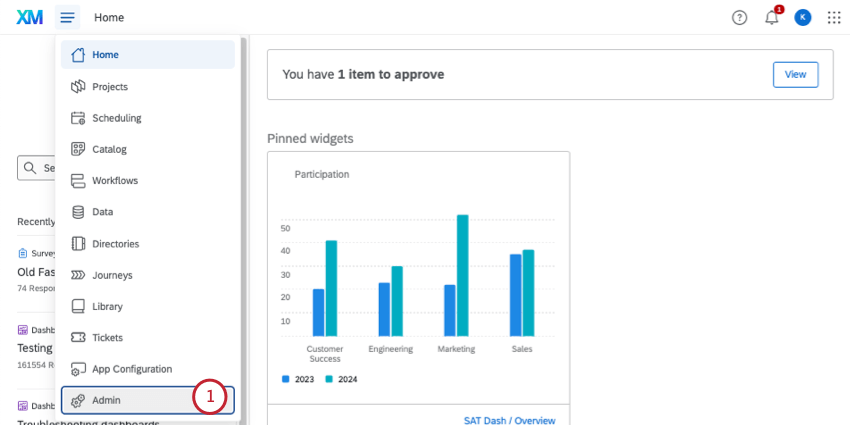
The platform collects feedback from customers, employees, and partners across channels, and the analysis turns it into insight about customer needs, employee satisfaction, and brand perception. It automatically spots friction across customer touchpoints and tracks brand recognition, favorability, and loyalty.
Surveys are optimized for mobile, and integrations cover Salesforce, Marketo, and Zendesk. SOC 2 Type II certification and HIPAA compliance back its security claims. Pricing is quote-based and not transparent, which costs time when I need an instant number, and its survey design features are more limited than some competitors’.
Pros
- Panel recruiting, targeting, and management
- Automatic detection of friction across touchpoints
- Brand perception tracking, including favorability and loyalty
- SOC 2 Type II certification and HIPAA compliance
Cons
- Pricing is not transparent, so getting a quote takes time
- Fewer survey design features than some alternatives
How Qualtrics Compares to Forsta: Qualtrics matches Forsta’s research orientation with strong panel tools, a far bigger review base, and the same quote-based pricing.
Pricing: Quote-only; contact the vendor for pricing.
User Rating: 4.7/5 (Capterra)
3. Alchemer: Best for Enterprise Surveys With Advanced Logic and Reporting
Are you after a Forsta alternative that can handle enterprise needs? Alchemer can be a good fit, and I can say why from experience. Personally, I have used Alchemer for surveys and found it extremely user-friendly, with options to create custom questions and layouts.
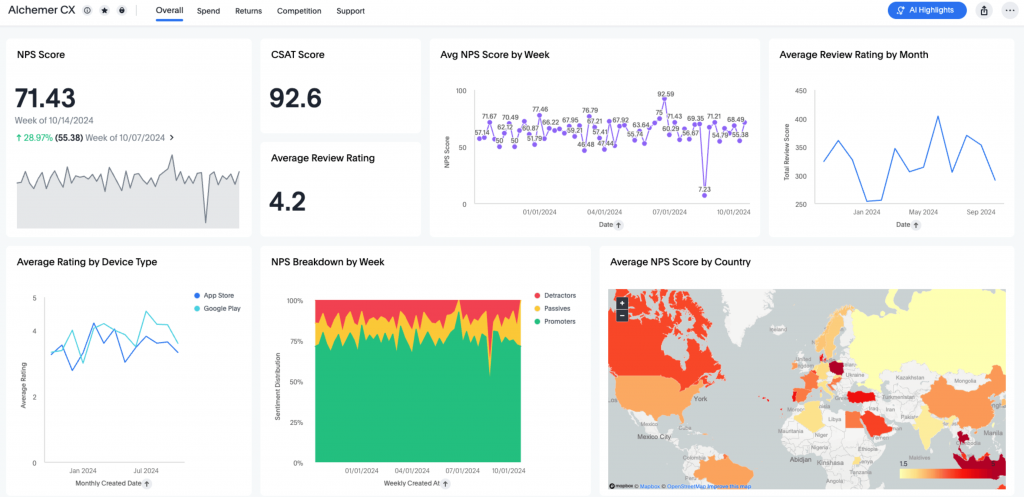
It creates surveys, collects feedback from mobile apps, automates workflows, and provides customizable reports that show data trends to support informed decisions. Support for complex survey requirements is generous, which makes it a solid pick for enterprises that need sophisticated survey software.
I like the white-label option for branding, survey templates that get me started, and enhanced logic that shows respondents only relevant questions. Surveys can be personalized with respondents’ names and embedded on websites and social channels. The paid plans can feel costly even for mid-sized businesses, occasional glitches can affect responses, and pricing is quote-only.
Pros
- White-labeling with your own brand
- Survey templates to kick-start creation
- Enhanced logic for relevant questions only
- Personalized questions and emails using respondents’ names
Cons
- Paid plans can feel costly for mid-sized businesses
- Occasional glitches can affect survey responses
How Alchemer Compares to Forsta: Alchemer offers enterprise-grade customization and a friendlier feel, with quote-based pricing and a larger review base than Forsta’s.
Pricing: Quote-only; contact the vendor for pricing.
User Rating: 4.5/5 (Capterra)
4. SurveyMonkey: Best for Professional Surveys and Fast Analysis
If Forsta is not getting you anywhere, I suggest trying SurveyMonkey. What I liked most is that I can customize a survey to match my brand, including fonts, colors, logos, and custom URLs, which can boost response rates and engagement.
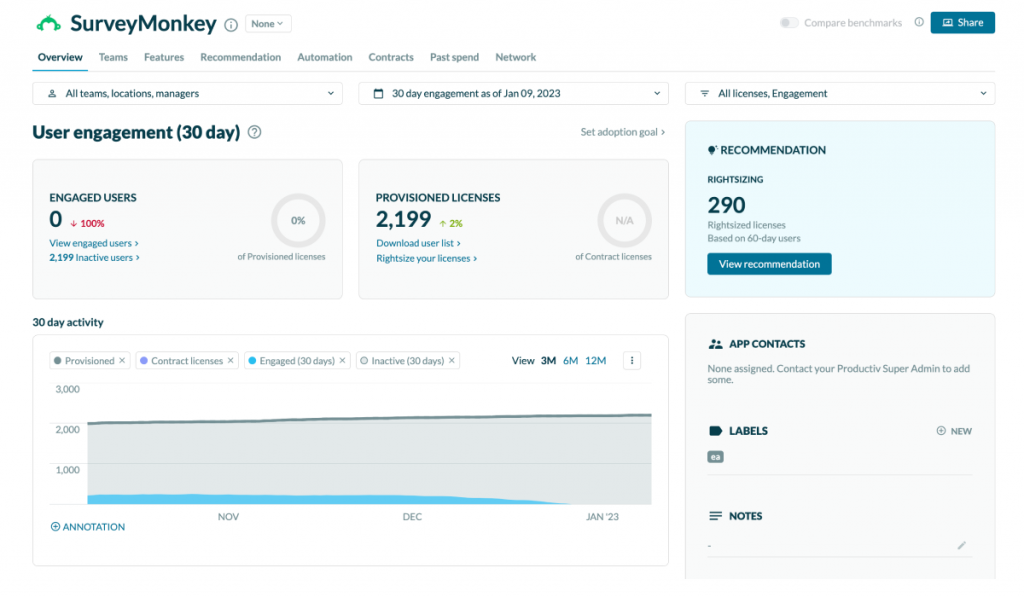
Hundreds of customizable templates cover everything from employee evaluations to product testing, and real-time reports and analysis save time and reveal audience preferences. Question types include multiple-choice, open-ended, Likert scale, and matrix questions.
Advanced logic and branching shape the experience, distribution runs through email invitations, social media, and website embeds, and translation options support surveys in several languages. Integrations cover Google Sheets, Microsoft Excel, and Salesforce. White-labeling is off the table on the starter plan, and reaching customer service can be a hassle, but I still think of it as my dependable fallback.
Pros
- Branding control over fonts, colors, logos, and URLs
- Hundreds of templates for many use cases
- Real-time reports and analysis
- Likert and matrix question types
Cons
- The starter plan does not allow white-labeling
- Customer service can be hard to reach
How SurveyMonkey Compares to Forsta: SurveyMonkey is quicker to start and far better evidenced on Capterra, with posted prices and less research depth than Forsta.
Pricing: Paid plans start at $30/user/month.
User Rating: 4.6/5 (Capterra)
5. Medallia: Best for Customer Lifecycle Insights Across Touchpoints
Medallia‘s customer feedback management helps me collect and analyze insights across the whole customer lifecycle. Feedback arrives from surveys, social media, chat, and phone calls, and I can use it to find areas for improvement, track progress over time, and make data-driven decisions.
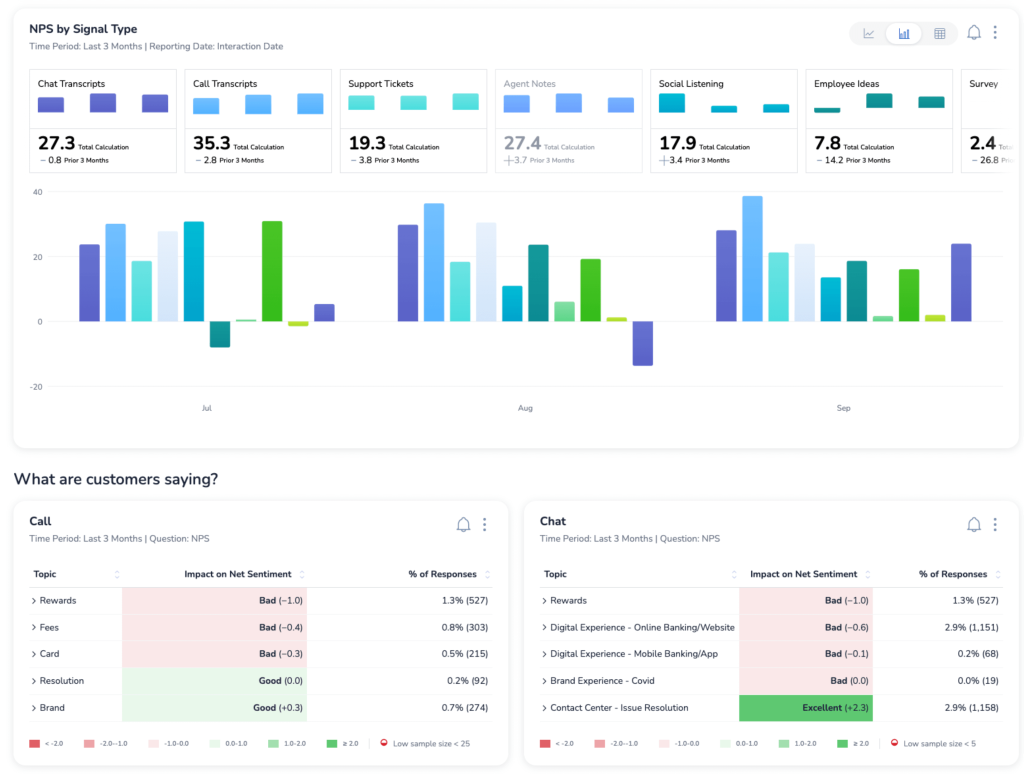
I found that it lets me customize survey questions and design, and it helps translate surveys into different languages with sophisticated built-in targeting logic, conditioning, and distribution. Omnichannel capture and engagement give a better idea of the lifecycle.
Machine learning predicts customer behavior and actions, case management keeps follow-ups timely, and text analysis identifies sentiment and themes. No pricing plan is shown on its site, so I could not get even a rough idea of cost, and it sometimes marks good feedback as unfavorable. Capterra rates it 4.5 on 33 reviews, a thin base.
Pros
- Feedback from surveys, social, chat, and phone calls
- Machine learning that predicts customer behavior
- Action and case management for timely follow-up
- Text analysis for sentiment and themes
Cons
- No displayed pricing, so a quote takes effort
- Good feedback is sometimes flagged as unfavorable
How Medallia Compares to Forsta: Medallia covers customer lifecycle insight at enterprise scale, and it shares Forsta’s hidden pricing and thin review base.
Pricing: Quote-only; contact the vendor for pricing.
User Rating: 4.5/5 (Capterra)
6. QuestionPro: Best for Market Research Insights
To stay ahead in a competitive market, I need a tool like QuestionPro, and it is one of the Forsta alternatives I tried earlier last year. I was tasked with market research for a product, and using it felt like having a personal assistant who helped uncover insights.
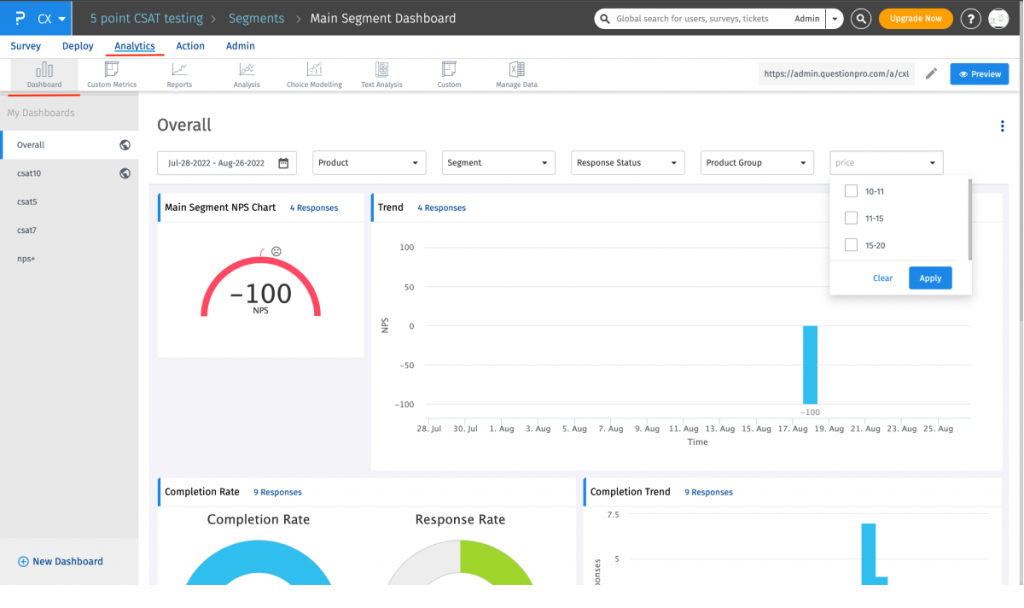
The suite offers real-time, automated, and advanced market research tools for creating surveys, collecting data, and analyzing results. It has an extensive template library, advanced question types, and real-time analysis, and its sentiment analysis, promoter amplification, and detractor recovery turn customers into advocates.
I can send surveys via email, SMS, social channels, or web forms, compare my results against industry benchmarks, and tailor each survey with advanced logic. It bills per user at $83 a month on Team Edition, and the free plan skips sentiment analysis, heatmaps, and advanced branching. Offline collection, though, never matched the online experience for me.
Pros
- Real-time, automated market research tools
- Sentiment analysis, promoter amplification, and detractor recovery
- Benchmarks against industry performance
- Omnichannel distribution by email, SMS, social, and web forms
Cons
- The free plan lacks sentiment analysis, heatmaps, and advanced branching
- Offline data collection is less robust than online
How QuestionPro Compares to Forsta: QuestionPro keeps pace with Forsta on research depth, lists a per-user price, and rests on a far bigger review base, at a higher cost than the lighter options.
Pricing: Free plan available. Paid plans start at $83/user/month, billed annually.
User Rating: 4.8/5 (Capterra)
7. Zonka Feedback: Best for CX Automation Across Channels
Zonka Feedback is an omnichannel feedback tool that measures real-time CX metrics such as NPS, CES, and CSAT, and it is famous for CX workflow automation. I was impressed by how it elevates customer experience with real-time feedback, in-depth insights, and automation.
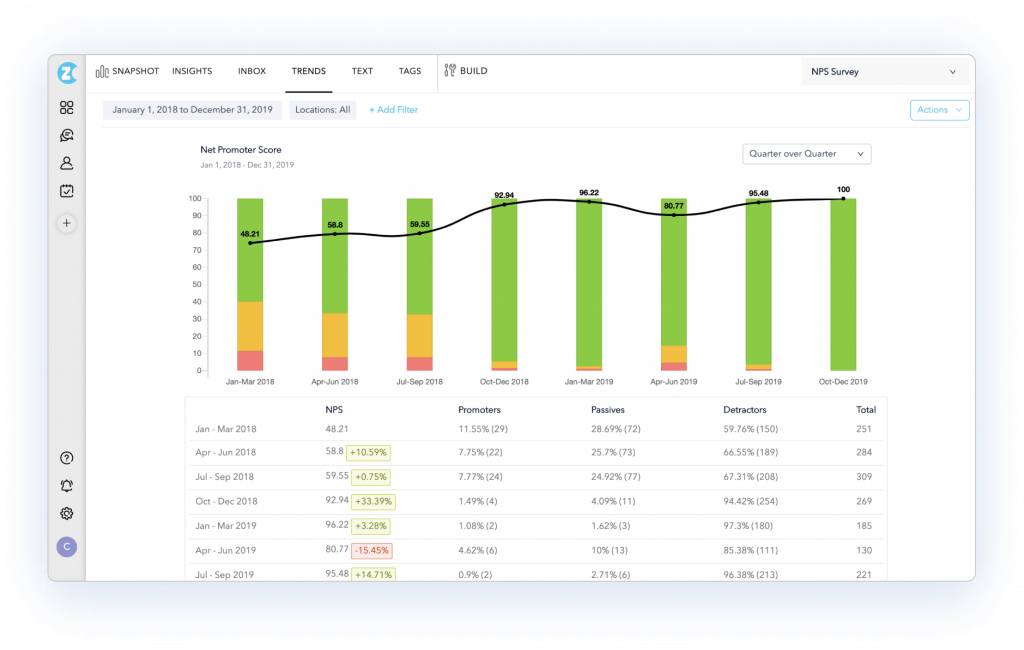
The part I enjoy is automation: a purchase can trigger an NPS survey and a support chat can trigger a CES survey, both with no manual work, and offline surveys, kiosks, satisfaction surveys, and website feedback round out the toolkit.
Feedback comes in by email, SMS, tablets, and kiosks; real-time alerts prompt immediate action, and reporting includes sentiment analysis and word clouds. Role-based access control and single sign-on cover enterprise needs. Key features may be missing from the free plan, and the question types can feel limited for complex surveys, so I would check what the free plan excludes and test a complex survey first.
Pros
- Surveys triggered by customer interactions
- Alerts and notifications for immediate action
- Sentiment analysis and word clouds
- Role-based access control and single sign-on
Cons
- Key features are missing from the free plan
- Limited question types for complex surveys
How Zonka Feedback Compares to Forsta: Zonka offers CX automation and omnichannel surveys with a narrower scope than Forsta’s research tools, and pricing is available via quote.
Pricing: Quote-only; contact vendor for pricing.
User Rating: 4.8/5 (Capterra)
8. AskNicely: Best for Tracking and Coaching Team Performance
Imagine measuring every customer’s experience with a Net Promoter Score and motivating your frontline teams to serve customers well. With AskNicely, I can do exactly that, because it captures real-time feedback and gives insight into individual and team performance.
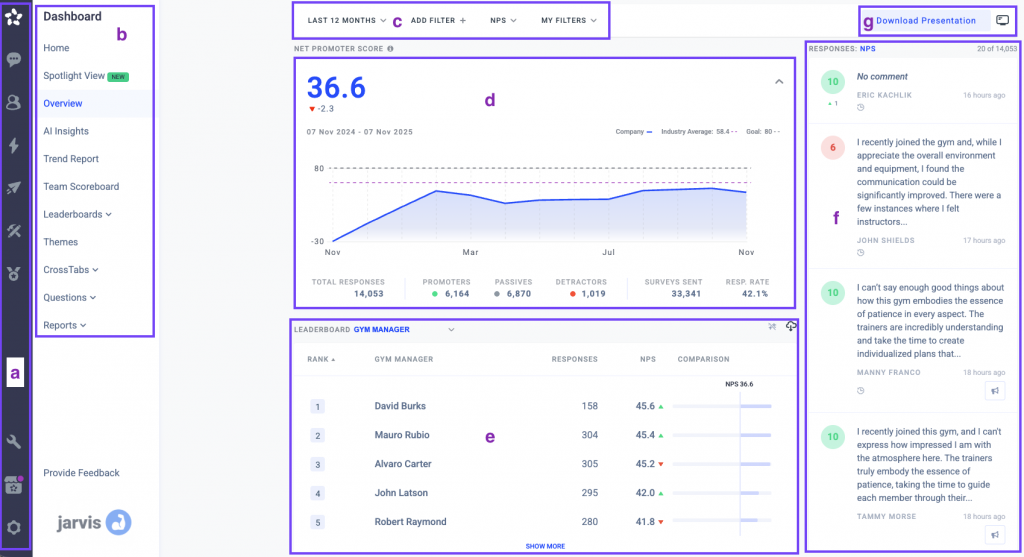
That makes data-driven coaching and recognition possible. Recognizing each team member’s progress toward monthly customer experience goals lifts morale and builds a customer-centric culture. I also think it is a good recommendation if you want to find a training gap in a customer service team.
I appreciate that requests and reminders run on autopilot, that I can benchmark performance against industry standards, and that the customer loop closes in one place. Pricing is quote-only, so I would book that conversation early, and I would expect a gentle learning curve and wish the reporting flexed more.
Pros
- Automated feedback requests and reminders
- A built-in recognition system for employee achievements
- Benchmarks against industry standards
- Closing the loop on customer feedback
Cons
- A bit of a learning curve
- Reporting could be more customizable
How AskNicely Compares to Forsta: AskNicely is far narrower, built for coaching frontline teams on NPS, with no research tooling, and its price also comes through a quote.
Pricing: Quote-only; contact vendor for pricing.
User Rating: 4.6/5 (Capterra)
9. Sogolytics: Best for Research-Grade Reports Without the Platform Weight
Sogolytics, formerly known as SoGoSurvey, suits the person who misses Forsta’s research depth but wants a cleaner tool. Reports come in custom, segmentation, pivot-table, and comparison flavors, so cutting results by group never sends me to another tool.
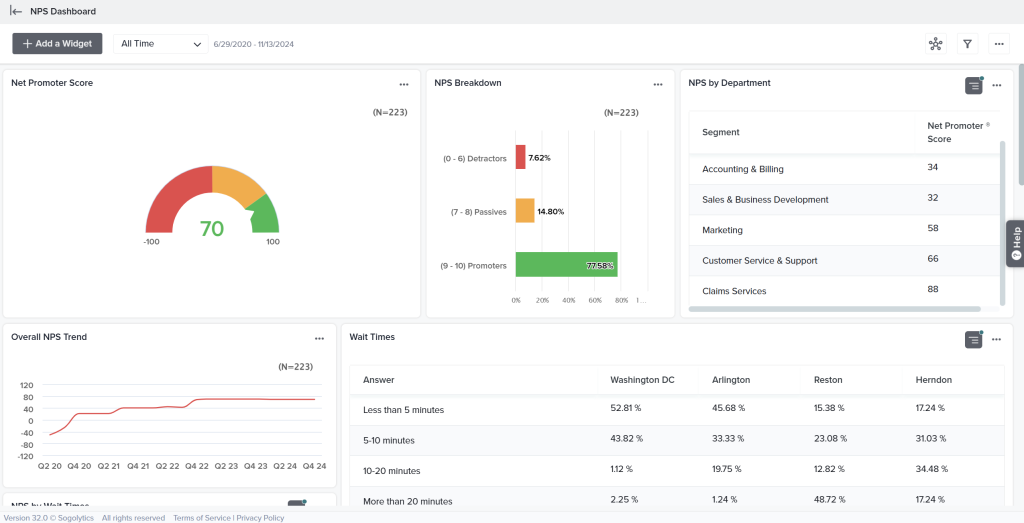
A panel service helps me reach the sample size a study needs, schedule reminders to chase unfinished surveys, and export to SPSS. Distribution runs over the web, email, SMS, links, social media, and offline channels, and the toolkit includes anonymous responses, white-labeling, and file attachments.
I trust a 4.7 built on about 730 Capterra reviews far more than Forsta’s 13. Styling options are limited, responses cannot carry internal comments, and pricing is quote-only, so I would ask early what the entry plan includes and whether the panel service is part of it or an add-on.
Pros
- Segmentation, pivot-table, and comparison reports
- A panel service for hitting sample size
- Reminders for unfinished surveys
- SPSS among the exports
Cons
- Limited styling choices
- No internal comments on responses
How Sogolytics Compares to Forsta: Sogolytics offers research-grade reporting and panels backed by a much larger review base, and its price is also quote-only.
Pricing: Quote-only; contact vendor for pricing.
User Rating: 4.7/5 (Capterra)
10. Typeform: Best for Engaging, Design-Led Surveys
I reach for Typeform when a survey has to feel pleasant to answer. Questions appear one at a time, which holds attention, and templates and design options let me match my brand without a designer.
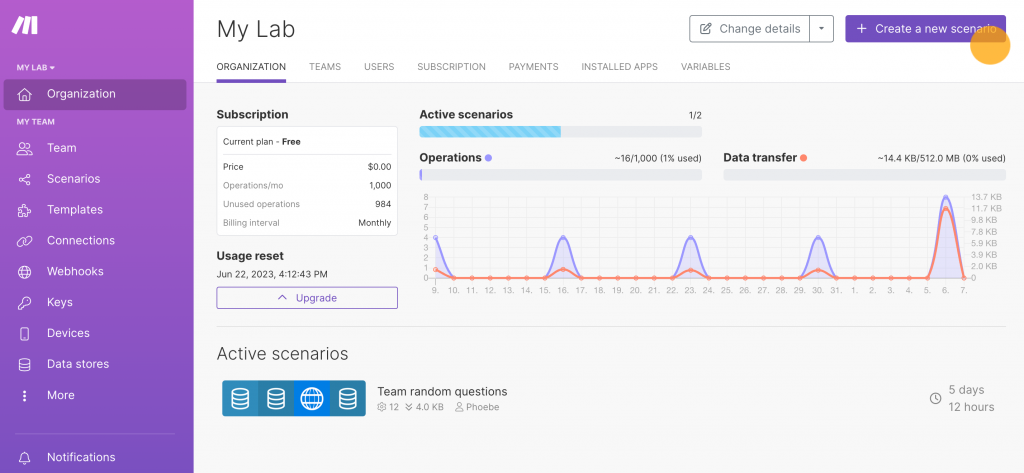
Conditional logic personalizes the path, integrations link it to plenty of apps, and live results appear as answers arrive. Marketing and product teams that want quick opinions and a polished look get a lot out of it.
Analysis is lighter than a research platform’s, and a few features need a paid plan. Its 4.7 rating is based on close to a thousand Capterra reviews, and plans start at $28 a month, so I choose it whenever appearance and completion rate matter more than research depth or panels.
Pros
- A single question per screen holds attention
- Templates and design options for branding
- Conditional logic for personalized paths
- Live results as answers arrive
Cons
- Analysis is shallower than a research platform’s
- Some features sit behind paid plans
How Typeform Compares to Forsta: Typeform offers a far friendlier respondent experience at a posted price, and none of Forsta’s research tooling.
Pricing: Paid plans start at $28/month.
User Rating: 4.7/5 (Capterra)
Which Forsta Alternative Should Be Your Top Pick?
Short on time? These are my three picks for a team that wants everyday feedback without a research platform.
1. Qualaroo: Best for Understanding the Why Behind Customer Decisions
My first pick is Qualaroo because it helps me understand why customers make the decisions they do. Real-time, AI-powered feedback reveals sentiment, and advanced targeting lets me survey specific users while they are actively engaging with my product or brand.
Nudges can be based on behavior, demographics, URLs, and past answers; A/B tests compare survey designs, and iOS and Android apps collect feedback within the product. Built-in AI Sentiment Analysis pulls sentiment and keywords out of written answers, and the summarizer shrinks a large stack into a short read.
Because the free plan includes every premium feature, I explored the entire product before paying. After more than a year, the intuitive interface still impresses me as it did during my first trial. Exit-intent surveys show why visitors walk away, and with more than 100 languages available, a small team can still serve a global audience.
2. Zonka Feedback: Best for Automating Feedback Around Customer Interactions
Zonka Feedback is a top-rated pick for teams that want feedback sent automatically when something happens. It measures real-time CX metrics such as NPS, CES, and CSAT, and I can trigger a survey after a purchase or after a support conversation.
Feedback arrives by email, SMS, tablets, and kiosks; real-time alerts prompt immediate action, and sentiment analysis and word clouds explain the numbers. Role-based access control and single sign-on cover enterprise requirements. Know the trade-offs: key features are missing from the free plan, the question types can feel limited for complex surveys, and pricing is quote-only.
For teams that value CX workflow automation, those costs are acceptable, and the offline surveys and kiosks extend reach beyond the web. It slots neatly beside a helpdesk, since a closed support conversation can start a CES survey on its own, and I would pilot it on one purchase flow first.
3. SurveyMonkey: Best for Value and Familiarity
SurveyMonkey is the pick when value for money and familiarity matter most. I can brand surveys with fonts, colors, logos, and custom URLs, start from hundreds of templates for everything from employee evaluations to product testing, and read real-time reports that save time. Advanced logic and branching tailor the experience, and translation options support multilingual audiences.
Distribution through email invitations, social media, and website embeds is simple, and integrations with Google Sheets, Microsoft Excel, and Salesforce keep data moving. The limits are plain: the starter plan does not allow white-labeling, and customer service can be hard to reach.
For a team that wants dependable, familiar software with a posted price, I would live with those trade-offs, since so many reviews have already mapped its rough edges. Because people know it, onboarding goes quickly, which helps when several departments must build surveys without a research background, and a pilot takes an afternoon.
How Did I Evaluate These Forsta Alternatives?
I evaluated the Forsta alternatives in this list based on what a team needs once a research platform is more than the job requires: a price I can see, tools suited to everyday feedback, and a vendor whose direction feels steady.
Each tool got the same six checks, and small samples are marked wherever they appear. Because I leaned on first-hand input from product and training managers who use these tools, I gave real-world experience the most weight.
Six factors carried the weight:
User Reviews and Ratings
Forsta’s 4.2 comes from only 13 Capterra reviews, and that is the number I keep coming back to. On Capterra, I read the count first, and Medallia’s 4.5 on 33 reviews gets the same wary look, while a rating backed by thousands, like SurveyMonkey’s, earns far more of my trust.
Essential Features and Functionality
My starting question is whether the team needs market research with scripting and panels or everyday customer and user feedback. Forsta handles the first well, so I asked what each alternative adds or drops, such as in-context targeting, AI analysis, and automation, and a feature serving neither job earned little.
Ease of Use
Forsta scores 4.0 for ease of use on Capterra, respectable but not remarkable. My test is simple: could a product or training manager launch a survey without calling a specialist? Tools that kept easy jobs easy stayed in, and heavier platforms had to earn their learning curve.
Customer Support
Forsta’s 4.1 for customer service is my yardstick here. I wanted to know who receives real help on a starter plan, whether onboarding is locked behind bigger contracts, and, for quote-only vendors, whether support is included. Slow replies during a live survey cost points.
Value for Money
Forsta scores 3.8 for value, its weakest mark, and the hidden pricing is why I look at total cost. I compared seats, responses, and extras, trusted free plans and listed prices over numbers that surface after a sales call, and flagged per-user billing, since it changes the math as a team grows.
Personal Experience and Experts’ Opinions
I talked with product and training managers across industries who use these tools daily and weighed their input against my own testing. Then, I mark the tools I have used myself, including Qualaroo, Alchemer, and QuestionPro. I also watched for ownership changes, because a takeover can reshape pricing and support overnight.
FREE. All Features. FOREVER!
Try our Forever FREE account with all premium features!
How Do You Choose the Right Forsta Alternative for Your Team?
Scan the table for the frustration that sounds most like yours. Several tools in one row means several routes to the same fix, so my notes are worth a read first.
| If My Main Forsta Frustration Is… | Consider This Alternative |
| Hidden, per-feature pricing | Qualaroo, SurveyMonkey, Typeform, or QuestionPro |
| It is built for research, not everyday feedback | Qualaroo, Typeform, or Zonka Feedback |
| I still need research depth and panels | Qualtrics, QuestionPro, or Sogolytics |
| Ownership and roadmap uncertainty | Qualaroo, Alchemer, or SurveyMonkey |
| I want CX automation and follow-up | Zonka Feedback, AskNicely, or Medallia |
| A thin review base worries me | SurveyMonkey, Typeform, or QuestionPro |
No Single Tool Ticks Every Box
Choosing a Forsta alternative is tough because no single tool fits everyone. What is best for an e-commerce firm with twenty employees may not suit an e-learning company of the same size, and a market research team has different needs from a product team running quick pulse checks. The honest answer depends on who you survey, how often, and what you do with the answers.
That is why I never choose from a feature page. Take each candidate’s free plan, run one real survey from your own work, and note how long idea-to-live takes, how obvious the price is, and whether a new colleague could repeat the steps alone. A tool can look perfect on a feature page and feel clumsy by the second survey, and only a real trial exposes that.
I have used Qualaroo for over a year now, and what struck me during my first trial was how intuitive the interface felt. My first impression has held up all this time, and the free plan lets you test it on your own work.
Frequently Asked Questions
What is Forsta used for?
Forsta is a market research and experience platform used for survey scripting, market research, and customer and employee experience programs. It was formerly known as FocusVision and Confirmit, and its HX platform spans research and feedback. Capterra rates it 4.2 based on 13 reviews, and the vendor does not provide pricing, so you will need to contact the company for a quote.
How much does Forsta cost?
Capterra lists Forsta's starting price as "not provided by the vendor" under a per-feature pricing model, so there is no public price list. The total depends on the modules and volume you need. Get the quote in writing, with every feature and service itemized, and hold it up against the listed prices of the lighter alternatives.
Who owns Forsta?
Forsta is reported to be part of Press Ganey, and coverage says Press Ganey Forsta absorbed InMoment in 2025 and that Qualtrics announced a $6.75 billion acquisition of it later that year. Reports differ on timing, so check the latest status. Ownership matters because roadmap, pricing, and support can change after a deal.
What is the cheapest Forsta alternative?
You can start free with Qualaroo, and its paid tiers begin at $19.99 a month. Typeform costs $28 a month, SurveyMonkey $30 per user, and QuestionPro starts from $83 per user, while Qualtrics, Alchemer, Medallia, Zonka Feedback, AskNicely, and Sogolytics require a quote. Compare what each entry plan covers, not only the sticker price.
Which alternative is closest to Forsta?
To maintain research depth, start with QuestionPro, Qualtrics, and Sogolytics, which offer advanced logic, panels, and detailed reporting; then consider Alchemer for flexible logic or Medallia for experience programs. Choose based on price visibility and review volume, since Forsta's hidden pricing and thin review base are the usual gripes; ask each vendor for a written quote.
Can Qualaroo replace Forsta?
For everyday customer and user feedback, yes: Qualaroo asks in-context on websites and apps and analyzes answers using built-in AI on the free plan. It leaves out survey scripting depth and research panels, so teams running large market research programs should consider QuestionPro, Qualtrics, or Sogolytics; a short pilot will show which matters more.
Which alternatives analyze open-text feedback?
Qualaroo's free plan already scores sentiment, extracts keywords, draws Word Clouds, and summarizes replies. QuestionPro adds sentiment and trend analysis, Zonka Feedback adds sentiment and word clouds, and Medallia mines open-ended text for themes. Features shift by plan, so run each tool on an identical batch of real answers before you commit.
What should I check before leaving Forsta?
Export your survey data first, then list the features you genuinely use, including scripting and panels. Ask each vendor to price exactly those in writing, confirm who owns the company, and time a first survey before trialing your top two on a live project, since logic, reporting, and support vary between tools.
FREE. All Features. FOREVER!
Try our Forever FREE account with all premium features!

 We'd love your feedback!
What did you like & how can we make it even better?
 Thanks for your feedback!
 Ask Your Question
Have a question? Get expert help to make your decision easier.