Spend real time in Glassbox and the same two things come up: the session-level visibility is genuinely strong, and getting a report to actually show what you need takes more configuration than it should.
That’s not a knock on the platform’s depth, it’s a mismatch between how much data Glassbox captures and how much work sits between that data and an answer.
I’ve tested ten Glassbox alternatives against that exact gap, Qualaroo included.
Some are lighter and cheaper, built for a team that just wants a usable answer without the enterprise sales process. Others match Glassbox’s own scale and ambition, for a CX team that genuinely needs that depth and just wants an easier way to get there.
This list breaks down which one gets you to a usable report faster, without needing Glassbox’s own guided sales process just to find out what it costs.
Why Are Teams Looking for Glassbox Alternatives?
None of this comes from a single frustrated moment. It’s a pattern that holds up once you get past Glassbox’s strong 4.9 rating and into what actually happens once you’ve configured the thing.
Reports Need Real Configuration: The reports are too basic out of the box, plain and simple, getting them to show the specific detail a team needs takes real setup work. Custom fields, funnels, and segment-level breakdowns don’t come pre-built, someone has to define them before a report actually answers the question that prompted it.
The Depth Itself Is the Onboarding Curve: Glassbox feels overwhelming at first, not because it lacks features, but because there’s so much data that finding the right view takes time. A new team member can spend their first few weeks just learning where a given metric lives before they can act on anything.
Performance Can Slow on Large Datasets: The platform is resource-intensive, with occasional slowdowns once a dataset gets large. That tends to show up right when it matters most, during a high-traffic period when a team needs a fast answer, not a spinning loading screen.
Pricing Isn’t Published: Glassbox’s own site describes three separate elements that factor into a quote, so there’s no way to self-serve estimate a cost before a sales conversation. That makes it hard to even shortlist Glassbox against a competitor without booking a call first.
It’s Built for Enterprise Scale: Glassbox is designed around large, often regulated industries, banking, insurance, telecom. A smaller team that doesn’t need that compliance depth is paying for scale it won’t use, often through the same sales cycle a much bigger company goes through to get there.
The Top 10 Glassbox Alternatives
Ten tools, one job each. Here’s where they land on price and rating before I break each one down.
| Tool | Best For | Starting Price | User Rating |
| Qualaroo | Real-time user insights in-app and on your website using contextual, AI-powered micro-surveys | Free plan; paid from $19.99/mo | 4.7/5 |
| Contentsquare | Enterprise-scale experience analytics | Paid from $39/mo | 4.8/5 |
| FullStory | Deep session replay and frustration-signal detection | Free plan; paid quote-only | 4.6/5 |
| Pendo | All-in-one product analytics, guides, and surveys | Quote-only | 4.5/5 |
| Quantum Metric | Enterprise digital experience intelligence at scale | $55/user/mo | 4.7/5 |
| Hotjar | Heatmaps and session recordings alongside feedback widgets | Free plan; paid from $39/mo | 4.6/5 |
| Smartlook | Session recordings for web and native mobile apps | Paid from $29/mo | 4.7/5 |
| Mouseflow | Automated heatmaps with funnel and form analytics | Free plan; paid from $25/mo | 4.7/5 |
| Medallia | Large-scale enterprise CX suite, omnichannel ingestion | Quote-only | 4.5/5 |
| Matomo | Privacy-first, GDPR-compliant web analytics | Free plan; paid from $26/mo | 4.7/5 |
1. Qualaroo: Best for Real-Time User Insights In-App and On Your Website Using Contextual, AI-Powered Micro-Surveys
Among all the Glassbox alternatives, I reach for Qualaroo when a team wants session-level context without Glassbox’s configuration curve standing between them and an answer.
The Nudge™ triggers right when it matters, exit intent, a rage click, a stall past a specific step, and asks the one question a session recording can only hint at. Native AI Sentiment Analysis reads through open-text answers automatically, so nobody’s stuck configuring a custom report just to find the pattern.
Question branching means a frustrated respondent and a happy one never see the same follow-up. Teams coming off Glassbox notice the setup difference immediately, a first Nudge can go live the same day, not after a guided onboarding process.
I like that the reporting stays readable even as feedback volume grows, exactly where Glassbox tends to get harder, not easier.
Pros:
- AI Survey Creator drafts a full Nudge from a prompt, no manual setup required
- Question branching and skip logic so respondents only see relevant follow-ups
- Native AI Customer Feedback Analysis, including AI Sentiment Analysis and word cloud generation for open-text responses
- Heatmaps and Session Recordings show what a user was doing right before they responded
- Advanced targeting by behavior, URL, exit intent, and custom user properties
- Identify API ties responses back to a real user by email or customer ID
- Nudge for Prototype works on Figma, Adobe XD, and InVision before a product ships
- Multilingual surveys in 100+ languages
- iOS and Android SDK for native in-app surveys
- Salesforce, HubSpot, and Slack integrations for CRM-connected feedback workflows
Cons:
- Dedicated onboarding/account manager services are generally reserved for the paid plans.
- There is no downloadable or on-premise version available (Internet connection required to use the tool)
How Qualaroo Compares to Glassbox: I’d put it simply: Qualaroo gets a team to a usable report faster than Glassbox does, at the cost of Glassbox’s deeper session-replay and compliance-grade data masking. It’s the right swap when configuration friction is the actual complaint, not when PCI-level compliance controls are the reason Glassbox was chosen in the first place.
Pricing: Free plan available, up to 50 responses with all premium features. Essentials at $19.99/month, Business at $49.99/month, Enterprise from $149.99/month.
User Rating: 4.7/5 (Capterra)
I like citing KingsPoint here, since the company used Qualaroo to surface a specific problem worth roughly $60,000, without needing to configure a complex report to find it. That’s the exact contrast this list keeps coming back to: a quick, targeted question can surface the same kind of costly issue a heavier analytics platform would need real setup time to uncover.

2. Contentsquare: Best for Enterprise-Scale Experience Analytics
Contentsquare is the tool I’d put closest to Glassbox in raw ambition, enterprise-grade session analysis, zone-based heatmaps, and AI-driven insights that flag which UX issues are actually costing revenue.
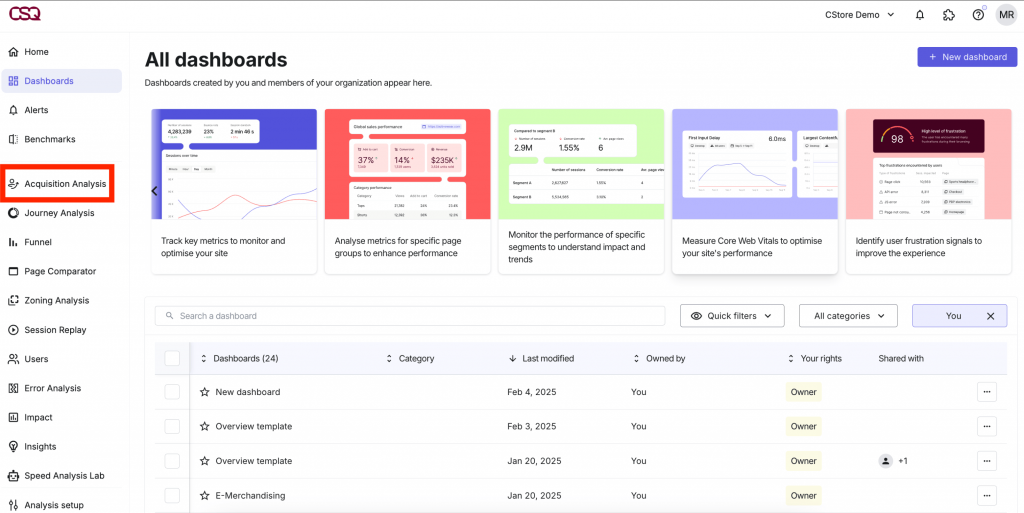
Where it pulls ahead is the AI layer doing more of the pattern-finding automatically, instead of leaving a team to configure a custom report to surface the same insight.
Journey analysis runs across an entire site, not page by page, which matters for the same large, complex sites Glassbox itself is built for. The onboarding curve is real here too, this isn’t a lighter alternative, it’s a different flavor of the same enterprise-scale tool.
Teams switching from Glassbox specifically for the AI-driven insights tend to find the transition worth it once the initial setup is done.
Pros:
- Zone-based heatmaps and AI-driven insights that flag revenue-impacting UX issues
- Journey analysis across an entire site, not just page by page
- Enterprise-grade session replay with advanced segmentation
- Dedicated onboarding and account support included
Cons:
- Significant cost and implementation time, similar to what Glassbox itself requires
- Overkill for a smaller site that doesn’t need enterprise-scale journey analysis
How Contentsquare Compares to Glassbox: I’d call this the closest lateral move on this list, Contentsquare matches Glassbox’s enterprise scale and adds more automated AI analysis on top, at a similar cost and onboarding curve rather than a lighter one.
Pricing: Paid plans start at $39/month.
User Rating: 4.8/5 (Capterra)
3. FullStory: Best for Deep Session Replay and Frustration-Signal Detection
I send teams to FullStory once the actual complaint is Glassbox’s reporting friction specifically, not its session-capture depth.
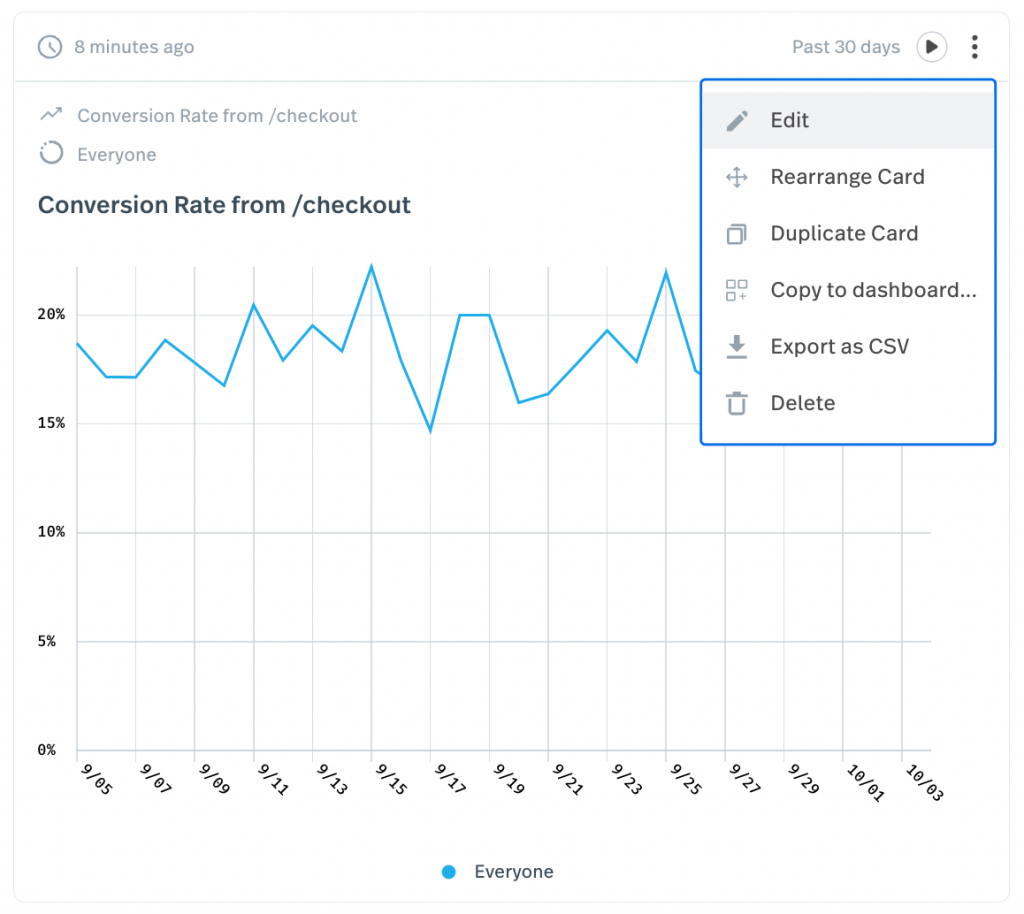
Session search pulls up every recording matching a specific error or rage click instantly, no manual report-building required to find the pattern. Automatic frustration-signal detection flags the sessions worth watching first, doing some of the configuration work Glassbox leaves to the team.
The free tier’s 30,000 monthly sessions is generous for a team testing the waters before committing to anything enterprise-scale. Engineering teams lean on this as much as product teams do, mostly to reproduce a bug nobody described clearly in a ticket.
The privacy and PII controls are solid too, though not built around the same regulated-industry compliance checklist Glassbox specifically targets.
Pros:
- Zero-instrumentation session capture with rage-click and frustration signals
- Searchable session index instead of scrubbing through recordings manually
- Generous free tier, up to 30,000 sessions per month
- API access for pulling behavioral data into other systems
Cons:
- No dedicated survey builder as a core feature
- Pricing scales with session volume and can rise quickly on high-traffic products
How FullStory Compares to Glassbox: FullStory solves the exact reporting-friction complaint that comes up most with Glassbox, automated search instead of manual configuration, though it doesn’t match Glassbox’s compliance-specific data masking built for regulated industries.
Pricing: Free plan available, up to 30,000 sessions/month. Paid plans are quote-only.
User Rating: 4.6/5 (Capterra)
4. Pendo: Best for an All-in-One Product Analytics, Guides, and Surveys Platform
Pendo is where I’d point a team that wants Glassbox’s depth folded into a broader product-analytics platform, guides, segmentation, and roadmap validation alongside the session data.
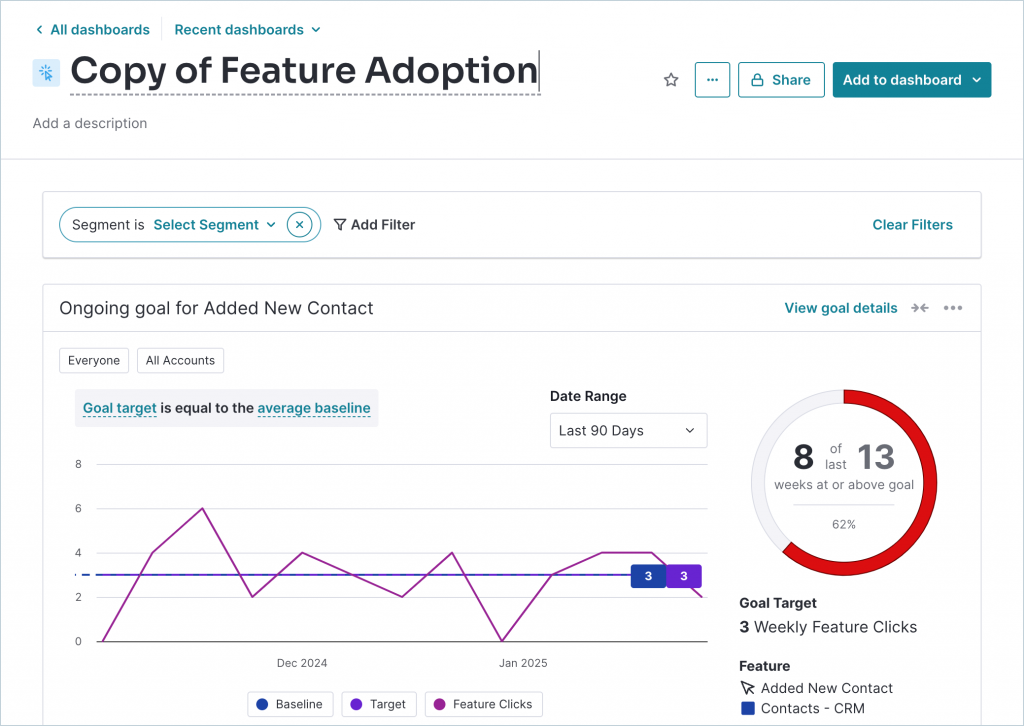
The resource center lets a team turn a support answer into a reusable in-app guide, something Glassbox itself doesn’t attempt. Segmentation is genuinely strong, letting a team slice session data by the same criteria they’d use to prioritize a roadmap decision.
Setup still takes real time, this isn’t a lighter Glassbox alternative, it’s a wider one. Product teams specifically tend to land here once they’ve decided session replay alone was never going to answer the roadmap questions they actually have.
The tradeoff mirrors Glassbox’s own quote-only pricing, so budgeting still starts with a sales conversation either way.
Pros:
- Combines product analytics, in-app guides, and surveys in one platform
- Strong segmentation for targeting specific user groups
- Built-in resource center and product-led courses
- Robust feature set for validating roadmap decisions
Cons:
- Pricing is not published and can climb quickly as monthly active users grow
- Heavier setup that typically needs a dedicated admin
How Pendo Compares to Glassbox: Pendo trades some of Glassbox’s session-replay depth for a wider product-analytics platform, in-app guides and roadmap tools Glassbox doesn’t attempt, at a similarly opaque, quote-only price.
Pricing: Free plan available, up to 500 MAU. Paid plans are quote-only.
User Rating: 4.5/5 (Capterra)
5. Quantum Metric: Best for Enterprise Digital Experience Intelligence at Scale
Quantum Metric operates at the same enterprise scale Glassbox does, real-time session replay and anomaly detection built for large, regulated industries like banking and travel.
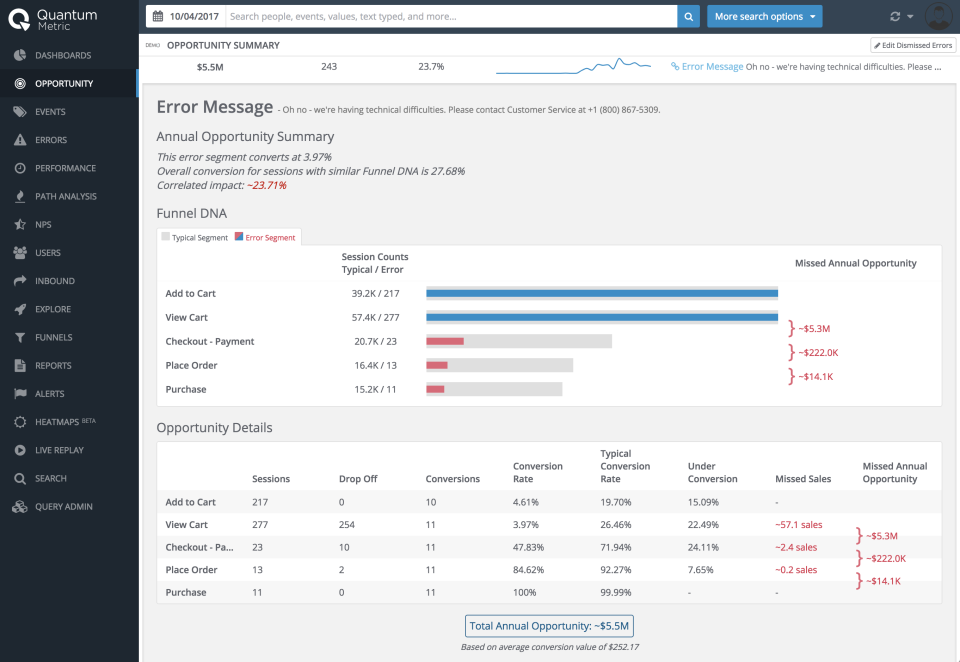
It consistently gets praised for how little training it takes to get real value, a direct answer to Glassbox’s own overwhelming-at-first problem. Anomaly detection flags issues automatically instead of requiring a team to configure a report to find them.
I’d flag the review base here as thin, a small sample on Capterra, so I’d weigh that alongside the genuinely strong feedback out there rather than treating the average as fully settled.
Teams already operating at Glassbox’s scale and budget are the right fit here, not a team looking for something lighter.
Pros:
- Real-time session replay and anomaly detection built for enterprise scale
- Consistently praised for a low training curve relative to its depth
- Strong ongoing support, consistently a highlight
- Built for the same regulated industries Glassbox targets (banking, travel, insurance)
Cons:
- Capterra review base is thin, worth weighing alongside other sources before trusting the average
- Priced and positioned for large enterprise budgets, not a lighter alternative
How Quantum Metric Compares to Glassbox: Quantum Metric is the most direct scale-for-scale swap on this list, similar depth and similar audience, with a noticeably easier onboarding curve than Glassbox’s own.
Pricing: Paid plans start at $55/user/month.
User Rating: 4.7/5 (Capterra, thin review base)
6. Hotjar: Best for Heatmaps and Session Recordings Alongside Feedback Widgets
Hotjar is the lightest version of what Glassbox does, heatmaps and session recordings, without the enterprise configuration layer on top.
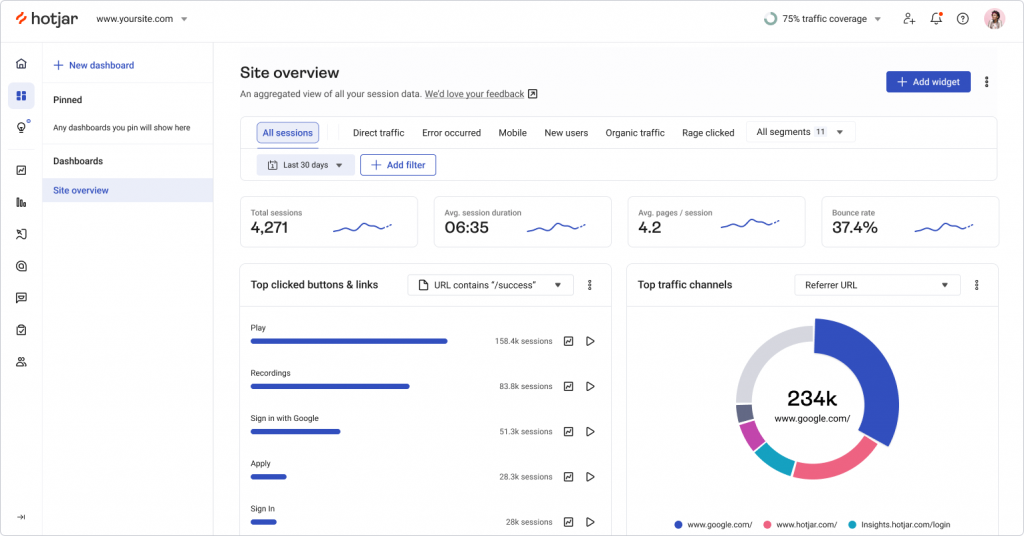
A single tracking script gets a first heatmap live same-day, a real contrast to Glassbox’s guided setup process. Survey and feedback widgets come bundled in too, something Glassbox doesn’t offer at all.
The free tier caps daily sessions, so it’s not a fit for the same traffic volume Glassbox handles, but for a smaller team, that’s rarely the binding constraint. I’d point teams here specifically when the actual goal is just seeing where visitors get stuck, not building an enterprise-wide analytics program.
The integration library is a real plus too, Slack, Zapier, and Google Analytics all connect without custom development work.
Pros:
- Heatmaps and session recordings alongside on-site surveys and feedback widgets
- Simple, published per-user pricing
- Fast setup with a single tracking script
- Large integration library, including Slack, Zapier, and Google Analytics
Cons:
- Free tier caps daily sessions, a real ceiling for high-traffic sites
- Survey targeting logic is lighter than dedicated feedback platforms
How Hotjar Compares to Glassbox: Hotjar covers a fraction of Glassbox’s depth, no compliance-grade data masking, no enterprise journey analysis, but gets a team to a first heatmap same-day instead of after a guided sales process.
Pricing: Free plan available. Paid plans start at $39/month.
User Rating: 4.6/5 (Capterra)
7. Smartlook: Best for Session Recordings for Web and Native Mobile Apps
Smartlook is the pick once native mobile coverage matters as much as web, session recordings and heatmaps on both from one dashboard.
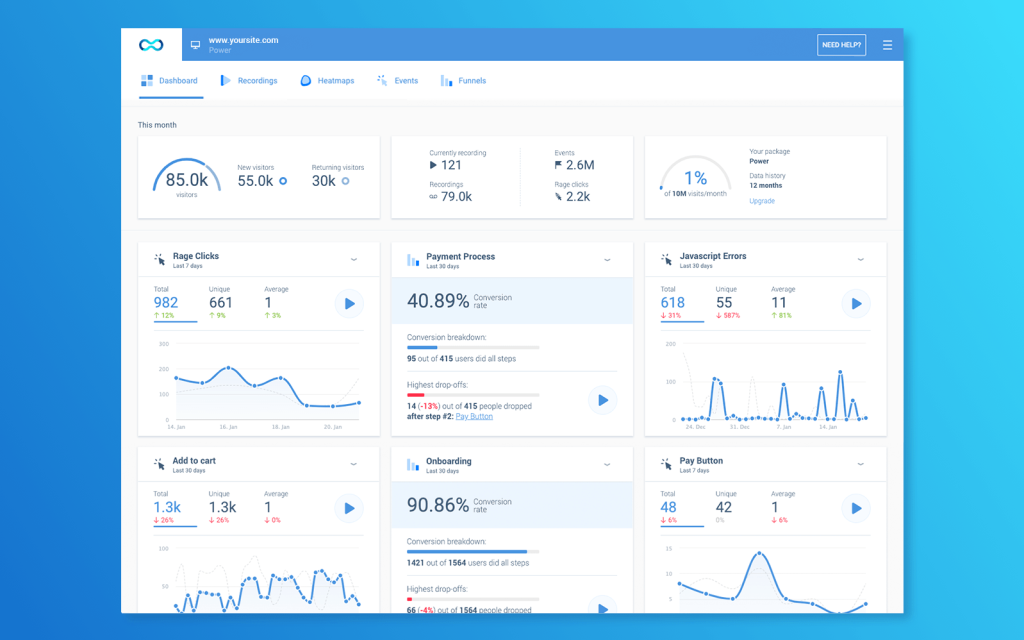
Funnel and event tracking come built in, so a team jumps straight to sessions tied to a specific action instead of configuring a custom report first. The published per-user pricing is refreshingly clear next to Glassbox’s own multi-element quote process.
Teams shipping a mobile app alongside a website land here because Glassbox’s own mobile depth isn’t its strongest angle relative to its web tooling.
Setup stays a single script on the web side, no separate SDK just to get the basic recording layer running. That simplicity matters most for a team that doesn’t have engineering time to spare on a longer rollout.
Pros:
- Session recordings and heatmaps for both web and native mobile apps
- Funnel and event tracking built in
- Published per-user pricing
- Fast integration via a single script
Cons:
- Feedback and survey tools are lighter than dedicated research platforms
- Occasional recording sync issues come up
How Smartlook Compares to Glassbox: Smartlook covers the same session-recording core Glassbox does, at a fraction of the price and with published pricing instead of a multi-element enterprise quote.
Pricing: Paid plans start at $29/month.
User Rating: 4.7/5 (Capterra)
8. Mouseflow: Best for Automated Heatmaps with Funnel and Form Analytics
I like Mouseflow for a team that wants Glassbox’s automatic-insight instinct without the enterprise price tag attached.
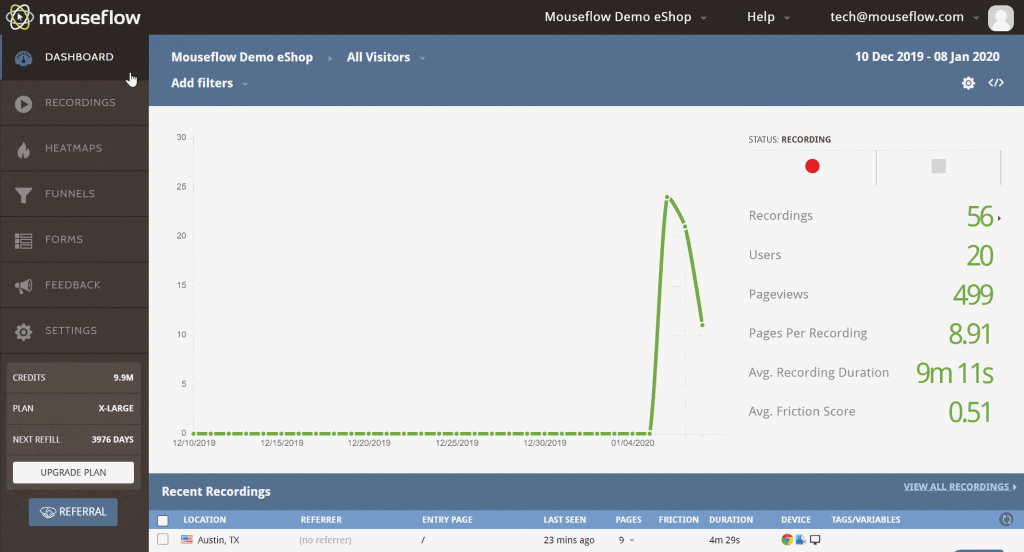
Six heatmap types generate automatically for every page, and form analytics flag exactly which field is losing conversions, real answers instead of a report a team has to build themselves.
Funnel reports layer on top, and recordings get tagged and organized, useful once a site has more sessions than anyone has time to watch individually. Pricing stays genuinely low at entry, with a free plan for testing the waters first.
I’d recommend this specifically to a team frustrated with Glassbox’s own reports-too-basic, needs-configuring reputation, and wants the opposite experience at a fraction of the cost.
Pros:
- Six heatmap types generated automatically for every page
- Form analytics flag which specific field is losing conversions
- Funnel reports built in, layered on top of session recordings
- Free plan available alongside a genuinely low-cost entry tier
Cons:
- Cancellation and refund requests can involve some friction
- Not built for the same regulated-industry compliance depth Glassbox targets
How Mouseflow Compares to Glassbox: Mouseflow answers Glassbox’s most common complaint almost directly, automatic insight instead of manual report configuration, at a fraction of the price and with none of the enterprise sales process.
Pricing: Free plan available. Paid plans start at $25/month.
User Rating: 4.7/5 (Capterra)
9. Medallia: Best for a Large-Scale Enterprise CX Suite with Omnichannel Ingestion
Medallia is where I’d send a team whose ambitions genuinely match Glassbox’s own enterprise scope, customer, employee, and research feedback pulled into one platform with predictive analytics on top.
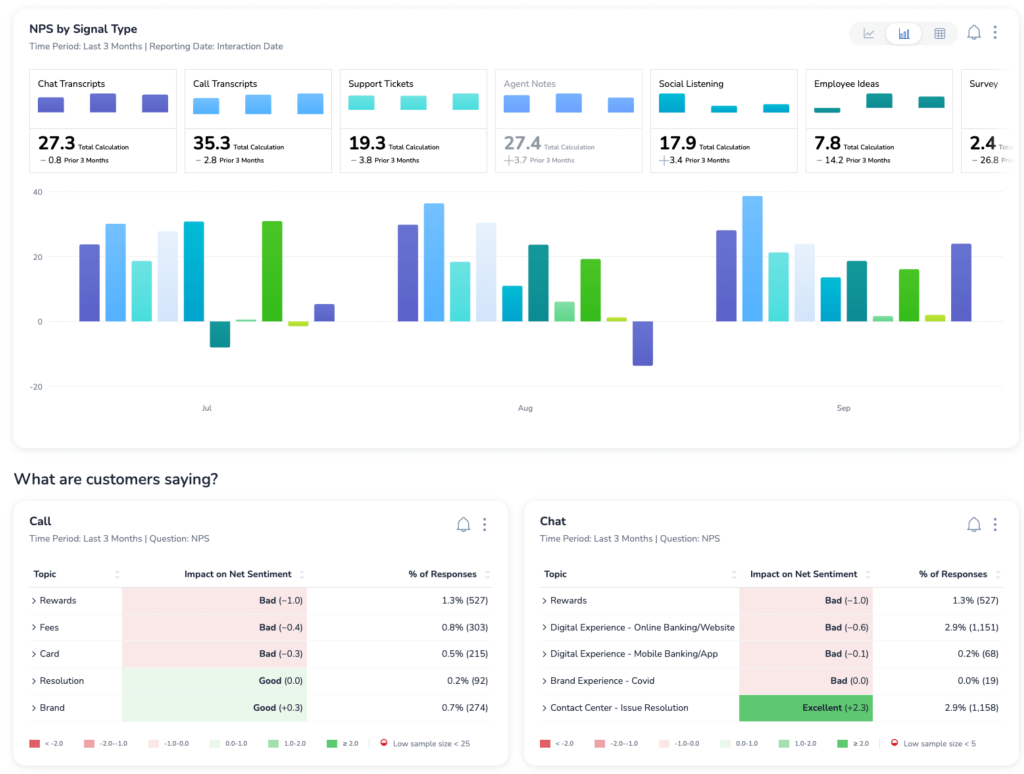
This is a bigger commitment than Glassbox itself in most cases, contracts here typically run into six figures annually.
Role-based dashboards mean different teams see only what’s relevant to them, which helps with the same overwhelming feeling Glassbox is known for, just at a steeper price for solving it.
I wouldn’t recommend this as a first move for a team just frustrated with Glassbox’s reporting, it’s a much bigger swing than the specific problem calls for. Large enterprises already running a dedicated CX function are the right audience here.
Pros:
- Predictive insights and automated workflows across customer, employee, and research data
- Role-based dashboards for different teams within one organization
- AI-driven analytics and omnichannel data ingestion
- Industry-leading depth for multi-department experience management
Cons:
- Six-figure-plus annual contracts are typical, a real step up from Glassbox’s own pricing
- Significant implementation time relative to a more focused analytics tool
How Medallia Compares to Glassbox: Medallia operates a tier above Glassbox in scope and price both, the right move only for a team whose feedback needs already span well past digital-experience analytics into a full CX program.
Pricing: Quote-only, contact vendor for pricing.
User Rating: 4.5/5 (Capterra)
10. Matomo: Best for Privacy-First, GDPR-Compliant Web Analytics
I recommend Matomo to a team that likes Glassbox’s session-level idea but wants to own the infrastructure and skip the enterprise sales process entirely.
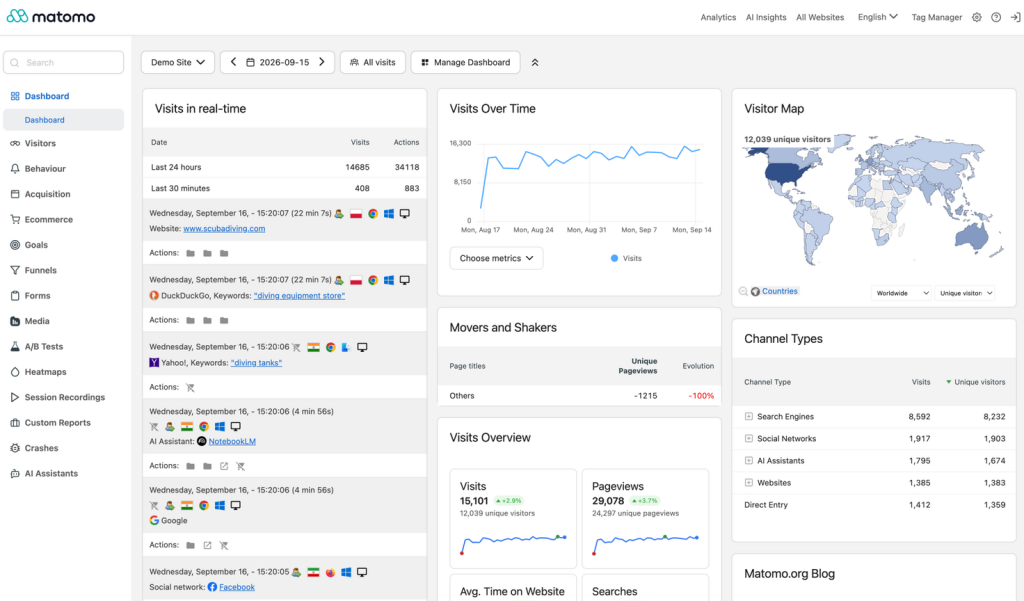
It’s open-source and self-hostable, so every recording and heatmap stays on infrastructure a team actually controls, a different answer to the same data-governance question Glassbox’s compliance features are built to solve.
Web analytics, heatmaps, and session recordings all live in one platform, with a cloud-hosted option for a team that wants ownership without managing a server.
The tradeoff is real: self-hosting means someone owns the maintenance, a different cost than a subscription fee. Teams in regulated industries specifically tend to like settling the data-residency question outright instead of trusting a vendor’s compliance certifications.
Pros:
- Open-source and self-hostable, full data ownership and control
- Web analytics, heatmaps, and session recordings in one platform
- No third-party cookie dependency, strong fit for GDPR-sensitive teams
- Cloud-hosted option available for teams that don’t want to self-manage
Cons:
- Self-hosting requires real technical maintenance, a different cost than a subscription
- Interface and reporting feel less polished than Glassbox’s own enterprise dashboards
How Matomo Compares to Glassbox: Matomo answers the same data-governance question Glassbox’s compliance features target, but hands the infrastructure to the team itself instead of trusting a vendor’s certifications, a real tradeoff of control against convenience.
Pricing: Free plan available. Paid plans start at $26/month.
User Rating: 4.7/5 (Capterra)
Which Glassbox Alternative Should Be Your Top Pick?
Ten tools is a lot to weigh. If you read only one section, make it this one. These are the three I’d genuinely point a team toward, and each answers a different version of what’s actually pushing people off Glassbox.
1. Qualaroo: Best Overall Pick if Configuration Friction Is the Real Complaint
Qualaroo tops this list because it solves the specific thing that comes up most with Glassbox: getting to a usable report without configuring one from scratch.
Essentials runs $19.99 a month, a real cost but a transparent one next to Glassbox’s multi-element quote process. Native AI Sentiment Analysis and question branching do the pattern-finding automatically, the same job Glassbox’s reports need manual setup to do.
That means a detractor and a promoter never see the same generic follow-up, and the reasoning behind a score shows up without anyone building that logic by hand. For a team that just wants a working report on day one instead of after a guided rollout, this is the fastest way there.
2. Mouseflow: Best if You Want Automatic Insight at a Fraction of the Price
If Glassbox’s price tag is as much the issue as its reporting friction, Mouseflow is where I’d look next. Six automatic heatmap types and form analytics that flag the exact field losing conversions, at an entry price that undercuts Glassbox by a wide margin.
It’s the closest thing to a direct answer to “the reports are too basic and need configuring,” just handled automatically instead.
The tradeoff is real: Mouseflow isn’t built for the same regulated-industry compliance checklist Glassbox specifically targets, so a bank or insurer choosing Glassbox for that reason won’t find the same coverage here.
3. Quantum Metric: Best if You Need Glassbox’s Scale With an Easier Onboarding Curve
For a team that genuinely needs Glassbox’s enterprise scale and isn’t willing to compromise on it, Quantum Metric is the honest lateral move, similar depth, similar regulated-industry focus, but with an onboarding curve that consistently gets credit for being easier than Glassbox’s own.
The catch is a thin review base on Capterra, worth weighing alongside other sources rather than treating as fully settled.
This pick is for a team that’s already committed to enterprise-scale spend and just wants less friction getting there, not a team still deciding whether that scale is even necessary in the first place.
How Do You Choose the Right Glassbox Alternative for Your Team?
Name the actual reason Glassbox isn’t working for you, not the reason you assume should matter, and the table below points to the right pick directly.
| If Your Main Glassbox Frustration Is… | Consider This Alternative |
| Reports need too much configuration | Qualaroo or Mouseflow |
| Wanting Glassbox’s scale with an easier onboarding curve | Quantum Metric |
| Wanting a wider product-analytics platform, not just session data | Pendo |
| Needing native mobile app coverage | Smartlook |
| Wanting a full enterprise CX program, not just digital analytics | Medallia |
| Needing full data ownership or GDPR self-hosting | Matomo |
| Wanting deeper AI-driven journey analysis | Contentsquare |
| Hitting a reporting or API ceiling on a lighter tool | FullStory |
| Wanting the lightest possible starting point | Hotjar |
FREE. All Features. FOREVER!
Try our Forever FREE account with all premium features!
How Did I Evaluate These Glassbox Alternatives?
What actually drove these rankings was whether a tool gets a team to a usable report faster than Glassbox does, not just whether it can technically capture a session, most tools on this list already can.
Six factors carried the weight:
User Reviews / Ratings: I pulled every rating straight from Capterra and weighed review count against the star average, not just the number alone. Glassbox’s own 4.9 rests on 54 reviews, a reasonable sample, though Quantum Metric’s rating here comes from just 6, thin enough that I held it to a higher bar before trusting it equally.
Essential Features & Functionality: Whether a tool surfaces an insight automatically or requires manual report-building mattered more than raw session-capture depth, since that’s exactly where Glassbox’s own friction lives.
Ease of Use: I looked at how steep the onboarding curve is specifically, since “overwhelming at first” is a direct, repeated complaint about Glassbox itself, not a hypothetical concern I’m inventing.
Customer Support: I checked whether real support exists at the entry price or only once a deal reaches enterprise scale, relevant given how heavily Glassbox’s own pricing model leans on a guided sales conversation.
Value for Money: I weighed what a tool’s reporting depth actually costs to unlock, since configuration effort is a real hidden cost sitting on top of Glassbox’s own sticker price.
Personal Experience / Experts’ Opinions: Where I’ve used a tool directly, that experience shaped what’s written here. Where I haven’t, I leaned on patterns that repeat consistently across independent research rather than any single source’s take.
Depth Isn’t the Problem. Getting to an Answer Is.
Every tool on this list can capture a session or draw a heatmap, Glassbox included, and does it well enough to earn a genuinely strong 4.9 rating. The complaint that sends people looking elsewhere isn’t the data itself, it’s how much configuration sits between that data and something a team can act on.
That’s why the right pick splits by what’s actually driving the search.
A team that wants Glassbox’s exact scale with less onboarding friction wants a different answer than one that’s decided a lighter, cheaper tool solves the same underlying problem without the enterprise commitment.
Compliance requirements are worth separating out too, a regulated enterprise that chose Glassbox specifically for its data-masking controls has a narrower list of real substitutes than a team that didn’t need that in the first place.
If getting to a usable report faster, without configuring one from scratch, is the actual goal, I’d start with Qualaroo. The free plan lets a team test the AI feedback analysis against real responses before committing to anything.
Frequently Asked Questions
What is the best free alternative to Glassbox?
Qualaroo's free plan covers up to 50 responses with every premium feature included, AI Sentiment Analysis included, a genuinely usable starting point next to Glassbox's enterprise-only pricing model. Hotjar, Mouseflow, and Matomo also offer real free tiers for teams that want to test session-level data before committing to anything paid.
Is Qualaroo cheaper than Glassbox?
Almost certainly, though Glassbox doesn't publish pricing, so a direct comparison isn't possible without a sales call. Qualaroo's Essentials plan is a transparent $19.99 a month, while Glassbox's own site describes three separate elements factoring into every quote, a process built around enterprise deals, not self-serve comparison.
Which Glassbox alternative solves the reporting-configuration complaint directly?
Mouseflow and FullStory both automate the insight-finding that requires manual configuration in Glassbox, flagging losing form fields or frustration signals without a custom report first. Qualaroo does the same for survey feedback specifically, reading open-text responses automatically instead of leaving a team to sort through them by hand.
Which Glassbox alternative matches its enterprise scale most closely?
Quantum Metric and Contentsquare both operate at the same scale, built for the same large, often regulated industries Glassbox targets. Quantum Metric consistently gets credit for an easier onboarding curve, while Contentsquare leans harder into automated AI-driven pattern-finding across an entire site rather than page by page.
Are there budget-friendly alternatives to Glassbox?
Mouseflow and Matomo are the two most budget-friendly picks on this list, starting at $25 and $26 a month respectively, against Glassbox's unpublished, enterprise-scale pricing. Neither matches Glassbox's compliance-grade data masking, so a regulated business should weigh that gap carefully before switching away from it entirely.
Does any Glassbox alternative support native mobile apps?
Qualaroo is the strongest fit here, covering session recordings and heatmaps for both web and native iOS and Android apps in one dashboard. Glassbox itself supports mobile too, but its depth and reputation lean more heavily toward web, especially in banking and insurance use cases where compliance depth matters most.
What should I look for in a Glassbox alternative besides price?
Check how much configuration a tool needs before its reports are actually usable, since that's the single most common Glassbox complaint. Also weigh onboarding time, whether real support exists at the entry price, and, for regulated industries, whether compliance-grade data masking is included or missing from the platform entirely.
Is there a Glassbox alternative built for a full enterprise CX program, not just analytics?
Medallia is built for exactly that, customer, employee, and research feedback in one platform with predictive analytics layered on top. It's a bigger commitment than Glassbox in most cases, contracts typically run into six figures annually, so it's the right move only for a team whose needs already span past digital-experience analytics.
FREE. All Features. FOREVER!
Try our Forever FREE account with all premium features!

 We'd love your feedback!
What did you like & how can we make it even better?
 Thanks for your feedback!
 Ask Your Question
Have a question? Get expert help to make your decision easier.