You already know the feeling. A pile of open-text survey responses lands in your inbox, you skim the first ten, and you already know there’s no time to read the rest.
The signal is in there, but digging it out by hand is a tax your team can’t keep paying.
This is the case for using AI for survey analysis. It clusters the noise, scores the sentiment, and hands you a starting point instead of a spreadsheet.
Qualaroo builds this directly into the Nudge™ survey experience, so sentiment scoring happens on the same page where the feedback was captured.
This guide covers how AI survey analysis actually works, where it gets things wrong, the steps to run it well, and how to set it up.
What Does AI Survey Analysis Actually Do?
AI survey analysis uses natural language processing to read open-text survey responses, group them into themes by meaning, and score the sentiment of each. It replaces manual tagging with automated pattern detection, turning a pile of raw comments into a prioritized list you can act on within minutes.
Across business functions, 80% of workers say AI has made them more productive, and half say it’s helped them make better decisions, according to McKinsey’s 2026 State of AI survey.
Feedback analysis is where that decision-quality gain shows up fastest, because the alternative is reading hundreds of comments by hand.
That is the surface. Underneath, AI survey analytics is really four jobs working together, and understanding each one changes how much you trust the output.
Theme Clustering
Groups responses by meaning rather than by keyword, so twenty different phrasings of the same complaint become one clear cluster.
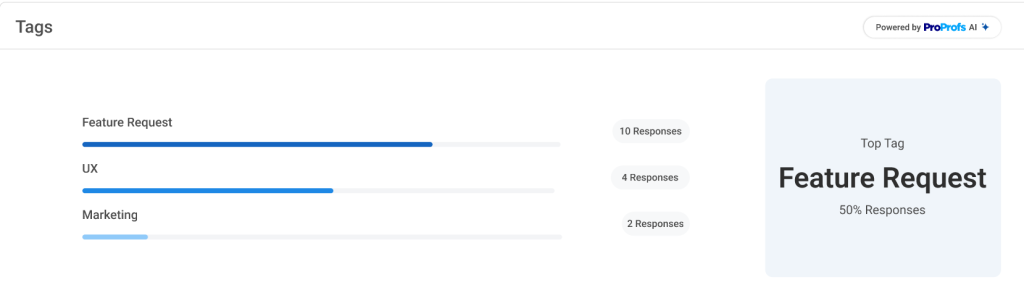
If ten people write “checkout is slow,” “takes forever to pay,” and “the payment step lagged,” theme clustering treats all three as the same underlying issue rather than three unrelated comments.
You end up with a short, ranked list of themes instead of a wall of near-duplicate quotes.
Sentiment Scoring
Reads the emotional tone behind a comment, not just whether the numeric rating attached to it was high or low.
A 7 out of 10 NPS response that says “it works, I guess” comes across as lukewarm, even though the number alone looks fine.
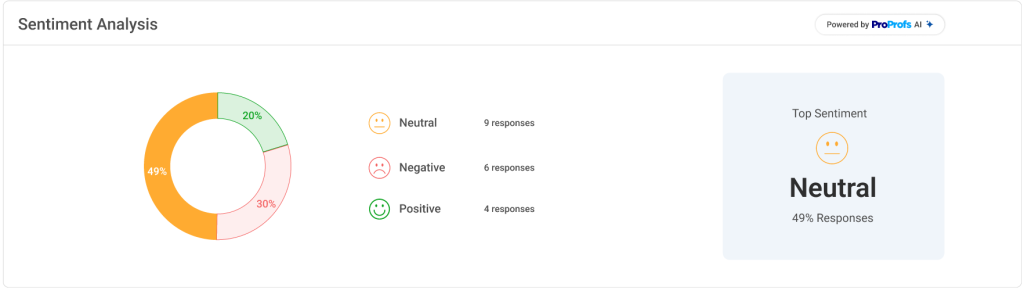
Sentiment scoring is what tells you the number is hiding quiet dissatisfaction rather than real enthusiasm.
Aspect Separation
Splits a single comment that touches pricing, support, and speed into three separate reads instead of one blended score.
A comment like “support was great, but the price increase stings” is not one sentiment; it is a positive read on support and a negative read on pricing.
Without aspect separation, that comment either gets buried as neutral or wrongly counted against a team that had nothing to do with the complaint.
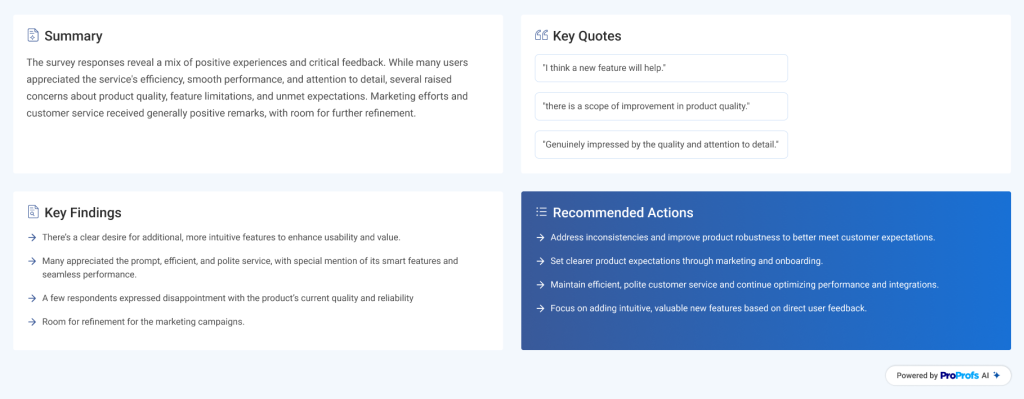
Signal Summarization
Condenses hundreds of comments into a short, reviewable brief without erasing the outliers that matter.
A good summary identifies the three biggest themes and still surfaces the one rare comment about a data privacy concern, even though it only appeared once.
That balance, compression without erasure, is what separates a useful summary from a generic word cloud.
None of this replaces your judgment. It clears the fog so you can see the pattern faster.
Why Manual Survey Analysis Breaks Down at Scale
Every team hits the same wall eventually. Reading and tagging open responses by hand cannot keep up with volume, nuance, or the speed the business needs, which is exactly why automated survey analysis has become the default rather than the exception.
| Where Manual Analysis Fails | What AI Analysis Delivers Instead |
| You spend hours reading and tagging open responses | AI interprets unstructured text at scale and extracts meaning in minutes |
| Theme coding is inconsistent because people read feedback differently | Clustering groups similar thoughts based on meaning, not wording |
| Spreadsheets flatten nuance and bury the “why” | Sentiment scoring captures emotion and context behind a score |
| Patterns surface only after they become problems | AI scans the full dataset at once and flags emerging themes early |
| Exporting, importing, and reformatting eat half your day | Native, in-tool analysis keeps insight close to where feedback happens |
Picture 400 open-text NPS responses landing after a product update. Reading and tagging that manually could take a full day, and two teammates would likely group the same comments differently.
Run it through AI analysis instead, and the same 400 comments cluster into a ranked list of themes within minutes, ready for you to sanity check rather than hand-sort.
How to Analyze Survey Responses With AI the Right Way
AI only works when you set it up with the right guardrails. Skip these steps and you get a polished-looking summary that quietly steers you wrong. Follow them, in order, and you get insight you can defend in a roadmap meeting.
1. Start With One Clear Question
“Analyze this” is not a prompt; it is an instruction with no direction. Before you run anything, write down the one question you actually need answered, such as “why are users dropping off after onboarding,” or “what’s driving low scores on mobile checkout.”
Feed that question into your analysis settings so the model knows what to look for instead of summarizing everything at the same shallow depth.
If your question is still broad, like “what do users think of us,” narrow it to a single flow, feature, or time window before you run anything.
2. Collect Feedback in Context, Not After the Fact
Responses tied to a real page or action carry meaning that AI can interpret, because the model already knows what the person was doing when they answered.
A Nudge survey triggered inside Qualaroo right after a failed checkout or a confusing settings screen produces language like “this button didn’t work,” instead of the vaguer “the app is annoying” you’d get from a generic email survey sent a week later.
If you’re still relying on email or a standalone survey link, tag each response with the page, feature, or campaign it relates to, so the AI has some context to work with.
3. Clean and Normalize the Data First
Remove duplicates and corrupted entries, normalize formatting, and map identities where you can. This step takes minutes and saves hours of downstream confusion.
Concretely, that means checking for exact duplicate submissions, which bots or double-clicks commonly cause, fixing broken characters, and standardizing casing so “Support Team” and “support team” get read as the same phrase.
If your platform lets you attach an email or user ID to each response, do it before you run analysis, not after, since adding identity to anonymous comments later is far harder.
4. Split Multi-Topic Comments Into Aspects
A reply like “the service was quick but the staff was rude” is not one sentiment, it is two. Reading it as a single blended score buries the complaint that actually needs fixing.
When you review clusters, watch for responses that get dropped into a neutral or mixed bucket; that’s usually a sign the comment covers more than one topic and deserves to be split and re-tagged instead of averaged out.
5. Review Every Cluster and Sentiment Score by Hand
Hand-label a small sample of raw comments, roughly 20 to 30, and compare them against what the AI scored.
If the AI and your own reading agree on most of them, you can trust the rest of the batch with reasonable confidence.
If they disagree often, especially on sarcasm, short answers, or mixed comments, treat that as a signal to refine your prompts or tagging rules, or to manually re-check that specific cluster before you act on it.
6. Tie Every Theme Back to a Real User or Segment
A theme is only actionable once you know who it affects. “Users are frustrated with onboarding” is a headline.
“These twelve accounts, all on the Business plan, hit the same onboarding wall” is a follow-up call.
Identify API links a response to a real account by email or customer ID, so an anonymous complaint becomes a specific customer list you can segment by plan, tenure, or usage before you reach out.
7. Turn Patterns Into a Decision
For every theme that surfaces, decide what needs fixing now, what needs testing, what needs deeper research, and what can wait.
Write that decision down next to the theme before you move to the next one.
A cluster without an assigned next step tends to just sit in the dashboard until the next round of feedback buries it. A prettier report is not the goal; a decision is.
Copy These Open-Text Questions
Use these four questions to get responses that are ready for sentiment scoring.
Primary Reason: What’s the main reason for your rating today? (NPS Questions/Rating Scales)
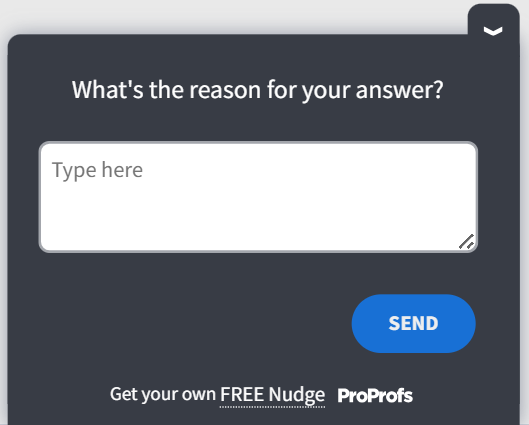
Friction Point: What almost stopped you from completing this?
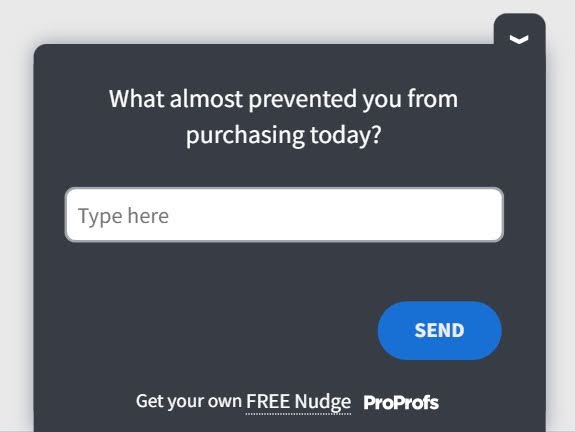
Emotional Driver: How did this experience make you feel?
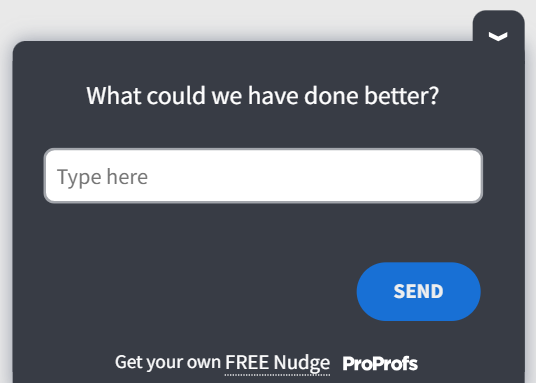
Improvement Ask: What’s one thing we could change to make this better?
How to Use AI Survey Analysis With Qualaroo
Creating the survey is the easy part, using the AI survey creator. The leverage comes from what happens after a response lands, and that is where Qualaroo’s AI feedback analysis takes over automatically.
1. Turn On Sentiment Analysis for Every Text Question
Any Nudge with a text-based answer can have sentiment analysis enabled at the question level, right from the question settings, while you’re building or editing a survey.
Any Nudge with a text-based answer can have sentiment analysis enabled at the question level, right from the question settings, while you’re building or editing a survey.
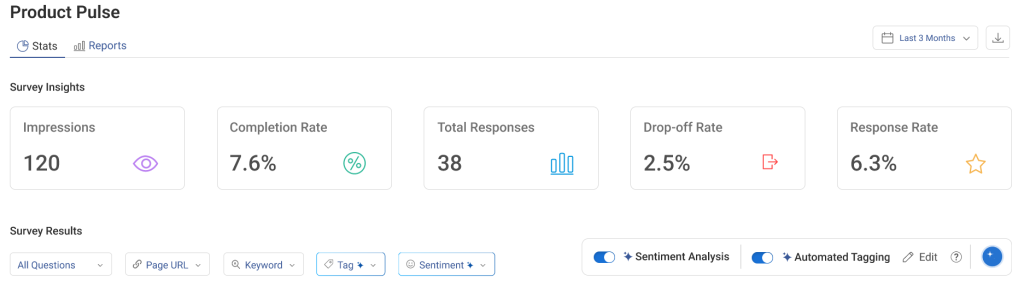
Once it’s switched on, the AI Sentiment Analysis scores every response as it comes in, so by the time you open the dashboard the next morning, yesterday’s responses already carry a sentiment label, no export or manual pass needed to get that first read.
Here’s how it works:
2. Let Automated Tagging Group Responses Into Themes
Responses are grouped into themes automatically as they arrive, based on what people are actually saying rather than the exact words they use.

Instead of opening a spreadsheet and coding each comment by hand, you open the dashboard to a running list of clusters ranked by how often they appear, so the theme with the most responses is the one waiting at the top for your attention.
3. Read the AI Response Summarizer Brief First
Before you scroll through individual comments, the AI Response Summarizer gives you a plain-language brief of what the data is saying overall, in a few sentences rather than a page of quotes.
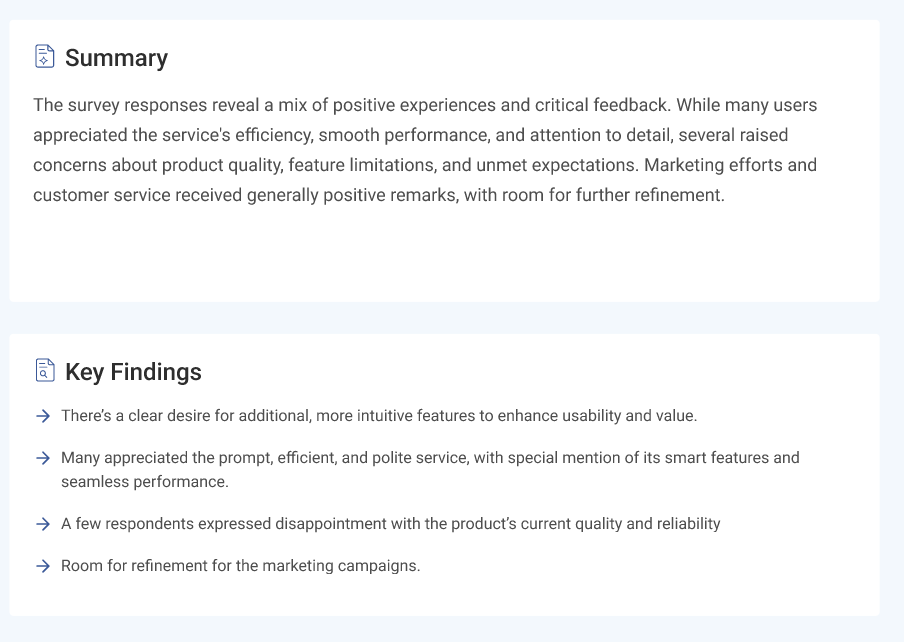
Use it to get oriented on the big picture, then drop into the raw comments behind any theme the summary flags as a shift from your last survey round.
4. Filter by Sentiment Score to Find What Matters
Filter the dashboard by negative sentiment to jump straight to the responses causing the most friction, skipping past the neutral and positive comments that don’t need immediate action.
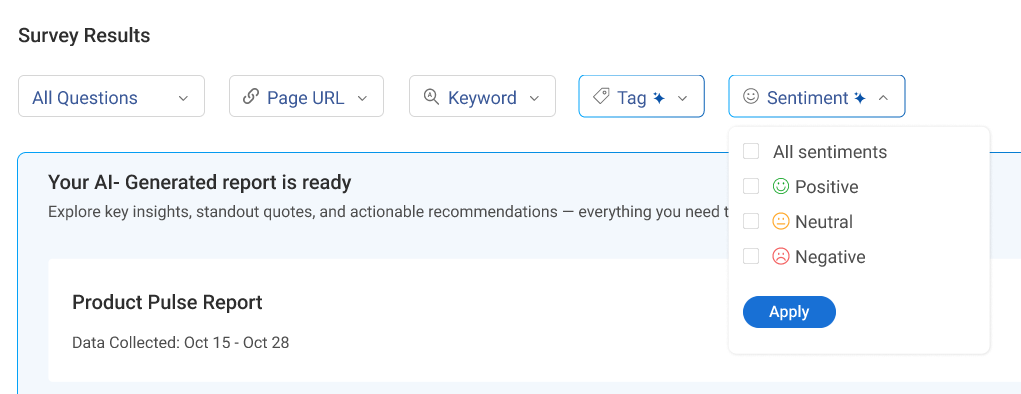
Flip the filter to positive sentiment when you want to find what’s working well enough to repeat elsewhere, a good source of quotes for a case study, or a template for what “good” looks like in a different flow.
5. Match Each Theme to a Real Account With the Identify API
The Identify API links a response to a real account by email or customer ID as it comes in, so a negative cluster stops being anonymous noise and becomes a specific list of customers to follow up with.
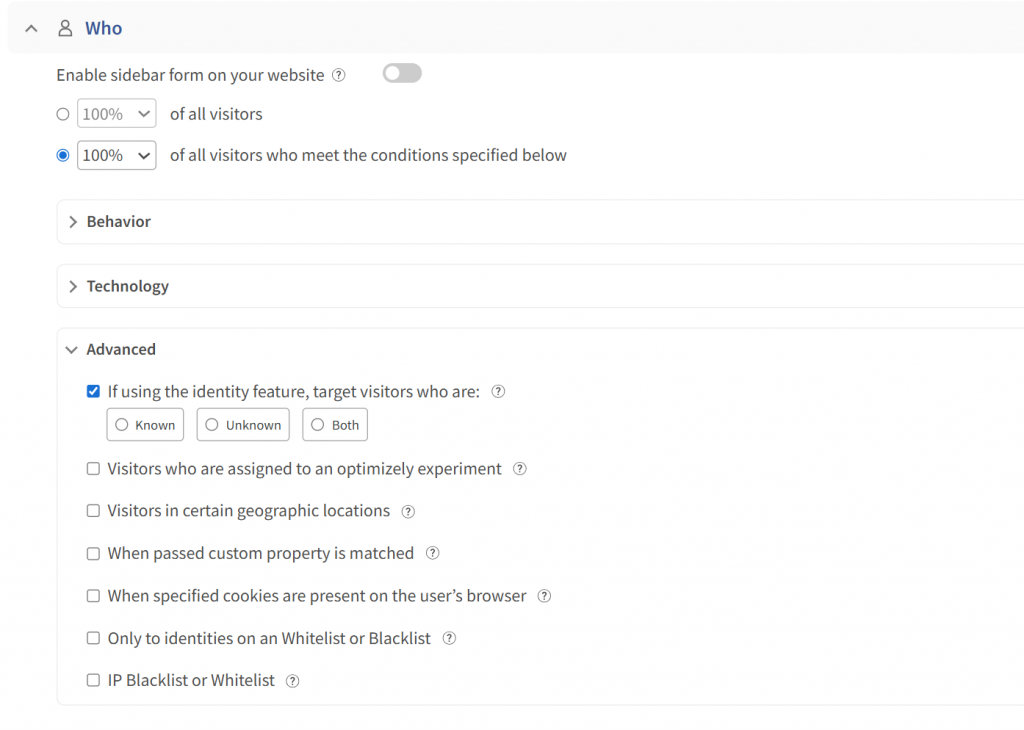
This is the step that turns “some users are frustrated” into “these named accounts are frustrated,” which is what your customer success or support team actually needs to act, not just read about.
6. Route Flagged Feedback to the Right Team
Connect Slack or Salesforce so a negative CSAT comment or a tagged bug report reaches the team that owns it automatically, instead of sitting in a dashboard nobody checks until the next reporting cycle.
Set the routing rule once, and a negative sentiment score above a certain threshold triggers a Slack alert to support, for example, and every future response that matches gets handled the same way without anyone needing to remember to look.
Success Story
According to Belron’s story, the company uses sentiment analysis to help maintain a consistently high NPS score.
That kind of consistency doesn’t come from a single glance at a dashboard; it comes from treating sentiment data as an ongoing signal to monitor and act on, the same review-and-decide loop covered in the seven steps above.

FREE. All Features. FOREVER!
Try our Forever FREE account with all premium features!
Where AI Sentiment Analysis Still Gets It Wrong
Even a well-set-up process has blind spots worth checking for before you fully trust a score.
Sarcasm and Tone: A sarcastic comment like “oh great, another update” often reads as positive to a keyword-based tool but is clearly negative in context.
Short or Vague Answers: Replies like “it’s fine” or “could be better” carry little signal on their own, and a quick follow-up question gets you further than trying to squeeze meaning out of two words.
Mixed Sentiment: One comment can praise support and criticize pricing in the same sentence, so a single score for the whole comment usually undersells one side of it.
Rare but Critical Issues: A single report of a security bug or a billing error matters more than its low frequency suggests; don’t let volume-based ranking bury it.
Cultural and Regional Phrasing: Words like “mad” or “sick” can carry different meanings depending on who uses them, which can skew scoring for a global or multilingual audience.
AI Survey Analysis Works Best as Leverage, Not Autopilot
The teams getting real value from AI survey analysis are not treating it as a finished report. They collect feedback in context, spot-check the sentiment, and keep a human deciding what actually matters.
That combination, in-context collection paired with native sentiment scoring, is what turns a pile of open-text comments into a decision you can defend at the next roadmap meeting.
Start with Qualaroo to automatically score sentiment on your next survey.
Frequently Asked Questions
Is AI survey analysis accurate enough to trust?
AI survey analysis is useful, but no sentiment tool is 100% accurate. It can still misinterpret sarcasm, vague responses, or comments containing both praise and criticism. Treat AI-generated insights as a strong first pass rather than a final verdict. For important decisions, review a sample of raw responses alongside the AI-generated themes and sentiment scores.
How soon after collecting responses can AI generate insights?
Many AI survey analysis tools can process open-text responses within minutes of submission. Instead of waiting for a monthly export, teams can identify emerging sentiment and recurring themes as responses arrive. This makes AI analysis particularly useful for continuously running surveys, where teams can spot changes in customer sentiment and investigate potential issues while they're still relevant.
Does AI survey analysis work better with in-product surveys than email surveys?
Often, yes. In-product surveys capture feedback closer to the user's actual experience, giving responses more context around what they were doing when they answered. Email surveys may be completed later, when details are less fresh. Contextual surveys can therefore produce more specific feedback, which gives AI more useful language to analyze and group into meaningful themes.
What is the minimum data volume needed for AI survey analysis to be useful?
There isn't a universal minimum because usefulness depends on the type and consistency of feedback. With fewer than 20 to 30 open-text responses, manually reviewing comments may provide better insight than automated clustering. As response volume grows, AI becomes more valuable for identifying recurring themes, comparing sentiment, and finding patterns that would take longer to spot manually.
Can AI help route survey feedback to the right team automatically?
Yes. AI can classify responses by sentiment, topic, or theme and use those classifications to trigger workflows. For example, a negative CSAT comment about a technical issue could be routed to a support or engineering team, while in-app feedback could reach the product team. Integrations with tools such as Slack, Salesforce, and help desks can automate this process.
What are the most common real-world uses for AI survey analysis?
Teams commonly use AI survey analysis to understand the reasons behind NPS and CSAT scores, identify friction in customer journeys, compare sentiment before and after product changes, and analyze large volumes of open-ended feedback. It can also help surface recurring complaints, feature requests, and emerging issues that would otherwise require significant manual review.
What tools offer built-in AI survey analysis?
Several survey and feedback platforms now offer AI-powered analysis directly within their products. Look for tools that combine sentiment scoring, theme detection, response summaries, and automated tagging rather than requiring you to export responses into another system. Qualaroo and other modern survey platforms can help teams turn open-ended responses into more actionable insights without extensive manual analysis.
What should I do when AI sentiment scores and my gut read disagree?
Go back to the original response before making a decision. AI can miss sarcasm, cultural context, mixed emotions, and unusual phrasing. Compare the score with the surrounding comments and look for patterns across multiple responses rather than relying on one classification. If discrepancies occur repeatedly, review how the tool is interpreting your feedback and adjust your analysis approach.
How do you use AI to analyze survey responses?
Start by defining what you want to learn from the responses, then collect relevant feedback through well-designed survey questions. Use AI to analyze open-ended responses for sentiment, recurring themes, topics, and patterns. Review a sample of the results against the original comments, then connect the most important findings to specific actions, such as improving a product feature or resolving a customer issue.
FREE. All Features. FOREVER!
Try our Forever FREE account with all premium features!

 We'd love your feedback!
What did you like & how can we make it even better?
 Thanks for your feedback!
 Ask Your Question
Have a question? Get expert help to make your decision easier.