Pendo alternatives became a real search for me after I tried the platform a while back, and it did not work out.
By then, I had worked on several products, and finding the right way to gather in-app feedback had become one of the more important parts of the job. Pendo is powerful, yet for what I needed, it felt like a lot of platform wrapped around a small feedback task.
The pricing did not help. Only the free plan, capped at 500 monthly active users, shows a number; all paid tiers are custom quotes. Capterra scores Pendo 4.5 based on 238 reviews, with ease of use its weakest sub-score at 4.1, which matches my own experience with the setup.
Since then, I have come across a good number of tools that handle in-app feedback more directly. This list covers ten of them, compared on surveys, targeting, analysis, and cost, and on where each one fits better than Pendo.
Qualaroo made the list as well, and I am upfront about where it falls short. If you only need one rule of thumb, decide whether you want guides and analytics or just feedback, because that choice decides the pick.
Why Are Teams Looking for Pendo Alternatives?
Pendo has plenty of fans, and nothing below questions that. What follows are the places where my own time with it, and its pricing page, suggested that a feedback-focused team might be better served elsewhere. Each point is about fit: visibility before buying, what each tier includes, and how much effort setup demands.
Pricing Is Opaque Beyond the Free Plan
Pendo publishes a number only for its Free plan, which covers up to 500 monthly active users. Base, Core, and Ultimate are custom quotes tied to monthly active users, product tier, and contract length, with no public list price. When I tried it, that made budgeting a guessing game until a sales call. A cost you cannot see is hard to defend to a finance team.
The Free Plan Has a Hard Ceiling
The free plan caps at 500 monthly active users, and going over it reportedly locks you out of creating new guides, NPS surveys, and segments until you upgrade. A good launch can push a product past that line almost overnight. The NPS surveys on the free plan also carry Pendo branding. For a small team, the free plan is a test drive, not a long-term home.
Survey and Analytics Depth Depends on the Tier
Session replay sits on Core and above, and sentiment and listening features arrive on Ultimate, so the pieces that explain a survey answer cost more. A team that mainly wants feedback has many tiers to climb. In my experience, the surveys alone never justified the platform built around them. That is the gap a survey-first tool is meant to close.
Setup and the Learning Curve Take Effort
Capterra scores Pendo 4.1 for ease of use, its lowest sub-score, against 4.5 for support and 4.3 for value. Configuration can get awkward on certain stacks, Angular being one example, and guides sometimes break when an app is built unconventionally. Tagging and setup take real time before the data feels trustworthy. It did not work out for me, and I suspect that effort was a big reason.
The Top 10 Pendo Alternatives
Below are all the tools with their entry prices and Capterra ratings, followed by my notes on each. Focus on the ones that match what you actually use Pendo for, since only some build guides and analytics.
| Tool | Best For | Starting Price | Capterra Rating |
| Qualaroo | Capturing Real-Time User Insights In-App & on Your Website Using Contextual, AI-Powered Micro-Surveys | Free plan; from $19.99/mo | 4.7/5 |
| Refiner | Behavior-triggered in-product microsurveys for SaaS | $149/mo | 4.6/5 |
| Survicate | Multichannel surveys with a centralized research hub | Free plan; paid from $114/month | 4.6/5 |
| Userpilot | In-app surveys alongside product adoption flows | $299/mo | 4.6/5 |
| Appcues | No-code onboarding flows with in-app prompts and NPS | Quote-only | 4.8/5 |
| UserGuiding | Quick-to-build microsurveys, guides, and checklists | $249/mo | 4.7/5 |
| WalkMe | Digital adoption with in-app surveys and analytics | Quote-only | 4.4/5 |
| Whatfix | Enterprise digital adoption with mobile in-app surveys | Quote-only | 4.6/5 |
| Gainsight PX | Product adoption and in-app engagement at scale | Quote-only | 4.4/5 |
| InMoment | Auto-categorized feedback and text analytics at scale | Quote-only | 4.4/5 |
1. Qualaroo: Best for Capturing Real-Time User Insights In-App & on Your Website Using Contextual, AI-Powered Micro-Surveys
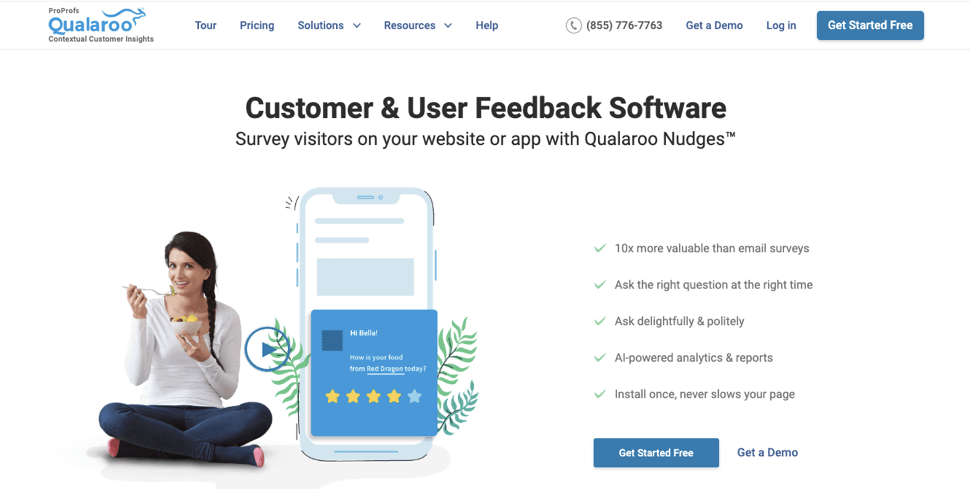
Pendo alternatives that treat the survey as the whole job are the ones I kept hunting for, and Qualaroo is the one I have used most. Within minutes, I can have a targeted survey live from a template, or I can hand a prompt to the AI Survey Creator and let it draft one.
Targeting is where it beats a generic popup. Conditional logic triggers a survey for specific actions within the app, and the Identify API narrows it to a single named user. Themes, colors, fonts, and logos all match my product, so people never notice another tool is involved.
As written answers accumulate, AI Customer Feedback Analysis with AI Sentiment Analysis reveals the feelings behind them, and Heatmaps and Session Recordings show what the user did beforehand. Because the free plan unlocks all premium features, I could try them all before paying a cent.
Pros
- AI Survey Creator drafts a full Nudge from a prompt, no manual setup required
- Question branching and skip logic so respondents only see relevant follow-ups
- Advanced targeting by behavior, URL, exit intent, and custom user properties
- Native AI Customer Feedback Analysis, including AI Sentiment Analysis and word cloud generation for open-text responses
- Heatmaps and Session Recordings show what a user was doing right before they responded
- Identify API ties responses back to a real user by email or customer ID
- Nudge for Prototype works on Figma, Adobe XD, and InVision before a product ships
- Multilingual surveys in 100+ languages
- iOS and Android SDK for native in-app surveys
- Salesforce, HubSpot, and Slack integrations for CRM-connected feedback workflows
Cons
- Hands-on onboarding and a named account manager generally come with the paid plans, not the free ones.
- There is no installable or self-hosted version, so using Qualaroo always requires an internet connection.
How Qualaroo Compares to Pendo: Pendo spreads surveys across tiers inside a larger analytics and guidance platform. Qualaroo focuses on surveys and their analysis from the free plan onward, and it has no guide builder, so anyone relying on Pendo’s walkthroughs will need a separate tool for them.
Pricing: Free plan available, up to 50 responses with all premium features. Essentials at $19.99/month, Business at $49.99/month, and Enterprise from $149.99/month.
User Rating: 4.7/5 (Capterra)
Vattenfall InCharge, a leader in the e-mobility market, used Qualaroo to collect feedback directly inside its app. It is exactly the in-app use case this list is about.
2. Refiner: Best for Microsurveys Without the Platform Around Them
Refiner is the one I would pick for a bare-bones microsurvey. A question appears for the right person at the right moment, driven by behavior, user attributes, devices, or lifecycle stage, in web and mobile apps.
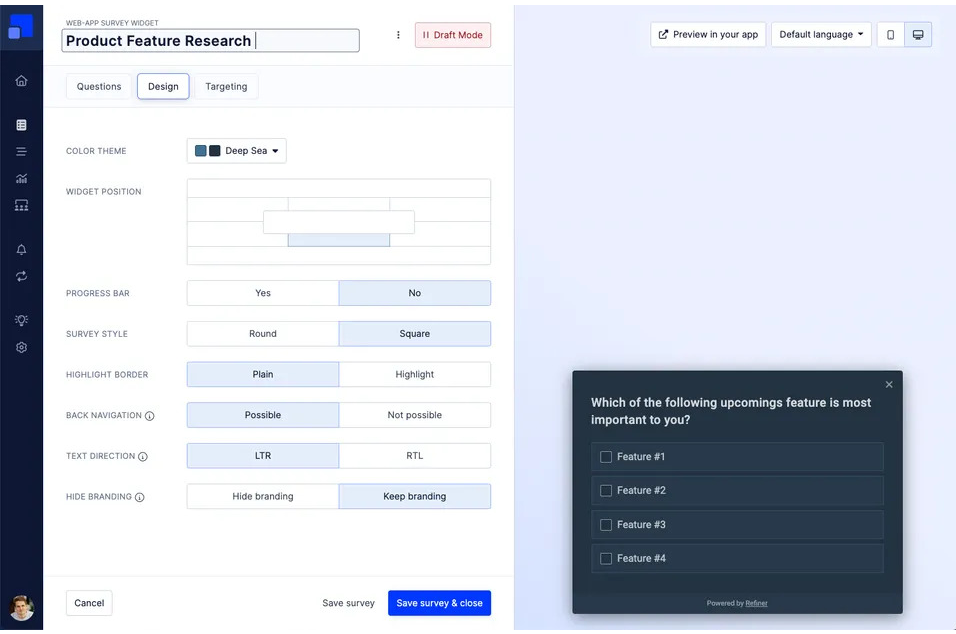
Everything from NPS to CSAT, CES, and product-market-fit research runs through a single editor, and scheduled repeats chart a loyalty score over time. Answers can flow into your product data via Segment and Zapier.
Like Pendo, it counts monthly active users, so a large audience lifts the price, and there are no guides or analytics here. It’s 4.6 on Capterra, which reflects very few reviews, so I suggest a trial first. It also keeps surveys short, which tends to improve completion rates.
Pros
- Triggers driven by behavior, traits, devices, and lifecycle stage
- A single editor from NPS through product-market-fit research
- Scheduled repeats for loyalty trends
- Segment and Zapier hook into product data
Cons
- Costs rise with monthly active users
- No guides or analytics suite
How Refiner Compares to Pendo: Refiner strips the platform down to the microsurvey and targets it well, but it offers no guides or analytics, and measures by users the same way Pendo does.
Pricing: Limited free plan available. Paid plans start at $149 a month, rising with monthly active users.
User Rating: 4.6/5 (Capterra)
3. Survicate: Best for In-App and Website Feedback in One Hub
Survicate kept appearing in my research for teams that want product and website feedback gathered in one place without running two setups. App, site, email, and link responses flow into a single Research Hub, which beats reconciling hand-reconciled exports.
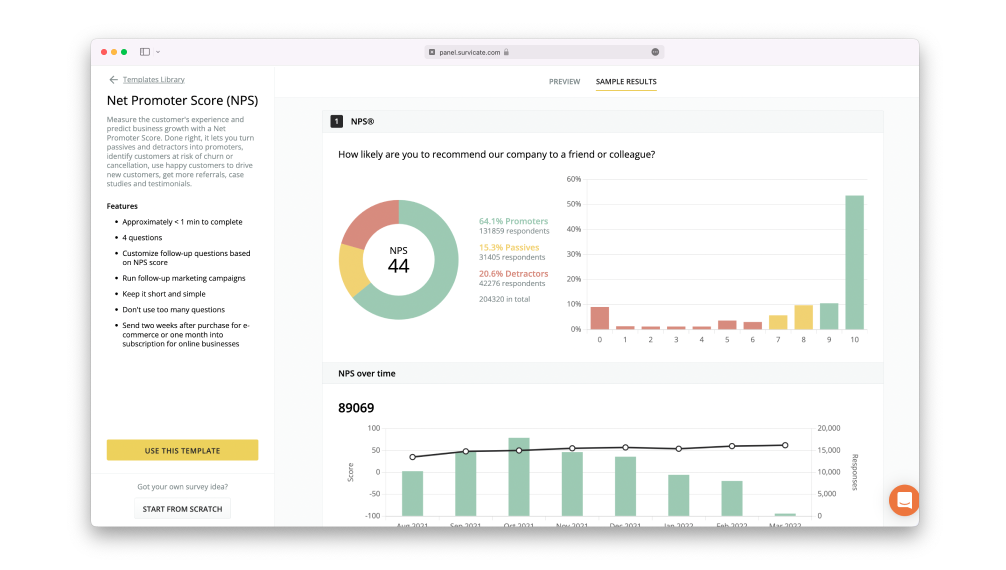
Questions can be aimed at attributes and events; anyone who abandons midway still leaves partial data, and AI-assisted analysis groups comments by theme. NPS and CSAT formats come included.
You can try it on a free plan, paid tiers are quote-only, and moving between them is a noticeable step up. Teams that run both a website and a product usually find that a single hub saves real time. There are no guides or product analytics dashboards, so you would pair it with another tool for those.
Pros
- A shared hub for app, site, email, and link replies
- AI-assisted grouping of comments by theme
- Targeting by attribute and event
- NPS and CSAT formats included
Cons
- The jump between free and paid tiers is noticeable
- No guides or product analytics dashboards
How Survicate Compares to Pendo: Survicate gathers feedback from several channels in one place with a free start and posted prices, but it leaves guidance and product analytics to other tools.
Pricing: Free plan available. Paid plans are quote-only.
User Rating: 4.6/5 (Capterra)
4. Userpilot: Best for a Platform Swap With Strong Translation
Userpilot caught my eye during research because of how it handles language. AI translates surveys into 100-plus languages, edits happen right on screen, and the tool can detect a user’s browser language to show the right version.
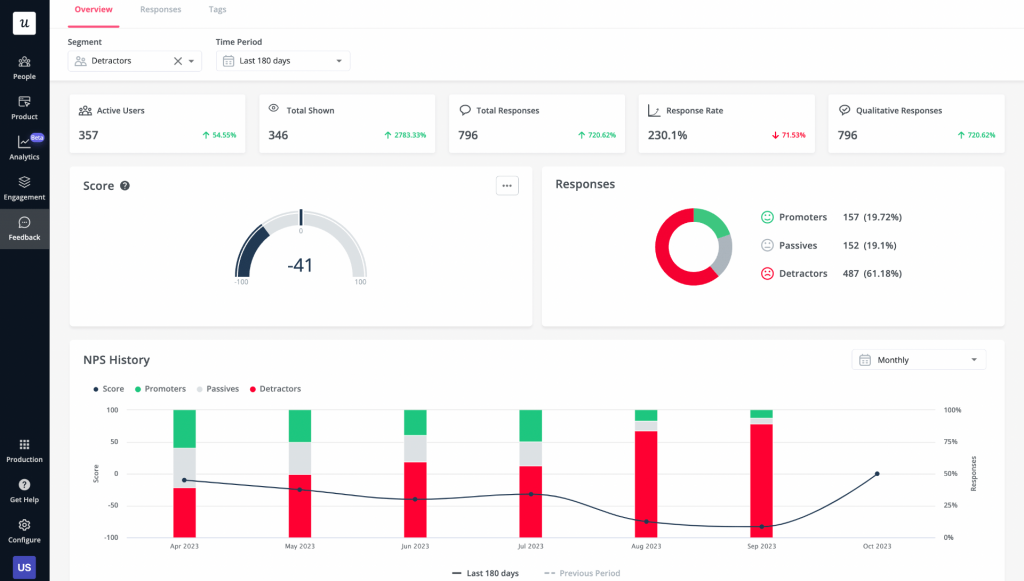
Among the options here, it is the closest to Pendo for mid-sized teams: walkthroughs, tooltips, and modals share the platform with surveys, which can be triggered by a page, an event, or a manual launch, and a priority setting determines what a user sees first.
The Starter plan is $299 per month for up to 2,000 monthly active users, billed annually, so the cost still scales with your audience. Fewer integrations and lighter analytics than Pendo are the trade, and I would pilot it on one onboarding flow first, since the editor rewards a little setup time.
Pros
- AI translation into 100-plus languages with on-screen edits
- Guides sharing a platform with the surveys
- Surveys set off by a page, an event, or a manual launch
- A priority setting for which survey appears first
Cons
- Cost follows monthly active users, with no free plan
- Fewer integrations and lighter analytics than Pendo
How Userpilot Compares to Pendo: Userpilot offers a similar guides-plus-surveys platform with stronger translation and a posted entry price, but with lighter analytics and no free plan.
Pricing: Paid plans start at $299/month on an annual plan and scale with monthly active users.
User Rating: 4.6/5 (Capterra)
5. Appcues: Best for Getting Onboarding Live Without Engineers
I steer clients here when they want onboarding live without pulling engineers off other work. The no-code builder comes with pre-designed templates for tours, tutorials, and announcements, so a first flow takes little time, and in-app prompts plus NPS surveys gather feedback in the same place.
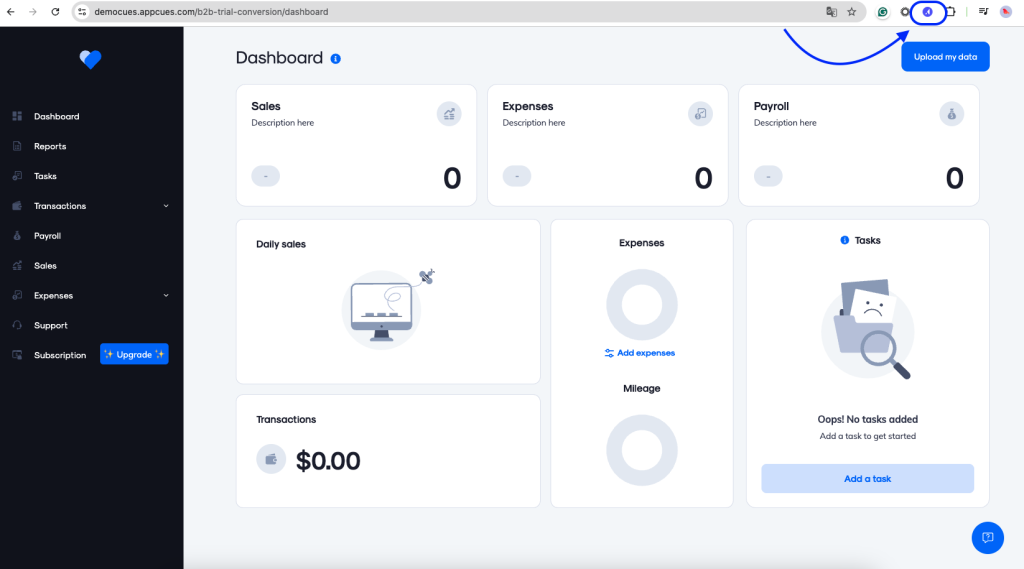
Segmentation determines who sees what and when, which keeps the answers useful, and the sentiment shown alongside usage adds context that neither number alone provides.
Prices are quoted rather than posted and rise with monthly active users, and the interface is friendlier than the learning curve underneath it, so I would set aside time for setup. It tends to work best when someone owns the flows week to week.
Pros
- Templates for tours, tutorials, and announcements in a no-code builder
- In-app prompts and NPS surveys beside the flows
- Segmentation that decides who sees what and when
- Sentiment displayed next to product usage
Cons
- Quote-based pricing that rises with monthly active users
- A learning curve steeper than the interface suggests
How Appcues Compares to Pendo: Appcues is lighter and easier to start than Pendo for onboarding, with a no-code builder, but it offers less analytics depth and still requires a quote.
Pricing: Quote-only, contact vendor for pricing.
User Rating: 4.8/5 (Capterra)
6. UserGuiding: Best for Quick Microsurveys, Guides, and Checklists
UserGuiding gave me popups and modals to show people mid-session, which is how I collected feedback in real time. Templates cover NPS, thumbs-up/down, open-ended, and multiple-choice questions, and a survey from scratch took me under five minutes.
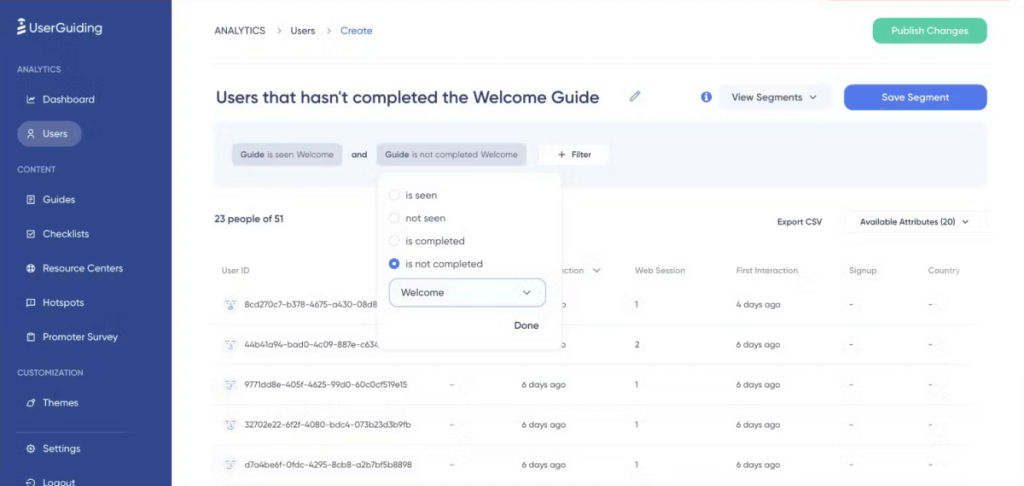
Custom segments built from survey or NPS answers let me follow up with tailored in-app content, and an analytics dashboard with user activity feeds kept the data readable.
Customization is limited, and performance can feel slow or buggy. Plans begin at $249 a month, a free trial makes it easy to test on one flow before committing, and a support score of 4.8 on Capterra helped when I needed it.
Pros
- Templates or a from-scratch build in under five minutes
- Popups and modals for feedback in real time
- Segments created from survey and NPS answers
- An analytics dashboard with user activity feeds
Cons
- Limited customization options
- Performance can feel slow or buggy
How UserGuiding Compares to Pendo: UserGuiding is faster to start and simpler than Pendo, with popups and checklists, but it offers shallower analytics and fewer customization options.
Pricing: Paid plans start at $249/month, with a free trial.
User Rating: 4.7/5 (Capterra)
7. WalkMe: Best for Digital Adoption With Built-In Survey Analytics
WalkMe was the closest Pendo rival I tried for digital adoption, and its surveys held up. I could run NPS surveys, collect feedback on new feature launches, and spot where users get stuck.
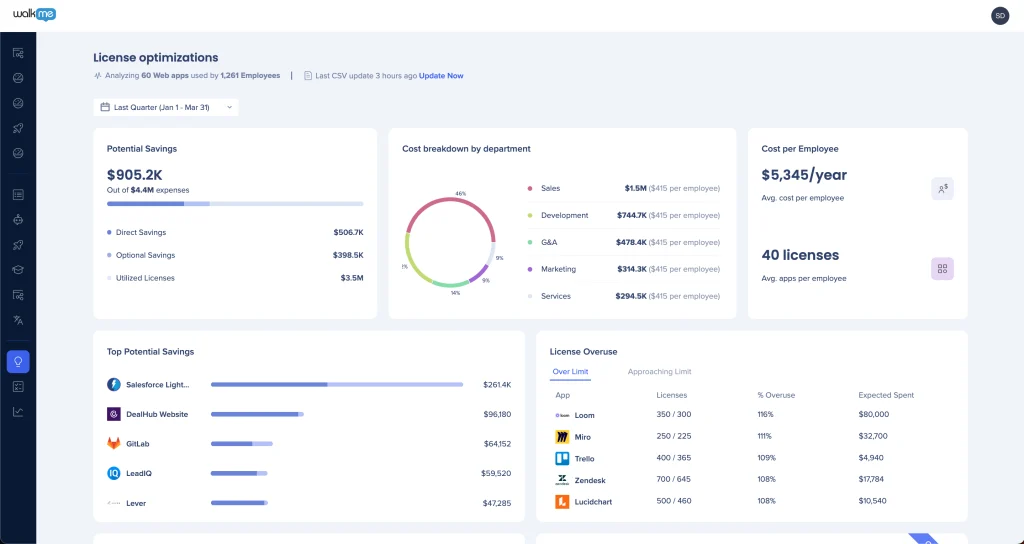
Its Insights analytics helped me turn feedback into action, and the Launcher feature let me show a survey at the right step in the journey. Surveys can be automated at set frequencies and styled to match the native design.
The interface is not very intuitive, and the ability to track different customer experience metrics is limited. Pricing is quote-based, and Capterra rates it 4.4 across 63 reviews. I would pair it with a lighter survey tool if feedback is your main goal, since its real strength is adoption.
Pros
- NPS surveys and feature-launch feedback
- Insights analytics that turn feedback into actions
- A Launcher that places surveys at key journey steps
- Automated survey frequency and native-style design
Cons
- The interface is not very intuitive
- Tracking different customer experience metrics is limited
How WalkMe Compares to Pendo: WalkMe offers similar adoption features and survey analytics, with a less intuitive interface and quote-only pricing.
Pricing: Quote-only, contact vendor for pricing.
User Rating: 4.4/5 (Capterra)
8. Whatfix: Best for Mobile In-App Surveys Inside an Adoption Platform
I liked Whatfix’s interactive surveys and the way I could aim them at specific screens of a mobile app and a particular group of users. It is a digital adoption platform first, so the surveys are a feature, not the headline.
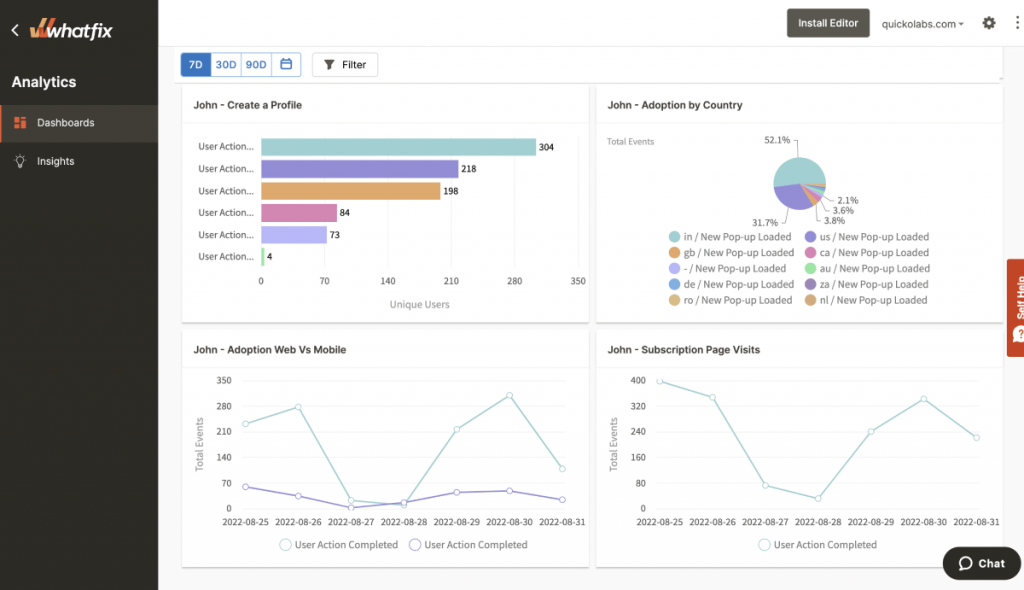
On mobile, it covers a lot of ground, running surveys through SDKs for Android, React Native, Xamarin, Cordova, and Ionic, while connections to Salesforce, Zendesk, and Google Analytics carry the results onward. Two built-in templates, Feedback and NPS, get a first survey going.
Survey types are limited, performance can feel slow at times, and for a team that only wants surveys, the price is hard to justify. It suits a team that wants onboarding, guidance, and feedback in one tool, and I would pilot it on one screen first, since adoption platforms reward focused tests. Capterra rates it 4.6 on 77 reviews.
Pros
- Surveys aimed at specific screens and user groups
- SDK coverage spanning five mobile frameworks
- Feedback and NPS templates
- Salesforce, Zendesk, and Google Analytics integrations
Cons
- A limited selection of survey types
- Performance can feel slow at times
How Whatfix Compares to Pendo: Whatfix covers similar adoption ground with broader mobile SDK support, but its surveys are more basic, and its pricing is quote-only.
Pricing: Quote-only, contact vendor for pricing.
User Rating: 4.6/5 (Capterra)
9. Gainsight PX: Best for Adoption Programs Run by Customer Success
Gainsight PX, in my research, looked like Pendo’s closest rival in analytics and engagement, though it leans more toward customer success teams than survey owners. Behavior-based targeting tailors in-app experiences, tracking pinpoints where adoption stalls, and walkthroughs help users past those points.
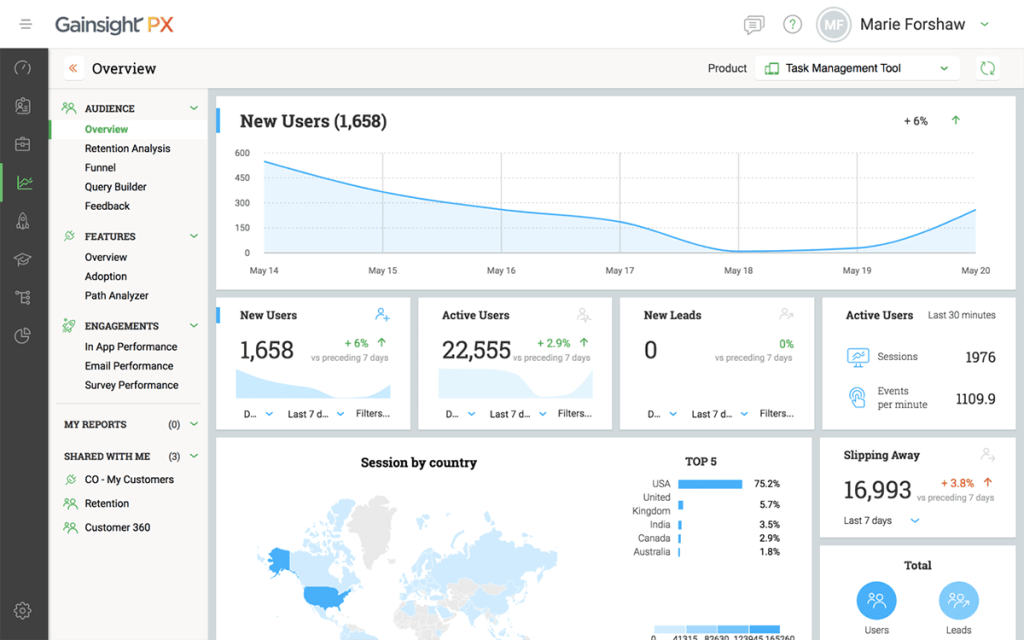
The findings support churn-reduction work, a real strength if that is the job, though a roundabout route if you simply want to ask users something.
Capterra’s ease-of-use score is 3.7 compared with 4.4 overall, and pricing appears only after a quote, so expect a longer rollout. Because customer success owns most of the value, survey features take a back seat to adoption dashboards, which suits some teams and not others.
Pros
- Engagement tracking and analytics linked to surveys
- Behavior-based targeting for tailored experiences
- Visibility into where adoption stalls
- Insights that support churn-reduction work
Cons
- Ease of use trails the overall score
- Quote-only pricing and a longer rollout
How Gainsight PX Compares to Pendo: Gainsight PX matches Pendo’s depth and adds customer success tooling, with a similar quote-only price and a steeper climb.
Pricing: Quote-only, contact vendor for pricing.
User Rating: 4.4/5 (Capterra)
10. InMoment: Best for Auto-Categorized Feedback and Text Analytics
InMoment was my tool before I moved to Qualaroo, mostly because of how much it could do. Auto-categorizing feedback was the standout: it grouped responses so I could spot user segments and build custom surveys and calls to action.
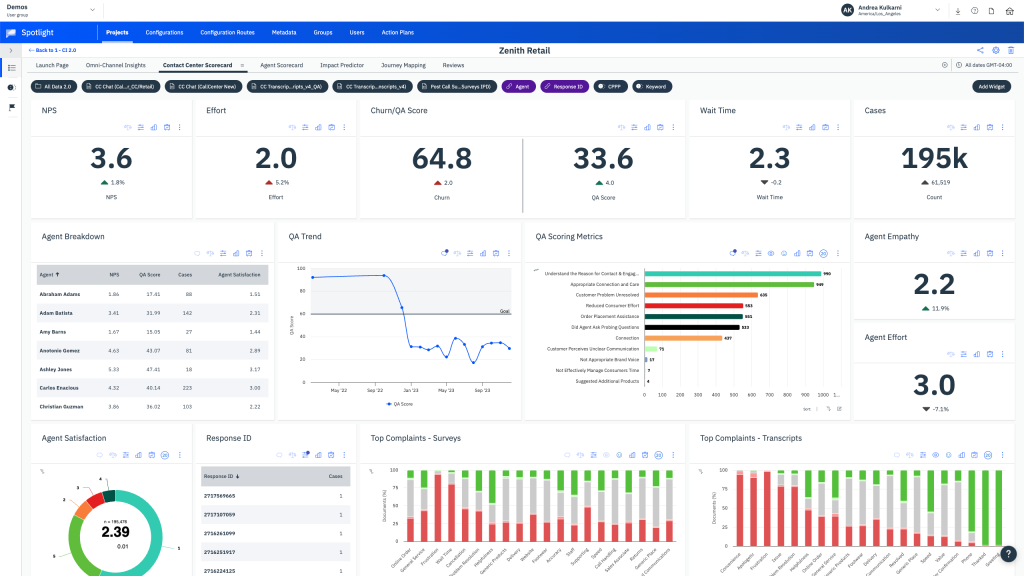
Text analytics read through large volumes in real time to surface emerging patterns, predictive analytics point to trends, and customizable dashboards give each product team the data it needs. Hyper-targeted microsurveys collect NPS, PSAT, and CES inside the product.
The pricing is too high and rigid for small businesses, the survey design is not flexible or attractive, and customization is not its strong suit. Capterra rates it 4.4, from a small number of reviews.
Pros
- Auto-categorization of feedback into segments
- Text analytics and predictive trend analysis
- Customizable dashboards for each product team
- Microsurveys for NPS, PSAT, and CES
Cons
- Pricing is too high and rigid for small businesses
- Survey design and customization are limited
How InMoment Compares to Pendo: InMoment is far stronger on feedback analysis and categorization, but it offers no guides and costs more than most small teams can justify.
Pricing: Quote-only, contact vendor for pricing.
User Rating: 4.4/5 (Capterra)
Which Pendo Alternative Should Be Your Top Pick?
Short on time? Three picks, each matched to a different reason for leaving Pendo.
1. Qualaroo: Best Overall for Feedback-First Teams Who Want to Start Free
Qualaroo is my first suggestion when feedback is the job to be done. A survey can be live within minutes from a template or an AI-drafted prompt, with conditional logic triggering it on specific in-app actions, and the Identify API narrowing it to one named person.
Branding matches your product, so the survey feels native. As responses arrive, sentiment scoring, Word Cloud views, tagging, and a response summarizer handle the reading, free plan included. Heatmaps and Session Recordings show the lead-up to a reply, and the iOS and Android SDK runs native in-app surveys.
Salesforce, HubSpot, and Slack connections carry results onward, translations cover more than 100 languages, and Nudge for Prototype even lets me test a survey before launch. With every premium feature on the free plan, I could judge the whole tool before spending anything, and flat-rate paid plans keep costs steady as the audience grows.
2. Userpilot: Best if You Want a Platform Swap, Not a Specialist
Userpilot is the swap I would test first for anyone who still wants guides and surveys together. A question about a new feature can sit right beside the walkthrough that introduces it; surveys can be triggered by a page, an event, or a manual launch; and AI translation supports over 100 languages with on-screen edits.
It is also where teams give up the least, since guides and surveys stay together, and a pilot on one onboarding flow shows quickly whether the editor suits you. Capterra gives it 4.6 on 57 reviews, a respectable base.
Go in knowing the costs: it meters by monthly active users much as Pendo does, offers no free plan, has fewer integrations than some rivals, and shows lighter analytics than Pendo. For a mid-sized team that wants guidance and feedback without negotiating a custom quote, I find those costs usually acceptable, and the survey side beats a typical add-on.
3. Refiner: Best if You Only Want the Survey
Refiner is the shortest route if surveys are all you want from Pendo. Surveys are triggered by behavior, attributes, devices, and lifecycle stage in web and mobile apps, and one editor covers NPS, CSAT, CES, and product-market-fit research.
Repeated sends keep a loyalty score trending, and Segment and Zapier links pass answers along. With no extra modules competing for space, a first survey goes live quickly, and the learning curve stays short. Weigh the catches: no guides or analytics, billing tied to monthly active users, and a rating built on a few reviews.
For a team that already covers onboarding elsewhere, that narrow focus is the whole appeal, and I would trial it beside a guide tool you already own, since the two do not overlap. Teams with a tight scope tend to appreciate how little there is to learn, which keeps a rollout simple.
How Did I Evaluate These Pendo Alternatives?
I evaluated the Pendo alternatives on this list based on what a product team needs for in-app feedback: surveys that reach the right users, analysis that saves time reading, and pricing you can actually see.
Every tool was scored on the same six factors, with small samples and quoted prices flagged. My time with Pendo shaped the weighting, so cost visibility and setup effort count for a lot.
Six factors carried the weight:
User Reviews and Ratings
Ratings come from Capterra; each rating is beside its review count. Pendo’s 4.5 on 238 reviews is solid, whereas Refiner’s and InMoment’s rest on far fewer, so I gave them less trust. Sub-scores for ease, support, and value mattered too, since a strong total can mask a weak area.
Essential Features and Functionality
Survey targeting, handling of written answers, and the delivery of in-app feedback came first because that was the job I needed done. What a team uses in a normal week outweighs the length of a feature page. Guides and analytics were a bonus, since many readers want feedback only.
Ease of Use
My question here was how fast a team without developers can launch a first in-app survey. Pendo’s 4.1 for ease of use was the bar to clear, and tools live within minutes did well. A long implementation had to pay for itself some other way.
Customer Support
The test case was a survey misfiring inside a live app. I looked at whether entry plans include real help or leave it to larger contracts, and whether quote-based vendors bundle support or charge extra. Pendo’s 4.5 for support is a high bar, so it has weaker help cost points.
Value for Money
Pricing opacity was my first complaint, so I weighed cost with surveys and analysis included. Posted prices and free plans beat numbers revealed after a sales call, flat-rate plans earned extra credit, and I noted which tools are metered by monthly active users like Pendo.
Personal Experience and Experts’ Opinions
Where I have used a tool, the entry says so and shares the small details a pricing page never shows. For the rest, I leaned on my research and on conclusions that repeat across independent sources. I screened every vendor for shutdowns and acquisitions first, because a vanished platform costs more than any license.
FREE. All Features. FOREVER!
Try our Forever FREE account with all premium features!
How Do You Choose the Right Pendo Alternative for Your Team?
Locate the row nearest to your biggest Pendo frustration. Rows with several names list tools that solve it differently, so check my notes before deciding.
| If My Main Pendo Frustration Is… | Consider This Alternative |
| The price is hidden behind a sales call | Qualaroo, Survicate, or Refiner |
| The free plan stops at 500 users | Qualaroo or Survicate |
| Set up and the learning curve | UserGuiding or Appcues |
| I only need in-app surveys | Qualaroo, Refiner, or Survicate |
| I still want guides and analytics | Userpilot or Appcues |
| I run an enterprise adoption program | WalkMe, Whatfix, or Gainsight PX |
| I need feedback analytics at scale | InMoment |
In-App Feedback Does Not Need a Platform Around It
Any of these tools can put a question in front of a user within a product, including Pendo. What pushed me to search was never one failure but a pile of small ones: a price I could not see, a free plan with a ceiling, survey depth spread across tiers, and a setup that cost more effort than the feedback returned.
The right choice depends on what you actually use. If you want guides and surveys together, Userpilot and Appcues are the closest swaps. If you mainly want surveys, Qualaroo, Refiner, and Survicate are your best options. Large adoption programs look at WalkMe, Whatfix, or Gainsight PX, and InMoment suits teams that need feedback analysis at scale.
Feedback-first teams should begin with Qualaroo. Start with the free plan, put one Nudge in front of real users, and see what the AI analysis makes of the first answers.
Frequently Asked Questions
Does Pendo have a free plan?
Yes. It covers up to 500 monthly active users and includes product analytics, in-app guides, and Pendo-branded NPS surveys. Past that, Base, Core, and Ultimate are custom quotes. For a free start without that ceiling, Qualaroo's free plan allows 50 responses with every premium feature, and Survicate also offers one.
How much does Pendo cost?
Pendo does not publish paid prices. Base, Core, and Ultimate are quoted on monthly active users, product tier, and contract length, and third-party marketplace data puts contracts in the five-figure range per year. Treat that as an estimate, and ask for a written quote that shows how users are counted before you commit.
What is the cheapest Pendo alternative?
Qualaroo is the lowest-cost way in, with a free plan and paid tiers from $19.99 a month. Survicate follows at $49, then Refiner at $99, UserGuiding at $174, and Userpilot at $299. Appcues, WalkMe, Whatfix, Gainsight PX, and InMoment require quotes, so measure each against the features you truly need.
Which alternative is closest to Pendo?
Userpilot is the nearest for mid-sized teams, combining guides and surveys with a posted entry price. Appcues is lighter and quicker to start, and WalkMe, Whatfix, and Gainsight PX fit bigger adoption programs. Each builds guidance, which Qualaroo, Refiner, and Survicate do not, so settle whether you need it before switching.
Can Qualaroo replace Pendo's analytics and guides?
No. Qualaroo puts surveys first and has no guide builder or full product analytics suite, so teams that rely on those keep a separate tool. What it replaces is the survey side, with contextual targeting, built-in AI analysis, and behavior context from Heatmaps and Session Recordings, starting on a free plan.
Which alternatives are strongest in analyzing written feedback?
InMoment leads on auto-categorizing feedback and text analytics, and Qualaroo reads written answers with sentiment scoring, tagging, Word Cloud views, and a response summarizer from the free plan. Survicate sorts comments into themes with AI assistance. InMoment is quote-based and aimed at larger programs, while Qualaroo and Survicate are easier to try.
Which alternative is best for mobile in-app surveys?
Qualaroo offers an iOS and Android SDK for native in-app surveys, and Whatfix supports Android, React Native, Xamarin, Cordova, and Ionic SDKs. Refiner runs microsurveys inside web and mobile apps. Check how each tool handles your specific stack, since mobile SDK coverage and survey types vary, and pilot on one real screen first.
What is the best way to move off Pendo?
Inventory every live guide, survey, and segment, and mark which ones you still need. Keep any survey responses worth saving, give each flow an owner, and run your two best candidates through one real product journey. Triggers and targeting behave differently from tool to tool, so a pilot exposes surprises early.
FREE. All Features. FOREVER!
Try our Forever FREE account with all premium features!

 We'd love your feedback!
What did you like & how can we make it even better?
 Thanks for your feedback!
 Ask Your Question
Have a question? Get expert help to make your decision easier.