Heap alternatives start showing up in search results the moment premium analytics, at a premium price, no longer feel like a fair trade.
Heap’s auto-capture is genuinely strong; every click, tap, and page view gets tracked automatically, no manual event tagging required before the data starts flowing.
What that depth does not include is a way to ask a user directly why they did what they just did, or a starting price under five figures a year.
I have tested 10 tools against that exact gap, including Qualaroo. Some are lighter and far cheaper, built for a team that just wants solid event tracking without the enterprise contract.
Others match Heap’s own depth for teams that genuinely need it. This list sorts out which is which.
Why Are Teams Looking for Heap Alternatives?
None of this comes from a single frustrated moment. It is a pattern that holds up once you get past Heap’s solid 4.5 rating and into what actually happens when a team is running it day-to-day.
Pricing Starts in Five Figures
Heap’s own Basic plan runs $24,000 a year, a real barrier for any team not already budgeting well over $2,000 a month for analytics alone. That floor alone rules Heap out before a team even gets to compare feature depth against anything else on this list.
Support and Interface Friction Add Up
Customer support response times and general interface polish are two of the most consistent complaints, real friction on top of an already steep price tag. Neither one is a dealbreaker in isolation, but together they add up to a rougher day-to-day experience than the price tag alone suggests.
Auto-Capture Still Leaves the Why Unanswered
Every event gets tracked automatically, but understanding why a user behaved a certain way still means bringing in a separate survey or feedback tool. That gap only grows more expensive to ignore as a product scales and the volume of unexplained behavior grows right along with it.
Pricing Isn’t Transparent Past the Entry Tier
Growth, Pro, and Premier plans all move to custom, session-based or event-based pricing, so budgeting past the Basic plan means a sales conversation either way. A team trying to compare Heap against anything else on this list has to book a call just to get a real number to work with.
Implementation Takes Real Time
Getting genuine value out of Heap’s depth takes a real ramp-up period, not a same-day setup. A new team member can spend real time just learning where a given metric lives before they can act on anything with real confidence.
The Top 10 Heap Alternatives
Before the individual breakdowns, here is how all ten stack up on price and rating.
| Tool | Best For | Starting Price | User Rating |
| Qualaroo | Real-time user insights in-app and on your website using contextual, AI-powered micro-surveys | Free plan; paid from $19.99/mo | 4.7/5 |
| Mixpanel | Event-based product analytics with published pricing | Paid quote-only | 4.5/5 |
| Amplitude | Deep behavioral analytics with experimentation built in | Paid quote-only | 4.6/5 |
| Google Analytics 360 | Enterprise-scale web analytics at effectively no entry cost | Quote-only | 4.7/5 |
| Zoho Analytics | Budget-friendly BI and reporting tied to the Zoho ecosystem | $24/mo | 4.4/5 |
| Lucky Orange | Bundled heatmaps, recordings, and live chat | Paid from $32/mo | 4.7/5 |
| Microsoft Power BI | Broad business intelligence and data visualization | $14/mo | 4.6/5 |
| FullStory | Deep session replay and frustration-signal detection | Free plan; paid quote-only | 4.6/5 |
| Pendo | All-in-one product analytics, guides, and surveys | Quote-only | 4.5/5 |
| Hotjar | Heatmaps and session recordings alongside feedback widgets | Free plan; paid from $39/mo | 4.6/5 |
1. Qualaroo: Best for Real-Time User Insights In-App and On Your Website Using Contextual, AI-Powered Micro-Surveys
Heap alternatives that actually add a why layer are rare, and Qualaroo is the one I reach for first, the moment auto-captured event data stops being enough on its own.
Heap can tell a team exactly what a user clicked. It cannot first ask the user why they hesitated. The Nudge triggers right when it matters, exit intent, a rage click, a stall past a specific step, and asks the one question the event log can only hint at.
Native AI Sentiment Analysis automatically reads through open-text answers, so nobody is stuck building a custom report just to find the pattern.
Question branching means a frustrated user and a happy one never see the same follow-up. You’d also immediately notice that a full year of Qualaroo Essentials costs less than one month of Heap’s own Basic plan.
Pros:
- AI Survey Creator drafts a full Nudge from a prompt, no manual setup required
- Question branching and skip logic so respondents only see relevant follow-ups
- Native Customer Feedback Analysis, including AI Sentiment Analysis and word cloud generation for open-text responses
- Heatmaps and Session Recordings show what a user was doing right before they responded
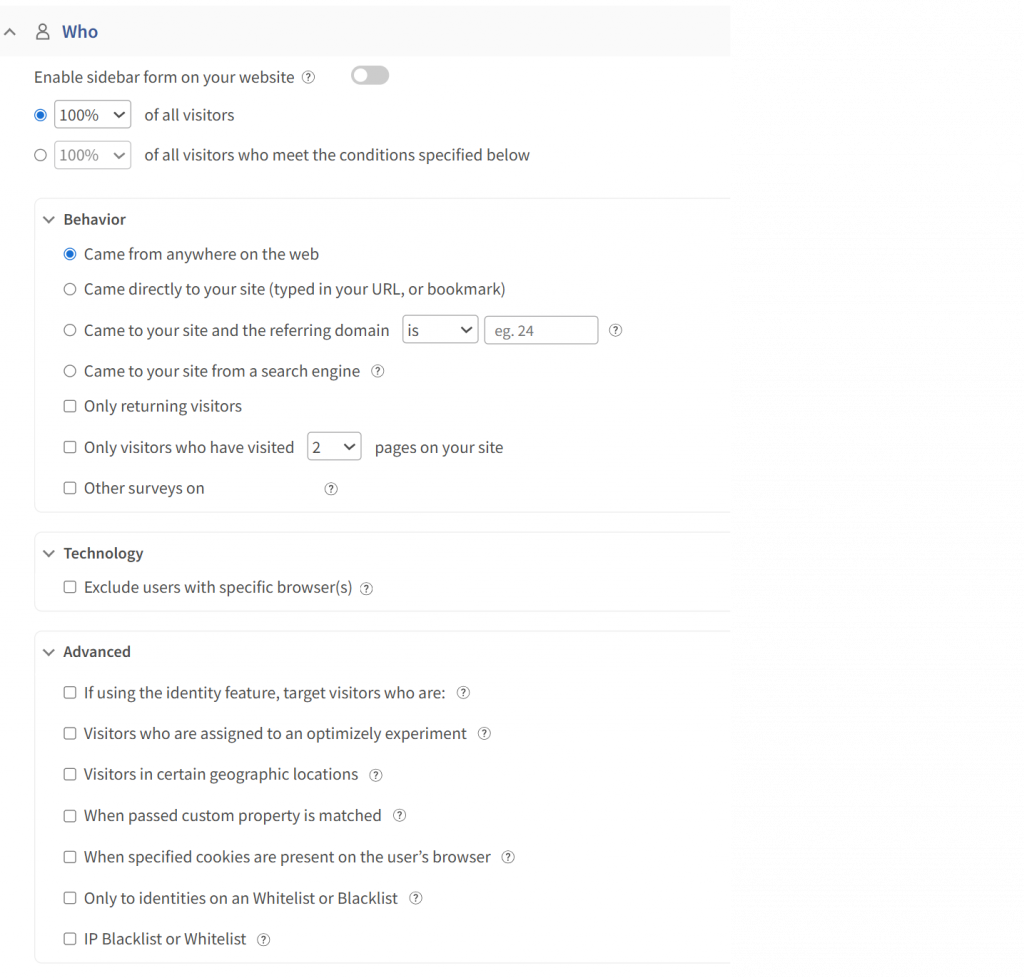
- Advanced targeting by behavior, URL, exit intent, and custom user properties
- Identify API ties responses back to a real user by email or customer ID
- Nudge for Prototype works on Figma, Adobe XD, and InVision before a product ships
- Multilingual surveys in 100+ languages
- iOS and Android SDK for native in-app surveys
- Salesforce, HubSpot, and Slack integrations for CRM-connected feedback workflows
Cons:
- There are quite a few targeting and survey options to work through, so getting the setup exactly right can take some time
- The reporting could also be a little more straightforward when reviewing larger amounts of feedback
How Qualaroo Compares to Heap: Qualaroo answers the exact question Heap’s auto-capture leaves open: why a user did something, not just what they did. It does not match Heap’s raw event-tracking depth or its retroactive analysis of data collected before a question was ever asked, so a team that genuinely needs that historical replay may still want Heap running alongside it.
Pricing: Free plan available, up to 50 responses with all premium features. Essentials at $19.99/month, Business at $49.99/month, and Enterprise from $149.99/month.
User Rating: 4.7/5 (Capterra)
Udemy is a good name to bring up here, since the company uses Qualaroo specifically to capture in-the-moment insight from learners rather than reconstructing intent after the fact from an event log. That immediacy is exactly what a pure auto-capture tool cannot offer on its own.

2. Mixpanel: Best for Event-Based Product Analytics with Published Pricing
Mixpanel is the closest like-for-like swap on this list, event-based product analytics with the same core job Heap does: funnels, retention, and cohort analysis.
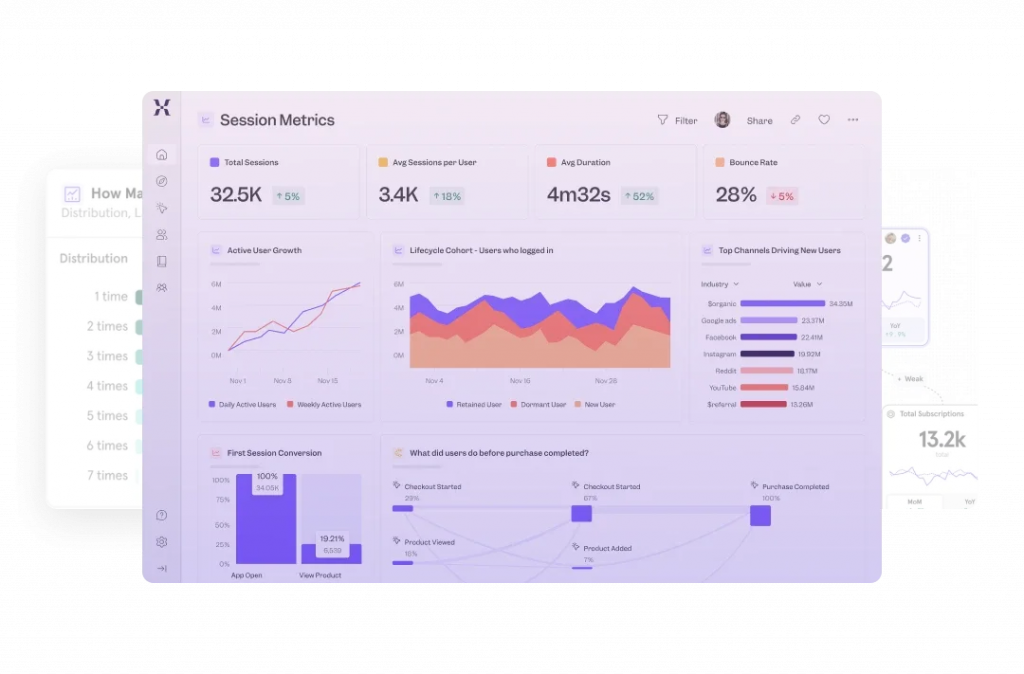
Where it pulls ahead is pricing transparency. Growth starts at a price point that Heap simply does not offer until Basic’s own five-figure floor.
Setup still takes real configuration to define the events worth tracking; this is not a lighter tool, just a more transparent one.
Teams switching specifically over cost tend to find the transition smooth, since the core mental model, events, and properties carry over directly from Heap.
Pros:
- Event-based product analytics with funnels, retention, and cohort analysis
- Published, transparent pricing starting at a genuinely low entry tier
- Generous free plan for smaller teams or early-stage products
- Strong API for pulling event data into other systems
Cons:
- Pricing climbs quickly once event volume grows past the entry tier
- Some teams report a real learning curve for advanced segmentation
How Mixpanel Compares to Heap: Mixpanel covers nearly the same core job Heap does, event tracking, funnels, and retention, at a fraction of the price and with a published number instead of a five-figure quote.
Pricing: Free plan available. Paid plans are quote only.
User Rating: 4.5/5 (Capterra)
3. Amplitude: Best for Deep Behavioral Analytics with Experimentation Built In
Amplitude is where I would send a team that wants Heap’s depth plus built-in real experimentation, behavioral cohorts, A/B testing, and session replay, all in one platform.
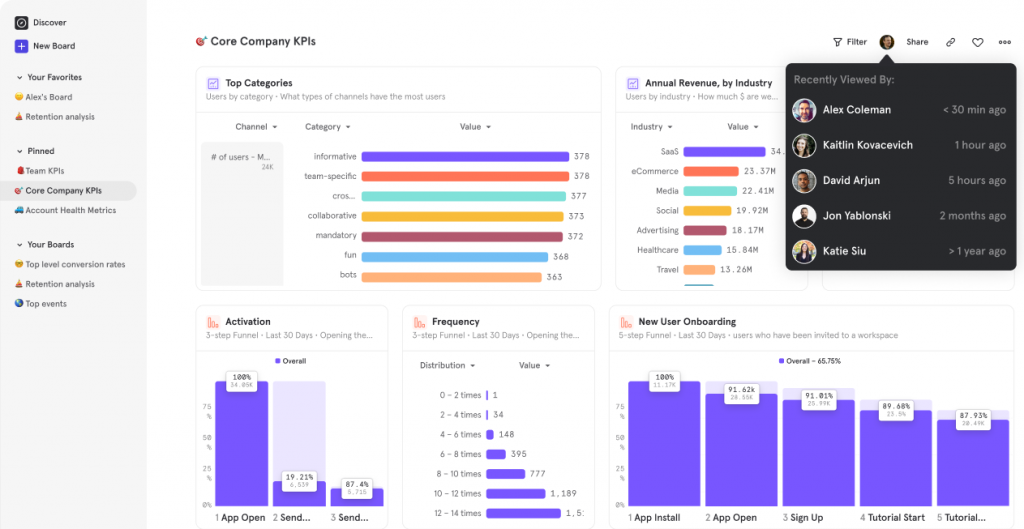
The free Starter plan covers 10,000 tracked users per month and 2 million events, a genuinely usable starting point before any real spend.
Growth and Enterprise both move to custom, event-based pricing, though, so the same five-figure conversation Heap requires eventually shows up here too, just further down the plan list.
Product teams that treat analytics as a full discipline, not just a dashboard, tend to get the most value once they are past the free tier. Unlimited seats on every plan are a real plus, too; nobody has to ration who gets access.
Pros:
- Behavioral cohorts, A/B testing, and session replay in one platform
- Generous free Starter plan covering 10,000 monthly tracked users
- Unlimited seats on every plan, reducing the cost of giving more people access
- Strong AI-assisted analysis features are layered on top of raw event data
Cons:
- Growth and Enterprise pricing is custom and not published
- The jump from the free plan to paid tiers is a real one for a growing team
How Amplitude Compares to Heap: Amplitude matches Heap’s depth and adds real experimentation tools on top, though it trades Heap’s flat pricing structure for a tiered model that eventually reaches the same custom-quote territory.
Pricing: Free plan available. Paid plans are quote only.
User Rating: 4.6/5 (Capterra)
4. Google Analytics 360: Best for Enterprise-Scale Web Analytics at Effectively No Entry Cost
Google Analytics 360 is the obvious question mark hanging over every Heap conversation. Why pay five figures a year when a free, ubiquitous alternative already sits in most teams’ stack?
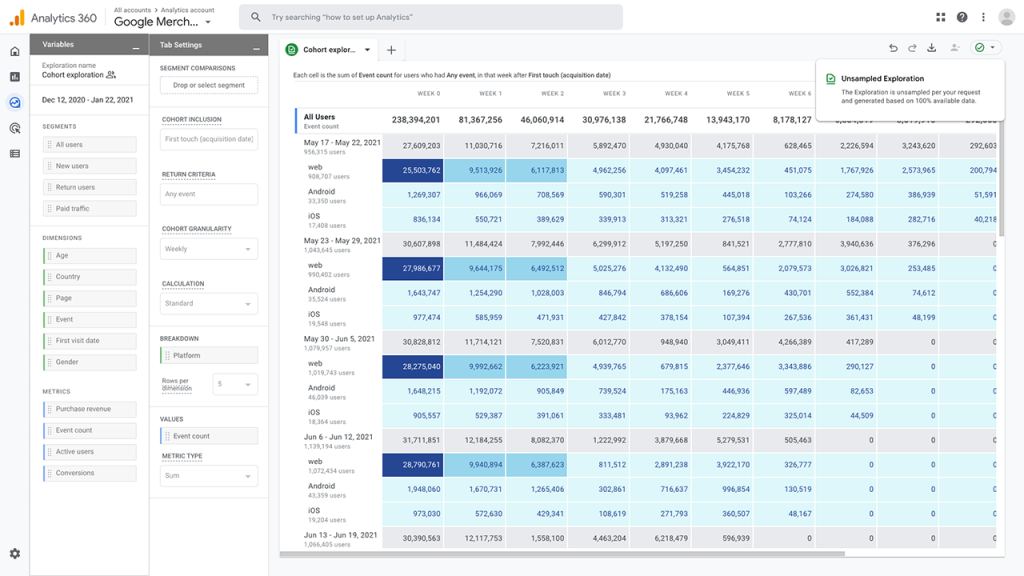
The standard free version already covers basic event tracking for most small- to mid-size sites. The 360 tier adds enterprise-scale data volume, dedicated support, and service-level agreements for traffic that would strain the free version.
Setup requires real technical familiarity, though. This is not the plug-and-play experience Heap’s auto-capture offers; someone still has to configure the tracking properly to get clean data out.
Nearly every marketing team already has some familiarity with the interface, too, which shortens the internal learning curve considerably.
Pros:
- Free standard version handles most small to mid-size site needs already
- 360 tier adds enterprise-scale volume, dedicated support, and SLAs
- Massive integration ecosystem across the broader Google Marketing Platform
- Extremely large, well-established review base to draw on
Cons:
- Standard free version lacks Heap’s automatic, retroactive event capture
- 360-tier pricing is not published and requires a sales conversation
How Google Analytics 360 Compares to Heap: Google Analytics 360 answers the pricing question most directly, free at the entry level, enterprise-scale at 360, though it never offers Heap’s retroactive analysis of events collected before a question was defined.
Pricing: Quote-only, contact vendor for pricing.
User Rating: 4.7/5 (Capterra)
5. Zoho Analytics: Best for Budget-Friendly BI and Reporting Tied to the Zoho Ecosystem
Zoho Analytics is the pick for a team that wants real, published pricing and a broader business intelligence platform, not just product analytics narrowly.
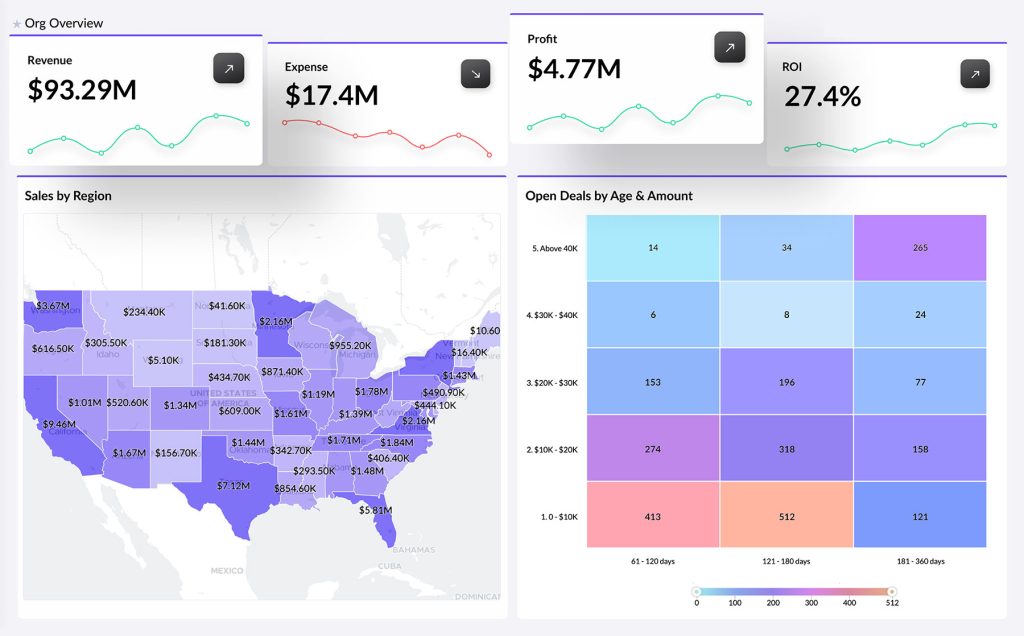
Basic starts at $24 a month, a genuinely low floor next to Heap’s own five-figure entry point. Reports and dashboards cover far more than user behavior, financial data, marketing performance, and operational metrics; all live in the same tool.
Native integration with the wider Zoho ecosystem is a real advantage for any team already running other Zoho products.
Setup stays approachable for a non-technical team member, a real contrast to the ramp-up time that genuinely getting value out of Heap tends to require. A genuinely usable free plan rounds out the offering for teams that want to test the waters first.
Pros:
- Broad BI platform covering financial, marketing, and operational reporting, not just user behavior
- Published, transparent pricing starting at a low entry tier
- Native integration with the wider Zoho ecosystem
- Approachable setup for non-technical team members
Cons:
- Less specialized for pure product analytics than a dedicated tool like Mixpanel
- Visualization depth has a ceiling once reporting needs get more advanced
How Zoho Analytics Compares to Heap: Zoho Analytics trades some of Heap’s product analytics specialization for a much broader, much cheaper BI platform, a real fit for a team that wants one tool covering more than just user behavior.
Pricing: Paid plans start at $24/month.
User Rating: 4.4/5 (Capterra)
6. Lucky Orange: Best for Bundled Heatmaps, Recordings, and Live Chat
Lucky Orange takes a lighter, more visual approach to the same underlying question that Heap answers with raw event data, heatmaps, recordings, and live chat bundled into one flat-rate plan.
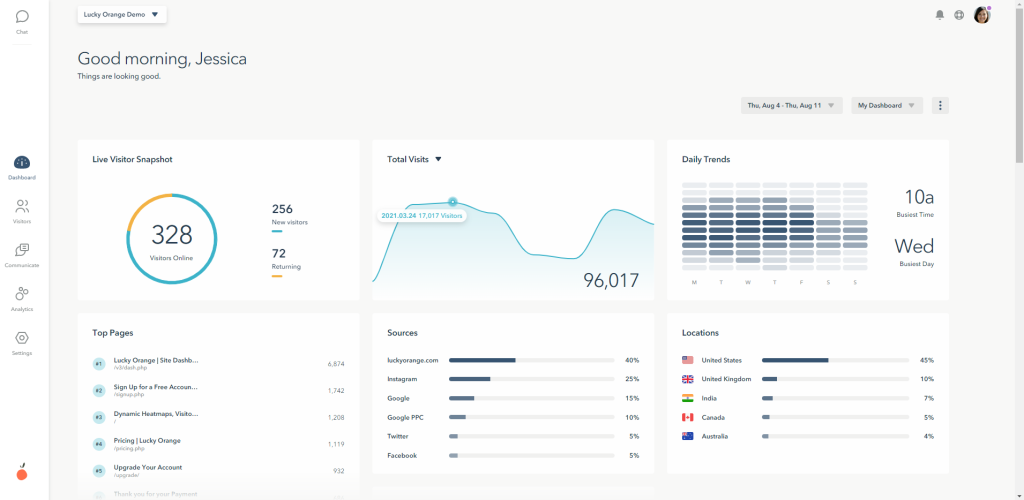
Watching a session directly answers a lot of the same questions a funnel report would, just faster for a smaller team without a dedicated analyst. On-site surveys come bundled in too, something Heap does not offer at all.
Setup takes minutes, in stark contrast to the configuration Heap’s event model requires before a first useful report is available.
Smaller sites, in particular, tend to prefer seeing a session directly rather than interpreting an aggregate chart. Live chat rounds out the package, letting a team message a visitor while a session is still active.
Pros:
- Heatmaps, recordings, live chat, and on-site surveys bundled into one flat-rate plan
- Easy setup with no separate SDK needed for web
- Conversion funnel reporting included
- Budget-friendly for smaller sites and teams
Cons:
- Less suited to SaaS products that need mobile in-app targeting
- Lacks the deep, retroactive event-level analysis that Heap specializes in
How Lucky Orange Compares to Heap: Lucky Orange gives a smaller team a faster, more visual path to the same kind of insight Heap’s event data provides, at a fraction of the price and without the same setup curve.
Pricing: Paid plans start at $32/month.
User Rating: 4.7/5 (Capterra)
7. Microsoft Power BI: Best for Broad Business Intelligence and Data Visualization
Microsoft Power BI is where I would point a team that already has broader business intelligence needs and wants product data folded into the same reporting layer.
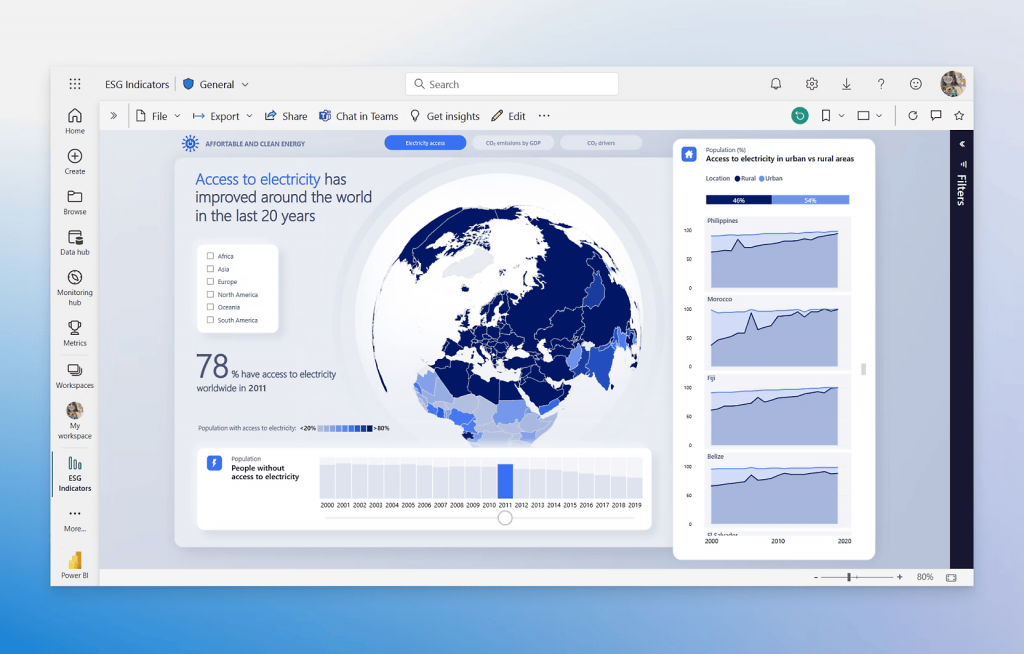
Published pricing starts at $14 per user per month, a genuinely accessible floor next to Heap’s own five-figure Basic plan.
Data visualization and reporting depth here go well past product analytics alone, financial dashboards, operational reporting, and executive summaries, all run through the same tool.
It does not auto-capture events the way Heap does, though; someone still has to build the data model and connect the sources manually. Teams already invested in the Microsoft ecosystem tend to find the integration work minimal compared to starting from scratch.
Pros:
- Published, accessible pricing starting at a low per-user rate
- Data visualization and reporting depth spanning well past product analytics
- Deep integration with the broader Microsoft ecosystem
- Massive, well-established review base to draw on
Cons:
- No automatic, retroactive event capture is the way Heap offers
- Requires a real setup to build the data model and connect sources
How Microsoft Power BI Compares to Heap: Power BI folds product data into a much broader reporting platform at a fraction of Heap’s price, though it never offers Heap’s automatic capture of every user event without manual configuration.
Pricing: Paid plans start at $14/month.
User Rating: 4.6/5 (Capterra)
8. FullStory: Best for Deep Session Replay and Frustration-Signal Detection
FullStory is where I would send a team that wants Heap’s depth of behavioral data, paired with genuinely fast session search.
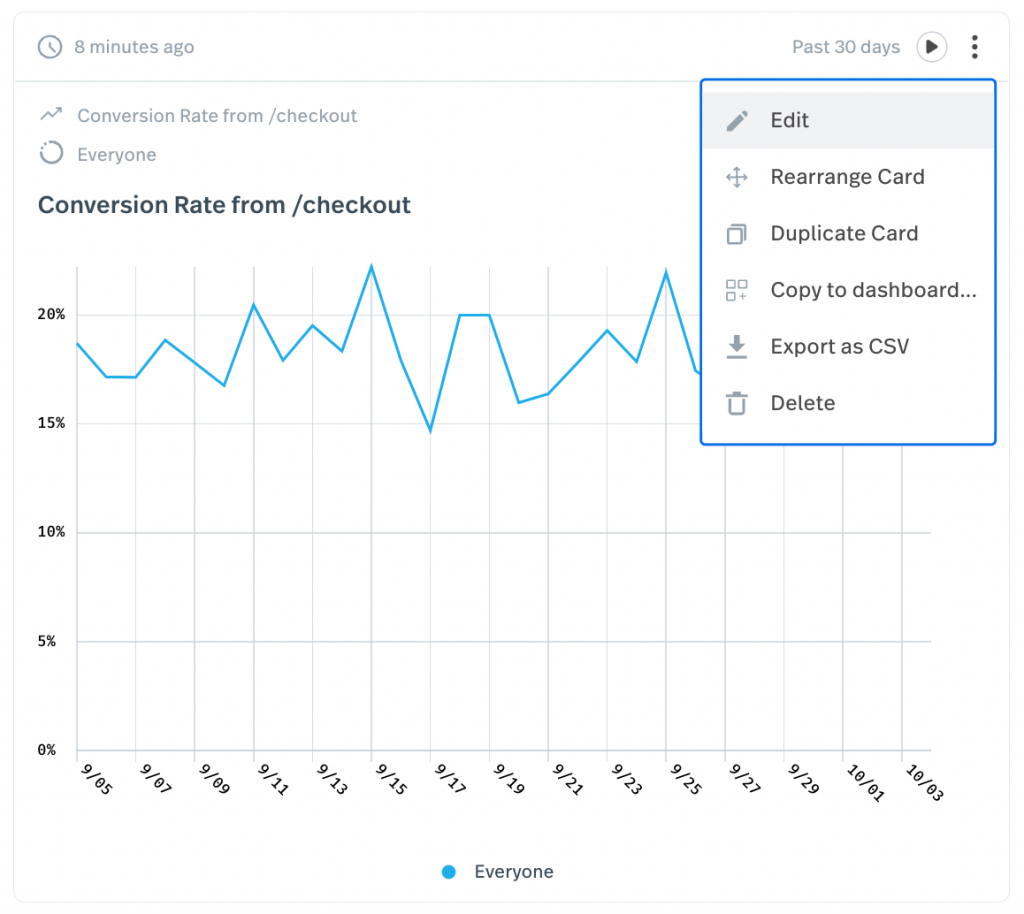
Every recording matching a specific error or rage click pulls up instantly, no manual report-building required to find the pattern. The free tier’s 30,000 monthly sessions is a real, usable starting point before any spend at all.
Automatic frustration-signal detection flags the sessions worth watching first, doing some of the interpretation work that a raw event log leaves to the team.
Engineering teams lean on this as much as product teams do, mostly to reproduce a bug nobody described clearly in a ticket. The privacy and PII controls are solid enough for teams handling sensitive user data, too.
Pros:
- Zero-instrumentation session capture with rage-click and frustration signals
- Searchable session index instead of scrubbing through recordings manually
- Generous free tier, up to 30,000 sessions per month
- API access for pulling behavioral data into other systems
Cons:
- No dedicated survey builder as a core feature
- Pricing scales with session volume and can rise quickly on high-traffic products
How FullStory Compares to Heap: FullStory pairs session-level visual detail with a genuinely fast search experience, a real complement to Heap’s raw event data rather than a like-for-like replacement.
Pricing: Free plan available, up to 30,000 sessions/month. Paid plans are quote-only.
User Rating: 4.6/5 (Capterra)
9. Pendo: Best for an All-in-One Product Analytics, Guides, and Surveys Platform
Pendo is the pick for a team that wants Heap’s product analytics depth folded into a wider platform, in-app guides, segmentation, and roadmap validation alongside the event data itself.
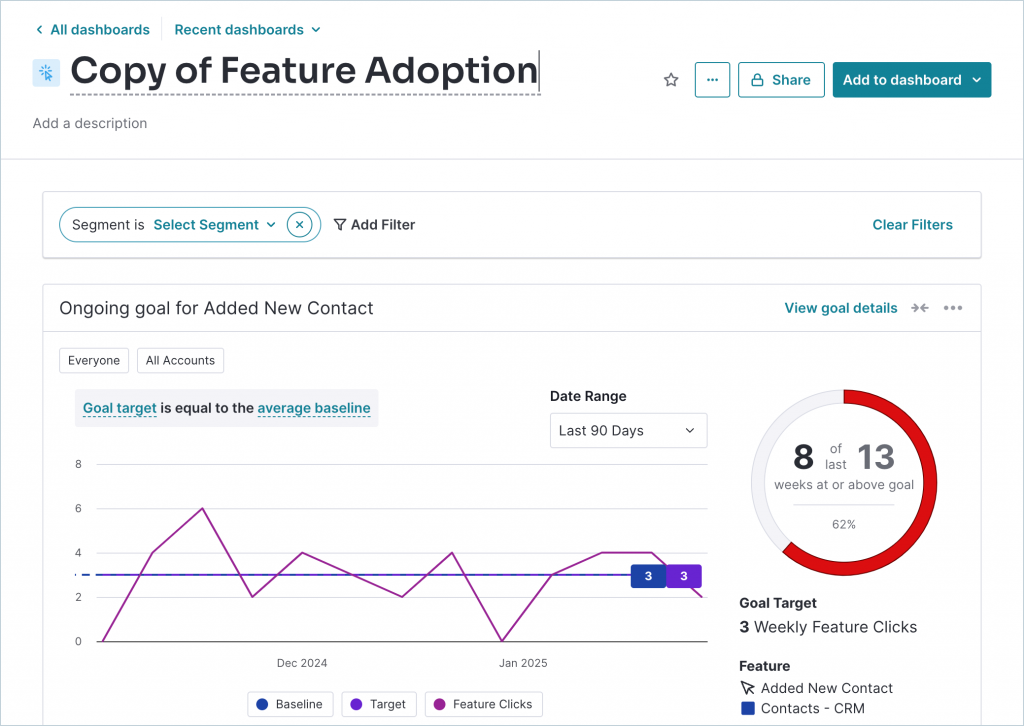
The resource center lets a team turn a support answer into a reusable in-app guide, something Heap does not attempt at all.
Segmentation is genuinely strong, allowing a team to slice event data using the same criteria they would use to prioritize a roadmap decision.
Setup still takes real time; this is not a lighter Heap alternative, it is a wider one built around a different core job. Product teams already running a roadmap process tend to see the fastest payoff here.
Pros:
- Combines product analytics, in-app guides, and surveys in one platform
- Strong segmentation for targeting specific user groups
- Built-in resource center and product-led courses
- Robust feature set for validating roadmap decisions
Cons:
- Pricing is not published and can climb quickly as monthly active users grow
- Heavier setup that typically needs a dedicated admin
How Pendo Compares to Heap: Pendo trades some of Heap’s raw event-tracking specialization for a wider product-analytics platform, in-app guides, and roadmap tools that Heap does not attempt, at a similarly unpublished price.
Pricing: Free plan available, up to 500 MAU. Paid plans are quote-only.
User Rating: 4.5/5 (Capterra)
10. Hotjar: Best for Heatmaps and Session Recordings Alongside Feedback Widgets
Hotjar is the lightest tool on this list relative to Heap’s depth, heatmaps, and session recordings without the enterprise event-tracking layer on top.
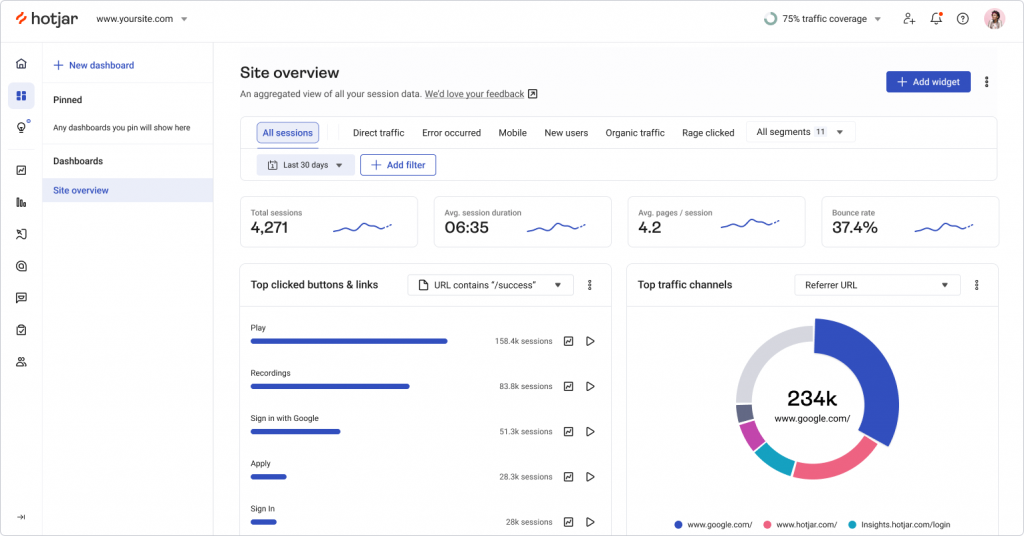
A single tracking script gets a first heatmap live the same day, a real contrast to the ramp-up time Heap’s own depth requires. Survey and feedback widgets come bundled in, too, something Heap does not offer at all.
The free tier caps daily sessions, so it is not built for the same traffic volume Heap handles, but for a smaller team, which is rarely the binding constraint.
I would point teams here specifically when the goal is just seeing where visitors get stuck, not building a full event-tracking program.
Pros:
- Heatmaps and session recordings alongside on-site surveys and feedback widgets
- Simple, published per-user pricing
- Fast setup with a single tracking script
- Large integration library, including Slack, Zapier, and Google Analytics
Cons:
- Free tier caps daily sessions, a real ceiling for high-traffic sites
- Lacks Heap’s retroactive, event-level analysis depth
How Hotjar Compares to Heap: Hotjar covers a fraction of Heap’s event-tracking depth, but gets a team to a first useful view of behavior the same day, instead of after real setup time.
Pricing: Free plan available. Paid plans start at $39/month.
User Rating: 4.6/5 (Capterra)
Which Heap Alternative Should Be Your Top Pick?
Ten tools are a lot to weigh. If you read only one section, make it this one.
These are the three I would genuinely point a team toward, and each answers a different version of what is actually pushing people off Heap.
1. Qualaroo: Best Overall Pick if You Want to Know Why, Not Just What
Qualaroo tops this list because it solves the one thing Heap’s auto-capture cannot: understanding why a user did something, not just logging that they did it, through micro-surveys that don’t disrupt user experience.
Native AI Sentiment Analysis and question branching handle the interpretation automatically, turning open-text feedback into a pattern rather than a spreadsheet nobody has time to read.
That means a team gets an actual answer to act on, not just another dataset to dig through, and gets it without needing a sales call to even start comparing options.
Teams coming from Heap’s event-only view tend to notice the shift right away, feedback stops being something to interpret on your own, and starts including the visitor’s own explanation.
2. Mixpanel: Best if You Want the Closest Like-for-Like Swap
For the most direct swap, I would send a team to Mixpanel, the same core event-tracking, funnel, and retention job Heap does, with genuinely published pricing instead of a sales-driven quote.
Setup still takes real configuration to define the events worth tracking; this is not a shortcut around doing the work, just a more transparent way to do it.
The tradeoff is Heap’s specific strength in retroactive analysis, capturing everything automatically so a team can ask a new question about old data without re-instrumenting anything.
This is a genuine gap that Mixpanel does not fully close. For most teams, switching purely over cost, that gap matters less than the transparency does.
3. Google Analytics 360: Best if Price Is the Only Real Complaint
If cost is genuinely the entire reason Heap is under review, Google Analytics 360 is the honest answer, free at the standard tier for most small to mid-size sites, enterprise-scale at 360 for the rest.
It already sits in most marketing stacks, too, so adoption rarely means convincing anyone that a new tool is worth learning.
The catch is real; no automatic, retroactive event capture the way Heap offers, someone still has to configure tracking properly before the data is clean enough to trust.
That setup cost is worth weighing honestly against what switching would actually save.
How Did I Evaluate These Heap Alternatives?
What actually drove these rankings was whether a tool closes the specific gap Heap leaves open, the missing why behind an auto-captured what, not just whether it can technically track an event.
Six factors carried the weight:
User Reviews and Ratings: Every rating here is pulled directly from Capterra and weighted by review count, not just the average star rating. Heap’s own 4.5 rests on 42 reviews, a reasonable sample worth trusting, and I held any noticeably thinner sample among the alternatives to a slightly higher bar before treating it as equally settled.
Essential Features and Functionality: Whether a tool surfaces meaning automatically, a survey answer, an experiment result, or a flagged frustration signal mattered more than raw event-tracking breadth, since that breadth is table stakes at this point. I looked past the feature list itself toward what a team could actually act on without building a custom report first.
Ease of Use: I looked at how much configuration it takes to get a first useful report live, since genuinely getting value out of Heap’s own depth takes real ramp-up time. A tool that traded a little depth for a same-day setup earned real credit here, not just a passing mention.
Customer Support: I checked whether support is responsive at the entry price or reserved for enterprise deals, relevant given how consistently support response time comes up around Heap itself. A tool that only offers real help once a deal reaches a certain size did not score as well here, even with strong features elsewhere.
Value for Money: I weighed what a tool’s depth actually costs to unlock, since Heap’s own five-figure floor is the single most common reason people start looking elsewhere. A published, predictable price carried more weight than a feature set that only reveals its real cost after a sales call.
Personal Experience and Experts’ Opinions: Where I have used a tool directly, that experience shaped what is written here, including small, practical details that do not always show up on a pricing page. Where I have not, I have leaned on patterns that recur across independent research rather than on any single source.
FREE. All Features. FOREVER!
Try our Forever FREE account with all premium features!
How Do You Choose the Right Heap Alternative for Your Team?
Name the actual reason Heap is not working for you, not the reason you assume should matter, and the table below points to the right pick directly.
| If Your Main Heap Frustration Is… | Consider This Alternative |
| Wanting to know why, not just what happened | Qualaroo |
| Price is the entire issue | Google Analytics 360 or Zoho Analytics |
| Needing the closest like-for-like product analytics swap | Mixpanel |
| Wanting experimentation and session replay built in | Amplitude |
| Wanting a wider BI platform, not just product analytics | Zoho Analytics or Microsoft Power BI |
| Needing a lighter, faster path to visual behavior data | Lucky Orange or Hotjar |
| Wanting deeper session search and frustration signals | FullStory |
| Wanting product analytics folded into guides and roadmap tools | Pendo |
Auto-Capture Tells You What. It Never Tells You Why.
Every tool on this list can track an event, Heap included, and does it well enough to earn a genuinely solid 4.5 rating.
The complaint that sends people looking elsewhere is not the tracking itself; it is the price attached to it and the question it still cannot answer on its own.
That is why the right pick splits a few different ways.
A team that just wants Heap’s core job at a fraction of the price wants a different answer than one that has decided price was never the real issue and genuinely needs experimentation or enterprise-scale reporting instead.
Worth watching, too, is a tool already absorbed into a bigger platform’s roadmap. Heap now sits inside the Contentsquare family, and any recently acquired tool is worth a second look for direction changes over the next year or two.
If closing the why gap without a five-figure commitment is the actual goal, I would start with Qualaroo. The free plan lets a team run the AI feedback analysis against real responses before committing to anything.
Frequently Asked Questions
What is the best free alternative to Heap?
Qualaroo's free plan covers up to 50 responses with every premium feature included, AI Sentiment Analysis included, a genuinely usable starting point next to Heap's five-figure entry price. Google Analytics standard, Mixpanel, and Amplitude all offer real free tiers too, for teams that want to test event tracking before committing to anything paid.
Is Qualaroo cheaper than Heap?
Significantly. Qualaroo's Essentials plan runs $19.99 a month, a gap wide enough that a full year of Qualaroo costs less than a single month of Heap's entry tier. Growth and Enterprise pricing past Heap's Basic plan climbs even higher, so the gap only widens from there.
Which Heap alternative is the closest like-for-like swap?
Mixpanel covers nearly the same core job, event tracking, funnels, retention, cohort analysis, at a lower per-month cost instead of Heap's five-figure quote. Amplitude is the second-closest match, adding experimentation and session replay on top, though its own pricing eventually reaches similarly custom territory once a team moves past the free tier.
Are there free or low-cost alternatives to Heap's event tracking?
Google Analytics 360's standard free tier covers most small to mid-size site needs already, and Mixpanel's free plan handles smaller event volumes at no cost. Zoho Analytics starts at just $24 a month for teams that want published, predictable pricing without an enterprise sales conversation standing in the way.
Which Heap alternative is best for a team that wants experimentation built in?
Amplitude is the strongest fit here, bundling behavioral cohorts, A/B testing, and session replay into the same platform as its core analytics. The free Starter plan covers 10,000 monthly tracked users, a real starting point before any custom, event-based pricing kicks in once a team scales past it.
Does any Heap alternative include survey or feedback capability?
Qualaroo, Pendo, Lucky Orange, and Hotjar all include native survey or feedback tools, something Heap does not offer at all. Qualaroo goes furthest here, pairing contextual surveys with native AI Sentiment Analysis to read open-text responses automatically, no manual review required to find the pattern.
What should I look for in a Heap alternative besides price?
Check whether a tool surfaces meaning automatically or just logs raw events for someone to interpret later, how much setup time stands between signup and a first usable report, and whether real support exists at the entry price rather than only at enterprise scale once you are already locked in.
Is there a Heap alternative built for broader business intelligence, not just product analytics?
Zoho Analytics and Microsoft Power BI both fold product data into a much wider BI platform, financial, marketing, and operational reporting included. Neither offers Heap's automatic, retroactive event capture, so a team still values Heap specifically for that if broad reporting is not the actual goal.
FREE. All Features. FOREVER!
Try our Forever FREE account with all premium features!

 We'd love your feedback!
What did you like & how can we make it even better?
 Thanks for your feedback!
 Ask Your Question
Have a question? Get expert help to make your decision easier.