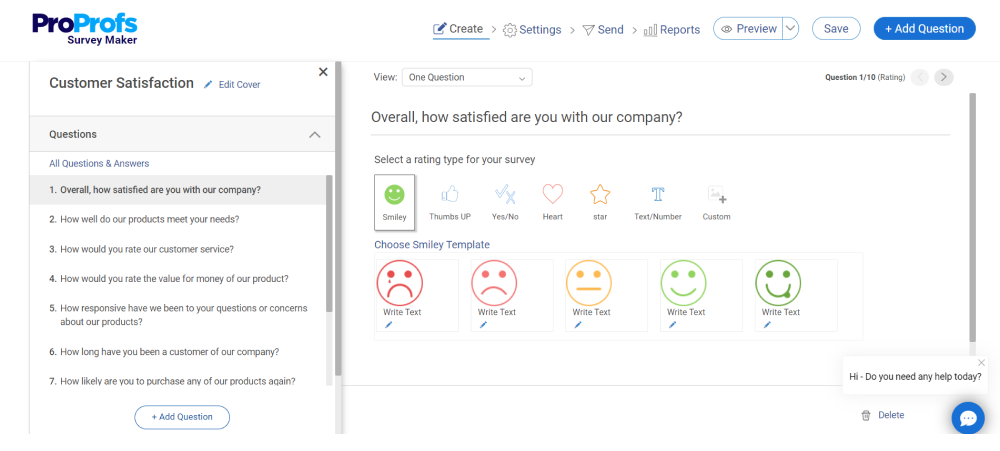
Qualaroo is AI-powered, in-context feedback software built around the Nudge™, a microsurvey that appears while someone is using your website, app, or even a prototype. Every plan also includes the full ProProfs Survey Maker for longer surveys. Survicate is a customer feedback platform that surveys people across web, product, email, and mobile, with a searchable research repository for surveys, support tickets, reviews, and calls. Both collect feedback from real users, so the differences come down to where the question gets asked, what you pay per answer, and how much of the analysis the platform does for you.
Choose Qualaroo
If you want the complete AI-powered feedback toolkit under one subscription, with prices you can see today: microsurveys that appear right inside your product, an AI Survey Creator, AI feedback analysis, and sentiment analysis, built-in heatmaps and session replay, prototype testing, the full ProProfs Survey Maker for longer surveys, unlimited responses on every paid plan, free custom integrations, and 24/7 Awesome Human Support.
Choose Survicate
If you want a multichannel survey platform: one searchable place for surveys, support tickets, reviews, and call transcripts, an AI chat assistant that searches across them, surveys across your website, email, and mobile apps, a general-purpose kiosk mode and a feedback button on the free plan, a single builder for short and long surveys, and live chat support.
At a Glance
| What Matters | Qualaroo | Survicate |
|---|---|---|
| How Pricing Works | Published prices, with unlimited responses from Essentials up ($19.99/mo) | Published prices based on response volume and data points, from Starter at $89/mo |
| Free Plan | $0 forever, unlimited surveys, 50 responses/mo, same core features as paid plans | $0 forever, 25 responses/mo (up to 300 across active surveys), 3 teammates, no data export |
| In-App Surveys (inside your product) | The Nudge shows while someone is actively using your website, app, or product | In-product surveys, the same core ideaNeeds Survicate's script or SDK installed first |
| Prototype Testing (before anything is built) | Figma, InVision, Adobe XD, Marvel, and Axure, through a pasted link, ready on any plan | |
| Heatmaps and Session Replay | Auto-generated heatmaps plus full session recordings, one script, every plan including Free | No built-in heatmaps; session recordings can be imported from a third-party tool such as Glassbox on Pro and above |
| Know Who Answered (Identify API) | Ties each response to a real, named person by email or ID | Respondent identification and enrichment, including on the free planDeeper profile details are on higher plans |
| AI for Writing Surveys and Reading Answers | AI Survey Creator, AI feedback analysis, and sentiment analysis on every plan, including Free | AI survey creation on every plan; AI categorization and sentiment from Growth |
| Surveys Beyond the Nudge | Full ProProfs Survey Maker on every plan, with a 1,000,000+ question bank | One builder for short and long surveys, with 400+ templates |
| Kiosk Mode (survey on a shared tablet) | Kiosk mode in the bundled Survey Maker, plus an auto-restart mode for prototype demos | General-purpose kiosk mode across any survey, included free |
| Surveys in Other Languages | 70+ languages, every plan | Multilingual surveys from Growth |
| Connections to Other Tools | Salesforce, HubSpot, Segment, Slack, Google Analytics, Tableau, Intercom, Zapier, and more, plus five prototype tools, and custom integrations we build for free on request | 25+ native integrations on Growth, 44+ on Pro and Enterprise, plus ZapierThe free plan includes only the Intercom channel |
| Team Access | Unlimited admins and creators from Essentials | 5 seats on Starter, 10 on Growth, custom above that |
| Support | 24/7 live chat, plus phone (Mon to Fri) and email; call 855-PROPROF (855-776-7763) and a real person answers | Live chat, roughly 8 AM to 11 PM CET; phone is part of the Enterprise plan |
| Other Tools From the Same Company | Connected ProProfs suites with chat, help desk, CRM, and knowledge base, and ProProfs Quiz Maker works great alongside | Standalone survey platform |
Survey Channels and Reach
Where you can ask matters as much as what you ask. Both platforms can survey people inside a product, on a website, and by email or link.
| Channel | Qualaroo | Survicate |
|---|---|---|
| In-App Surveys (inside your product) | The Nudge appears while someone is actively using your website, app, or product, no separate email needed | In-product surveys work the same wayNeeds Survicate's script or SDK installed first |
| Website and Marketing Pages | Included | Included |
| Mobile App Surveys (via a developer toolkit, or SDK) | Mobile Nudge on every plan; a full developer toolkit for deeper native app integration at Enterprise | iOS, Android, React Native, Flutter, and Unity toolkits on every planPer Survicate's docs, survey changes can take up to 60 seconds to reach a device |
| Email, Link, QR Code, and Web Forms | Email, link, QR code, and web forms | Email, link, and QR code |
| Persistent Feedback Button | Feedback Button and Sidebar Form, from the Business plan | Feedback Button, included on the free plan |
| Exit Intent (a popup right before someone leaves) | Included | Included |
| Prototype Testing (before anything is built) | Figma, InVision, Adobe XD, Marvel, and Axure, all through a pasted public link, with no plugin or embed | |
| Kiosk Mode (survey on a shared tablet) | Kiosk mode in the bundled Survey Maker, plus an auto-restart mode for prototype demos | General-purpose kiosk mode across any survey, from the free plan |
Qualaroo: The Nudge shows up inside your website, web app, or native mobile app while someone is actually using it. Qualaroo also reaches people by email, link, QR code, and web forms, and it adds prototype testing with five design tools by pasting a link, on any plan.
Survicate: Covers the same core channels and offers more developer toolkits for native mobile apps (React Native, Flutter, and Unity as well as iOS and Android). It also includes a feedback button and a general-purpose kiosk mode on the free plan, which suit events and in-store feedback.
Pick Qualaroo if you want to hear from people before launch, on a prototype, as well as during use. Pick Survicate if you want a feedback button and kiosk mode on the free plan, or toolkits for React Native, Flutter, and Unity.
Audience Targeting
This is where you decide who gets asked: which pages, which visitors, and when.
| Who Sees the Survey | Qualaroo | Survicate |
|---|---|---|
| Show Only on Certain Pages or URLs | Included, every plan | Included |
| Behavior, Scroll, and Time on Page | Included, every plan | Included |
| Target by Saved Visitor Details (cookies and attributes) | Included, every plan | From Growth |
| Target by Something a Visitor Did (event-based) | Behavior targeting on every plan; deeper rule-based targeting at Enterprise | From Pro |
| A/B Testing (show two versions, see which works better) | Included on every plan | From Pro |
Qualaroo: Targets by URL, page, behavior, scroll depth, exit intent, cookies, and custom user data. It also runs A/B tests (two versions of a survey, to see which gets more responses) at no extra cost on any plan.
Survicate: Covers URL, behavior, and exit-intent targeting from its entry plans, then adds attribute and cookie targeting on Growth, and event-based targeting and A/B tests on Pro.
Pick Qualaroo if you want cookie, event, and A/B testing options available on every plan. Pick Survicate if URL and behavior targeting is enough for now and you expect to move to a higher plan later.
Respondent Identification
By default, survey answers are anonymous. The Identify API is a small piece of code that tells Qualaroo who is answering, such as “Jane from Acme Inc.”, instead of “anonymous visitor.”
| Who Answered | Qualaroo | Survicate |
|---|---|---|
| Tie a Response to a Real Name or Email | Yes, with one line of code | Yes, with a similar code snippetDepends on adding Survicate's identification snippet first |
| Target Logged-In, Anonymous, or Both | One toggle, by default anonymous | Available through targeting rules |
| See Responses by Name, Plan, or Customer ID | In the dashboard and CSV export | In the dashboardDepends on sending identification data into Survicate first |
| Add Extra Details to a Person's Profile | Custom variables, every plan | Respondent enrichmentDeeper profile details are on higher plans |
Qualaroo: The Identify API links a response to a real, named person with one line of code, on every plan. You can also include or exclude specific people by rule, not just by broad group.
Survicate: Includes respondent identification and enrichment from the free plan, and shows who answered in its dashboard. Deeper profile details sit on higher plans.
Pick Qualaroo if you want named responses with one line of code and custom variables on every plan. Pick Survicate if identification on the free plan is all you need.
FREE. All Features. FOREVER!
Try our Forever FREE account with all premium features!
Heatmaps and Session Recordings
Click and scroll data shows what people did, not only what they said. This is where the two products differ most.
| Click and Scroll Data | Qualaroo | Survicate |
|---|---|---|
| Heatmaps (color maps of clicks and scrolls) | Auto-generated per page: clicks, scroll depth, drop-off, every plan including Free | |
| Visit Recordings (session recordings) | Full recordings, configurable duration, ready on every plan | Imported from a third-party tool such as Glassbox, on Pro and above |
| One Piece of Code for Survey and Behavior Data | Yes | Behavior data comes from a connected tool |
Qualaroo: One script covers the Nudge, auto-generated heatmaps, and full session recordings on your website, mobile site, and web app, on every plan including Free. Click data and the “why” answers sit in the same dashboard.
Survicate: Doesn't include a built-in heatmap or recording tool. On Pro and Enterprise it can bring in recordings from a third-party tool such as Glassbox, so behavior data is available as an import.
Pick Qualaroo if you want heatmaps and recordings in the same script and dashboard as your surveys. Pick Survicate if you already use a separate session-replay tool and prefer to import its data.
AI Survey Creation and Analysis
Both platforms lead with AI. Qualaroo puts a full suite in the everyday survey workflow on every plan; Survicate adds an assistant that searches across more data sources.
Qualaroo's AI Survey Creator covers seven named capabilities:
- AI Question Writer: drafts questions from a prompt
- AI Smart Targeter: recommends who to target and where
- AI Branch Logic Router: builds skip logic automatically
- AI Sentiment Analyst: scores every open-text response as positive, neutral, or negative as it lands
- AI Response Summarizer: condenses open-text answers into themes
- AI Keyword Visualizer: surfaces recurring words as a word cloud
- AI Insights Engineer: surfaces patterns across responses
| What the AI Does | Qualaroo | Survicate |
|---|---|---|
| Writing Questions, Choosing Who Sees Them, and Follow-Up Rules | AI Question Writer, Smart Targeter, and Branch Logic Router, on every plan, even Free | AI survey creation on every plan |
| Reading the Mood of Answers and Finding Themes | AI Sentiment Analyst and word clouds, on every plan, including Free | AI categorization and sentiment, from Growth |
| Summaries of Written Answers | AI Response Summarizer, included on every plan | AI chat can summarize on requestThe AI chat is capped by plan |
| AI Assistant That Searches All Your Feedback Sources | Coming Soon | An AI chat assistant that searches surveys, support tickets, reviews, and call transcripts3 to 15+ chats depending on plan |
Qualaroo: Runs its full AI Survey Creator suite on every plan, including the $0 free plan. It writes questions, suggests targeting, builds branch logic, scores sentiment, summarizes answers, builds word clouds, and finds patterns.
Survicate: Includes AI survey creation on every plan and adds AI categorization and sentiment from Growth. Its standout is an AI chat assistant that searches the Research Hub, which combines surveys, tickets, reviews, and calls.
Pick Qualaroo if you want AI help with everyday surveys and feedback analysis from day one, on any plan. Pick Survicate if you want one assistant that searches across surveys, support tickets, reviews, and calls.
Long-Format Survey Capability
Quick in-the-moment questions and longer studies often need different tools. Qualaroo includes both in one subscription; Survicate uses a single builder for both.
| What's Included | Qualaroo + Survey Maker | Survicate |
|---|---|---|
| Second Tool Included | ProProfs Survey Maker, included on every plan | One builder for short and long surveys |
| Question Bank | 1,000,000+ ready-to-use questions | Questions built in the survey editor |
| Templates | 200+ templates across the Nudge and the Survey Maker | 400+ templates |
| Quizzes and Assessments | Scored surveys built in, and it works great with ProProfs Quiz Maker for full quizzes | Surveys only; no dedicated quiz builder is listed |
Qualaroo: Every plan already includes ProProfs Survey Maker, so a team that needs both a two-question in-app Nudge and a full customer-satisfaction study never has to buy or learn a second tool. It also works great with ProProfs Quiz Maker when you want quizzes and assessments alongside your surveys.
Survicate: Uses one builder for every survey, short or long, which is simpler to learn. It has more templates by raw count (400+ against Qualaroo's 200+ combined), but it doesn't include a separate long-form tool or a question bank.
Pick Qualaroo if you want a separate, full survey tool with a 1,000,000+ question bank in the same subscription. Pick Survicate if you prefer to build every survey in one interface and want a larger template library.
Question Types and Survey Builder
Both platforms offer a solid range of question types. The difference is how many, and how they're packaged.
| Survey Building | Qualaroo | Survicate |
|---|---|---|
| Question Types and Formats | 30+ types across the Nudge and the Survey Maker, from one-tap questions to long-form studies, every plan | 15+ types in one builder |
| Follow-Up Rules (skip or show questions based on the last answer) | Included, every plan | Standard logic includedA drag-and-drop logic builder is on Pro |
| Surveys in Other Languages | 70+ languages, every plan | Multilingual surveys from Growth |
| Your Own Look (colors, logo, text) | Color, logo, and custom text from Essentials; $300/yr White Label add-on on any plan | Company logo from Starter, custom branding from Growth, custom CSS and domain from Pro |
Qualaroo: 30+ question types in total: 10 in the Nudge, built for speed, and 20+ in the Survey Maker, backed by a 1,000,000+ question bank. Surveys run in 70+ languages on every plan, and branding starts at a low tier.
Survicate: Has 15+ question types in a single builder. Multilingual surveys start at Growth, and custom CSS and a custom domain start at Pro.
Pick Qualaroo if you want a wider range of question types and 70+ languages on every plan. Pick Survicate if a single builder with 15+ types covers your needs.
FREE. All Features. FOREVER!
Try our Forever FREE account with all premium features!
Reporting and Data Export
Both platforms report on responses and let you download results.
| Results | Qualaroo | Survicate |
|---|---|---|
| Results Dashboard | New-response highlighting, favorites, and filtering | Available |
| Download Results as a Spreadsheet | CSV or Excel from the Business plan | CSV or XLSX from StarterNot available on the free plan |
| Send Data to Other Tools Automatically (API and webhooks) | A two-way connection, plus automatic alerts, on Enterprise | Webhooks and a Data Export APIPro and above |
| AI-Written Summaries of Results | AI Response Summarizer, included on every plan | AI chat can summarize on request |
Qualaroo: Response dashboards highlight new activity and let you favorite and filter. CSV and Excel export start at Business, and Enterprise adds a two-way connection to other tools and automatic alerts.
Survicate: Offers a results dashboard and manual CSV or XLSX export from Starter. Webhooks and the Data Export API start at Pro, and the free plan cannot export data.
Pick Qualaroo if you want a dashboard, export, and AI summaries at published prices from Business up. Pick Survicate if you want spreadsheet export from its Starter plan and plan to use webhooks later.
Integrations
Your feedback is only useful if it reaches the tools your team already works in. Both platforms connect to CRM, chat, analytics, and automation tools.
| Integrations | Qualaroo | Survicate |
|---|---|---|
| Connected Tools | Salesforce, HubSpot, Pipedrive, Marketo, Segment, Slack, Microsoft Teams, Google Analytics, Tableau, Intercom, Optimizely, Mailchimp, FullStory, Notion, Mixpanel, Google Tag Manager, Adobe Analytics, Google Sheets, and more, plus the five design tools in Nudge for Prototypes | 25+ native integrations on Growth and 44+ on Pro and EnterpriseThe free plan includes only the Intercom channel |
| Customer and Marketing Tools (CRM) | Salesforce, HubSpot, Pipedrive, Marketo, Mailchimp, and more; deeper connections at Enterprise | Salesforce, HubSpot, and moreAvailable from Growth |
| Connect to Thousands of Other Apps (Zapier) | Included: no-code connections to thousands of apps, plus a Slack alert for every new response | Included |
| Custom Integrations Built for You | Need a connection that isn't on the list? Tell us and we'll build it for you at no charge, usually within 30 days | Integrations come from its listed catalog and Zapier; no custom-build service is published |
Qualaroo: Connects to the tools your team already uses: Salesforce, HubSpot, Pipedrive, Marketo, Segment, Slack, Microsoft Teams, Google Analytics, Tableau, Intercom, Google Sheets, and more. Zapier adds thousands of other apps with no code. And if the tool you need isn't on the list, we'll build the connection for you free.
Survicate: Connects broadly, with 25+ native integrations on Growth and 44+ on Pro and Enterprise. The free plan includes only the Intercom channel.
Pick Qualaroo if you want a published list of connections from the start, plus a free custom integration if yours is missing. Pick Survicate if you plan to be on Pro or Enterprise and want the larger native catalog.
User Seats and Permissions
Team access works differently on each platform, mostly because the pricing models differ.
| Team Access | Qualaroo | Survicate |
|---|---|---|
| Admins and Creators | Unlimited from Essentials | 5 seats on Starter, 10 on Growth, custom above that |
| Many Websites and Users | Unlimited at Enterprise | Custom at EnterpriseRequires an Enterprise conversation to confirm exact limits |
| Separate Teams for Each Department | Enterprise | Teams and workspaces are available on higher plansLower plans are limited to 1 team and 1 workspace |
| Single Sign-On (log in with your company account) | Enterprise | Enterprise |
Qualaroo: Admin and creator seats are unlimited from Essentials (about $20/month), so a growing team pays no per-seat fees until Enterprise-level controls matter.
Survicate: Sets seat limits by plan: 5 on Starter, 10 on Growth, and custom above that. A team that outgrows those numbers moves up a plan to add people.
Pick Qualaroo if you want to add admins and creators without a per-seat limit. Pick Survicate if your team fits within its seat counts.
Pricing and Response Limits
The biggest structural difference between these two tools is how responses are counted.
| Plan | Qualaroo | Survicate |
|---|---|---|
| Free | $0 forever, 50 responses/mo, same core feature set as every paid plan | $0 forever, 25 responses/mo, capped at 300 across active surveys, 3 teammates |
| Paid Tiers | Essentials $19.99/mo, Business $49.99/mo, and Enterprise from $149.99/mo, billed annually | Starter from $89/mo (monthly), Growth from $56/mo (annual), Pro from $349/mo, and Enterprise from $569/mo |
| Limit on Responses | None from Essentials up | A response pool on every plan, plus a data-point allowance; Starter allows overages at extra cost |
| Money-Back Guarantee | 15 days, every plan |
Qualaroo: Prices around tracked pageviews and email sends, not feature access. Every plan, including the $0 free plan, has the same Nudge, Identify API, heatmaps and session replay, AI sentiment analysis, and multilingual surveys. Every paid plan has a 15-day money-back guarantee.
Survicate: Prices around a response pool on every plan, from Starter to a custom Enterprise pool, plus a separate data-point allowance. Growth and above are billed annually, and the price rises with the response volume you choose.
Pick Qualaroo if you want unlimited responses and a bill you can predict as volume grows. Pick Survicate if your response volume is modest and stays within one of its published tiers.
FREE. All Features. FOREVER!
Try our Forever FREE account with all premium features!
Customer Support
| Support | Qualaroo | Survicate |
|---|---|---|
| Live Chat | Under 2 minutes, available 24/7, every plan | Roughly 8 AM to 11 PM CET |
| Phone Support | Real product experts, Mon to Fri, 8 AM to 6 PM ET, at 855-PROPROF (855-776-7763) | Part of the Enterprise plan |
| Email Support | A response within one business day, guaranteed | Standard email support |
| Help Articles and Guides | 1,000+ help articles and video guides | Help documentation available |
| Help Getting Started | 1-on-1 call from Business, dedicated Success Manager | Self-serve to guided, depending on plan |
Qualaroo: Support comes through four channels: live chat that replies in under 2 minutes, 24/7, on every plan; phone with real product experts Monday to Friday, 8 AM to 6 PM ET; email with a guaranteed reply within one business day; and a help center with 1,000+ articles and video guides.
Survicate: Offers live chat from about 8 AM to 11 PM CET with a fast average first response. Phone access is part of the Enterprise plan.
Pick Qualaroo if you want live chat at any hour and a phone line on every plan. Pick Survicate if daytime and evening chat in European hours covers your needs.
Tools Beyond Surveys
Survicate is a focused feedback platform. Qualaroo is part of a wider set of ProProfs tools that goes beyond feedback into chat, support, knowledge base, and CRM.
| Extra Tools | Qualaroo | Survicate |
|---|---|---|
| Core Feedback Tool | Yes | Yes |
| Live Chat and Help Desk | Included in the Customer Delight Suite | |
| Help-Article Site (knowledge base) | Included in the Customer Delight Suite | |
| Customer Database (CRM) | BIGContacts CRM, in the Customer Growth Suite | |
| Quizzes and Assessments | ProProfs Quiz Maker works great alongside Qualaroo | Surveys only; no dedicated quiz builder is listed |
| How It Is Sold | Two named suites from $499/mo, with prices published | Standalone survey platform |
Qualaroo: Sits inside two ProProfs suites. The Customer Delight Suite includes Qualaroo, Live Chat, Knowledge Base, Survey Maker, and Help Desk. The Customer Growth Suite adds BIGContacts CRM and Picreel. Qualaroo also works great with ProProfs Quiz Maker for quizzes and assessments.
Survicate: Is a focused, standalone feedback platform with a bigger integration catalog and its own Research Hub. It connects to the tools you already use rather than replacing them.
Pick Qualaroo if you want feedback, support, knowledge base, CRM, and quizzes connected under one account. Pick Survicate if you want a dedicated feedback platform and already have the rest of your stack.
Which Should You Choose?
Here is the simplest way to decide.
Pick Qualaroo to Collect Feedback Right Where People Use Your Product
Qualaroo covers the whole feedback job under one subscription, AI-powered from start to finish: microsurveys inside your product, an AI Survey Creator, AI feedback analysis, and sentiment analysis, built-in heatmaps and session replay, prototype testing before launch, the full ProProfs Survey Maker for longer surveys, unlimited surveys, and unlimited responses on paid plans. You can see the price and sign up today. If you need an integration we don't have, we'll build it for you free. And 24/7 Awesome Human Support is there whenever you need it.
Pick Survicate if You Want a Research Hub
If you want one searchable hub for surveys, support tickets, reviews, and call transcripts, Survicate offers that, with an AI chat assistant that searches across all of them. It also includes a general-purpose kiosk mode and a feedback button on its free plan, developer toolkits for iOS, Android, React Native, Flutter, and Unity, 400+ ready-made templates, a single builder for short and long surveys, and live chat support.
Both tools help you hear from real users. Qualaroo is the quicker start for in-context feedback, with unlimited responses and a free plan. Survicate suits teams that want a multichannel platform with a research repository.
Switching From Survicate
Plan for a couple of weeks, depending on how many surveys and integrations you run.
- Export everything first. Download your responses as CSV or XLSX from the Analyze tab (export starts on Starter, so the free plan can't do it), and note your survey setups, integration list, and Research Hub tags.
- Rebuild your channels. Match each Survicate survey type (website, in-product, mobile, or email) to a Qualaroo Nudge or a Survey Maker survey.
- Set up identity and targeting again. Use Qualaroo's Identify API (it links each response to a named person) in place of Survicate's respondent identification, then rebuild your URL, behavior, and cookie targeting rules.
- Reconnect your integrations. Sign in again to Salesforce, HubSpot, Slack, Segment, and any Zapier flows, and check which ones need Business or Enterprise. If a tool you use isn't on the list, tell us and we'll build the connection for you free.
- Run both, then switch. Keep both scripts live for one full response cycle. Compare response volume and completion rate. Remove the Survicate script once the numbers match.
FREE. All Features. FOREVER!
Try our Forever FREE account with all premium features!
The Complete Buyer's Guide: Qualaroo vs Survicate
The Short Version
- Qualaroo doesn't limit responses on any paid plan. Survicate sets a response pool on every plan, with prices based on response volume and data points.
- Qualaroo's free plan includes unlimited surveys, 50 responses a month, AI sentiment analysis, the Identify API, and heatmaps and session replay. Survicate's free plan has 25 responses a month, 3 teammates, and no data export.
- Qualaroo can test feedback on a prototype before launch and bundles a full second survey product, ProProfs Survey Maker, into every plan. Survicate uses one builder for every survey.
- Survicate's Research Hub and AI chat assistant search surveys, tickets, reviews, and calls together, which Qualaroo does not offer yet.
- Qualaroo's live chat runs 24/7 on every plan, with phone support Monday to Friday. Survicate's chat runs from about 8 AM to 11 PM CET, and phone is part of its Enterprise plan.
- If an integration is missing, Qualaroo will build it for you free, usually within 30 days.
Which One Should You Buy?
Start with how your response volume will change. If it keeps growing (a growing product, a busy support team, a popular NPS program), Qualaroo's unlimited responses keep your bill steady, and the platform also includes heatmaps, session replay, prototype testing, and a full survey maker. If your volume is modest and you want one searchable place for surveys, support tickets, reviews, and calls, Survicate's Research Hub is built for that. Many teams need the first; some research-focused teams prefer the second.
How Does Pricing Differ, and What Will I Pay?
Qualaroo prices around tracked pageviews and email sends, and responses are unlimited from Essentials ($19.99/mo) up. Volume mostly affects your bill on a very high-traffic site with the Nudge on every page. Survicate prices around a response pool on every plan, from Starter (from $89/mo) to a custom Enterprise pool, plus a data-point allowance, so the price rises with the response volume you choose. If you want a bill you can predict as volume grows, Qualaroo is the simpler model.
Where Does AI Help on Each Platform?
On Qualaroo, the full AI Survey Creator suite runs on every plan, including the free one. It writes questions, suggests targeting, builds branch logic, scores sentiment, summarizes answers, and creates word clouds. On Survicate, AI survey writing is on every plan, and sentiment scoring and categorization start at Growth. Survicate's Research Hub adds an AI chat assistant that searches all your feedback sources, with the number of chats set by plan. Qualaroo's AI covers everyday surveys and analysis; Survicate's reaches across more sources.
How Do I See and Download My Results?
Qualaroo's response dashboard, filtering, and CSV or Excel export are in the same product from Business up (about $50/mo). Enterprise adds a two-way connection to other tools (API) and automatic alerts (webhooks). Survicate offers CSV or XLSX export from Starter (from $89/mo), and webhooks and a Data Export API from Pro. The free plan on either side doesn't include everything, so check which plan covers your export needs.
What Does Support Look Like Day to Day?
Qualaroo's live chat replies in under 2 minutes, 24/7, on every plan. Its phone line is staffed by real product experts Monday to Friday, 8 AM to 6 PM ET, at 855-PROPROF (855-776-7763). Email gets a reply within one business day, guaranteed. Survicate's support is chat-first, from about 8 AM to 11 PM CET, with phone access on its Enterprise plan.
What if You Need an Integration Qualaroo Doesn't Have?
Tell us. We'll build the connection for you at no charge, usually within 30 days, so you aren't left waiting on a roadmap. Survicate's native catalog is larger on its higher plans, but it does not publish a custom-build service.
Straight Answers About Survicate
The tough questions buyers ask, answered plainly. Where Survicate is the better choice, we say so.
Does Survicate Have Heatmaps (Click and Scroll Maps) Like Qualaroo?
No. Survicate has no built-in heatmap tool, and no built-in session recording. It can bring in session replay from a third-party tool such as Glassbox on Pro and above. Qualaroo builds heatmaps and full session recordings itself, in the same script as the survey, on every plan, including Free.
Can I Test a Prototype With Survicate Before It's Built?
Not currently. Survicate's channels start once something is live: website, web app, in-product, mobile SDK, email, or kiosk. Qualaroo's Nudge for Prototypes collects feedback on Figma, InVision, Adobe XD, Marvel, or Axure mockups before development starts, all connected the same way: paste a public link.
Is Survicate's Free Plan Enough to Get Started?
For a small team testing one feature or running a single survey, it can be. It includes 25 responses a month (up to 300 in total across active surveys), 3 teammates, a feedback button, kiosk mode, and respondent identification. It doesn't include data export, multilingual surveys, or AI sentiment, which need a paid plan. Qualaroo's free plan includes unlimited surveys, 50 responses a month, and the same core features as paid plans, including heatmaps and session replay.
How Do Survicate's Response Limits Work?
Every Survicate plan includes a response pool, and Pro and Enterprise pools are set per contract. Starter allows overages at extra cost, and Growth and above reset the pool each billing period, so a traffic spike either costs more or means moving up a plan. Qualaroo doesn't limit responses on any paid plan.
Does Survicate Include a Second Tool for Longer Surveys, Like Qualaroo's Survey Maker?
No. Survicate uses one builder for every survey, short or long, with 400+ templates. Qualaroo includes the full ProProfs Survey Maker, with a 1,000,000+ question bank, in every plan at no extra cost.
What Does Survicate Genuinely Do Better?
Its Research Hub gives you one searchable place for surveys, support tickets, reviews, and call transcripts, with an AI chat assistant that searches across them, which Qualaroo does not offer yet. Survicate also includes a general-purpose kiosk mode and a feedback button on its free plan, supports more developer toolkits for mobile apps, and has a larger template library. If a cross-source research hub is your top need, Survicate is the stronger pick for that job. For everyday in-context feedback, Qualaroo is the simpler start.
How Do I Switch Without Losing My Response History?
Plan for a couple of weeks, depending on how many surveys and integrations you run. Export your responses from Survicate as CSV or XLSX (export starts on Starter). Then rebuild your channels in Qualaroo's Nudge and Survey Maker, set up identity and targeting with the Identify API, reconnect your integrations, and run both tools side by side for one full response cycle before you remove the old script.
Qualaroo vs Survicate, 2026 comparison.
FREE. All Features. FOREVER!
Try our Forever FREE account with all premium features!

 We'd love your feedback!
What did you like & how can we make it even better?
 Thanks for your feedback!
 Ask Your Question
Have a question? Get expert help to make your decision easier.