

I’ve sat in more product meetings than I’d like to admit, where a single line of feedback turned into a twenty-minute argument.
Someone writes, “This update is interesting,” and half the room reads it as a compliment while the other half swears it’s a polite complaint.
I learned the hard way that guessing at tone doesn’t scale once you’re staring down a few hundred NPS responses a week.
That’s exactly why I’ve spent real time testing sentiment analysis tools instead of just picking whichever one shows up first in a search.
Some, like Qualaroo, score sentiment the second someone answers an in-app survey. Others read public reviews or social mentions instead.
Here’s how I’d list the ten best sentiment analysis tools, what each one is actually built for, real Capterra ratings, and where each falls short, so you skip the trial and error I went through.
What Are Sentiment Analysis Tools?
Sentiment analysis software uses AI to read open-ended text, like survey answers, reviews, or support tickets, and classifies it as positive, negative, neutral, or mixed. Instead of someone reading every comment by hand, teams get a scored, searchable view of how customers actually feel, at whatever scale their feedback comes in.
I think of it less as its own tool category and more as a layer that sits on top of whatever feedback I’m already collecting.
A survey or review platform captures the response, and a sentiment engine tells me what that response actually means, without me reading it myself and guessing at tone.
Add in every NPS campaign, support ticket, and app review your own product generates, and manual reading stops being realistic fast, which is exactly the gap this category of software exists to close.
Top 10 Sentiment Analysis Tools for Customer Feedback
Before I get into the details on each one, here’s the side-by-side view I wish I’d had when I started comparing these.
| Tool | Best For | Key Strength | Capterra Rating | Starting Price |
| Qualaroo | Product and UX teams that are collecting in-app and website feedback | Native AI Sentiment Analysis built into contextual Nudge™ surveys | 4.7/5 | Free plan available; paid from $19.99/month |
| ProProfs Survey Maker | Easily creating custom customer surveys, CSAT, CX, and NPS forms using AI | AI survey builder with sentiment reporting built in | 4.8/5 | Free plan available; paid from $19.99/month |
| Enterpret | Product teams unifying feedback across many channels | Customer context graph ties sentiment to real accounts | 4.8/5 | Custom quote |
| Clootrack | Enterprise teams analyzing high-volume reviews and journeys | Unsupervised AI theme and sentiment detection at scale | 5.0/5 | Custom quote |
| Chattermill | Enterprise CX and VoC teams | Aspect-based sentiment tied to business outcomes | 4.5/5 | Custom enterprise pricing |
| Brandwatch | Brand and marketing teams monitoring public sentiment | Real-time monitoring across social, forums, and news | 4.2/5 | Custom quote |
| Talkwalker | Global teams tracking multilingual media sentiment | Multi-format coverage across social, news, and broadcast | 4.4/5 | Custom quote |
| Sprout Social | Social-first teams wanting sentiment in one dashboard | Sentiment is built into the publishing and engagement workflow | 4.4/5 | From $199/seat/month |
| Medallia | Large enterprises running omnichannel CX programs | Journey mapping tied to sentiment across every touchpoint | 4.5/5 | Custom quote |
| Amazon Comprehend | Teams are already building on AWS | API-based sentiment that plugs into existing pipelines | Not yet rated (G2: 4.8/5) | Pay-per-use, from $0.0001/unit (Up to 10M units) |
The table gives you my quick take. Here’s what each tool is actually like to use, including where I’ve used it myself and where I’m going off what people I trust have told me.
1. Qualaroo: Best for Capturing Real-Time User Insights In-App and On Your Website
Qualaroo has been my go-to for in-the-moment feedback for years now, and it’s honestly the one tool that feels built for product teams who move fast.
The star of the show is the Nudge™, a small, non-intrusive survey that slides in exactly when someone is on your site or in your app, at the moment they’re actually forming an opinion, not three days later in an email inbox.
I can target these surveys to users who just failed onboarding, paid customers, visitors from a specific campaign, or almost any segment I can define.
Native AI Sentiment Analysis, part of Qualaroo’s AI Feedback Analysis suite, turns thousands of open-text responses into themes I can read in minutes instead of weeks, and question branching keeps surveys short by only asking what’s relevant to each respondent.
When the volume gets too high to read every response myself, the AI Response Summarizer condenses the rest into something I can scan in one sitting.
Pros:
- AI Survey Creator for quick, prompt-based survey creation
- AI Feedback Analysis suite for automated tagging, sentiment scoring, and response summaries
- Advanced targeting based on identity, custom properties, behavior, and exit intent
- Heatmaps and Session Recordings for behavioral context alongside sentiment
- The Identify API to tie every response to a known user
- Nudge for prototypes on Figma, Adobe XD, InVision, and more
- Multilingual surveys in 100+ languages
- In-app surveys for iOS and Android
- Lightweight script that doesn’t slow down my site or app
- Reads sentiment directly at the point of collection instead of after the fact
Cons:
- Dedicated onboarding and account manager services are generally reserved for paid plans
- There is no downloadable or on-premise version available (an internet connection is required to use the tool)
Rating: 4.7/5 (Capterra)
Pricing: Free plan available with all premium features. Paid plans start at $19.99/month, followed by Business at $49.99 and Enterprise at $149.99.
According to Qualaroo’s case study with Hootsuite, this approach helped drive a 16% lift in conversion at 98% statistical significance.

2. ProProfs Survey Maker: Best for Easily Creating Custom Customer Surveys, CSAT, CX, & NPS Forms Using AI
I’ve used ProProfs Survey Maker whenever I needed a fast way to spin up a survey without pulling in design or engineering.
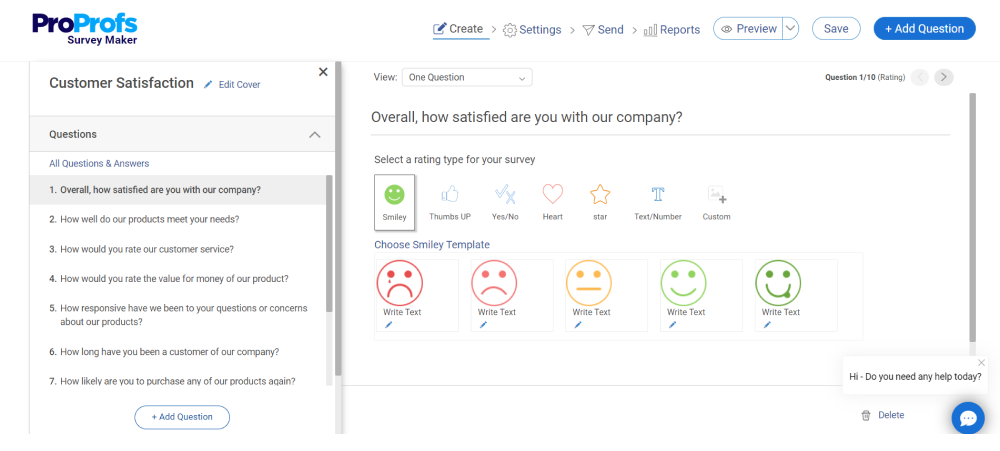
The AI Survey Maker gets me from idea to a working draft faster than a blank form ever could. I describe what I need in plain language and get a structured survey back with built-in logic and scoring. For NPS, CSAT, and CX programs specifically, the template library saves me from starting from zero every time.
The built-in sentiment analysis is what actually keeps me coming back, though. It gives me a clean read on open-ended answers without manually coding a single comment
And, the reporting dashboard breaks sentiment down by question so I can see exactly where a program is losing people. For teams that live inside structured surveys rather than in-app nudges, this is the more natural fit.
Pros:
- AI Survey Maker builds a draft survey from a plain-language prompt
- AI-powered question suggestions speed up survey building
- PDF, DOCX, and TXT upload-to-survey conversion
- 100+ templates for NPS, CSAT, CX, product, and HR feedback
- Drag-and-drop editor with logic, scoring, and branching
- Sentiment breakdowns built directly into reporting
- Very easy to build and publish surveys without design or engineering help
Cons:
- No dedicated account manager available on the free plan
- Requires an internet connection to use the platform
Rating: 4.8/5 (Capterra)
Pricing: Free plan available. Paid plans start at $19.99/month.
3. Enterpret: Best for Unifying Multi-Channel Product Feedback
A product ops friend at a Series C startup mentioned Enterpret to me when her team finally stopped stitching together feedback dashboards by hand.
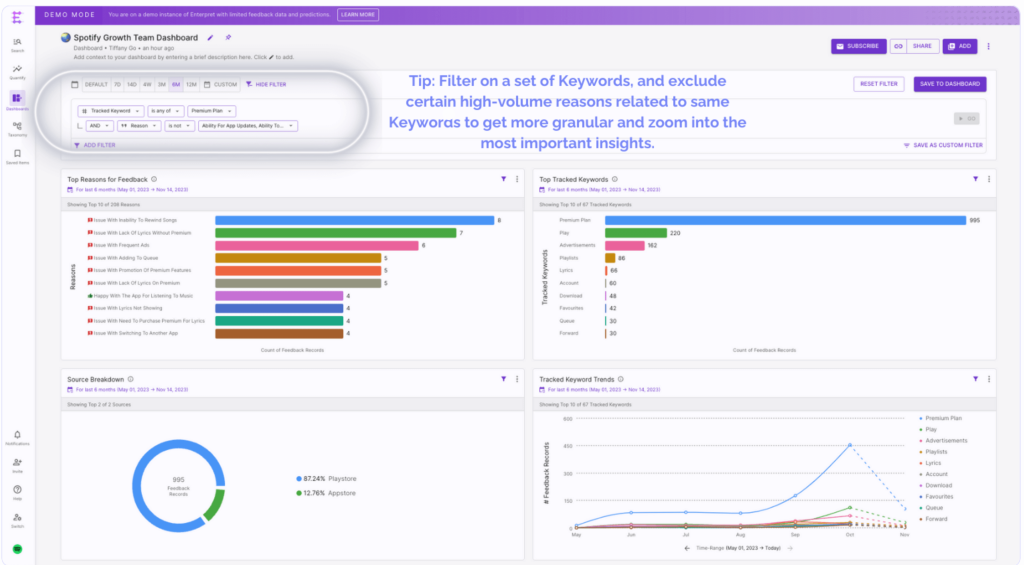
It centralizes feedback from support tickets, app reviews, community posts, and surveys, then uses an adaptive taxonomy and a customer context graph to tie sentiment to themes and to the actual customer record behind each comment.
What stood out to me most is the natural-language querying. Instead of building a new dashboard every time a question comes up, I can just ask the tool directly and get an answer tied to real accounts, not just an aggregate score.
Cross-channel anomaly alerts also flag when sentiment shifts line up across sources, which catches problems before they show up in a quarterly report.
Pros:
- Unified sentiment model across 25+ integrations (Zendesk, Salesforce, SurveyMonkey, TrustPilot, App Store, Reddit, and more)
- Adaptive taxonomy tags themes automatically
- Customer context graph ties every sentiment score back to a real account
- Cross-channel anomaly alerts catch sentiment shifts before they show up in a quarterly report
- Natural-language querying means I don’t need a data analyst to pull an answer
- Strong at surfacing the “why” behind sentiment shifts, not just the score
Cons:
- Custom pricing makes it harder for me to budget upfront
- Best suited for teams with multiple feedback channels, not single-source setups
Rating: 4.8/5 (Capterra, based on a small review sample)
Pricing: Custom quote, volume-based
4. Clootrack: Best for Large-Scale Customer Journey and Experience Analytics
An agency contact who runs CX for e-commerce brands pointed me to Clootrack when her team needed to process tens of thousands of reviews without manual tagging.
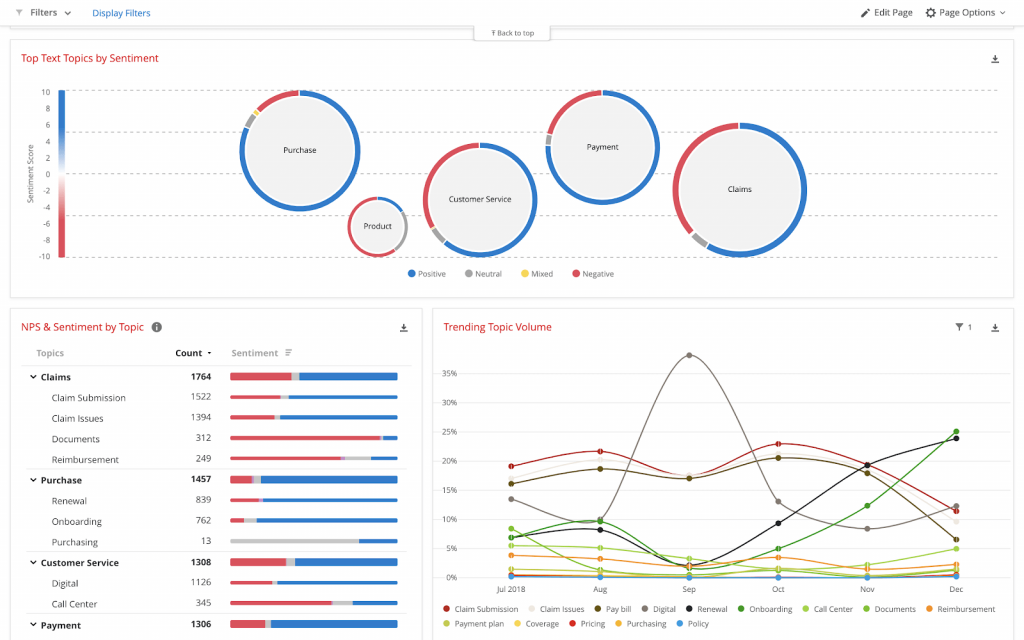
Its unsupervised AI model is built to extract themes and sentiment from large, messy datasets, reviews, forums, social media, and surveys, without a human setting up the taxonomy first.
Clootrack claims 94%-plus accuracy on qualitative insight extraction, and the patented approach is specifically designed to reduce the bias that creeps in when a person builds the tagging categories by hand.
With over 1,000 connectors to first-party and online data sources, it’s built for teams that need to pull from everywhere at once rather than one feed at a time. For high-volume review analysis or journey mapping across a large customer base, this is the tool I’d point to first.
Pros:
- AI-powered sentiment and emotion detection
- Automatic theme and topic extraction across channels
- 1,000+ connectors to first-party and online data sources
- Multi-language support
- Root-cause analysis across categories or segments
- An unsupervised model reduces the bias that comes from manual tagging
Cons:
- Enterprise-focused pricing, Capterra lists a usage-based starting price around $25,000 a year
- Overkill for teams with lower feedback volume
Rating: 5.0/5 (Capterra, based on a small review sample, I’d treat it as a strong but early signal)
Pricing: Custom quote
5. Chattermill: Best for Enterprise Feedback Analytics Tied to Business Outcomes
A CX lead at an enterprise SaaS company told me Chattermill was the first tool that got her exec team to actually open a feedback dashboard.
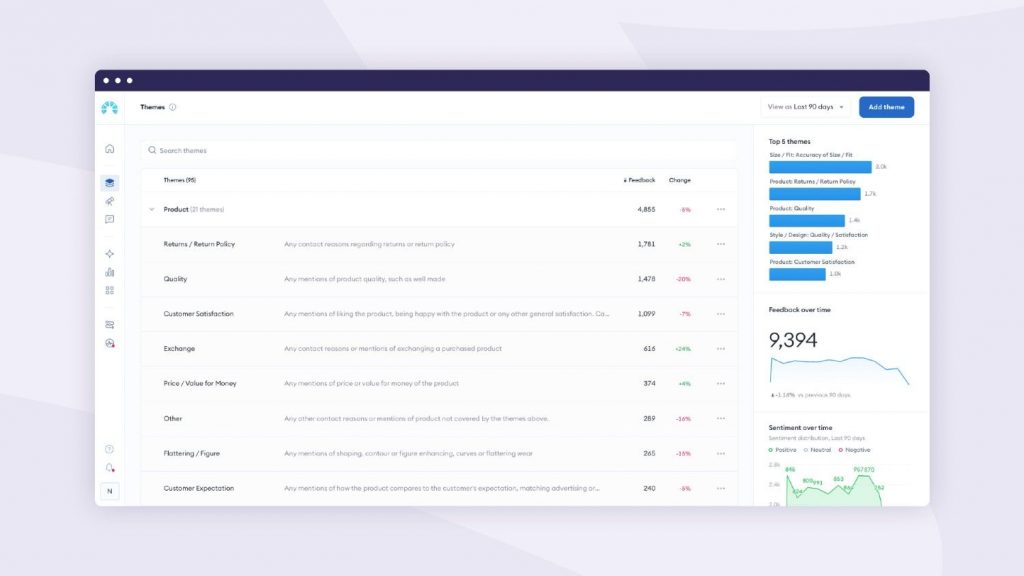
Its proprietary Lyra AI model uses aspect-based sentiment, going beyond a simple positive or negative score to topic-level detail, so a single review can show negative sentiment on pricing and positive sentiment on support in the same read.
What makes it different from a lot of the other enterprise platforms I’ve looked at is the direct line it draws from sentiment themes to business metrics like NPS, CSAT, retention, and revenue.
With 90-plus integrations and support for 50-plus languages, it’s built to sit on top of whatever feedback stack a large, multi-region company already has running.
Pros:
- Lyra AI feedback categorization
- Unified hub for surveys, reviews, and support tickets
- Aspect-based sentiment analysis gives topic-level detail instead of one flat score
- Impact analysis linking sentiment to business metrics like NPS, CSAT, retention, and revenue
- 90+ integrations and 50+ supported languages
- Connects sentiment directly to business outcomes
Cons:
- Not designed as a standalone survey or feedback collection tool
- Requires a custom quote; pricing isn’t public
Rating: 4.5/5 (Capterra)
Pricing: Custom enterprise pricing based on feedback volume
6. Brandwatch: Best for Real-Time Social and Web Sentiment Monitoring
I first came across Brandwatch through a marketing team I know that was tracking how a product launch played out across social and news in real time.
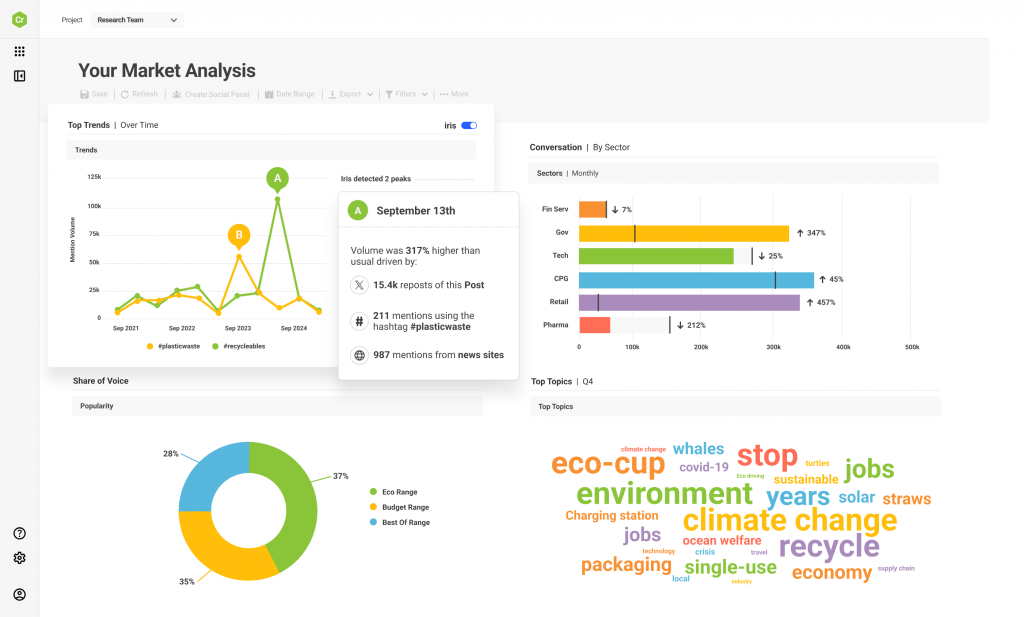
Instead of surveys or support tickets, it pulls sentiment straight from public conversations across social networks, forums, blogs, and news sites, which is why I’d point to it for brand and reputation tracking rather than product feedback.
The competitive benchmarking is where it earns its keep for a lot of the marketing teams I know. It shows how a complaint or a compliment about your brand compares to what’s being said about competitors in the same window.
Real-time alerts for mention or sentiment spikes mean a team finds out about a reputation problem the same day, not after it’s already spread.
Pros:
- Real-time monitoring across social networks, forums, blogs, and news
- Trend tracking and mention categorization
- Competitive benchmarking lets me see how a complaint compares to what rivals are hearing
- Custom dashboards make it easy to hand a clean view to non-technical stakeholders
- Strong real-time alerts for reputation management
Cons:
- Not built for in-product or survey feedback
- Reviewers note a learning curve, and pricing is custom only
Rating: 4.2/5 (Capterra)
Pricing: Custom quote (contact sales)
7. Talkwalker: Best for Multilingual, Multi-Format Media Sentiment Tracking
A PR colleague of mine swears by Talkwalker for tracking how a story spreads across regions and languages.
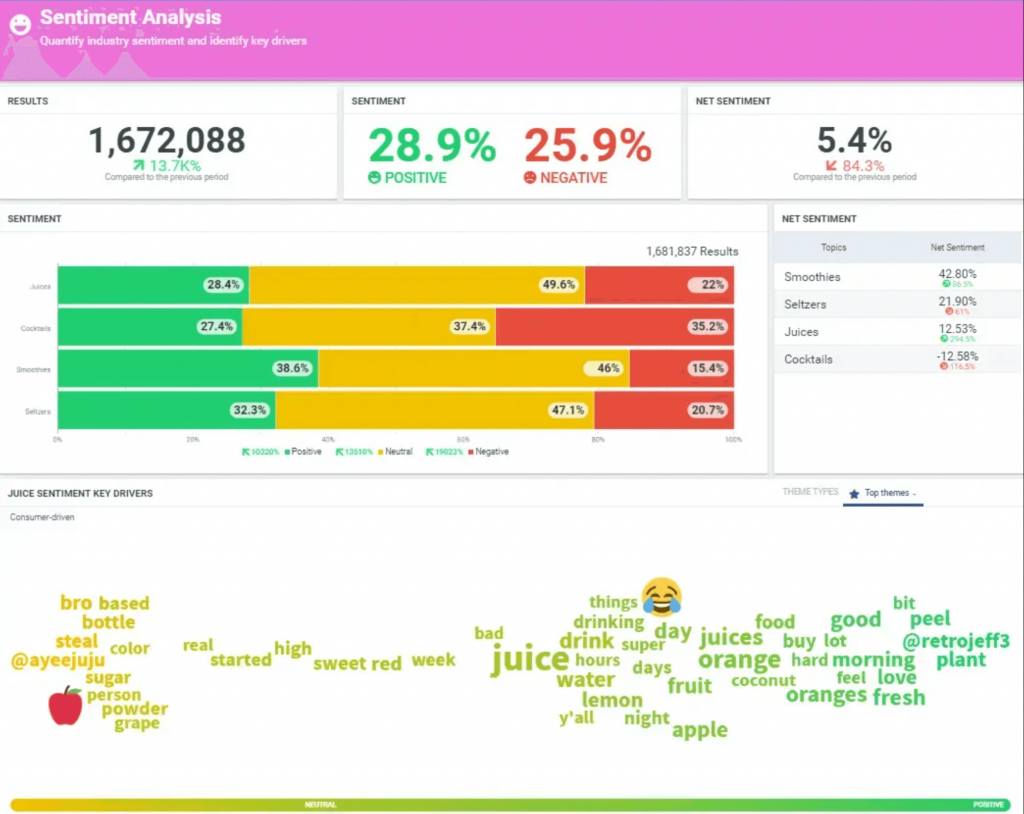
It reads sentiment across social, news, forums, podcasts, and broadcast media, which is what makes it useful for teams that need to watch a brand conversation evolve well beyond social apps, especially when a story is breaking across markets that don’t share a language.
The multilingual coverage is genuinely strong, and the visual dashboards make it easy to brief a team that isn’t living in the data every day.
Reviewers do note a real learning curve getting started, so I’d budget time for onboarding rather than expecting to self-serve on day one.
Pros:
- Sentiment across social, news, podcasts, and broadcast media
- Multilingual sentiment models cover global brand perception
- Real-time spike alerts caught shifts before they became a full-blown story
- Visual dashboards make it easy to brief a team that isn’t deep in the data
- Strong multi-format and multi-language coverage
Cons:
- Reviewers note a real learning curve for new users
- Pricing isn’t published; a demo is required
Rating: 4.4/5 (Capterra)
Pricing: Custom quote (demo required)
8. Sprout Social: Best for Social Media Management With Built-In Sentiment
I’ve used Sprout Social when managing social alongside other content channels, mainly because sentiment sits in the same dashboard as publishing and engagement instead of in a separate tool.
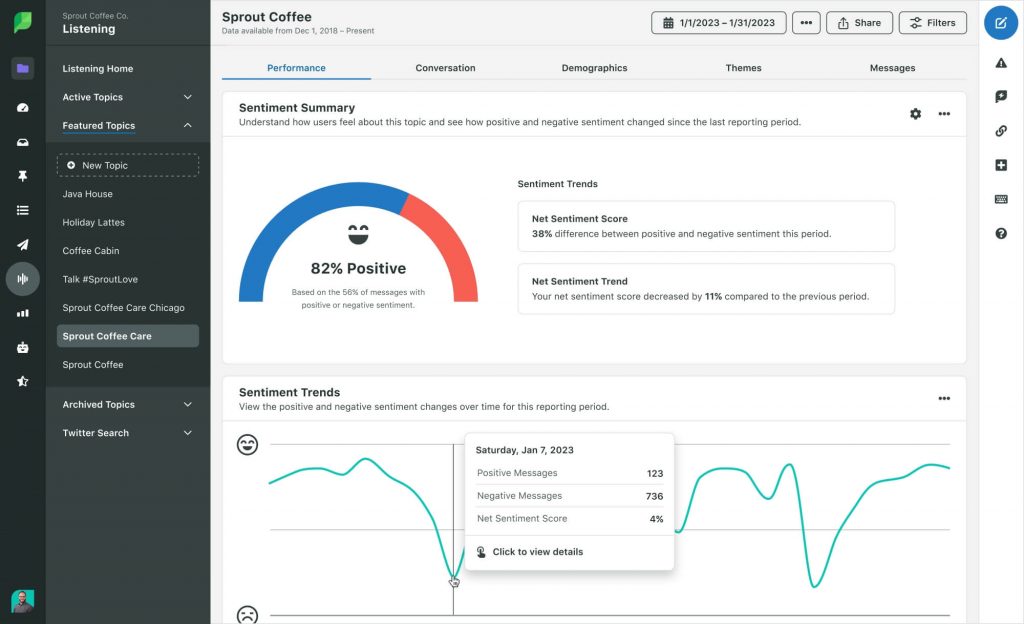
It analyzes conversations across X, Facebook, Instagram, LinkedIn, and review sites, then automatically categorizes mentions by sentiment and topic, so I can see a shift in tone the same day it happens rather than after a weekly report lands in my inbox.
The unified inbox is what actually saves me time day-to-day. I’m not jumping between four different apps to see what people are saying about a launch or a campaign.
Audience insights layer on top of that to show who’s actually driving the sentiment shift, not just that one occurred.
Pros:
- Sentiment analysis for social conversations and campaigns
- Unified inbox meant I wasn’t jumping between four apps to see what people were saying
- Publishing and content calendar tools on the same platform
- Audience insights helped me see sentiment trends alongside who was actually saying it
- Easy for teams already doing social publishing to adopt
Cons:
- Reviewers note pricing rises quickly with added seats and paywalled features
- Sentiment is limited to social channels
Rating: 4.4/5 (Capterra)
Pricing: Starts from $199/seat/month
9. Medallia: Best for Enterprise Voice of Customer Programs
An enterprise CX friend of mine at a retail chain uses Medallia to stitch together feedback from stores, apps, and support calls into one view.
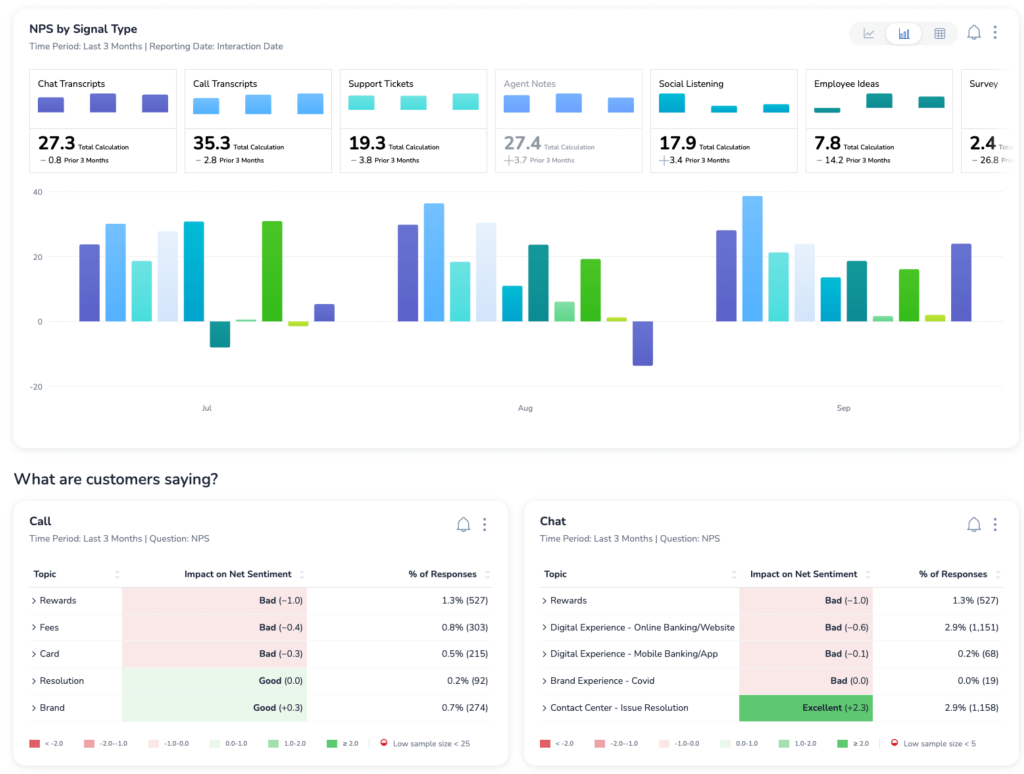
Sentiment sits on top of a broader CX system here, tying together every touchpoint with journey mapping and predictive risk scoring, so a negative comment doesn’t just sit in a dashboard; it gets mapped to the exact point in the customer journey where things went wrong.
The predictive intelligence layer is the part that stands out to me most; it flags accounts likely to churn before the NPS score actually drops, which gives a team time to act instead of just reporting on what already happened.
It’s built for large organizations running feedback programs across many touchpoints at once, not a single-channel setup.
Pros:
- AI-driven sentiment and text analytics across touchpoints
- Voice of customer collection from web, mobile, in-store, and support
- Journey mapping shows me where in the experience sentiment actually turned negative
- Predictive risk scoring flags accounts likely to churn before the NPS score drops
- Consolidates many channels into one system
Cons:
- Requires real implementation time and resources
- Built for large organizations, not smaller teams
Rating: 4.5/5 (Capterra)
Pricing: Custom quote
10. Amazon Comprehend: Best for Teams Already Running on AWS
A data engineer friend of mine picked Amazon Comprehend mainly because, in his words, it plays nicely with everything else already in AWS.
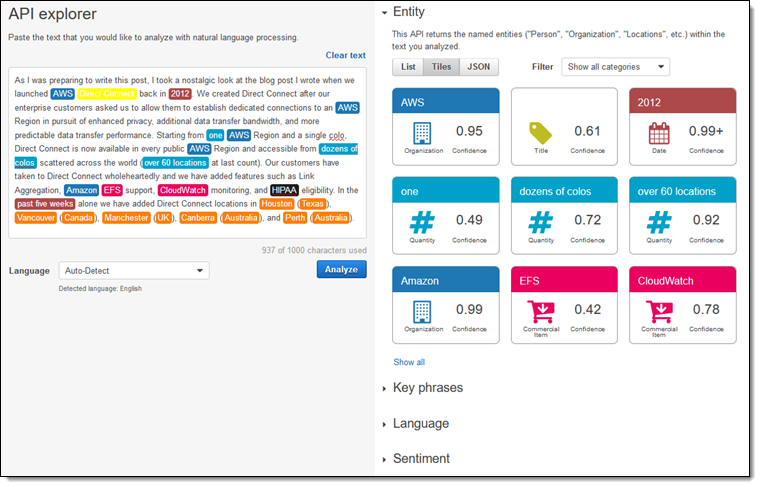
To me it reads less like a standalone sentiment tool and more like an NLP API you drop into an existing data pipeline, sentiment, entity, and key phrase extraction all come back through the same call you’re already making to S3, Redshift, or Lambda.
What I like about it for a technical team is the targeted sentiment feature, it can isolate tone about one specific subject inside a longer piece of text instead of scoring the whole thing as one number.
Pay-per-use pricing also means a team can start small and only pay for what actually gets processed, rather than committing to an enterprise contract upfront.
Pros:
- API-based sentiment analysis with entity, key phrase, and topic extraction
- Targeted sentiment let me isolate the tone about one feature instead of the whole review
- Tight integration with S3, Redshift, and Lambda
- Pay-per-use pricing lets me start small and only pay for what I actually process
- Scales easily for large feedback volumes
Cons:
- Developer-oriented, not built for non-technical teams
- No built-in dashboards or survey workflows
Rating: Not yet rated on Capterra (G2: 4.8/5)
Pricing: Pay-per-use, from approximately $0.0001 per unit (up to 10M units)
The Top 3 Sentiment Analysis Tools That Should Be On Your Shortlist
Qualaroo: My Pick for Product and UX Teams
I’d put Qualaroo at the top of this list when sentiment needs to happen inside the product experience itself, not after the fact. Nudge surveys capture feedback the moment a user is engaged, and native AI Sentiment Analysis handles open-ended responses without anyone manually tagging a comment. Pair that with the Identify API and I know exactly which account a comment came from. According to Qualaroo’s case study with Hootsuite, this combination helped drive a 16% lift in conversion at 98% statistical significance.
Enterpret: My Pick for Multi-Channel Feedback
I’d reach for Enterpret when feedback is scattered across support tickets, app reviews, community posts, and surveys, and nobody has stitched it together yet. It centralizes everything and uses a customer context graph to tie every sentiment score back to the actual account it came from, a step most social listening tools skip. The adaptive taxonomy also tags themes automatically instead of someone building a category list by hand. If your feedback lives in five different tools right now, this is the one I’d try first.
Sprout Social: My Pick for Social-Driven Teams
If most of your sentiment signals come from social channels, this is the one I’d choose over a dedicated listening tool. Publishing, engagement, and sentiment analysis sit in the same dashboard, so I’m not switching between four different apps to react to what people are actually saying. It automatically categorizes mentions across X, Facebook, Instagram, LinkedIn, and review sites by sentiment and topic, which means I can see a shift in tone the same day it happens, not after a weekly report lands in my inbox.
Evaluation Criteria
The evaluation of the sentiment analysis tools featured in this article follows an unbiased, systematic approach that ensures a fair, insightful, and well-rounded review. This method employs six key factors:
User Reviews and Ratings: I pulled ratings and reviews from Capterra, since ground-level feedback from verified users tells me more about how a tool holds up in daily use than any spec sheet. Where the review count was thin, like Clootrack’s 5.0 on 16 reviews, I treated the score as a strong early signal rather than a settled verdict.
Essential Features and Functionality: I evaluated each tool against what actually matters for sentiment work, how deep the analysis goes beyond a simple positive or negative score, and how well it handles the specific feedback channel it’s built for.
Ease of Use: I looked at how quickly I could go from sign-up to a real sentiment score. Qualaroo and ProProfs Survey Maker got me there the same day; several enterprise platforms needed a demo and onboarding first.
Customer Support: I factored in what I could learn about onboarding quality and ongoing support, especially for tools with a real learning curve, like Talkwalker and Brandwatch, where good support makes or breaks adoption.
Value for Money: I compared what each tool actually charges against what it unlocks. Published, self-serve pricing from Qualaroo and ProProfs Survey Maker made this easy to judge; custom-quoted enterprise tools made it much harder.
Personal Experience and Expert Input: Where I’ve used a tool directly, that’s noted in its listing above. For the rest, I leaned on what people I trust, product ops leads, CX managers, and agency contacts, told me about running these tools day to day, and framed those as secondhand observations, not firsthand claims.
FREE. All Features. FOREVER!
Try our Forever FREE account with all premium features!
Which Tool Fits Your Feedback Channel?
| Your Main Feedback Channel | Tool To Start With |
| In-app or website micro-surveys | Qualaroo |
| Structured, standalone surveys | ProProfs Survey Maker |
| Feedback scattered across many channels | Enterpret |
| High-volume reviews and journey analytics | Clootrack |
| Enterprise CX tied to revenue outcomes | Chattermill or Medallia |
| Public social and brand monitoring | Brandwatch or Talkwalker |
| Social publishing plus sentiment | Sprout Social |
| Existing AWS data pipeline | Amazon Comprehend |
What Should You Watch Out For With Sentiment Analysis Tools?
Even the best AI models still misread sarcasm and polite frustration, in my experience. A comment like “great, another update nobody asked for” reads as positive to a keyword-based model but negative to any human reader. I treat every sentiment score as a starting point, not a verdict.
Sentiment scores also mean little to me without context. If a survey response comes from an anonymous visitor, I can’t tell whether the negative sentiment came from a first-time user or a longtime customer having a bad day.
The same goes for knowing why sentiment shifted. A negative comment about a checkout page means more to me when I can see the Session Recording of that exact visit or the Heatmap showing where people got stuck. Sentiment tells me how someone felt, behavior tells me why.
Sentiment analysis only earns its keep, for me, when it changes what I do next, not when it sits in a dashboard nobody opens.
If most of your feedback already lives in a survey, an NPS campaign, or an in-app moment, that’s exactly where Qualaroo‘s Nudge and AI Feedback Analysis are built to work, scoring sentiment the moment someone answers, not weeks later.
Frequently Asked Questions
Can ChatGPT do sentiment analysis?
Yes. ChatGPT can classify text as positive, negative, neutral, or mixed, and it handles nuance reasonably well for small batches. In my experience, it works fine for a few hundred responses at a time. Once I need continuous scoring, customer-record joins, and dashboards my whole team can use, a dedicated tool becomes worth the switch.
What is the best AI tool for sentiment analysis?
There's no single best tool, in my view, it depends on your feedback channel. In-app survey feedback fits Qualaroo, multi-channel product feedback fits Enterpret, and public social sentiment fits Brandwatch or Talkwalker. I'd match the tool to where the feedback actually lives instead of picking by feature count alone.
Can you do sentiment analysis in Excel?
Yes, with add-ins or a formula that flags keyword sentiment, though accuracy stays low since Excel can't understand context, sarcasm, or mixed emotion. I've used it for a quick, rough pass on a small dataset. Anything beyond a few hundred rows, I've found it's faster and more accurate in a dedicated tool.
How is NLP used in sentiment analysis?
Natural language processing breaks text into tokens, identifies entities and phrases, and scores tone using models trained on labeled examples. Older, rule-based NLP relies on keyword dictionaries and misses context easily. Modern LLM-based NLP reads full sentences and surrounding context, which is why it catches sarcasm and mixed sentiment far more often in my testing.
Why do sentiment analysis tools struggle with sarcasm?
Sarcasm often uses positive words to express a negative feeling, like calling a slow support response "great." Most models still lean on word-level patterns, so they read the positive word before catching the actual tone. Even advanced models fine-tuned on sarcasm markers still fail on subtle or industry-specific phrasing I've come across.
Is a sentiment score enough to make a product decision?
Not on its own, in my experience. A sentiment score tells me how someone felt, not why or what to fix. I pair it with usage data, customer segment, and behavioral context, like Heatmaps or Session Recordings, before I act. Sentiment is one input into a decision for me, not the decision itself.
Do I need a different tool for social sentiment versus survey sentiment?
Usually, yes, at least in my experience. Tools built for public social and brand monitoring, like Brandwatch or Talkwalker, aren't designed to run in-app surveys or NPS campaigns, and survey-first tools like Qualaroo aren't built to scan the open web. I'd pick based on where your feedback is actually collected.
FREE. All Features. FOREVER!
Try our Forever FREE account with all premium features!

 We'd love your feedback!
What did you like & how can we make it even better?
 Thanks for your feedback!
 Ask Your Question
Have a question? Get expert help to make your decision easier.