Microsoft Clarity’s pitch is simple: unlimited heatmaps and session recordings for $0. That’s rare in this category, and it’s exactly why so many teams start there.
Nobody leaves Clarity over price. They find other Microsoft Clarity alternatives because of the ceiling. Clarity shows you where someone clicked. It never asks them why they left.
And pulling more than 3 days of history via the API means babysitting a cron job every single day.
I’ve tested 10 Microsoft Clarity alternatives against that exact ceiling, including Qualaroo. This list breaks down which one closes the specific gap you’re actually running into: a survey layer, deeper reporting, or just a real person to call when something breaks.
Why Are Teams Looking for Microsoft Clarity Alternatives?
None of this shows up as a pricing complaint. It’s a ceiling pattern instead, the specific things Clarity’s free scope was never built to do. You only see it once you read past the strong 4.8 rating into what reviewers actually run into.
No Way to Ask Why: Clarity is purely behavioral, including heatmaps, scroll depth, and session recordings. There’s no survey, Net Promoter Score, or CSAT capability built in, so a team still needs a second tool the moment it wants to ask a visitor a direct question.
The API Is Genuinely Restrictive: The free Data Export API caps out at 10 requests a day and only looks back three days. Build a historical dashboard, and you’re pulling data every single day without fail, or losing that day permanently.
No Dedicated Support Line: Being a free Microsoft tool means there’s no account rep or support tier to escalate to when something breaks, a real gap compared to paid tools with a team on the other end.
Recording Sync Issues Occur Occasionally: More than one reviewer notes that session duration sometimes doesn’t match the actual recording, a minor but recurring quality complaint.
It’s Web-First: Clarity’s core strength is website heatmaps and recordings; native in-app mobile coverage isn’t where the tool’s depth lives, which matters for teams running a mobile product alongside their site.
The Top 10 Microsoft Clarity Alternatives
Ten Microsoft Clarity alternatives, one table. Here’s how they stack up in terms of price and rating before I break each one down individually.
| Tool | Best For | Starting Price | User Rating |
| Qualaroo | Real-time user insights in-app and on your website using contextual, AI-powered micro-surveys | Free plan; paid from $19.99/mo | 4.7/5 |
| Hotjar | Heatmaps and session recordings alongside feedback widgets | Free plan; paid from $39/mo | 4.6/5 |
| Lucky Orange | Bundled heatmaps, recordings, and live chat | Paid from $32/mo | 4.7/5 |
| FullStory | Deep session replay and frustration-signal detection | Free plan; paid quote-only | 4.6/5 |
| Smartlook | Session recordings for web and native mobile apps | Paid from $29/mo | 4.7/5 |
| Zoho PageSense | Budget-friendly heatmaps tied to the Zoho ecosystem | Free plan; paid from $12/mo | 4.5/5 |
| Mouseflow | Automated heatmaps with funnel and form analytics | Free plan; paid from $25/mo | 4.7/5 |
| Contentsquare | Enterprise-scale experience analytics | Paid from $39/mo | 4.8/5 |
| Crazy Egg | Heatmaps bundled with built-in A/B testing | Paid from $29/mo | 4.4/5 |
| Matomo | Privacy-first, GDPR-compliant web analytics | Free plan; paid from $26/mo | 4.7/5 |
Here’s the full breakdown of the best Microsoft Clarity alternatives:
1. Qualaroo: Best for Real-Time User Insights In-App and On Your Website Using Contextual, AI-Powered Micro-Surveys
Qualaroo is one of those Microsoft Clarity alternatives I reach for when watching a behavior isn’t enough, I need to know why it happened. The Nudge™ shows up right when it matters: exit intent, a rage click, a stall on a pricing page.
It asks the one question a heatmap can only imply. Native AI survey analysis reads through the open-text answers automatically, so I’m not stuck interpreting a scroll map on my own.
Question branching means a frustrated visitor and a happy one never see the same follow-up.
Teams coming from a pure behavioral tool notice this shift fast; the dashboard stops being a puzzle and starts including the visitor’s own explanation.
I’ve seen teams run this alongside Clarity rather than instead of it, letting Clarity handle raw behavioral volume while Qualaroo asks the follow-up question on the sessions that actually matter.
Pros:
- AI Survey Creator drafts a full Nudge from a prompt, no manual setup required
- Question branching and skip logic so respondents only see relevant follow-ups
- Native AI Customer Feedback Analysis, including AI Sentiment Analysis and word cloud generation for open-text responses
- Heatmaps and Session Recordings show what a user was doing right before they responded
- Identify API ties responses back to a real user by email or customer ID
- Nudge for Prototype works on Figma, Adobe XD, and InVision before a product ships
- Multilingual surveys in 100+ languages
- Advanced targeting by behavior, URL, exit intent, and custom user properties
- iOS and Android SDK for native in-app surveys
- Salesforce, HubSpot, and Slack integrations for CRM-connected feedback workflows
Cons:
- No downloadable or on-premise version, an internet connection is required to use the tool, in the same way Clarity itself works
- Dedicated onboarding and account manager support is generally reserved for paid plans
How Qualaroo Compares to Microsoft Clarity: I’d put it simply: Qualaroo picks up exactly where Clarity’s behavioral data stops, adding the survey layer, AI sentiment analysis, and question branching that Clarity was never built to include. It doesn’t match Clarity’s price tag; free is a hard number to beat, so the case for switching rests entirely on needing that missing “why” layer badly enough to pay for it.
User Rating: 4.7/5 (Capterra)
Pricing: Free plan available, up to 50 responses with all premium features. Essentials at $19.99/month, Business at $49.99/month, and Enterprise from $149.99/month.
I like citing Twilio here, since the company uses Qualaroo specifically to ask targeted, behavioral questions during research rather than guessing at intent from analytics alone. That’s the exact gap a heatmap can’t close on its own; knowing someone hesitated isn’t the same as knowing why.
2. Hotjar: Best for Heatmaps and Session Recordings Alongside Feedback Widgets
Coming from Clarity, Hotjar is the most natural next step. It covers the same behavioral ground, heatmaps, recordings, and scroll depth, and adds the survey and feedback widgets that Clarity skips entirely.
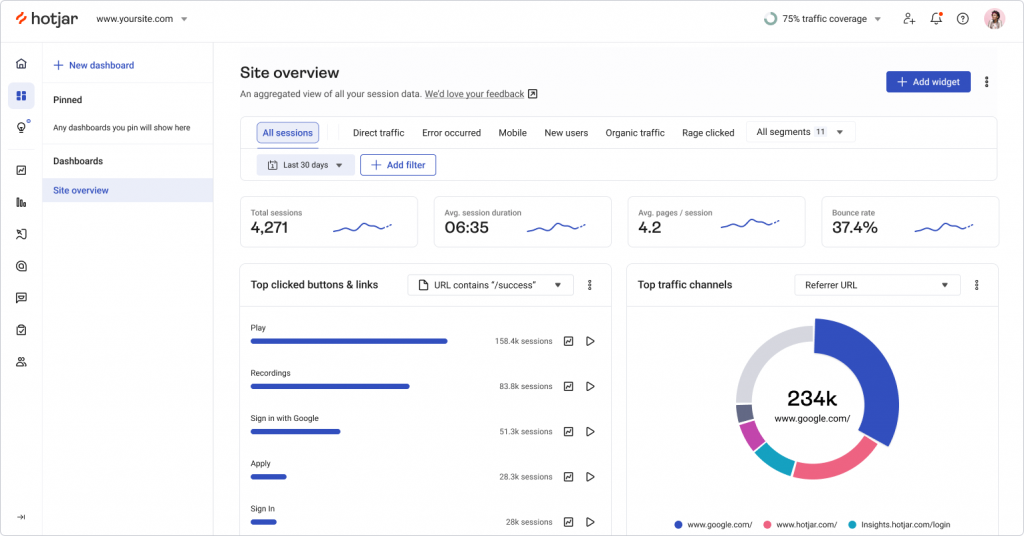
One tracking script handles both sides, so there’s no need to wire in a second vendor. The free tier caps daily sessions, a real step down from Clarity’s unlimited recording, but the paid tiers unlock reporting depth and integrations, Slack, Zapier, and Google Analytics, that Clarity’s read-only API can’t touch.
If surveys bolted onto the same behavioral picture is the goal, this is the shortest path there.
I like the feedback widget specifically, a small persistent tab most visitors never notice until they need it, and it tends to surface more useful bug reports than a dedicated support form.
Pros:
- Heatmaps and session recordings alongside on-site surveys and feedback widgets
- Simple, published per-user pricing
- Fast setup with a single tracking script
- Large integration library, including Slack, Zapier, and Google Analytics
Cons:
- Free tier caps daily sessions, unlike Clarity’s uncapped recording volume
- Survey targeting logic is lighter than dedicated feedback platforms
How Hotjar Compares to Microsoft Clarity: Hotjar and Clarity cover nearly identical behavioral ground, but Hotjar adds the survey and feedback layer Clarity leaves out entirely, at the cost of Clarity’s unlimited, uncapped free recording volume.
User Rating: 4.6/5 (Capterra)
Pricing: Free plan available. Paid plans start at $39/month.
3. Lucky Orange: Best for Bundled Heatmaps, Recordings, and Live Chat
Lucky Orange earns its spot for one reason: live chat sits right next to the heatmaps and recordings. Watch a session in real time, then actually reach out mid-visit.
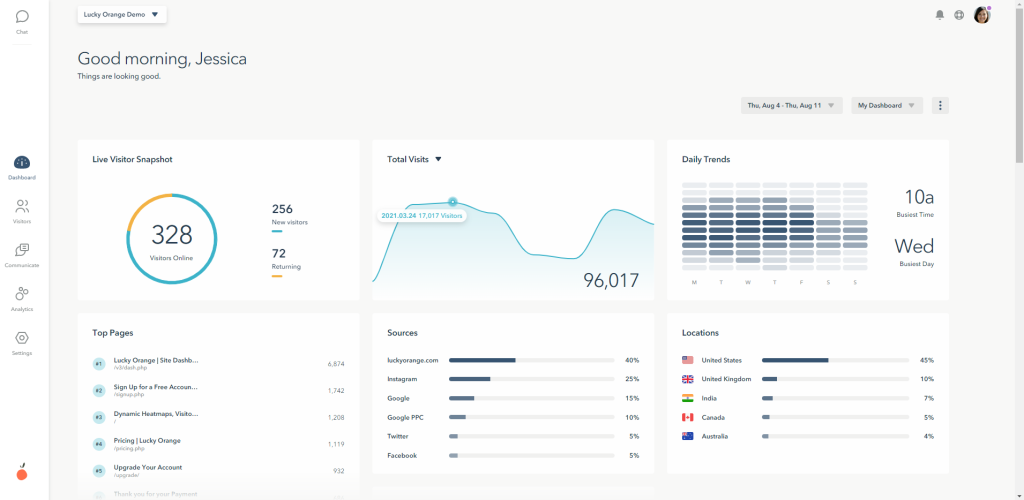
On-site surveys are basic but present, another gap Clarity leaves open. Everything runs on one flat-rate plan rather than Clarity’s free-but-limited API, which matters when you want predictable, exportable reporting instead of a daily data-pull routine.
Smaller e-commerce sites tend to prefer having chat, recordings, and lightweight surveys under one login rather than stitching Clarity into a separate chat tool. Support teams like jumping from a stuck visitor straight into a live conversation without switching tabs.
It’s a genuinely simple setup, too, no separate SDK required, which matters for a team that doesn’t want a developer involved just to get a heatmap running.
Pros:
- Heatmaps, recordings, live chat, and on-site surveys bundled into one flat-rate plan
- Easy setup with no separate SDK needed for web
- Conversion funnel reporting included
- Live chat lets a team message a visitor while a session is still active
Cons:
- Less suited to SaaS products that need mobile in-app targeting
- Survey logic and branching are more basic than dedicated feedback tools
How Lucky Orange Compares to Microsoft Clarity: Lucky Orange matches Clarity’s core heatmap-and-recording job and then bundles in live chat and basic surveys Clarity doesn’t have at all, trading Clarity’s free price for a flat monthly one and a much less restrictive data-export experience.
User Rating: 4.7/5 (Capterra)
Pricing: Paid plans start at $32/month.
4. FullStory: Best for Deep Session Replay and Frustration-Signal Detection
I send teams to FullStory once they’ve hit Clarity’s API ceiling and need real, queryable historical data instead of a daily export chore.
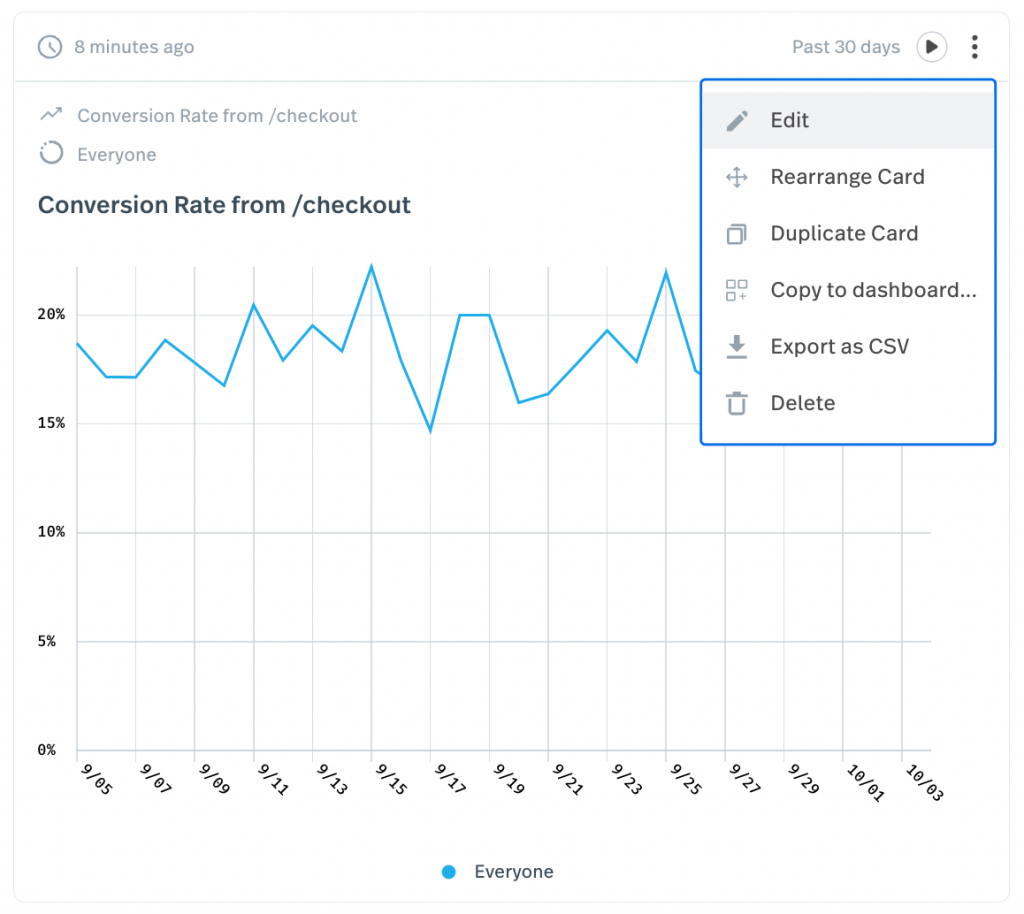
Session search pulls up every recording matching a specific error or rage click instantly, no scrubbing through footage required. Automatic frustration-signal detection flags the sessions worth watching first.
Engineering teams lean on this as much as product teams do, mostly to reproduce a bug nobody described clearly in a ticket. The privacy and PII controls are a real step up from what a free, general-purpose tool typically offers.
I’d also flag API access as a genuine strength here, pulling behavioral data into a separate BI tool or internal dashboard without approaching Clarity’s daily request limit.
Pros:
- Zero-instrumentation session capture with rage-click and frustration signals
- Searchable session index instead of scrubbing through recordings manually
- Generous free tier, up to 30,000 sessions per month
- API access for pulling behavioral data into other systems
Cons:
- No dedicated survey builder as a core feature
- Pricing scales with session volume and can rise quickly on high-traffic products
How FullStory Compares to Microsoft Clarity: FullStory solves the exact API and historical data limitations Clarity reviewers cite most often, at the cost of Clarity’s genuinely unlimited free session recording once a team’s traffic outgrows FullStory’s own free tier.
User Rating: 4.6/5 (Capterra)
Pricing: Free plan available, up to 30,000 sessions/month. Paid plans are quote-only.
5. Smartlook: Best for Session Recordings for Web and Native Mobile Apps
Smartlook is my pick once a team outgrows Clarity’s web-only depth and needs the same session recording and heatmap coverage on a native mobile app, too.
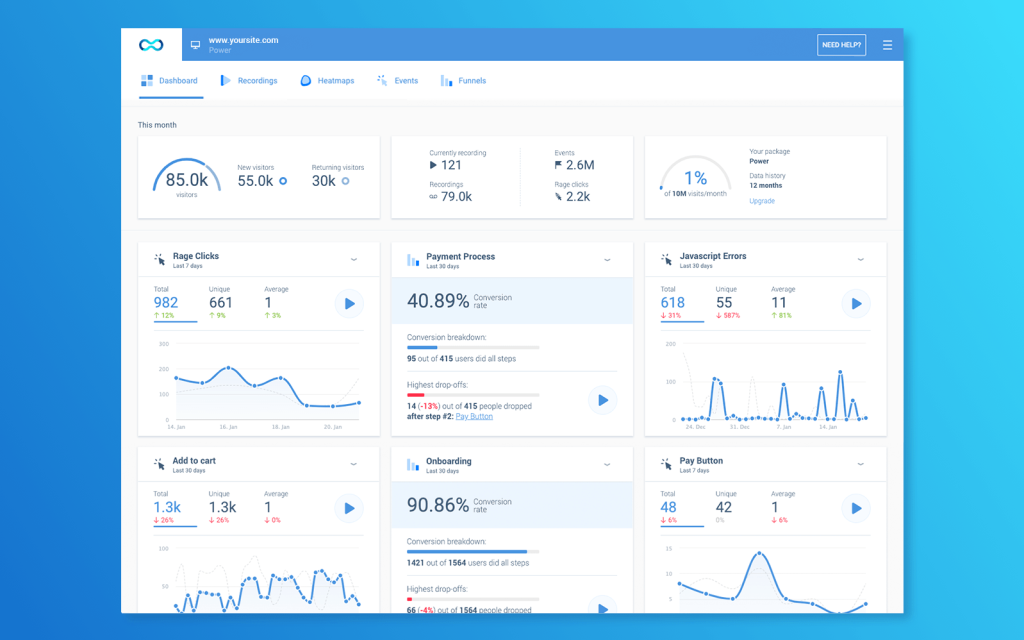
One dashboard covers both; mobile isn’t an afterthought here, the way it is with Clarity. Funnel and event tracking come built in, so you jump straight to sessions tied to a specific action instead of watching footage in order.
The published per-user pricing is refreshingly clear next to the quote-only tools on this list, even if it’s a real cost against Clarity’s zero.
Teams shipping a website and an app together land here because juggling two separate tools gets old fast. Setup is a single script on the web side too, so there’s no separate SDK to manage just to get the basic recording layer running.
Pros:
- Session recordings and heatmaps for both web and native mobile apps
- Funnel and event tracking are built in
- Published per-user pricing
- Fast integration via a single script
Cons:
- Feedback and survey tools are lighter than dedicated research platforms
- Some reviewers note occasional recording sync issues
How Smartlook Compares to Microsoft Clarity: Smartlook picks up specifically where Clarity’s mobile coverage runs thin, extending the same recording and heatmap approach to native apps, a gap Clarity hasn’t closed.
User Rating: 4.7/5 (Capterra)
Pricing: Paid plans start at $29/month.
6. Zoho PageSense: Best for Budget-Friendly Heatmaps Tied to the Zoho Ecosystem
Zoho PageSense is the closest thing here to Clarity’s own budget instinct: a genuinely low starting price that includes heatmaps, session recordings, and funnel analysis.
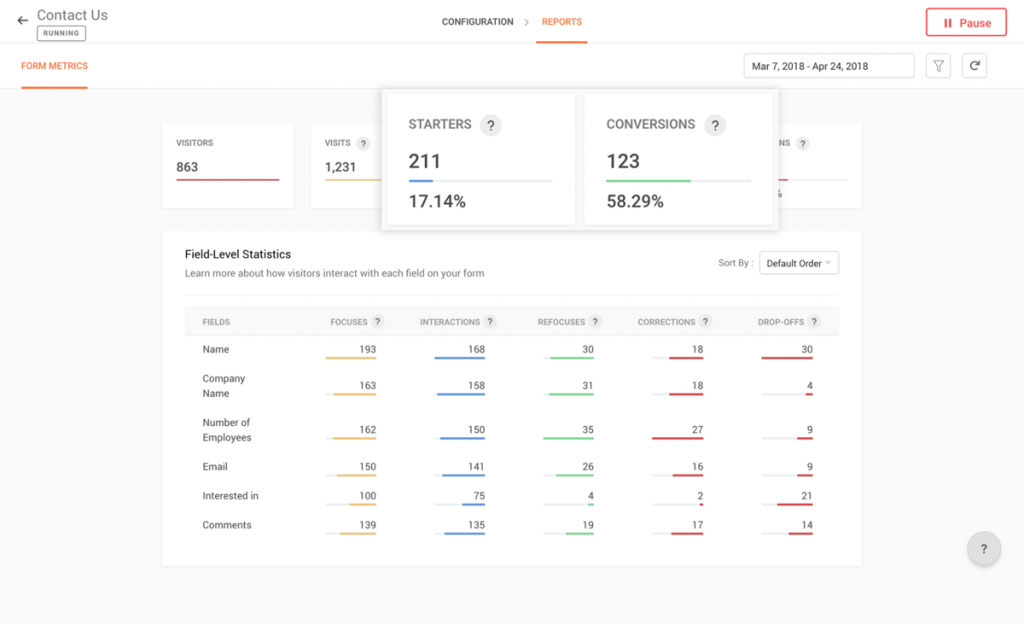
It pulls ahead of Clarity with a survey and personalization layer bolted on top. Now you can watch behavior and ask a question about it, all inside one tool. Native ties into the wider Zoho ecosystem, CRM, campaigns, and forms are a real win for anyone already running other Zoho products.
Setup stays simple enough that a marketing team configures a heatmap without pulling in a developer, the same low-friction spirit Clarity itself runs on.
I’d flag the personalization piece as the real differentiator; it lets a team show different content to different visitor segments based on the same behavioral data the heatmaps are already collecting.
Pros:
- Heatmaps, session recordings, and funnel analysis in one dashboard
- On-site surveys and personalization are layered on top of behavioral data
- Native integration with the wider Zoho ecosystem (CRM, Campaigns, Forms)
- Low entry price relative to most paid tools on this list
Cons:
- Feature depth thins out quickly for teams outside the Zoho ecosystem
- Smaller review base than most other tools on this list
How Zoho PageSense Compares to Microsoft Clarity: Zoho PageSense adds the survey and personalization layer Clarity skips, at a genuinely low price, though a team completely outside the Zoho ecosystem won’t see the same integration payoff.
User Rating: 4.5/5 (Capterra)
Pricing: Free plan available. Paid plans start at $12/month.
7. Mouseflow: Best for Automated Heatmaps with Funnel and Form Analytics
Mouseflow takes Clarity’s automatic-heatmap idea and pushes it further: six heatmap types generated for every page, plus form analytics that flag exactly which field is killing conversions. Funnel reports layer on top, something Clarity’s simpler interface never attempts.
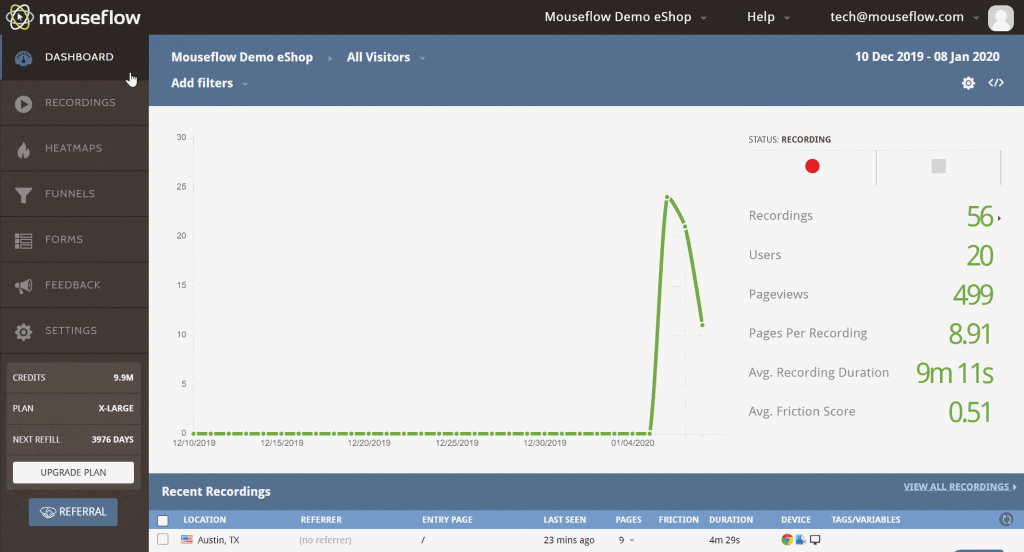
Recordings get tagged and organized, a real win once you have more sessions than anyone has time to watch.
Pricing stays genuinely low at entry, and a free plan exists for testing the waters, though nowhere near as generous as Clarity’s uncapped volume.
Marketing teams chasing a conversion problem reach for the form analytics first, it points straight at the losing field instead of leaving that to guesswork.
Pros:
- Six heatmap types are generated automatically for every page
- Form analytics flag which specific field is losing conversions
- Funnel reports built in, layered on top of session recordings
- Free plan available alongside a genuinely low-cost entry tier
Cons:
- Some reviewers cite friction around cancellations and refund requests
- Recording volume on lower tiers falls well short of Clarity’s uncapped approach
How Mouseflow Compares to Microsoft Clarity: Mouseflow goes further than Clarity on form and funnel analysis, specifically, the exact “why did this form fail” layer of insight that Clarity’s pure heatmap approach doesn’t reach, at a price that still undercuts most of this list.
User Rating: 4.7/5 (Capterra)
Pricing: Free plan available. Paid plans start at $25/month.
8. Contentsquare: Best for Enterprise-Scale Experience Analytics
I point teams to Contentsquare once they’ve decided Clarity’s free scope was never going to cut it: enterprise-grade session analysis, zone-based heatmaps, AI-driven insights that flag which UX issues are actually costing revenue.
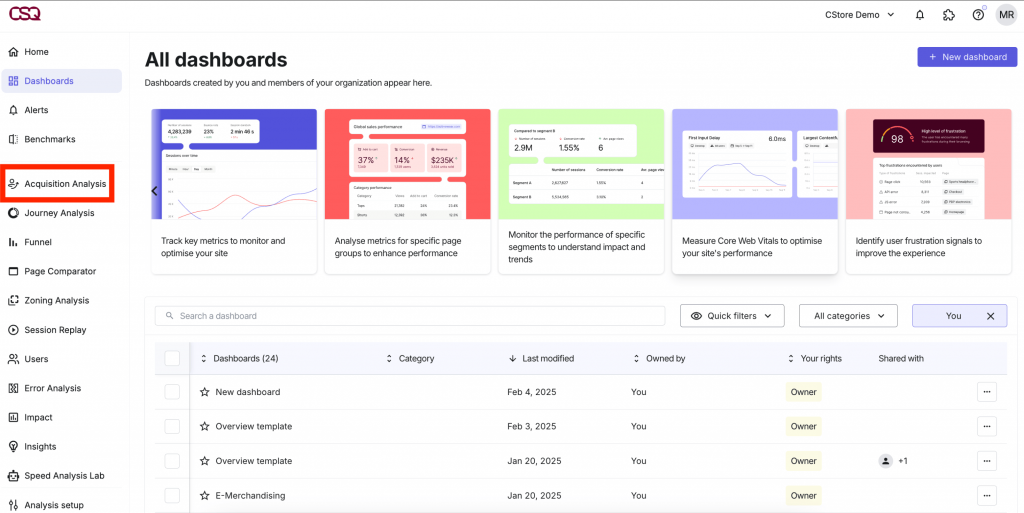
The depth here goes well past anything a free tool attempts, journey analysis across an entire site, not page by page. That depth comes with real cost and a real onboarding curve.
This isn’t a drop-in Clarity replacement; it’s a different tier of tool. Large e-commerce and enterprise teams already budgeting for a dedicated CX analytics function get full value here; the AI surfaces patterns a human scanning heatmaps would likely miss.
I wouldn’t recommend this as a first move for anyone still comparing free tools; it’s built for a team that already knows Clarity was never going to be the long-term answer.
Pros:
- Zone-based heatmaps and AI-driven insights that flag revenue-impacting UX issues
- Journey analysis across an entire site, not just page by page
- Enterprise-grade session replay with advanced segmentation
- Dedicated onboarding and account support included
Cons:
- High cost and implementation time relative to a free tool like Clarity
- Overkill for a small site that just wants basic heatmaps
How Contentsquare Compares to Microsoft Clarity: Contentsquare operates a full tier above Clarity in analytical depth and price, making it the right move only for a team whose behavioral analytics needs have genuinely outgrown a free tool.
User Rating: 4.8/5 (Capterra)
Pricing: Paid plans start at $39/month.
9. Crazy Egg: Best for Heatmaps Bundled with Built-In A/B Testing
Crazy Egg pairs heatmaps with built-in A/B testing, a combination that Clarity doesn’t attempt. The confetti view breaks click data down by traffic source and device, so you see not just that visitor segments behave differently but exactly how.
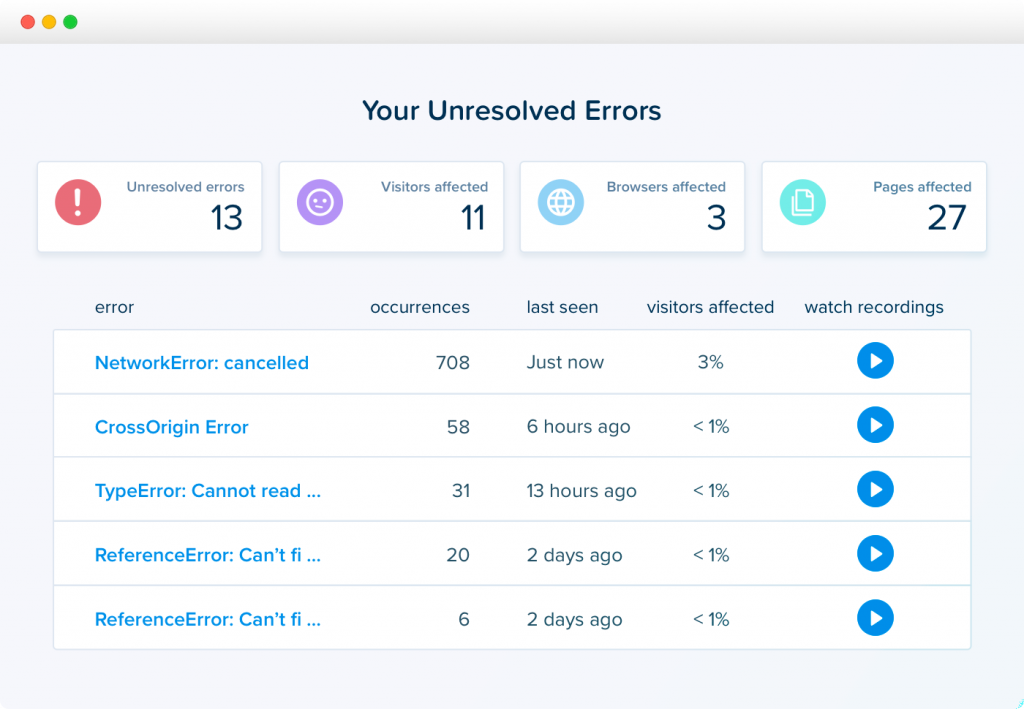
Setup stays fast enough to launch a test without engineering help, which matters for smaller teams with no dedicated conversion specialist.
Reviewers consistently praise the customer support, a real contrast to Clarity’s lack of any support tier at all. If you’re already running a heatmap and just want to layer testing on top without adopting a whole new platform, this is the simplest next step.
I’d add that the A/B testing goals tie directly back to the same heatmap data, so a test isn’t run in isolation from the behavioral picture that prompted it in the first place.
Pros:
- Heatmaps paired with built-in A/B testing in one tool
- Confetti view segments, click data by traffic source and device
- Fast setup with no engineering help required to launch a test
- Responsive customer support, consistently praised in reviews
Cons:
- Value-for-money rated lower than most other tools on this list by its own reviewers
- Heatmap depth trails behind more specialized tools like Mouseflow or Contentsquare
How Crazy Egg Compares to Microsoft Clarity: Crazy Egg adds a real A/B testing workflow. Clarity has no version of it at all, though its own reviewers rate value for money lower than almost anything else on this list, worth weighing against Clarity’s price of zero.
User Rating: 4.4/5 (Capterra)
Pricing: Paid plans start at $29/month.
10. Matomo: Best for Privacy-First, GDPR-Compliant Web Analytics
Matomo is my pick for a team that likes Clarity’s price point but wants full data ownership instead of handing everything to Microsoft.
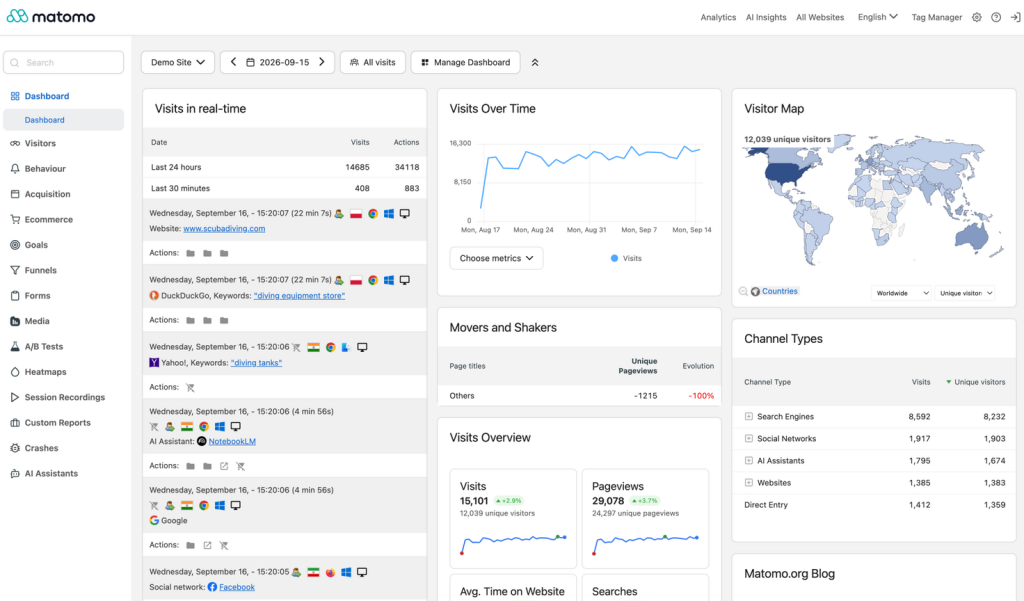
It’s open-source and self-hostable; every recording and heatmap stays on infrastructure you actually control, a real answer to the GDPR and data-residency questions Clarity’s cloud-only setup raises. Web analytics, heatmaps, and session recordings all live in one platform, with no third-party cookie dependencies.
The trade-off is real: self-hosting means someone owns the maintenance, which is a different cost than a subscription fee. Teams in regulated industries or under strict data-residency rules land here first; the self-hosted option settles those questions outright.
I’d point out the cloud-hosted option too, for a team that wants the data-ownership story without actually managing a server, a middle ground between Clarity’s convenience and full self-hosting.
Pros:
- Open-source and self-hostable, with full data ownership and control
- Web analytics, heatmaps, and session recordings in one platform
- No third-party cookie dependency, strong fit for GDPR-sensitive teams
- Cloud-hosted option available for teams that don’t want to self-manage
Cons:
- Self-hosting requires real technical maintenance, a different cost than a subscription
- Interface and reporting feel less polished than commercial competitors
How Matomo Compares to Microsoft Clarity: Matomo answers the data-ownership question. Clarity’s cloud-only, Microsoft-hosted setup raises concerns for privacy-conscious teams, at the cost of needing to self-host and maintain the thing yourself.
User Rating: 4.7/5 (Capterra)
Pricing: Free plan available. Paid plans start at $26/month.
Which Microsoft Clarity Alternative Should Be Your Top Pick?
Ten Clarity alternatives are a lot to sift through. If you read only one section, make it this one. These are the three I’d genuinely point a team toward, and each answers a different version of what Clarity’s free scope leaves out.
1. Qualaroo: Best Overall Pick if You Want to Know Why, Not Just Where
Qualaroo tops this list because it solves the one thing every other tool here, including Clarity itself, leaves as a gap: understanding why, not just what.
Essentials runs $19.99 a month, a real cost next to Clarity’s zero, but that buys contextual Nudge surveys, native AI Sentiment Analysis, and question branching, the entire “ask the visitor directly” layer, a pure behavioral tool was never built to include.
What you don’t get is Clarity’s literally uncapped recording volume. A high-traffic site on a tight budget might still want Clarity running alongside it rather than replacing it entirely.
2. Mouseflow: Best if You Want to Stay Close to Clarity’s Price Point
If you don’t want to move far from Clarity’s price point, Mouseflow is where I’d look next. A genuinely low-cost entry tier, a free plan of its own, and form analytics plus funnel reports, Clarity’s simpler interface never attempts. It’s the closest thing to a direct upgrade rather than a full switch.
The tradeoff is real: even Mouseflow’s generous tiers don’t match Clarity’s completely uncapped session recording, so a high-traffic site will still hit a volume ceiling.
If your complaint is “I can see people bounce off this form but not why,” this fixes it more directly than jumping straight to a survey tool.
3. Contentsquare: Best if You’ve Outgrown a Free Tool Entirely
If Clarity’s free scope was never going to be enough, Contentsquare is the honest answer. Enterprise-grade session analysis and AI-driven insights that flag revenue-impacting UX issues automatically.
This isn’t a lateral move from Clarity; it’s a different tier of tool, with a real implementation curve and a price to match.
This pick is for a team that’s already budgeted for a dedicated CX analytics function, not one still comparing free options for the first time. If “could Clarity ever have covered this” is genuinely no, skip the smaller upgrades on this list and go straight here.
How Did I Evaluate These Microsoft Clarity Alternatives?
I ranked these Microsoft Clarity alternatives on one question: Does the tool close the specific gap Clarity’s free scope leaves open? Not whether it can technically draw a heatmap, almost everything here already can.
Six factors carried the weight:
User Reviews / Ratings: I pulled every rating straight from Capterra and weighed review count against the star average, not just the number on its own. Clarity’s own 4.8 comes from a real base of 56 reviews, solid enough to trust, unlike Zoho PageSense’s thinner sample of 17, which I still included but held to a slightly higher bar of scrutiny before trusting the number equally.
Essential Features & Functionality: I checked whether the Microsoft Clarity alternatives add anything Clarity genuinely lacks, such as surveys, funnel analysis, A/B testing, or what matters more than how many heatmap types it draws. Heatmaps themselves are table stakes at this point, so I looked past them to whatever each tool actually does once you’re past the first scroll map.
Ease of Use: I looked at how much setup effort it takes to get a first heatmap or recording live, not just whether it’s technically possible without a developer. Clarity’s own appeal rests heavily on how little friction that takes, so anything on this list asking for a longer onboarding process needed to earn that with real depth elsewhere.
Customer Support: I checked whether a real support tier exists at all, and if it does, whether it’s included at the entry price or reserved for a higher one. Clarity, being free, doesn’t have one to compare against, which made this factor less about ranking support quality and more about whether a team switching from a free tool actually gets a human to call when something breaks.
Value for Money: I checked what a paid tier actually buys against Clarity’s zero, since that’s a harder bar to clear than beating another paid competitor. Every tool here has to justify a real cost against a free, genuinely capable option, so I weighed whether the added feature set was worth the jump, not just whether the price itself seemed fair on its own.
Personal Experience / Experts’ Opinions: Where I’ve used some of the Microsoft Clarity alternatives directly, that shaped what’s written here, including the small, practical details that don’t always show up in a spec sheet. Where I haven’t, independent review patterns filled the gap, weighted toward complaints and praise that showed up repeatedly rather than a single standout review either way.
FREE. All Features. FOREVER!
Try our Forever FREE account with all premium features!
How Do You Choose Microsoft Clarity Alternatives for Your Team?
Name the actual gap Clarity’s leaving open for you, not the one you assume matters most, and the table below points to the right pick directly.
| If Your Main Microsoft Clarity Gap Is… | Consider This Alternative |
| No way to ask visitors why, not just what | Qualaroo |
| Wanting surveys bolted onto the same behavioral data | Hotjar or Zoho PageSense |
| Needing live chat alongside recordings | Lucky Orange |
| Hitting the API’s historical data limit | FullStory |
| Needing native mobile app coverage | Smartlook |
| Wanting form and funnel analysis specifically | Mouseflow |
| Needing enterprise-scale session analysis | Contentsquare |
| Wanting A/B testing built in | Crazy Egg |
| Needing full data ownership or GDPR self-hosting | Matomo |
Behavior Data Answers “What?” It Never Answers “Why?”
All Microsoft Clarity alternatives on this list, Clarity included, can show you exactly where a visitor clicked and how far they scrolled before giving up.
None of the purely behavioral options can ask that visitor a direct question and get an answer back in their own words.
That’s why the right pick genuinely splits by what’s actually missing for you.
Want Clarity’s price point with a bit more reporting depth? That’s a different answer than deciding a free tool was never going to cover enterprise-scale analysis in the first place, which is why Mouseflow and Contentsquare both earned spots here despite sitting at opposite ends of that spectrum.
Data ownership is its own separate question, too, worth a look if GDPR or self-hosting is what’s actually pushing your search.
If closing the “why” gap is the actual goal, start with Qualaroo. The free plan lets you run a real Nudge survey on your own traffic and see what a heatmap alone never could.
Frequently Asked Questions
Is there a free alternative to Microsoft Clarity?
Qualaroo's free plan covers up to 50 responses with every premium feature included, a solid no-cost option if the goal is adding survey and AI sentiment analysis on top of what Clarity already gives away. Zoho PageSense, Mouseflow, and Matomo also offer usable free tiers for teams that want to stay behavioral-only.
Is Qualaroo better than Microsoft Clarity?
They solve different problems. Clarity is free and shows pure behavioral data, heatmaps and recordings, with no cap on volume. Qualaroo starts at $19.99 a month and adds the survey and AI sentiment analysis layer Clarity doesn't have, so "better" depends entirely on whether asking visitors questions directly matters to your team.
Why would a team pay for a Clarity alternative if Clarity is free?
Because free doesn't mean unlimited in every direction. Clarity's API caps at 10 requests a day with only three days of history, there's no survey capability, and no dedicated support line. Paid alternatives close one or more of those specific gaps, which is worth the cost for teams that actually hit them.
Which Microsoft Clarity alternative is closest in price?
Mouseflow and Zoho PageSense both stay close to Clarity's free-first approach, with real free tiers and low-cost paid plans starting at $25 a month and $12 a month respectively. Neither matches Clarity's completely uncapped recording volume, but both add features, like form analytics or on-site surveys, that Clarity doesn't offer.
Which alternative is best for enterprise-scale behavioral analytics?
Contentsquare is built for exactly that: zone-based heatmaps, AI-driven insights, and journey analysis across an entire site rather than page by page. It comes with real cost and implementation time that a small team, comparing free tools, probably doesn't need yet, so it's worth confirming the need is genuine before committing.
Does any Microsoft Clarity alternative support native mobile apps?
Smartlook is the strongest fit here, extending the same session recording and heatmap approach to native iOS and Android apps in one dashboard. Clarity's own depth is concentrated on the web, so a team running a mobile product alongside its site will likely need a second tool regardless of which alternative it picks.
What should I look for in a Microsoft Clarity alternative besides heatmaps?
Check whether a tool includes a survey or feedback layer (Clarity has none), how restrictive the data export or API access is, and whether a real support tier exists. Those three gaps are what actually drive most searches for an alternative in the first place.
Is there a privacy-focused or self-hosted alternative to Microsoft Clarity?
Matomo is the clear pick, open-source and self-hostable, so every recording and heatmap stays on infrastructure a team controls directly rather than routed through Microsoft's cloud. The trade-off is real: self-hosting means someone on the team owns ongoing maintenance, which is a genuine time cost, not just a technical detail.
FREE. All Features. FOREVER!
Try our Forever FREE account with all premium features!

 We'd love your feedback!
What did you like & how can we make it even better?
 Thanks for your feedback!
 Ask Your Question
Have a question? Get expert help to make your decision easier.