
With our new Intercom integration you now have the ability to pair Intercom messages with Qualaroo surveys. You’re able to associate an Intercom visitor ID with Qualaroo responses via our Identity API and open new Intercom messages based on survey answers with the ability to define prepopulated messages. BONUS: You can record survey events into Intercom! You now have a more complete picture of your customer so you can really cater to them.
Sign in to your Qualaroo account now to integrate with Intercom!
Integration is a breeze! It’s as simple as using our Identity API to pass the Visitor ID from Intercom to associate visitors with responses. Simply add the below snippet immediately after your main Qualaroo snippet:
<script>
_kiq.push([‘identity’, Intercom(‘getVisitorId’)]);
</script>
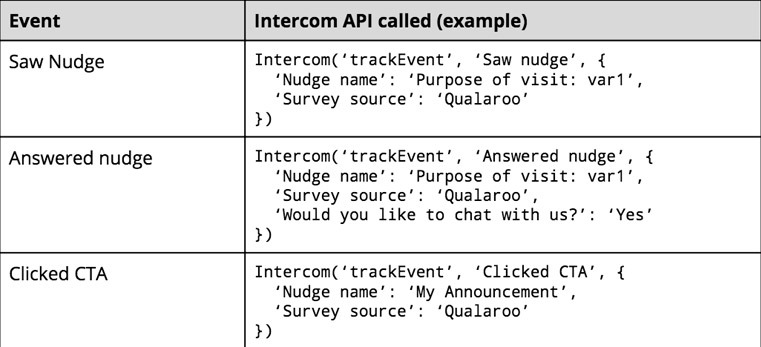
To track survey events inside of Intercom simply enable the integration under Site Settings in your account.
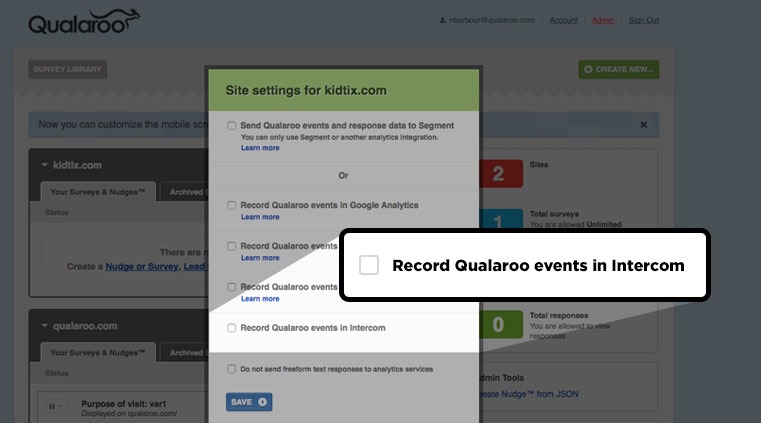
Use our handy dandy chart to see standard Qualaroo events and how they are passed to Intercom.
Opening a new Intercom message depending on a survey answer is super simple. Just like our other chat integrations, you can add this functionality by going to Add Step > Start a Chat > New Intercom Message.
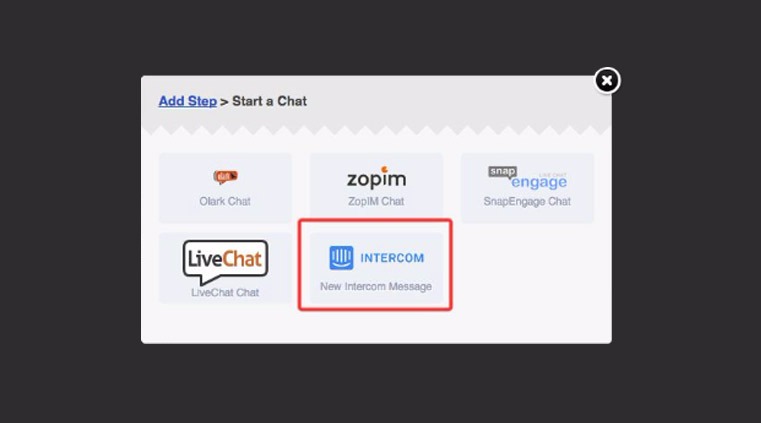
Once Intercom is added to the survey you can add a prepopulated message if you’d like. Then use our branching options to choose when the new message window opens. BOOM. Customer insights and engagement at its finest!
Sign in to your Qualaroo account now to integrate with Intercom!
FREE. All Features. FOREVER!
Try our Forever FREE account with all premium features!

 We'd love your feedback!
What did you like & how can we make it even better?
 Thanks for your feedback!
 Ask Your Question
Have a question? Get expert help to make your decision easier.