If you have priced out Sprig recently, you already know the number is not the confusing part. The confusing part is what the number actually includes.
Monthly Tracked Users are counted separately from study units, a Starter plan that jumps straight to a flat annual commitment, and an Enterprise tier that you can only reach through a sales call.
None of that tells you whether the tool still fits the job you actually need done: catching a user’s feedback the moment they hit friction.
I have spent time testing lighter, more transparent tools, including Qualaroo, against that exact job, and this list breaks down ten alternatives I think are worth comparing before you sign anything.
Why Are Teams Looking for Sprig Alternatives?
I did not find this in a single bad review. It is the pattern that shows up once you read past the star ratings into the specific complaints on G2, Capterra, and independent pricing breakdowns.
Billing Is Hard to Predict: Sprig counts Monthly Tracked Users separately from study units as survey responses, replay clips, and heatmap captures. A product’s audience growth alone can push a team toward a limit that nobody on the research side actually set.
Meaningful Pricing Sits Behind a Sales Call: Published pricing stops at the Starter plan. Anything past that requires a custom Enterprise quote, which slows down teams that just want a number to plan a budget around.
The Free-to-Paid Jump Is Steep: Moving off the free tier means committing to a flat annual plan. That is a hard sell for a small product team that only needs a handful of in-app pulse surveys a month.
The Platform Is Broader Than Most Teams Need: Sprig is built around a full research lifecycle, in-product surveys, long-form studies, prototype testing, and AI-driven synthesis, when a lot of teams are really just trying to catch a user mid-friction and ask one good question.
Feedback Stays Inside the Product: Sprig’s scope is in-product by design, so it does not pull in signals from review sites, support tickets, or social mentions the way a broader feedback stack can.
The Top 10 Sprig Alternatives
Here is how the ten alternatives on this list compare on price and rating before the full breakdowns below.
| Tool | Best For | Starting Price | Capterra Rating |
| Qualaroo | Lightweight, AI-powered, contextual in-app micro-surveys | Free plan; paid from $19.99/month | 4.7/5 |
| Hotjar | Heatmaps and session recordings alongside feedback | Free plan; paid from $39/month | 4.6/5 |
| Pendo | All-in-one product analytics, guides, and surveys | Free plan; paid quote-only | 4.5/5 |
| Survicate | Multichannel microsurveys with CRM sync | Free plan; paid from $114/month | 4.6/5 |
| Maze | Prototype and usability testing | Free plan; paid quote-only | 4.5/5 |
| FullStory | Deep session replay and frustration signals | Free plan; paid quote-only | 4.6/5 |
| UserTesting | Moderated and unmoderated panel research | Free plan; paid quote-only | 4.5/5 |
| Whatfix | Enterprise digital adoption and guided walkthroughs | Quote-only | 4.6/5 |
| Smartlook | Session recordings for web and mobile apps | Paid from $29/month | 4.7/5 |
| Lucky Orange | Bundled heatmaps, recordings, and on-site surveys | Paid from $32/month | 4.7/5 |
1. Qualaroo: Best for Capturing Real-Time User Insights In-App & on Your Website Using Contextual, AI-Powered Micro-Surveys
Qualaroo is what I reach for whenever the real question is not how do we run a research study, but why did this person just get stuck.
The Nudge™ triggers a small, non-intrusive survey based on real behavior, exit intent, time on a page, or right after onboarding, instead of waiting for a study someone has to design and launch.
The AI Survey Creator drafts a full Nudge from a plain-language prompt in under a minute, and native AI Sentiment Analysis turns open-text answers into themes you can act on the same day.
Teams running frequent product releases tend to lean hardest on the exit-intent trigger specifically, since that is the moment a user’s frustration is freshest and easiest to act on before they are gone for good.
Pros:
- AI Survey Creator drafts a full Nudge from a prompt, no manual setup required
- Question branching and skip logic so respondents only see relevant follow-ups
- Native Customer Feedback Analysis AI, including AI Sentiment Analysis and word cloud generation for open-text responses
- Heatmaps and Session Recordings show what a user was doing right before they responded
- Advanced targeting by behavior, URL, exit intent, and custom user properties
- Identify API ties responses back to a real user by email or customer ID
- Nudge for Prototype works on Figma, Adobe XD, and InVision before a product ships
- Multilingual surveys in 100+ languages
- iOS and Android SDK for native in-app surveys
- Salesforce, HubSpot, and Slack integrations for CRM-connected feedback workflows
Cons:
- There is no dark user interface for long hours or late nights.
- Dedicated onboarding/account manager services are available only in paid plans.
How Qualaroo Compares to Sprig: I’d sum it up this way: Qualaroo does the same core job Sprig is known for, catching a user in the moment, without the Monthly Tracked User and study unit billing or the sales call past the free tier. It does not replace Sprig’s long-form study design or panel-based research, so teams running multi-week, multi-method research programs will still find more depth in Sprig itself.
User Rating: 4.7/5 (Capterra)
Pricing: Free plan available, up to 50 responses with all premium features. Essentials at $19.99/month, Business at $49.99/month, and Enterprise from $149.99/month.
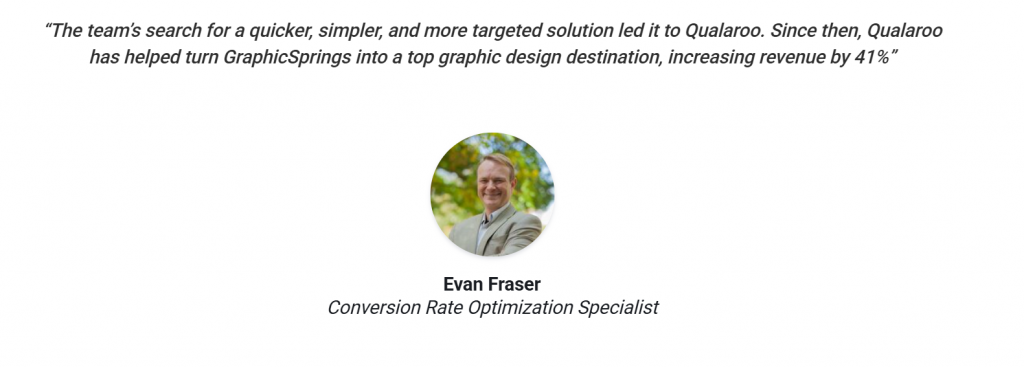
I like pointing to GraphicSprings here, a free logo-making platform that used Qualaroo to run exit-intent, UX, and demographic surveys directly on-site instead of relying on slower, less contextual methods to figure out why visitors were dropping off. Acting on that feedback led to a 41 percent increase in revenue, the same kind of quick, in-the-moment insight I’ve been making the case for throughout this list.
2. Hotjar: Best for Heatmaps and Session Recordings Alongside Feedback
Hotjar is the one most teams already know by name, and for good reason. Heatmaps and session recordings sit next to on-site surveys and feedback widgets in the same dashboard, so a single tracking script gives you both behavioral context and stated feedback.
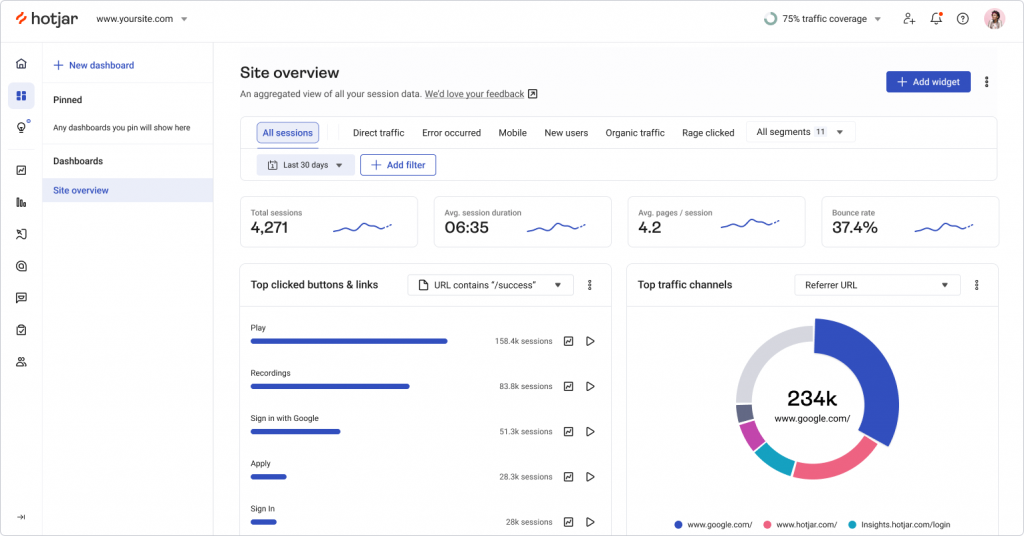
It is the tool I point smaller teams toward when they want visual evidence of where users struggle without committing to a full research platform, and the setup takes minutes rather than a sales cycle.
The feedback widget alone, a small persistent tab most visitors never notice until they need it, has surfaced more useful bug reports for teams I’ve worked with than a dedicated support form ever did.
Teams that have never run a dedicated feedback tool before tend to start here, since there is genuinely nothing new to learn beyond reading a heatmap.
Pros:
- Heatmaps and session recordings alongside on-site surveys and feedback widgets
- Simple, published per-user pricing
- Fast setup with a single tracking script
- Large integration library, including Slack, Zapier, and Google Analytics
Cons:
- Web-focused, with no dedicated mobile app SDK for native in-app surveys
- Survey targeting logic is lighter than dedicated feedback platforms
How Hotjar Compares to Sprig: I’d say Hotjar matches Sprig’s heatmap and session-recording layer at a fraction of the cost, but its survey and feedback tools stay simpler and do not carry Sprig’s AI-agent research framing or long-form study design.
User Rating: 4.6/5 (Capterra)
Pricing: Free plan available. Paid plans start at $39/month.
3. Pendo: Best for an All-in-One Product Experience Platform
I would call Pendo the closest thing on this list to Sprig’s own ambition. It bundles product analytics, in-app guides, and NPS or feedback surveys into a single platform, making it the pick for teams drawn to Sprig specifically because it does more than surveys alone.
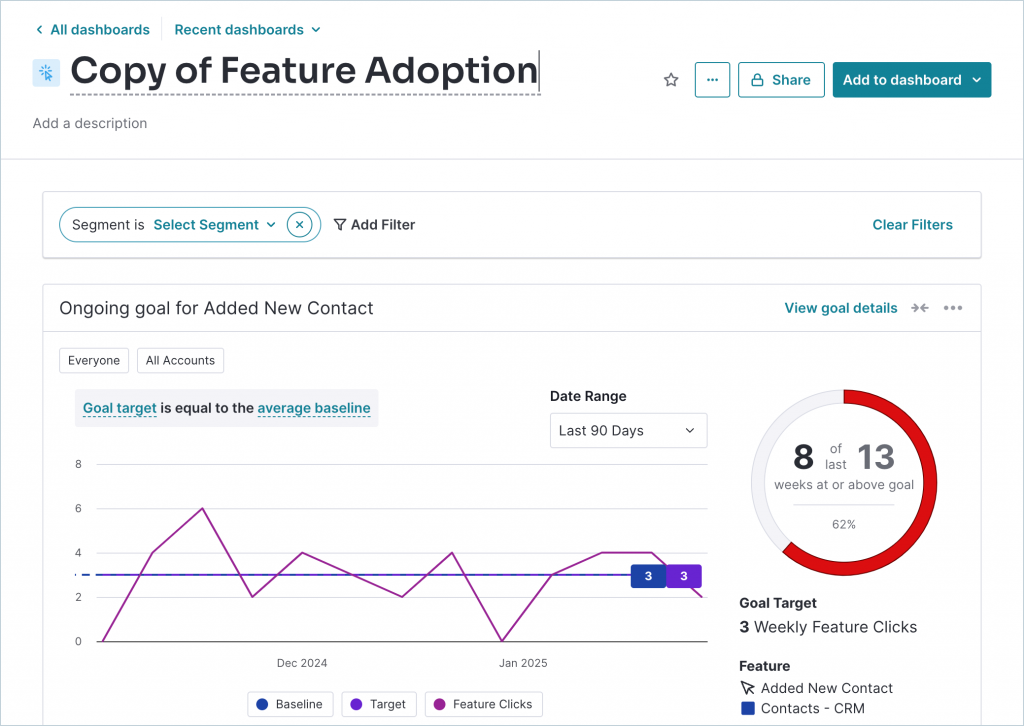
The segmentation is genuinely strong, and I like that the built-in resource center gives product teams a way to educate users without bringing engineering in for every small guide.
The in-app guide builder is also a genuine differentiator here, since it lets a team turn a support answer into a reusable walkthrough without writing a single line of code.
Teams already investing in product-led growth tend to gravitate here first, since the guides and the analytics reinforce each other instead of living in separate tools that nobody connects.
Pros:
- Combines product analytics, in-app guides, and surveys in one platform
- Strong segmentation for targeting specific user groups
- Built-in resource center and product-led courses
- Robust feature set for validating roadmap decisions
Cons:
- Pricing is not published and can climb quickly as monthly active users grow
- Heavier setup that typically needs a dedicated admin
How Pendo Compares to Sprig: I’d flag Pendo as the one tool here that actually competes with Sprig’s full-platform ambition, but its pricing is just as opaque, and it often lands higher once a team’s monthly active users climb past Sprig’s own tiers.
User Rating: 4.5/5 (Capterra)
Pricing: Free plan available, up to 500 MAU. Paid plans are quote-only.
4. Survicate: Best for Multichannel Microsurveys
Survicate is the tool I point teams toward when in-product feedback is only part of the job. It runs targeted surveys across web, in-app, email, link, and mobile channels from a single response pool, with an AI-powered Insights Hub that automatically summarizes open-text answers.
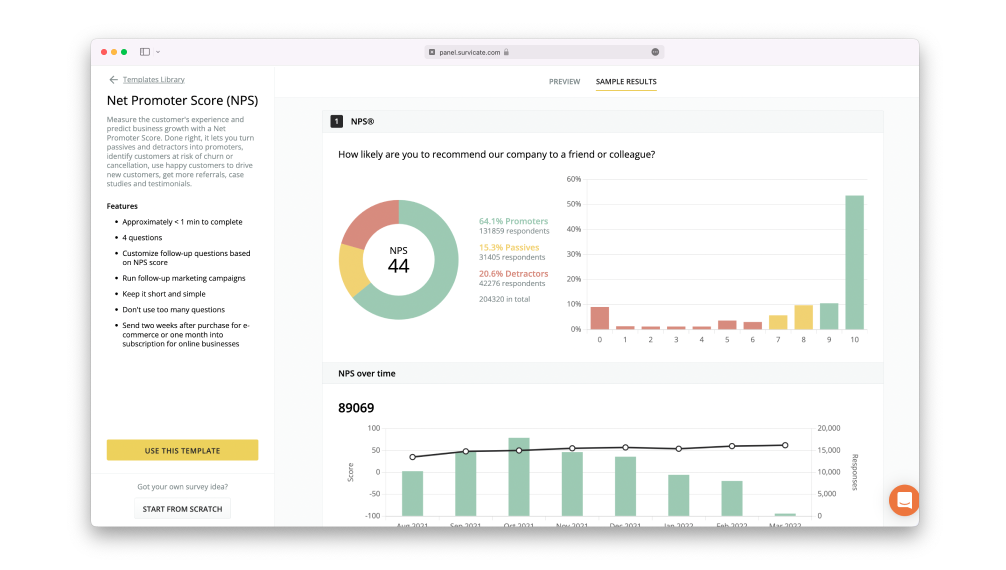
I’ve also noticed reviewers consistently point to customer support as a differentiator, calling out fast, human responses instead of bot-driven tickets.
The identified-response workflow is another reason I rate it highly: when a respondent is known, their answer can update a CRM record and automatically trigger a follow-up, without anyone exporting a spreadsheet by hand.
Teams migrating off a heavier platform tend to appreciate how quickly a first survey goes live here, often the same day, without any onboarding call required.
Pros:
- Multichannel surveys across web, in-app, email, link, and mobile from one response pool
- AI-powered Insights Hub for open-text analysis
- 40+ native integrations, including HubSpot and Salesforce
- Published starting price, no quote required to get a number
Cons:
- Reporting depth is lighter than research-focused platforms
- Some reviewers note occasional friction with survey list uploads
How Survicate Compares to Sprig: In my view, Survicate is the closest match to Sprig’s core in-product survey job without the research-lifecycle layer, and its published starting price is public, whereas Sprig’s is not.
User Rating: 4.6/5 (Capterra)
Pricing: Free plan available. Paid plans start at $114/month.
5. Maze: Best for Prototype and Usability Testing
I think of Maze as covering a different slice of what Sprig offers: testing a prototype or an information architecture with real users before anything ships, rather than always-on in-product pulse feedback.
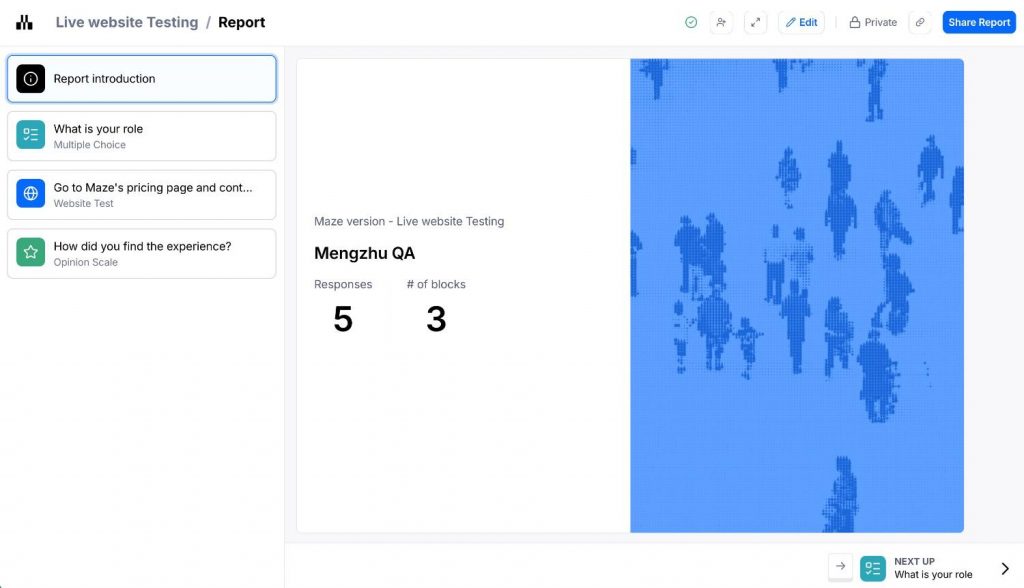
The Figma integration is smooth enough that designers can turn a prototype into a live usability test in minutes, and I’ve found the AI-generated reporting saves real time when you’re staring at dozens of session recordings and need the pattern, not the raw footage.
Card sorting and tree testing round out the toolkit, which makes Maze a genuine fit for teams validating navigation and information architecture, not just visual design.
Teams without a dedicated researcher on staff seem to get the most value here, since a designer can run and read a study without pulling in anyone else.
Pros:
- Prototype and usability testing directly from Figma
- AI-powered reporting and smart summaries
- Card sorting and tree testing for information architecture
- Free plan available for basic unmoderated tests
Cons:
- Thin fit for recurring, always-on pulse surveys compared to dedicated feedback tools
- Moderated research and AI analysis push into a custom quote-only tier
How Maze Compares to Sprig: I’d put it this way: Maze overlaps with Sprig on prototype and usability testing rather than continuous in-product feedback, and its own quote-only tier for moderated research runs into the same opaque pricing territory Sprig’s Enterprise plan does.
User Rating: 4.5/5 (Capterra)
Pricing: Free plan available. Paid plans are quote-only.
6. FullStory: Best for Deep Session Replay and Frustration Signals
FullStory is the one I’d reach for when session replay depth matters more than survey breadth, with zero-instrumentation session capture and automatic rage-click and frustration-signal detection.
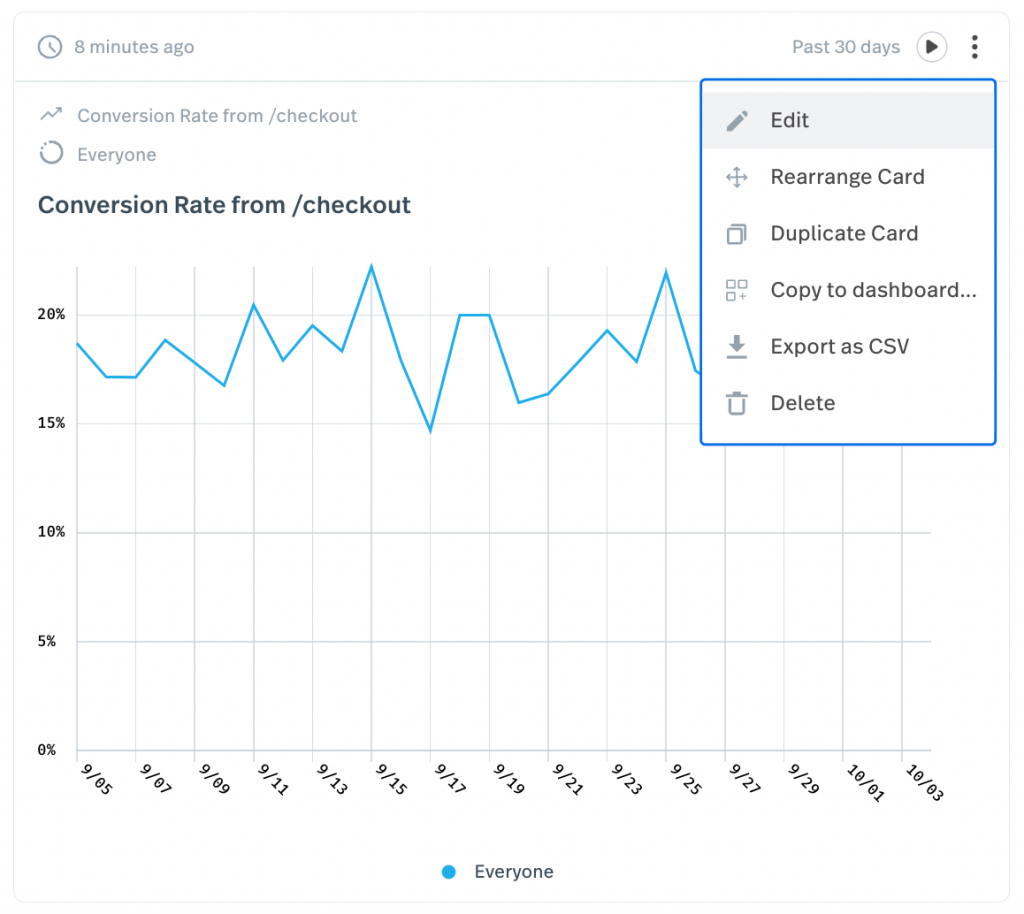
The privacy and PII controls are genuinely enterprise-grade, which matters once legal gets involved in any tool that records real user sessions.
I’ve seen support and product teams both lean on it for the same reason: watching a session usually explains a bug report faster than any written description could.
Engineering teams end up using it just as often as product teams do, mostly to reproduce a bug that nobody could clearly describe in a ticket.
Pros:
- Zero-instrumentation session capture with rage-click and frustration signals
- Strong privacy and PII controls
- Generous free tier, up to 30,000 sessions per month
- API access for pulling behavioral data into other systems
Cons:
- No dedicated survey builder as a core feature
- Pricing scales with session volume and can rise quickly on high-traffic products
How FullStory Compares to Sprig: I’d note that FullStory goes deeper than Sprig on session replay and frustration-signal detection, but it is not built as a survey tool, so teams still need something else for structured feedback collection.
User Rating: 4.6/5 (Capterra)
Pricing: Free plan available, up to 30,000 sessions/month. Paid plans are quote-only.
7. UserTesting: Best for Moderated and Unmoderated Panel Research
UserTesting is the one I recommend when a team needs the panel-recruited, moderated side of research that Sprig’s own Enterprise tier reaches for, video-based sessions with real participants rather than passive survey responses.
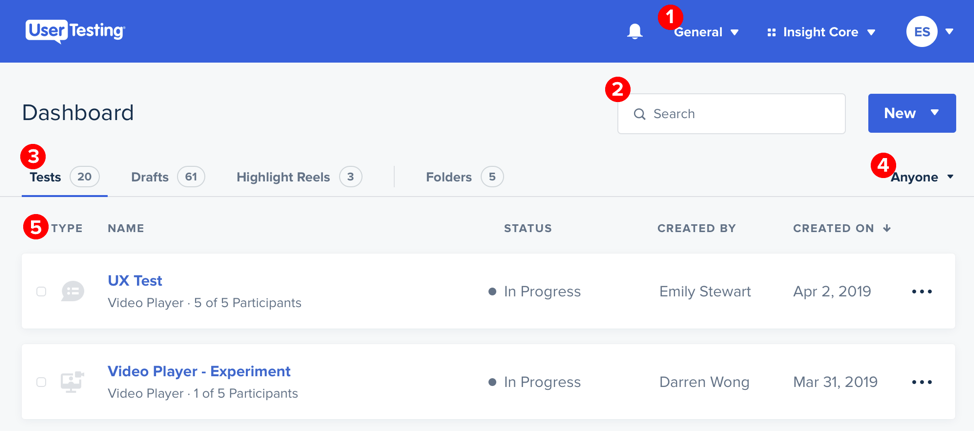
The participant panel is the real differentiator here, since recruiting the right person for a niche B2B study is usually the hardest part of any research project, and UserTesting has already solved that logistics problem for you.
That said, I’d flag the learning curve as real for teams used to a lighter, self-serve tool.
Teams evaluating a major redesign or a completely new feature tend to reach for it specifically, since the qualitative depth catches confusion that a quantitative survey alone would miss entirely, and the recruiting speed still beats running a study from scratch.
Pros:
- Access to a large, vetted participant panel for moderated and unmoderated studies
- Strong qualitative depth through video-based testing
- Established enterprise support and account management
- Wide range of test types beyond simple surveys
Cons:
- Priced and structured for project-based research rather than continuous, lightweight feedback
- Steeper learning curve for smaller teams
How UserTesting Compares to Sprig: I’d position UserTesting as covering the moderated, panel-recruited research that Sprig’s Enterprise tier targets, at a setup effort that is usually harder to justify for a routine, recurring feedback loop than Sprig’s Starter plan.
User Rating: 4.5/5 (Capterra)
Pricing: Free plan available. Paid plans are quote-only.
8. Whatfix: Best for Enterprise Digital Adoption
I’d file Whatfix under adjacent rather than a direct swap. It shows up on Sprig-alternative shortlists more for what it’s built to do, guided, in-app walkthroughs for adoption at scale, for employees as often as for customers.
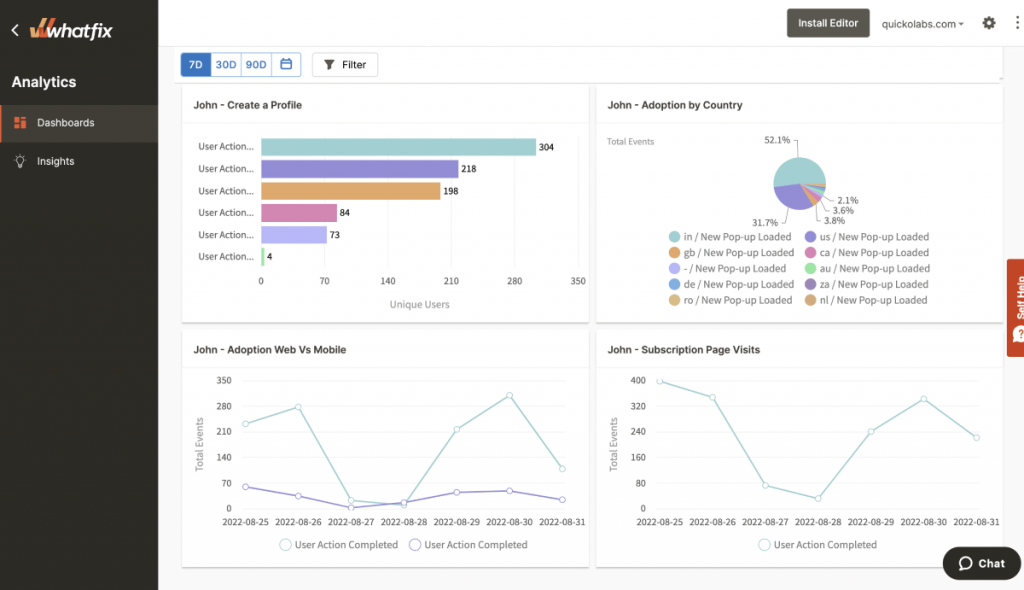
The no-code content authoring is solid, and the completion analytics give a clear picture of where a walkthrough loses people. I’d point a team here specifically when a feedback tool alone will not solve an adoption problem.
It’s also worth noting that Whatfix supports both web and desktop applications, which is more infrastructure coverage than most of the customer-feedback-focused tools on this list attempt.
Larger organizations with a dedicated enablement or learning and development function tend to be the ones that get full value out of it.
Pros:
- Built for guided walkthroughs and digital adoption at scale
- In-app content authoring without code
- Usable for both customer-facing and internal employee training
- Detailed analytics on flow completion
Cons:
- Pricing is quote-only with no published starting point
- More infrastructure than most teams need for a straightforward feedback loop
How Whatfix Compares to Sprig: I’d draw the line this way: Whatfix is built for internal, employee-facing digital adoption more than customer-facing product research, so it solves a different job than Sprig, even though both quote pricing only after a sales call.
User Rating: 4.6/5 (Capterra)
Pricing: Quote-only, contact vendor for pricing.
9. Smartlook: Best for Session Recordings Across Web and Mobile
I lean on Smartlook when a team ships both a website and a mobile app, since it covers the same behavioral layer as FullStory and Hotjar, session recordings, heatmaps, and funnel tracking, extended to native mobile apps as well as web.
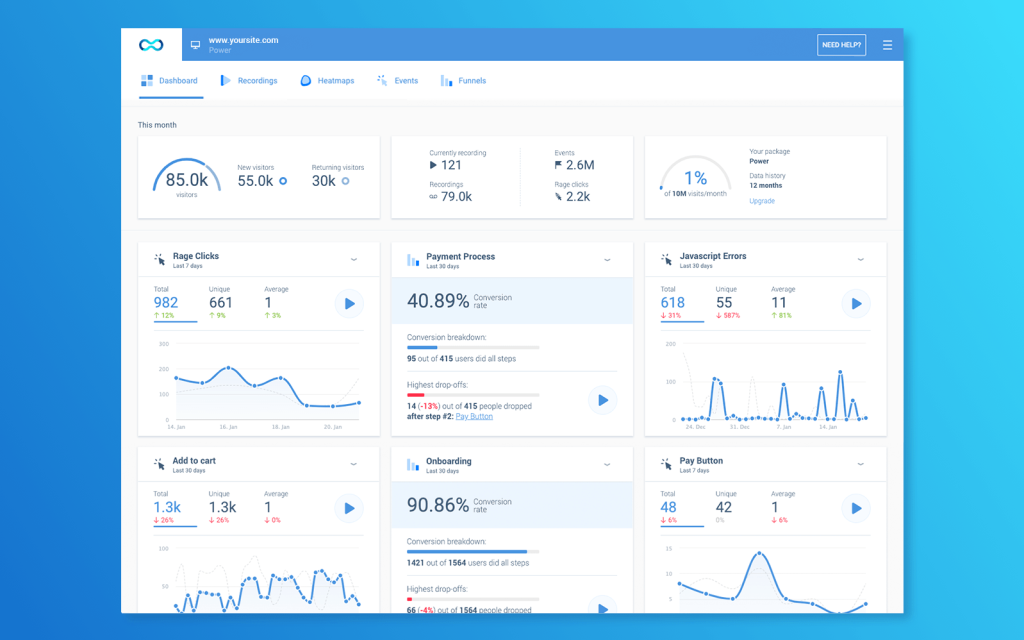
That single dashboard is genuinely convenient, since most session-recording tools make you stitch web and mobile data together yourself. Setup is a single script, so there is no separate SDK to manage for the web side of the product.
Event tracking ties recordings to specific actions, too, so a team can jump straight to the sessions where a particular button or screen was involved instead of scrubbing through everything.
Smaller teams without a dedicated analytics function seem to like it specifically because there is genuinely nothing extra to configure beyond installing the script.
Pros:
- Session recordings and heatmaps for both web and native mobile apps
- Funnel and event tracking are built in
- Published per-user pricing
- Fast integration via a single script
Cons:
- Feedback and survey tools are lighter than dedicated research platforms
- Some reviewers note occasional recording sync issues
How Smartlook Compares to Sprig: I’d summarize it as Smartlook covering session recording and mobile app replay at a lower, published price point than Sprig, but its feedback and survey capabilities stay lighter than what Sprig’s research platform offers.
User Rating: 4.7/5 (Capterra)
Pricing: Paid plans start at $29/month.
10. Lucky Orange: Best for Budget-Friendly Bundled Feedback
Lucky Orange is my pick for smaller sites that never needed Sprig’s full research-lifecycle scope to begin with. It bundles heatmaps, recordings, live chat, and simple on-site surveys into one flat-rate plan.
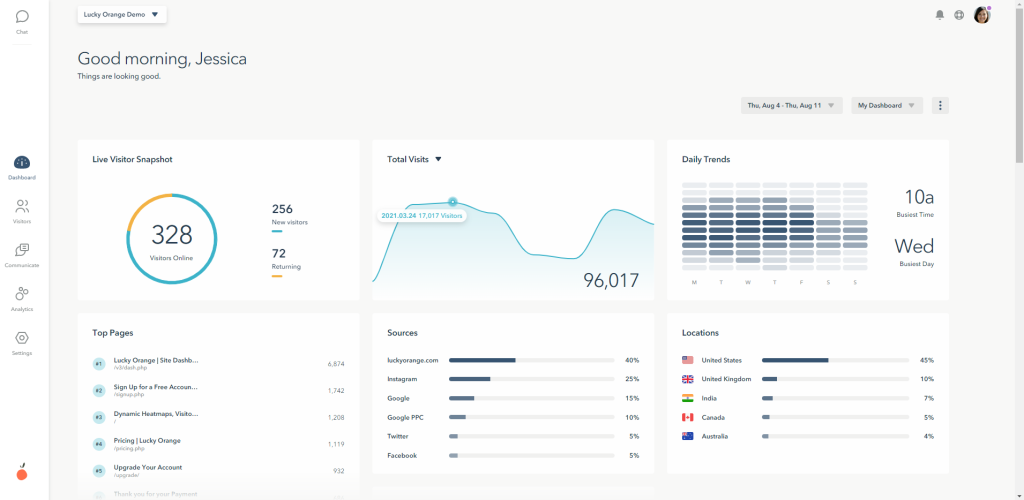
I like that the live chat feature is an addition most pure feedback tools skip entirely, and that the conversion funnel reporting provides a straightforward way to see where visitors actually drop off.
Setup takes minutes, with no separate SDK required to get the whole bundle running. For e-commerce teams specifically, the ability to watch a recording and message the same visitor live is a combination that few other tools on this list offer in a single dashboard.
Teams running lean marketing operations tend to like that a single flat fee covers everything, with no separate line item for each capability.
Pros:
- Heatmaps, recordings, live chat, and on-site surveys bundled into one flat-rate plan
- Easy setup with no separate SDK needed for web
- Conversion funnel reporting included
- Budget-friendly for smaller sites and teams
Cons:
- Less suited to SaaS products that need mobile in-app targeting
- Survey logic and branching are more basic than dedicated feedback tools
How Lucky Orange Compares to Sprig: I’d describe Lucky Orange as bundling heatmaps, recordings, and simple on-site surveys into one flat-rate plan, which suits smaller e-commerce and SaaS sites that never needed Sprig’s full research-lifecycle scope in the first place.
User Rating: 4.7/5 (Capterra)
Pricing: Paid plans start at $32/month.
My Top 3 Picks
Ten alternatives are a lot to hold in your head at once, so if you read nothing else in this piece, I’d start here. These are the three I would actually point a team to, and each one solves a different version of the Sprig problem.
1. Qualaroo: Best Overall Pick if Your Real Problem Is Sprig’s Weight, Not Its Job
I’d put Qualaroo at the top of this list because most Sprig switches I see do not start with “the concept is wrong.”
They start with the billing model and the platform’s size relative to what the team actually uses. Qualaroo does the same core job: catching a user in the moment with a contextual Nudge, without the Monthly Tracked User and study-unit math, or the sales call past the free tier.
On pricing alone, Essentials runs $19.99 a month against Sprig’s Starter at $5,000 a year, roughly $417 a month, for unlimited responses and the same contextual targeting Sprig built its reputation on.
What you give up is Sprig’s long-form study design and prototype testing, features that most teams running lightweight pulse surveys were not using anyway.
2. Survicate: Best if In-Product Is Only Part of the Job
I’d recommend Survicate for teams that need the same multichannel reach Sprig offers, web, in-app, email, and mobile, without the full research-lifecycle scope.
It closes that gap at a published $114 per month, compared with Sprig’s four-figure annual floor. The AI-powered Insights Hub handles open-text synthesis, which covers most of what teams actually use Sprig’s AI agents for day-to-day.
The trade-off is depth: Survicate will not design a long-form study or run prototype tests, so teams that need those specific capabilities should look elsewhere on this list.
3. Pendo: Best if You Actually Need Sprig’s Full-Platform Ambition
For teams drawn to Sprig for bundling multiple research and engagement functions in one place, I’d point them to Pendo as the more direct swap, matching that breadth with in-app guides, product analytics, and surveys.
The catch is that Pendo’s own pricing is just as quote-only as Sprig’s, and it can run just as high once monthly active users climb.
This pick trades one opaque billing model for another in exchange for deeper product analytics than a pure feedback tool provides.
How Did I Evaluate These Sprig Alternatives?
I evaluated the Sprig alternatives in this list based on what actually replaces the reason a product team reaches for Sprig in the first place: catching a user’s feedback in the exact moment they are stuck, then turning it into something the team can act on without a billing model or a sales call standing between the question and the answer.
This method employs six key factors:
User Reviews / Ratings: I pulled every rating in this piece from Capterra and read past the star count into the specific complaints, since Sprig’s own Capterra listing carries no reviews at the time of writing, which makes a pattern of complaints about billing on other platforms a more useful signal than a star average alone.
Essential Features & Functionality: I weighed in-product targeting, AI-powered response analysis, and multichannel distribution more heavily than raw template count, because those are the exact areas Sprig built its reputation on and where a real alternative has to hold up.
Ease of Use: I considered how much setup time and engineering support a team needs to get a first survey live, since Sprig’s split billing, Monthly Tracked Users counted separately from study units, adds complexity that shows up during onboarding, not just on the invoice.
Customer Support: I looked into whether help is available on a standard paid plan or is gated behind an enterprise contract, since Sprig’s published pricing stops at Starter and pushes anything beyond that into a custom quote.
Value for Money: I checked what the jump from free to paid actually buys and whether pricing scales predictably with usage, since Sprig’s Starter plan jumps straight into a five-figure annual commitment with Enterprise pricing available only on request.
Personal Experience / Experts’ Opinions: For the tools I have used directly, that experience shaped what I wrote here. For the rest, I leaned on patterns that recur across independent reviews rather than on any single reviewer’s opinion.
FREE. All Features. FOREVER!
Try our Forever FREE account with all premium features!
How Do You Choose the Right Sprig Alternative for Your Team?
I’d start by naming the actual reason you are looking, not the thing you assume should matter, then use the table below to skip straight to the right pick.
| If Your Main Sprig Frustration Is… | Consider This Alternative |
| Unpredictable, usage-based billing | Qualaroo or Survicate |
| Wanting analytics, guides, and surveys in one platform | Pendo |
| Needing deeper behavioral or session data than surveys alone | Hotjar or FullStory |
| Needing moderated or panel-based research | UserTesting |
| Testing prototypes or information architecture | Maze |
| Running on a tight budget with a small site or app | Lucky Orange or Smartlook |
| Training internal employees, not just customers | Whatfix |
The Real Question Isn’t Features, It’s Fit
Every tool on this list can technically collect feedback.
The question I’d ask before you switch is which job you actually do every week, catching a quick in-app reaction, running a full usability study, or watching where a user’s cursor hesitates, and whether the tool you pick matches that job instead of a bigger one you do not need yet.
If that job is contextual, recurring, and in-product feedback without a five-figure commitment, I’d start with Qualaroo.
It’s built around exactly that, and the free plan gives you a real way to test it against your own use case before you decide anything.
Frequently Asked Questions
What is the best free alternative to Sprig?
Qualaroo's free plan covers up to 50 responses with every premium feature included, which makes it the strongest free starting point on this list for teams that want contextual in-app surveys without committing to Sprig's flat annual Starter plan first. Hotjar, Pendo, FullStory, and Maze also offer free tiers, though each caps a different metric.
Is Qualaroo cheaper than Sprig?
Yes. Qualaroo's Essentials plan starts at $19.99 a month with unlimited responses, while Sprig's published Starter plan runs $5,000 a year flat rate, roughly $417 a month, with Enterprise pricing available only through a custom quote after a sales call. That gap holds even before factoring in Sprig's usage-based study unit charges.
Which Sprig alternative is best for session recordings and heatmaps?
Hotjar, FullStory, Smartlook, and Lucky Orange all cover session recordings and heatmaps. FullStory goes deepest on frustration-signal detection, while Lucky Orange bundles that same behavioral layer with on-site surveys at a lower, published price point. Smartlook is the strongest pick if your product ships a native mobile app alongside the website.
Can I replace Sprig with a tool that also handles usability testing?
Maze is the closest match for prototype and usability testing, covering card sorting, tree testing, and Figma-based prototype tests. For moderated, panel-recruited research specifically, UserTesting is the stronger fit for that particular job. Neither one replaces Sprig's always-on, in-product pulse surveys, so many teams end up running two tools.
Do any Sprig alternatives support mobile app feedback?
Qualaroo and Smartlook both support native mobile coverage. Qualaroo does it through its iOS and Android SDK for in-app Nudge surveys, and Smartlook does it through mobile session recording and event tracking across native apps. Neither requires the kind of custom mobile setup Sprig's own SDK integration typically involves.
Why is Sprig's pricing hard to compare against other tools?
Sprig bills on Monthly Tracked Users and study units, survey responses, replay clips, and heatmap captures, separately, and only its Free and Starter tiers are published. Enterprise pricing requires a custom quote, which makes side-by-side comparison difficult without a sales call. Most alternatives on this list publish at least a starting price.
What should I look for in a Sprig alternative besides price?
Check whether the tool covers your actual channels, web, in-app, and mobile, how quickly a non-technical team member can launch a survey, and whether AI-powered response analysis is included standard or gated behind a higher tier. Support quality matters too, especially once you are past the free plan.
Is there a Sprig alternative built specifically for SaaS product teams?
Qualaroo, Survicate, and Pendo all target SaaS product teams directly. Qualaroo and Survicate focus on lightweight, recurring in-product surveys, while Pendo adds product analytics and in-app guidance on top of feedback collection. Which one fits best usually comes down to how much platform you actually need beyond surveys.
FREE. All Features. FOREVER!
Try our Forever FREE account with all premium features!

 We'd love your feedback!
What did you like & how can we make it even better?
 Thanks for your feedback!
 Ask Your Question
Have a question? Get expert help to make your decision easier.