When I talk to product and CX teams collecting feedback at scale, they all say some version of the same thing: getting responses was never the hard part, making sense of thousands of open-ended comments is.
AI sentiment analysis is what turns that pile of comments into something you can actually act on.
I have spent the last few years testing and comparing these tools for our own feedback programs, and this list reflects what actually held up, not just what looked good in a demo.
I am only including the tools I would genuinely recommend, with real Capterra ratings, honest pricing, and an explanation of where each one falls short.
What Are AI Sentiment Analysis Tools?
AI sentiment analysis software reads open-ended text, like survey answers, reviews, or support tickets, and automatically classifies it as positive, negative, neutral, or mixed. Instead of someone reading every comment by hand, teams get a scored, searchable view of how customers actually feel, at whatever scale their feedback comes in.
I think of it less as its own category and more as a layer that sits atop whatever feedback you are already collecting.
A survey or review platform captures the response. A sentiment engine tells you what that response actually means, without you reading it yourself and guessing at tone.
Metrics like CSAT and NPS show the score. They do not tell you the reason behind it.
AI sentiment analysis is what gets you from “users rated onboarding 2 out of 5” to “users are frustrated because step two is unclear and setup takes too long.”
That gap is exactly where the right tool earns its cost.
Top 10 AI Sentiment Analysis Tools Compared
Before the full breakdown, here is a quick comparison to help you shortlist by budget and use case first.
| Tool | Best For | Key AI Capability | Pricing | User Rating (Capterra) |
| Qualaroo | In-app and website contextual micro-surveys | Native AI Feedback Analysis (Sentiment Analysis, Automated Tagging, AI Response Summarizer) + AI Survey Creator | Free plan available. Paid starts at $19.99/month | 4.7/5 |
| MonkeyLearn (part of Medallia) | No-code custom sentiment classifiers | Trainable text classifiers without coding | Custom pricing | 4.3/5 (4 reviews) |
| Thematic | Theme and driver analysis at scale | Automated theme clustering tied to sentiment shifts | Custom pricing | 4.9/5 (15 reviews) |
| Lexalytics (part of InMoment) | Enterprise text analytics, on-premise NLP | Entity, intent, and categorization engine | Custom pricing | 4.3/5 (G2)Not rated on Capterra |
| Chattermill | Unifying sentiment across surveys, tickets, and reviews | AI-native theme and sentiment unification (Lyra AI) | Custom pricing | 4.5/5 (25 reviews) |
| Cauliflower | Multilingual open-ended feedback, no manual coding | AI topic extraction plus driver analysis | Starts around €39.20/month per seat | 4.9/5 (12 reviews) |
| Alchemer | AI-powered text analysis built into an established feedback platform | Aspect-based sentiment analysis (ABSA) plus NLP theme detection (Alchemer Pulse) | Starts around $55/month | 4.5/5 (393 reviews) |
| Brand24 | Real-time sentiment alerts and reputation monitoring | AI sentiment plus anomaly detection | Starts around $199/month | 4.7/5 (254 reviews) |
| Talkwalker | Multilingual social listening at a global scale | AI sentiment plus trend spotting across languages | Custom pricing | 4.4/5 (24 reviews) |
| Brandwatch | Enterprise consumer intelligence, competitive benchmarking | AI sentiment plus audience intelligence | Custom pricing | 4.2/5 (235 reviews) |
Most tools will claim they “analyze sentiment.” What a lot of them really do is slap a positive or negative tag on text and call it insight.
The ten below go further, whether that is capturing feedback at the right moment, digging into what is actually driving a score, or catching the sarcasm and mixed sentiment that basic tools miss.
1. Qualaroo: Best for Capturing Real-Time User Insights In-App and on Your Website Using Contextual, AI-Powered Micro-Surveys
Qualaroo has been my go-to for in-the-moment feedback for years now, and it is honestly the one tool that actually feels like it was built for product teams who move fast.
The star of the show is the Nudge™, those little non-annoying surveys that slide in when someone is on your site or in your app.
You can target these surveys only to users who just failed onboarding, paid customers, visitors from a specific campaign, or practically any segment you can imagine.
Native AI Feedback Analysis then turns thousands of open-text responses into insights you can understand in minutes instead of weeks, and the Identify API ties every scored response back to a real user instead of leaving it anonymous.
Plus, branching works intelligently, asking only the follow-up questions that make sense, so your users are never overwhelmed.
Pros:
- AI Survey Creator for quick and easy survey creation.
- Native AI Feedback Analysis for automated tagging, AI response summaries, sentiment analysis, and more.
- Advanced targeting based on identity, custom properties, behavior, geolocation, exit intent, and more.
- Heatmaps and session recordings for behavioral tracking.
- The Identify API to tie each response to particular users.
- Nudge™ for prototypes on Figma, Adobe XD, InVision, and more.
- Branching and skip logic for relevant questions.
- Multilingual surveys in over 70 languages.
- Customizable branding, colors, and logo.
- In-app surveys for iOS and Android.
Cons:
- Dedicated onboarding and account manager services are generally reserved for the paid plans.
- There is no downloadable or on-premise version available. An internet connection is required to use the tool.
User Rating: 4.7/5 (Capterra)
Pricing: Free plan available with all premium features. Paid starts at $19.99 per month, followed by Business at $49.99 and Enterprise at $149.99.
2. MonkeyLearn: Best for No-Code Custom Sentiment Classifiers Without a Data Science Team
I first tried MonkeyLearn a few years back, when it was still an independent no-code tool a colleague swore by for quick text classification.
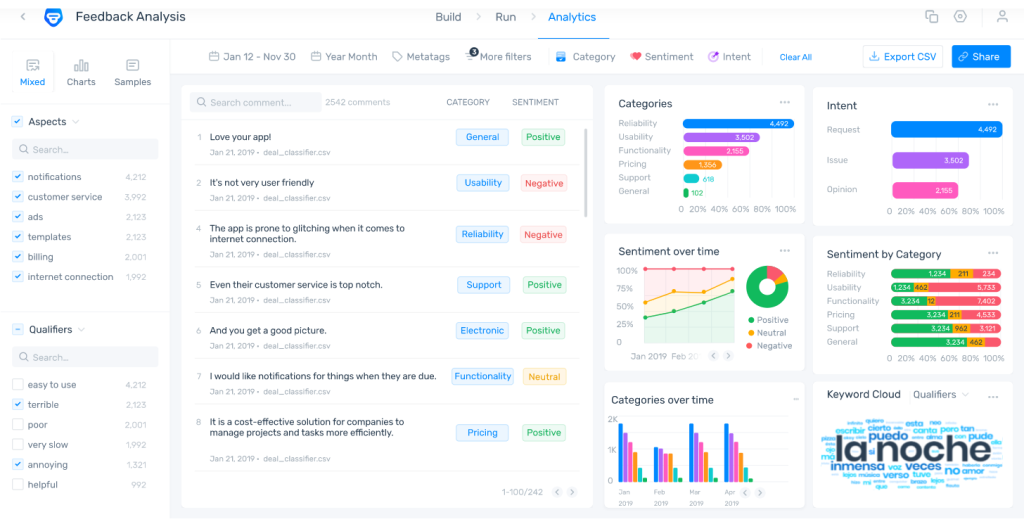
It lets you drop in survey comments, app reviews, or support tickets and start tagging sentiment and clustering feedback into themes without writing a line of code.
Today, MonkeyLearn’s workflow builder sits within Medallia’s larger ecosystem, but the core idea still holds: you can train a custom classifier on your own labels so it understands your product’s specific language, rather than relying on a generic model.
If your feedback uses industry-specific terms that general sentiment models miss, custom training remains the practical middle path.
Pros:
- No-code visual workflow builder for training custom sentiment models.
- Strong topic and keyword extraction for recurring themes.
- Integrates with Zapier, Zendesk, and Google Sheets without engineering help.
- Useful for teams that want product-specific classification without a data science hire.
Cons:
- Now folded into Medallia’s broader platform, so its future as a lightweight standalone tool is uncertain.
- Not built for in-product micro-surveys or contextual targeting.
- Costs scale quickly as volume increases.
User Rating: 4.3/5, 4 reviews (Capterra)
Pricing: Custom pricing.
3. Thematic: Best for Theme and Driver Analysis Behind Sentiment Shifts
A friend running CX at a mid-size SaaS company kept bringing up Thematic whenever leadership asked, “What is actually causing churn?”
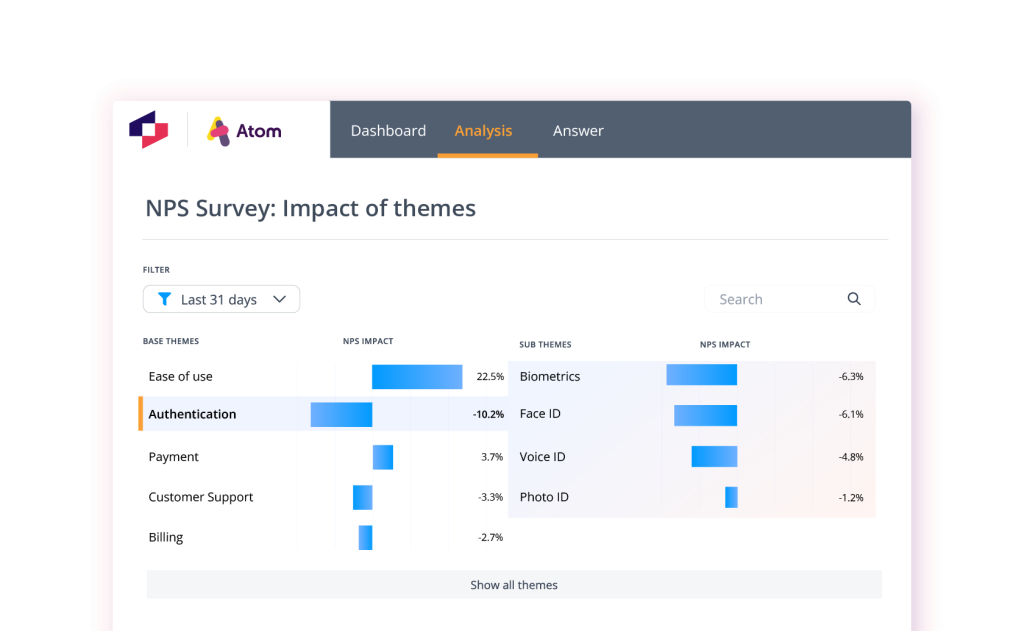
This is the tool teams reach for when a word cloud and a shrug are no longer good enough answers.
Thematic clusters feed into themes and directly tie them to sentiment shifts. Instead of “users are unhappy,” you get something closer to “users are unhappy because onboarding fails at step two and billing feels unpredictable.”
That is the kind of output that becomes a roadmap decision rather than a report nobody reads.
Pros:
- Strong theme clustering across large volumes of feedback.
- Aspect-based sentiment analysis to pinpoint what is driving a score inside the same comment.
- Connects themes directly to outcomes like churn, retention, and CSAT.
- Built for voice-of-customer workflows, not just text tagging.
Cons:
- Overkill if you are only working with a small volume of feedback.
- Needs a steady, consistent flow of data to deliver its best value.
- Enterprise-level pricing, so it is not a casual trial for a small team.
User Rating: 4.9/5, 15 reviews (Capterra)
Pricing: Custom pricing.
4. Lexalytics: Best for Enterprise Text Analytics and On-Premise NLP Deployment
I first heard about Lexalytics from an ex-colleague on an enterprise CX team who needed to extract text from surveys, support logs, chat transcripts, and reviews, and wanted more than a sentiment tag.
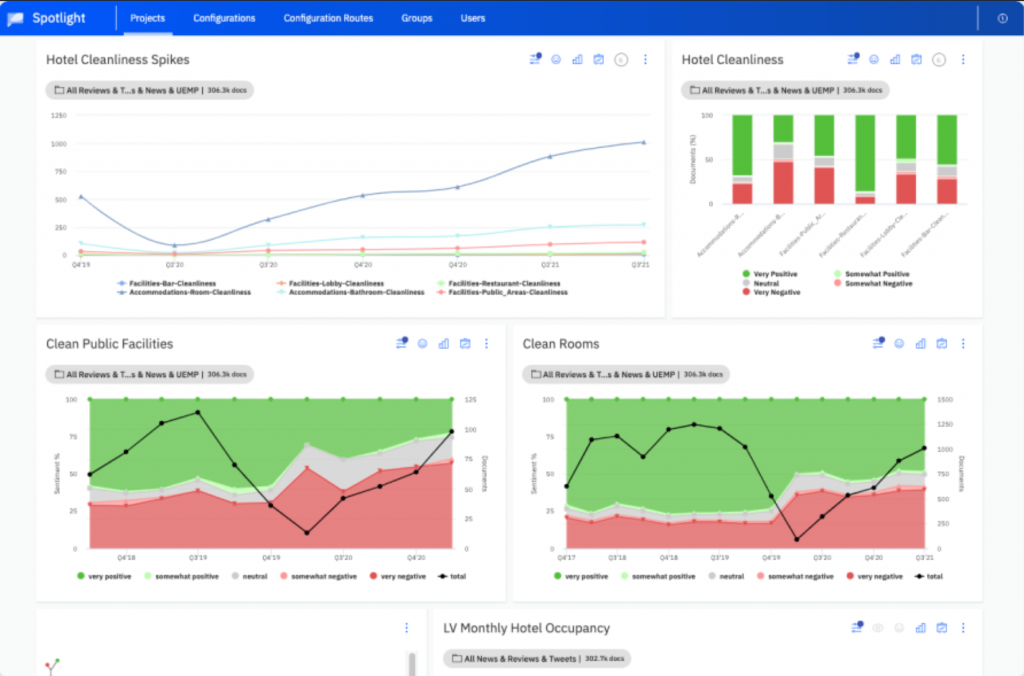
Lexalytics goes deeper into intent, entities, and categorization, essentially sentiment analysis plus a full text analytics engine.
InMoment acquired Lexalytics in 2021, and the two brands have since merged under the InMoment name.
The technology itself is still built for high-volume, multi-channel feedback where you need structured output you can govern and report on, including on-premise deployment for teams with strict data requirements.
Pros:
- AI-driven sentiment analysis built for high-volume feedback.
- Strong categorization and entity extraction for recurring themes.
- Supports on-premise or hybrid cloud deployment for sensitive data.
- Designed for enterprise-grade reporting and multi-channel governance.
Cons:
- Setup can feel heavy if you are a small team without dedicated analysts.
- Enterprise-only pricing, so it is not ideal for lean budgets.
- Less focused on real-time, in-product feedback collection than a tool like Qualaroo.
User Rating: 4.3/5 (G2) (not on Capterra)
Pricing: Custom pricing. Contact the vendor for a quote.
5. Chattermill: Best for Unifying Sentiment Across Surveys, Support Tickets, and Reviews
I came across Chattermill while comparing tools for a client whose feedback was scattered across three different platforms: one for NPS, one for support, and one for app reviews.
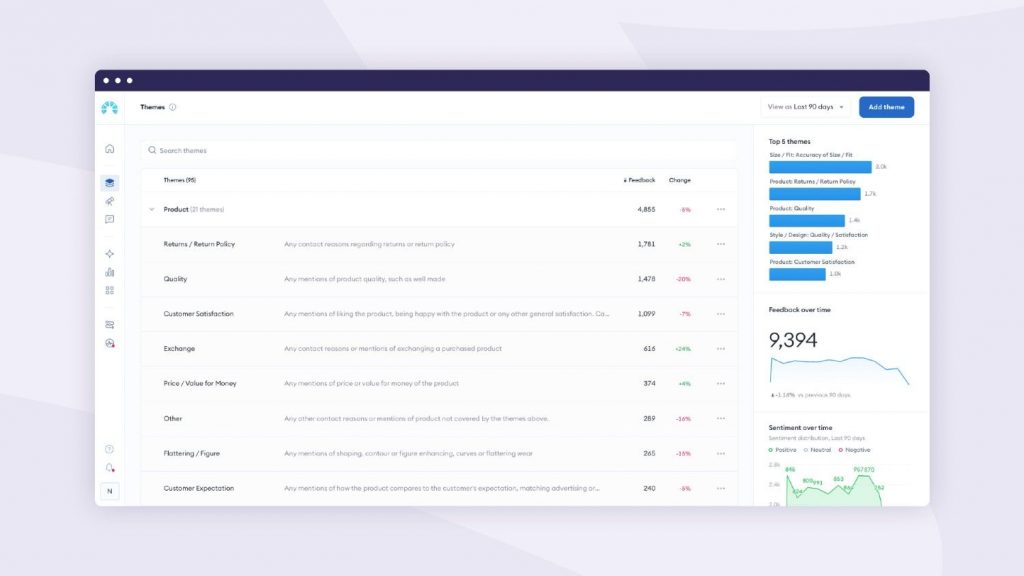
Chattermill’s whole pitch is pulling all of that into one place instead of asking your team to stitch together three dashboards by hand.
It applies AI text analytics across all sources and can unify verbatims into a single set of themes, so a comment from a support ticket and one from an NPS survey about the same issue are grouped together.
That unification is genuinely useful, though it does require some configuration to tune themes to your product.
Pros:
- Unifies feedback from surveys, support tickets, and reviews into one theme model.
- AI-native analysis (Lyra AI) is built specifically for customer experience data.
- Custom dashboards for CX, product, and executive reporting.
- Strong fit for teams juggling multiple disconnected feedback sources.
Cons:
- Custom, enterprise-style pricing based on data sources and volume.
- Theme configuration takes real setup time to get accurate.
- Not designed for capturing feedback in the first place, it analyzes what you already have.
User Rating: 4.5/5, 25 reviews (Capterra)
Pricing: Custom pricing based on feedback volume and data sources.
6. Cauliflower: Best for Multilingual Open-Ended Feedback Analysis Without Manual Coding
Cauliflower came up in a comparison thread I was reading while reviewing this list, and it stuck out for how deliberately it avoids the old-school word cloud approach to open-text analysis.
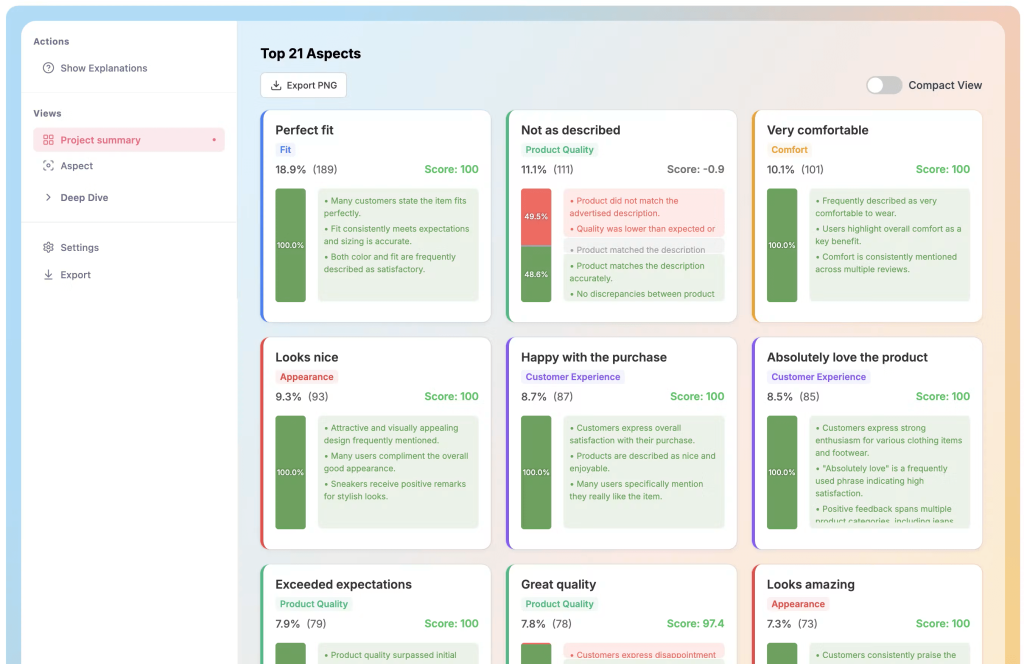
You upload survey exports, review data or qualitative feedback, and it turns unstructured text into structured topics without you having to manually code a single response.
What makes it worth a look is the driver analysis: it quantifies how much each topic actually affects a KPI like satisfaction or purchase intent, not just how often it is mentioned.
For teams running open-ended questions across multiple languages and markets, that combination of automatic translation and driver scoring is hard to replicate manually.
Pros:
- AI-generated topics that you can manually refine afterward.
- Driver analysis that quantifies impact on satisfaction or purchase intent.
- Multilingual processing with automatic translation of open-ended responses.
- Built-in extractive and generative summarization for fast reads.
Cons:
- Smaller review based on Capterra, so treat the rating as a helpful signal rather than the final word.
- Best suited to survey and review exports, not real-time in-app capture.
- Pricing is per user, which adds up for larger teams.
User Rating: 4.9/5, 12 reviews (Capterra)
Pricing: Starts around €39.20 per user, per month for a single seat.
7. Deep Talk: Best for Fast Sentiment Scoring Across Feedback, Chats, and Emails
I tried Deep Talk directly on a small NPS dataset while putting this list together, mostly because it promised to classify and score sentiment with just a few clicks, no model training required.
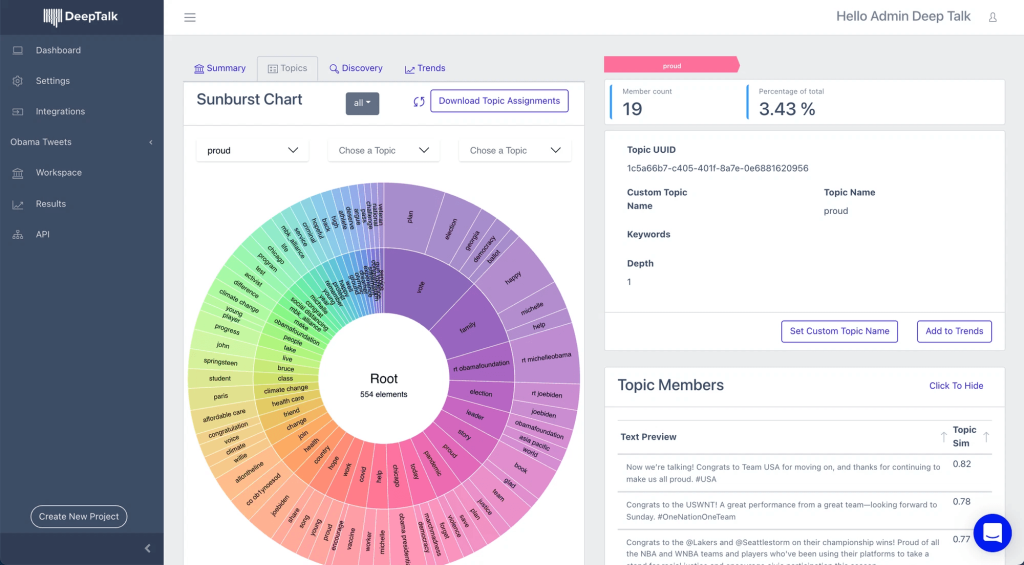
It delivered on that promise for the basics: upload your text, and it categorizes feedback, scores sentiment, and breaks down what is behind your NPS or CSAT number.
Where it showed its limits was depth. For a quick read on a batch of comments, it is genuinely fast. For the kind of nuanced, multi-topic analysis a dedicated theme tool like Thematic or Cauliflower offers, you will likely still need a second tool in your stack.
Pros:
- Quick setup, upload data, and start classifying within minutes.
- Useful topic and subtopic connections with visual breakdowns.
- Works across surveys, reviews, chats, and emails in one place.
- Affordable entry point compared to enterprise text analytics platforms.
Cons:
- Lighter on nuanced, multi-topic sentiment than dedicated theme-analysis tools.
- Smaller review base, so validate it on your own data before committing.
- Best treated as a first pass rather than a full replacement for deeper analysis.
User Rating: 4.5/5, 12 reviews (Capterra)
Pricing: Starts around $55 per month.
8. Brand24: Best for Real-Time Sentiment Alerts and Reputation Monitoring
I started using Brand24 when our team needed sentiment tracking as an early warning system rather than a reporting tool.
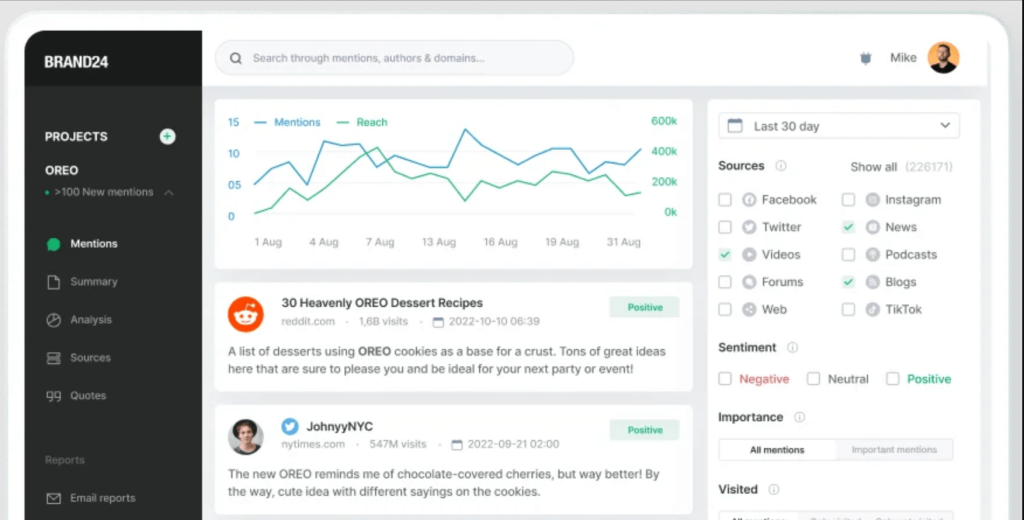
It tracks mentions across social media, blogs, forums, news, and the wider web, then tags sentiment so you can spot a negative spike before it becomes a real problem.
This matters more than people think. A single angry thread can turn into a reputation issue before your team even notices it exists.
If your product has any public footprint, Brand24 gives you a practical way to set alerts for sentiment drops and jump in early, rather than finding out about a crisis after it has already spread.
Pros:
- AI-powered sentiment analysis across web and social mentions.
- Real-time alerts for negative sentiment spikes.
- Strong monitoring coverage without enterprise-level complexity.
- Useful dashboards for tracking sentiment trends over time.
Cons:
- Sentiment accuracy still struggles with sarcasm and dry humor.
- Not built for deep product feedback workflows like survey analysis.
- You still need a process to act on alerts, or they become noise.
User Rating: 4.7/5, 254 reviews (Capterra)
Pricing: Starts around $199 per month.
9. Talkwalker: Best for Multilingual Social Listening at Global Scale
Talkwalker kept surfacing as I researched enterprise-grade listening tools for a global brand project, mostly for its ability to analyze conversations across social media, news sites, blogs, and forums in real time and across multiple languages.
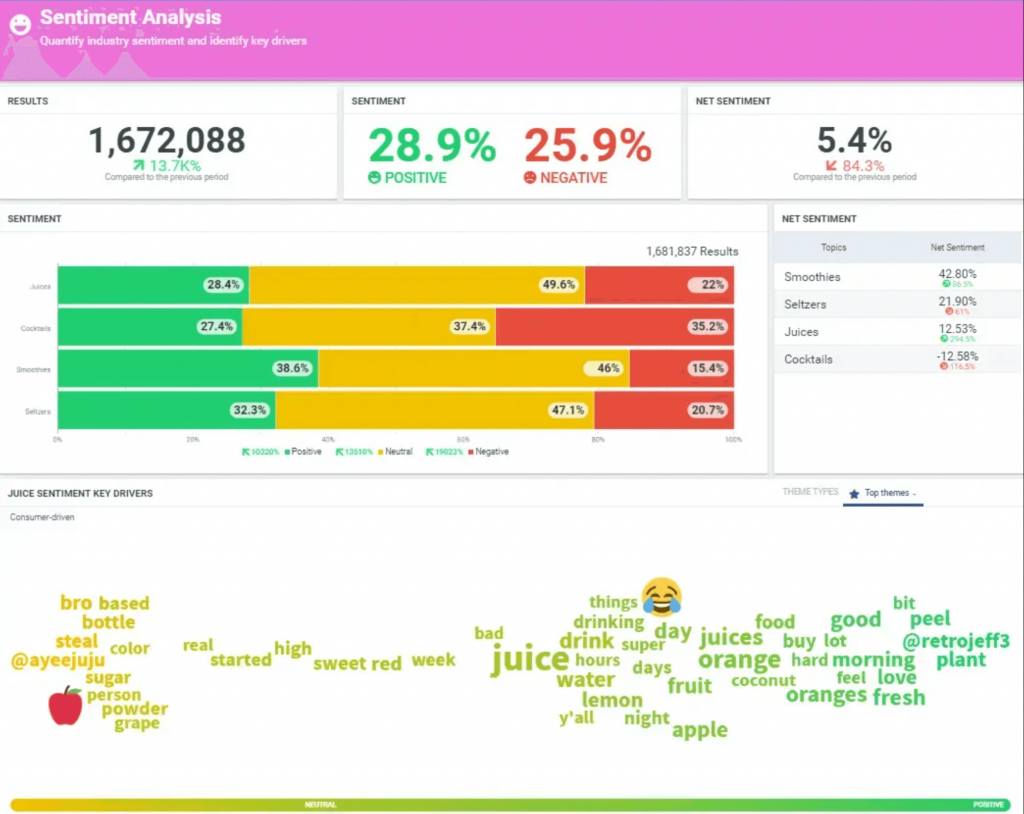
Instead of just tracking mentions, it surfaces the sentiment and trends actually shaping how people perceive a brand.
What makes it particularly useful for global teams is multilingual AI analysis paired with trend detection.
If you are monitoring sentiment across several markets at once, that combination saves you from running the same analysis separately for every language.
Pros:
- AI-powered sentiment analysis across social, news, blogs, and forums.
- Multilingual monitoring built for global audiences.
- Advanced trend detection alongside real-time brand monitoring.
- Competitive benchmarking for marketing and PR teams.
Cons:
- Pricing is tailored to enterprise customers, not small teams.
- Advanced features carry a real onboarding and training curve.
- More feature-rich than most small or mid-size businesses will need.
User Rating: 4.4/5, 24 reviews (Capterra)
Pricing: Custom pricing.
10. Brandwatch: Best for Enterprise Consumer Intelligence and Competitive Benchmarking
I was introduced to Brandwatch by a former teammate who used it as a command center for sentiment and competitive intelligence at a consumer brand too big to rely on manual tracking.
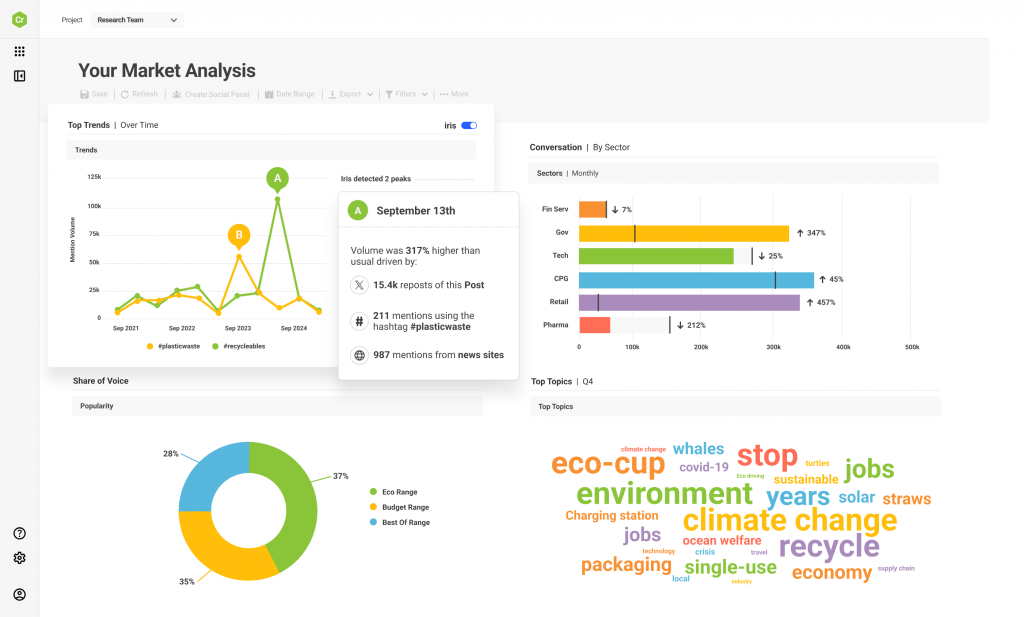
It pulls conversations from social platforms, forums, blogs, and news outlets, then layers in sentiment and audience intelligence.
The real value is context. Brandwatch helps you track sentiment by segment, region, and audience type, and even against named competitors, so you are not just asking whether people are happy, but who is unhappy and why.
That is a genuinely different use case than analyzing your own survey or support data.
Pros:
- AI-powered sentiment analysis across social and public web sources.
- Strong competitive benchmarking and trend analysis.
- Deep filtering and segmentation for audience-specific insights.
- Built for handling high-volume listening at enterprise scale.
Cons:
- Expensive and firmly enterprise-focused.
- Takes real time to set up dashboards and start seeing value.
- Not designed for in-product feedback collection or micro-surveys.
User Rating: 4.2/5, 235 reviews (Capterra)
Pricing: Custom pricing based on monitoring needs and scale.
Which AI Sentiment Analysis Tools Should You Try First?
If you do not want to overthink this, here are the three I would shortlist first, depending on what you are actually trying to solve for.
Qualaroo: Best Overall Pick for Product and CX Teams
If your goal is product and UX improvement, start here. You can trigger micro-surveys at the exact moment of friction, an onboarding failure, a cancellation attempt, an error state, and use Native AI Feedback Analysis to turn that open text into themes and trends fast.
Belron uses sentiment analysis in this way to help maintain a consistently high Net Promoter Score. This is how you catch a real problem before it turns into churn.
Thematic: Best Pick for Driver Analysis at Scale
If you already have a large volume of feedback pouring in, thousands of NPS verbatims, support tickets, or app reviews, and you need to know what is actually driving sentiment, Thematic is built for exactly that.
Instead of leaving you to manually tag thousands of responses one by one, it clusters comments into themes and tracks which ones are pulling your sentiment score up or down over time.
Brand24: Best Pick for Real-Time Alerts and Reputation Monitoring
If your biggest risk is public rather than internal, a complaint thread that goes viral, a wave of one-star reviews, an influencer post gone wrong, Brand24 is the practical choice.
It tracks mentions across social media, review sites, forums, and news in real time, and its AI sentiment tagging is built to flag a negative spike the moment it starts building, not after it has already landed in your support inbox.
How Were These AI Sentiment Analysis Tools Evaluated?
The evaluation of products or tools chosen for this article follows an unbiased, systematic approach that ensures a fair, insightful, and well-rounded review. This method employs six key factors:
User Reviews and Ratings: Direct user experiences, including Capterra ratings and feedback, provide a ground-level perspective. This feedback is critical in understanding overall satisfaction and potential problems.
Essential Features and Functionality: The value of a product is ascertained by its core features and overall functionality. Through an in-depth exploration of these aspects, the practical usefulness and effectiveness of the tools are carefully evaluated.
Ease of Use: The user-friendliness of a product or service is assessed, focusing on the design, interface, and navigation. This ensures a positive experience for users of all levels of expertise.
Customer Support: The quality of customer support is assessed, considering its efficiency and how well it supports users across phases, such as setup, addressing concerns, and resolving operational issues.
Value for Money: Value for money is evaluated by comparing the quality, performance, and features. The goal is to help the reader understand whether they will get their money’s worth.
Personal Experience and Experts’ Opinions: This part of the evaluation criteria draws on the writer’s personal experience and industry experts’ opinions.
FREE. All Features. FOREVER!
Try our Forever FREE account with all premium features!
What Should You Look For Before You Choose a Sentiment Analysis Tool?
Most people pick a sentiment tool based on features. That is the wrong filter.
What actually predicts whether you use the tool past week two is whether it fits your feedback source, your volume, and your team’s technical comfort.
Here is a quick way to map your situation to the right category.
| If Your Situation Is… | Prioritize This | Tools to Look At |
| You collect feedback in-app or on-site and want sentiment scored the moment it is captured | Contextual, in-the-moment capture with built-in AI analysis | Qualaroo |
| You have thousands of existing survey or review responses and need to know what is driving the score | Theme clustering and driver analysis | Thematic, Cauliflower |
| Your feedback is scattered across surveys, tickets, and reviews | Unified, cross-source theme analysis | Chattermill |
| You need to train a model on your own product-specific language | No-code custom classifiers | MonkeyLearn |
| Your risk is public, not internal | Social listening and reputation monitoring | Brand24, Talkwalker, Brandwatch |
| You need an on-premise deployment or strict data governance | Enterprise text analytics infrastructure | Lexalytics |
Notice that the fastest path to something usable, without months of taxonomy setup, is almost always the tool that captures feedback in context in the first place.
Sentiment analysis performed on a vague, generic comment gives you a vague, generic answer.
Sentiment analysis performed on a comment collected right after someone hit a specific error, a specific pricing page, or a specific onboarding step gives you something you can act on the same day.
Which AI Sentiment Analysis Tool Should You Start With?
If your feedback is walking in the door already tied to a moment, a failed checkout, a confusing setting, a support escalation, the fastest win is capturing it in context and scoring it right there, which is exactly what Qualaroo‘s Nudge™ and Native AI Feedback Analysis are built for.
If you are instead sitting on a backlog of existing feedback and need to find the drivers behind a stuck NPS score, a theme-analysis tool like Thematic or Cauliflower will get you there faster than reading it line by line.
Either way, the decision is not about finding the tool with the most features. It is about matching the tool to where your feedback actually comes from.
Frequently Asked Questions
Which AI model is used for sentiment analysis?
Most sentiment analysis tools use natural language processing models built on transformer architectures. Some rely on BERT-style classifiers for fast and consistent sentiment tagging, while others use large language models for more nuanced interpretation. Advanced platforms may combine both approaches, using classifiers to process large volumes of feedback and LLMs to explain themes, context, and potential root causes.
Can ChatGPT or other general AI chatbots do sentiment analysis?
Yes, general-purpose AI tools such as ChatGPT can classify individual comments as positive, negative, or neutral and explain the reasoning behind the classification. However, they aren't designed primarily for continuous sentiment monitoring at scale. Dedicated tools can automatically process large feedback volumes, identify recurring themes, track sentiment trends, and connect insights with customer or product data.
What are the three main types of sentiment analysis?
The three common approaches are polarity, emotion, and aspect-based sentiment analysis. Polarity identifies whether feedback is positive, negative, neutral, or mixed. Emotion detection identifies feelings such as frustration, excitement, or disappointment. Aspect-based analysis goes deeper by connecting sentiment to a specific topic, feature, or experience, helping teams understand exactly what customers reacted to.
How does AI sentiment analysis explain the "why" behind a CSAT or NPS score?
A customer satisfaction survey or NPS survey score tells you what customers rated, but the accompanying comment often explains why. AI sentiment analysis can examine those comments, identify emotional tone, and group similar responses into recurring themes. For example, instead of simply seeing low onboarding scores, a team might discover that customers are frustrated because a particular setup step is confusing.
Can sentiment analysis tools detect sarcasm and mixed sentiment?
Modern sentiment analysis tools are better at understanding context than older keyword-based systems. They can recognize that phrases such as "great, another outage" are negative despite positive wording. They can also identify mixed sentiment, such as a customer saying they love a product but found the setup frustrating, giving teams a more accurate picture of the overall experience.
Do I need a developer or a data scientist to use a sentiment analysis tool?
Not necessarily. Many modern sentiment analysis platforms are designed for non-technical teams and offer no-code interfaces to import feedback, analyze responses, and review trends. Tools such as MonkeyLearn, Deep Talk, and Cauliflower are examples of platforms aimed at business users. Developer-focused APIs are still useful when teams need custom models or deeper integration.
How much does AI sentiment analysis software typically cost?
Pricing varies considerably based on the type of tool, processing volume, and features included. Basic no-code and in-app sentiment tools may start below $100 per month, while social listening platforms often cost a few hundred dollars monthly. Enterprise text analytics and voice-of-customer platforms can cost thousands of dollars per month, with larger deployments typically requiring custom pricing.
Is free sentiment analysis software accurate enough for a small team?
For basic positive, negative, and neutral classification on a manageable volume of feedback, free tools can be accurate enough to get started. However, teams may need paid capabilities for deeper theme detection, multilingual analysis, advanced reporting, or customer-level insights.
FREE. All Features. FOREVER!
Try our Forever FREE account with all premium features!

 We'd love your feedback!
What did you like & how can we make it even better?
 Thanks for your feedback!
 Ask Your Question
Have a question? Get expert help to make your decision easier.