When I talk to product teams that collect feedback at scale, the one thing they all say is, “Getting responses isn’t the problem—we’re drowning in them.” The challenging part is making sense of thousands of open-ended comments in a way that actually drives meaningful improvements for the product.
In this case, AI sentiment analysis gives you the why. It sifts through the real mess of feedback—“this feature was so confusing,” “support took forever,” “I absolutely love the product, but…” — and turns it into clear patterns, recurring themes, and honest sentiments you can actually act on.
Here’s the thing, though: most tools out there stop at basic labels—positive, negative, neutral. The ones worth your time go deeper. They show you exactly what customers are reacting to, which issues are bubbling up, and what deserves your attention first.
That’s why, in this post, I’m only sharing the AI sentiment analysis tools I’d actually recommend instead of just shiny dashboards that look impressive but don’t help you ship better products.
Let’s get into them. But first, let’s understand what AI sentiment analysis looks like.
What Is AI Sentiment Analysis?
AI sentiment analysis is a way to automatically understand how users feel based on the words they write. It scans open-text feedback from sources like:
- Survey Responses
- Reviews
- Support Tickets
- Live Chat
- Social Mentions
And, labels feedback as positive, negative, or neutral, often with a confidence score.
Why It Matters
Numbers like CSAT and NPS tell you the score. They don’t tell you the reason behind it. AI sentiment analysis is what helps you go from:
- “Users rated onboarding 2/5”
To - “Users are frustrated because step 2 is unclear and the setup takes too long.”
That’s why the tool you choose matters. The right one helps you analyze feedback at scale, spot trends quickly, and push insights into workflows your team already runs.
To choose the best AI sentiment analysis tool, here is a quick table you can scan (in case you are running short of time).
| Tool | Best For | What It Does Best | Key AI Capability | Pricing | User Rating |
|---|---|---|---|---|---|
| Qualaroo | In-product feedback and UX insights | Captures feedback at the moment of intent and analyzes sentiment instantly | AI sentiment analysis (IBM Watson) + theme insights | Free + paid starts at $19.99/month | 4.7/5 (Capterra) |
| MonkeyLearn (Now Medallia) | No-code sentiment tagging | Turns feedback into sentiment and topics without engineering | Custom sentiment models + classifiers | Custom Pricing | 4.3/5 (Capterra) |
| Thematic | Deep drivers behind sentiment | Finds themes and drivers across large feedback datasets | Aspect-based sentiment + clustering | Paid starts at $25,000 (yearly) | 4.8/5 (G2) |
| Lexalytics | Enterprise CX and VoC | Strong text analytics across channels | Sentiment + intent + categorization | Paid starts at $10,000 (basic cloud analytics | 4.3/5 (G2) |
| Brand24 | Real-time reputation monitoring | Alerts you when negative sentiment spikes | AI sentiment + anomaly detection | Starts around $149/mo | 4.6/5 (G2) |
| Talkwalker | Multilingual social sentiment | Global social monitoring at scale | AI sentiment + trend spotting | Custom Pricing | 4.3/5 (G2) |
| Brandwatch | Enterprise social intelligence | Advanced dashboards and competitive insights | AI sentiment + audience intelligence | Custom Pricing | 4.4/5 (G2) |
| Amazon Comprehend | Developers and scalable NLP | High-volume sentiment analysis via API | Sentiment + entity + key phrase extraction | Pay-per-use (AWS pricing) | 4.2/5 (G2) |
| Google Cloud Natural Language | GCP-based NLP workflows | Strong general sentiment + entity parsing | Sentiment + entity + syntax analysis | Price per 1000 char units: $0.0010/month | 4.3/5 (G2) |
| Azure AI Language | Microsoft-first orgs | Sentiment + opinion mining inside Azure | Sentiment + opinion mining | $700 per 1M text records/month | 4.3/5 (G2) |
Now that you’ve got the quick comparison, let’s get into the tools that actually do the work.
10 Best AI Sentiment Analysis Tools (Tried, Tested & Worth Your Time)
Most tools will claim they “analyze sentiment.” What they really do is slap a positive or negative tag on text and call it insight.
The tools below are the ones that go further. They help you capture feedback at the right moment, analyze open-text at scale, and turn qualitative noise into decisions you can ship.
Let’s start with one that’s underrated for how much ground it covers.
1. Qualaroo
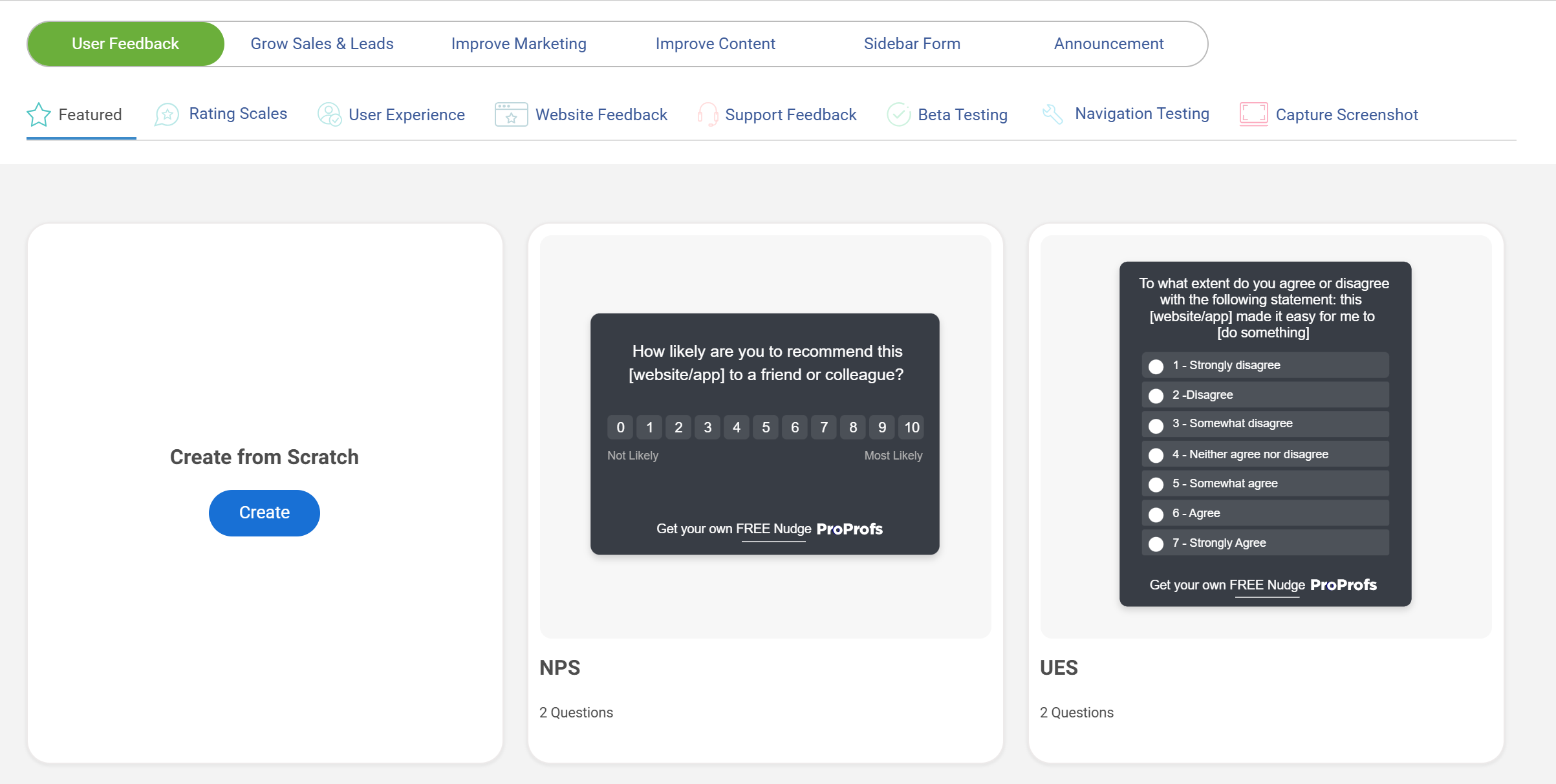
Qualaroo has been my go-to for in-the-moment feedback for years now, and it’s honestly the one tool that actually feels like it was built for product teams who move fast. The star of the show is the Nudge™, those little non-annoying surveys that slide in when someone’s on your site or in your app.
You can target these surveys only to users who just failed onboarding, paid customers, visitors from a specific campaign, or practically any segment you can imagine. And AI-powered sentiment analysis turns thousands of open-text responses into insights you can understand in minutes instead of weeks. Plus, branching works intelligently, asking only the follow-up questions that make sense, so your users aren’t overwhelmed.
Best For: Businesses and enterprises seeking actionable, real-time user insights by surveying visitors on their website, app, or prototypes at the moment of interaction.
Pros:
- AI-driven sentiment analysis by IBM Watson.
- Advanced targeting based on identity, custom properties, behavior, geolocation, exit intent, and more.
- Nudge™ for prototypes on Figma, Adobe XD, InVision, and more.
- Branching & skip logic for relevant questions.
- Multilingual surveys in over 70 languages.
- Customizable branding, colors, and logo.
- In-app surveys for iOS and Android.
Cons:
- Dedicated onboarding/account manager services are generally reserved for the paid plans.
- There is no downloadable or on-premise version available (Internet connection required to use the tool)
User Rating: 4.7/5 (Capterra)
Pricing: Free plan available with all premium features. Paid starts at $19.99/month per month, followed by Business at $49.99 and Enterprise at $149.99.
2. MonkeyLearn
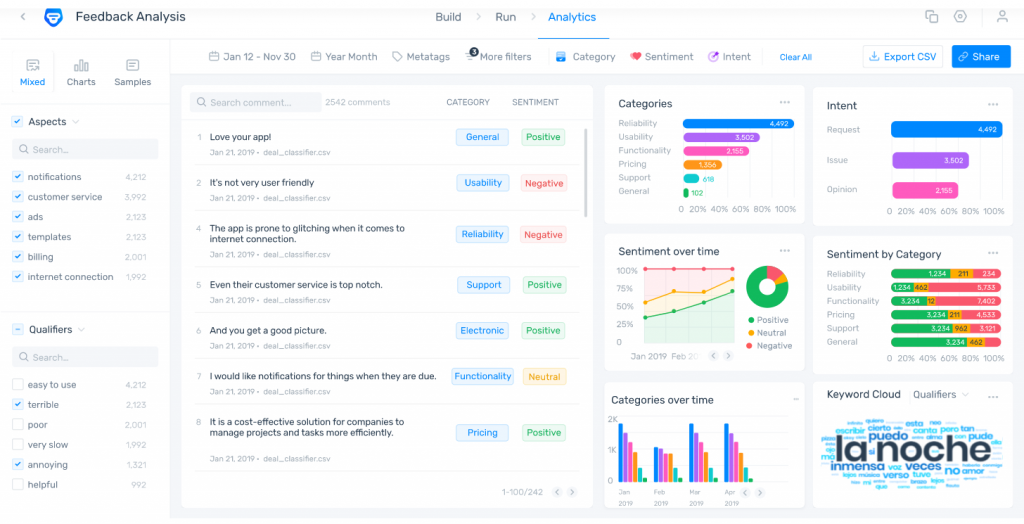
MonkeyLearn is what you use when you want sentiment analysis without turning it into a data science project. You drop in survey comments, app reviews, support tickets, or NPS verbatims, and it starts tagging sentiment and clustering feedback into themes you can actually work with.
What I like about MonkeyLearn is speed. You can build a model fast, train it on your own labels, and get a dashboard that answers real questions like what people are upset about. If you’re running feedback loops across multiple sources and need an AI layer to organize the chaos, MonkeyLearn does the job cleanly.
Best For: Product, CX, and ops teams who want no-code sentiment analysis with fast theme extraction and simple dashboards.
Pros:
- AI-powered sentiment classification for reviews, tickets, and survey responses.
- Custom model training so you can match your product language (not generic sentiment guesses).
- Strong topic and keyword extraction to identify recurring themes.
- Easy-to-use interface for non-technical teams.
- Dashboards and exports that make reporting straightforward.
Cons:
- Costs scale quickly as volume increases.
- Not built for in-product micro-surveys or contextual targeting like Qualaroo.
- Aspect-based sentiment is possible, but takes more setup compared to tools built for ABSA.
User Rating: 4.3/5 (G2)
Pricing: Custom pricing model based on your usage and needs.
3. Thematic
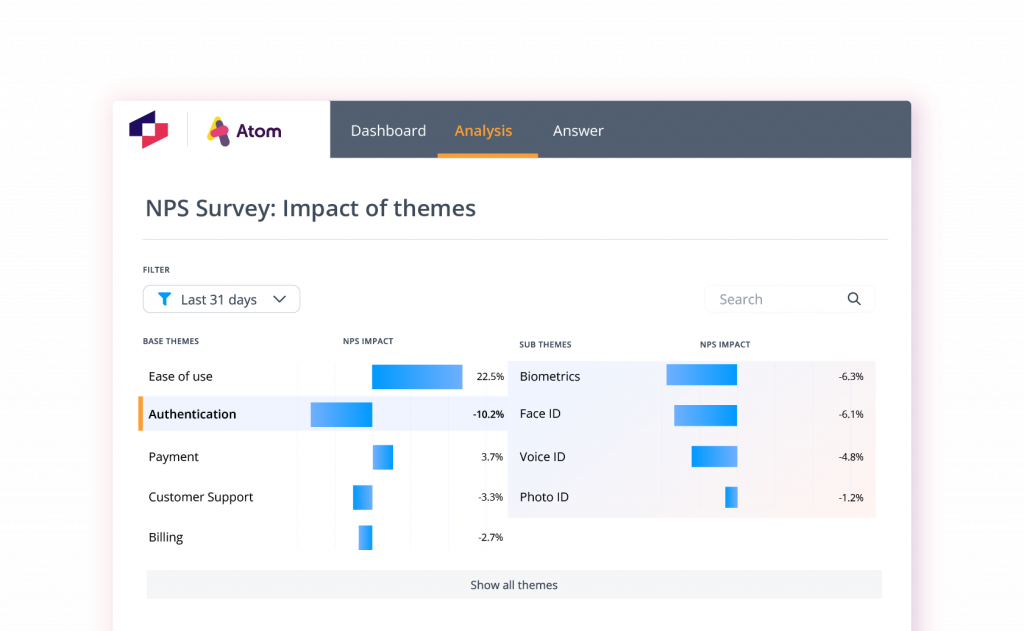
Thematic is for when you’re past the “positive vs negative” phase, and you want to know what’s actually driving sentiment. This is the tool teams pull in when leadership asks, “What’s causing churn?” and you don’t want to answer with a word cloud and a prayer.
Thematic clusters feedback into themes and ties those themes to sentiment shifts. So instead of “users are unhappy,” you get something like: “Users are unhappy because onboarding fails at step 2 and billing feels unpredictable.” That’s the kind of output that turns into a roadmap decision, not a weekly report that nobody reads.
Best For: Product and CX teams who need aspect-based sentiment and theme clustering to identify what’s driving satisfaction or frustration.
Pros:
- Strong theme clustering across large volumes of feedback.
- Aspect-based sentiment analysis to pinpoint drivers inside the same comment.
- Connects themes to business outcomes (churn, retention, CSAT).
- Helps prioritize fixes based on frequency and sentiment impact.
- Built for VoC workflows, not just tagging text.
Cons:
- Overkill if you only have small volumes of feedback.
- Requires consistent data flow to get the most value.
- Pricing is enterprise-level, so it’s not a “try it for $19” type of tool.
User Rating: 4.8/5 (G2)
Pricing: Paid plans start at $25,000 per year
4. Lexalytics (InMoment)
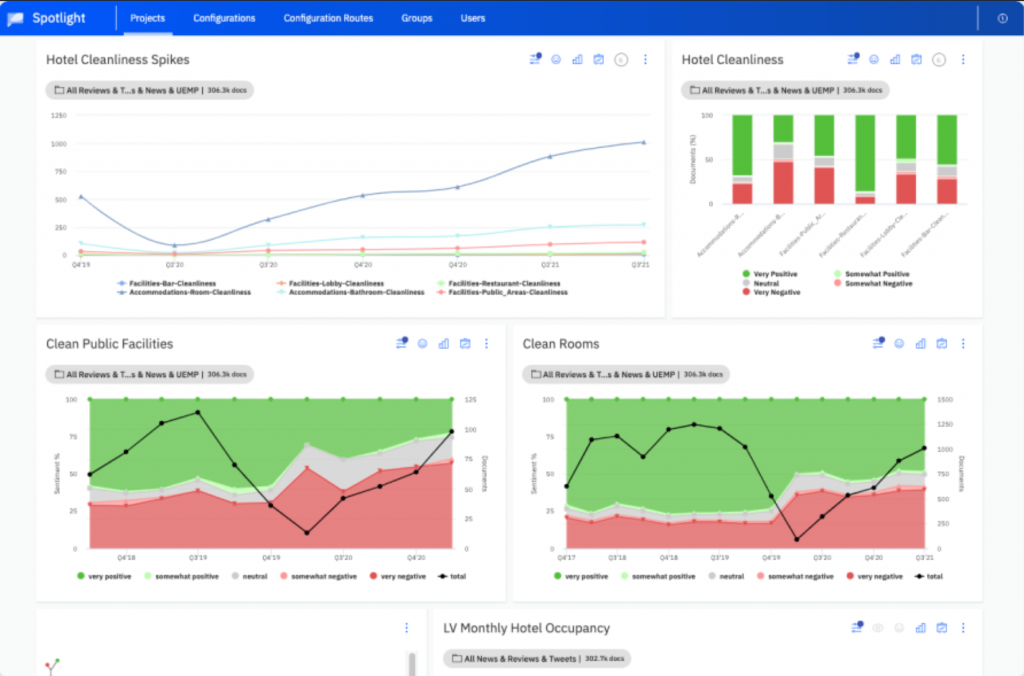
Lexalytics is one of those tools that I’ve heard the most about from my enterprise friends. It’s built to handle messy, high-volume feedback across channels and still give you structured output you can rely on.
You use it when you’re pulling text from multiple sources like surveys, support logs, chat transcripts, reviews, and you want more than sentiment. Lexalytics goes deeper into intent, entities, categorization, and theme-level insight. It’s basically sentiment analysis plus a full text analytics engine.
Best For: Enterprise teams that need sentiment analysis plus deeper text analytics (intent, categorization, entity extraction) across multiple data sources.
Pros:
- AI-driven sentiment analysis built for high-volume feedback.
- Strong categorization and entity extraction to identify recurring themes.
- Supports intent and emotion-style analysis depending on configuration.
- Works well across multi-channel VoC programs.
- Designed for enterprise-grade reporting and governance.
Cons:
- Setup can feel heavy if you’re a small team.
- Pricing is enterprise-only, so it’s not ideal for lean budgets.
- Less focused on real-time, in-product feedback collection compared to Qualaroo.
User Rating: 4.3/5 (G2)
Pricing: Paid plans start at $10,000 for basic cloud analytics.
5. Brand24
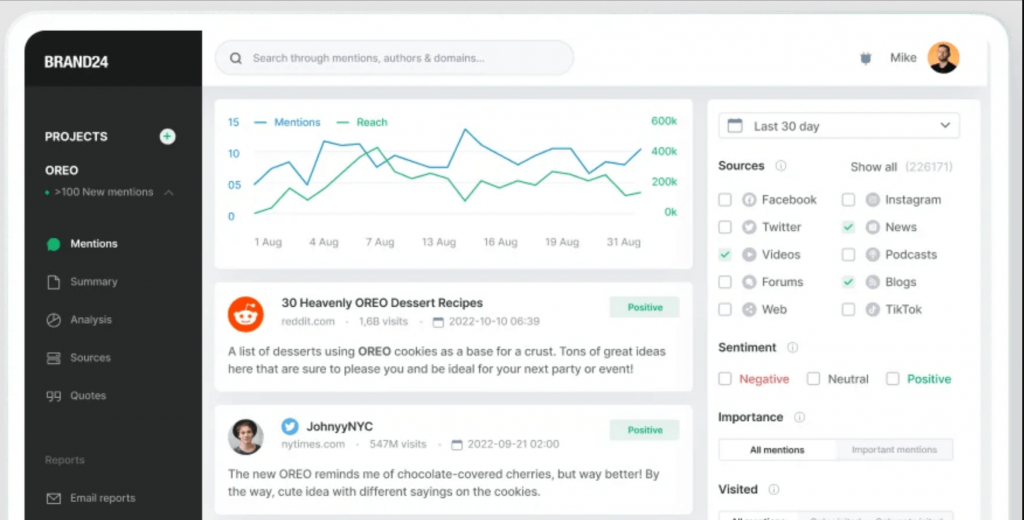
I first encountered Brand24 when our customer support team needed sentiment analysis as an early warning system. It tracks mentions across social media, blogs, forums, news, and the wider web, then tags sentiment so you can spot negative spikes fast. This matters more than people think. A single angry thread can become a reputation problem before your team even notices it exists.
If your product has any kind of public footprint, Brand24 gives you a practical way to monitor sentiment shifts and jump in early. The best use case is simple: set alerts for sentiment drops, route them to the right owner, and respond before the fire spreads.
Best For: Teams that want real-time sentiment monitoring and alerts for PR risks, customer complaints, or brand reputation shifts.
Pros:
- AI-powered sentiment analysis across web and social mentions.
- Real-time alerts for negative sentiment spikes.
- Strong monitoring coverage for smaller teams without enterprise complexity.
- Useful dashboards for trend tracking over time.
- Helps spot “troll” activity or coordinated negativity early.
Cons:
- Sentiment accuracy depends heavily on context (sarcasm still trips it up).
- Not built for deep product feedback workflows like survey analysis.
- You’ll still need a process to act on alerts; otherwise, it becomes noise.
User Rating: 4.6/5 (G2)
Pricing: Paid plans start at around $149 per month.
7. Brandwatch
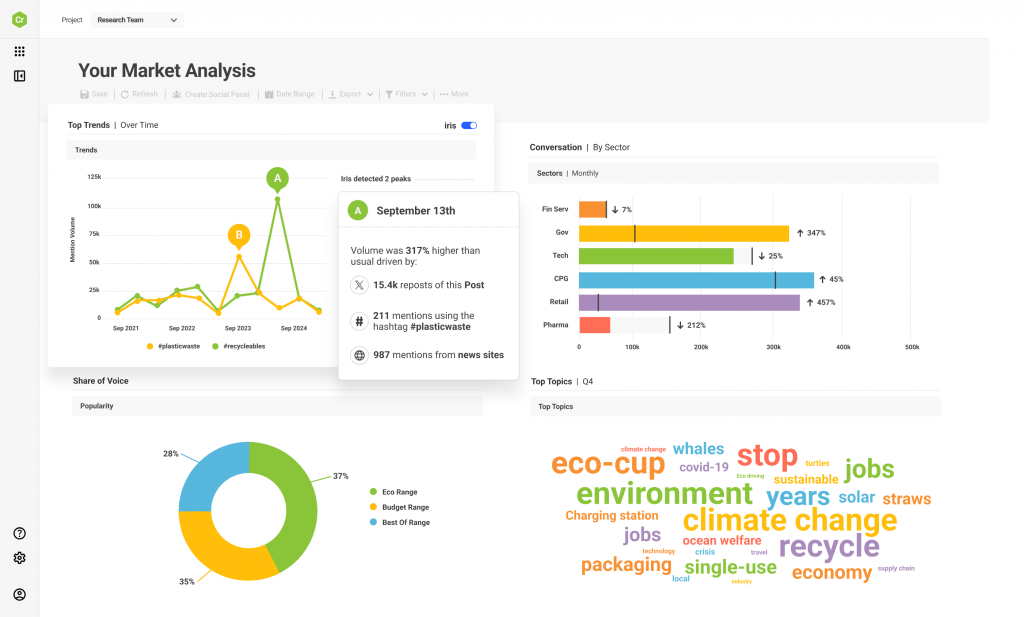
I started paying attention to Brandwatch when I saw how many serious consumer brands use it as their “command center” for sentiment and competitive intelligence. It pulls conversations from social platforms, forums, blogs, and news, then gives you the kind of sentiment and audience intelligence you need when your brand is too big to rely on manual tracking or basic alerts.
The biggest value is context. Brandwatch helps you track sentiment by segment, region, audience type, and even against competitors. So you’re not just asking “Are people happy?” You’re asking “Who’s unhappy, why are they unhappy, and is this a product issue, a messaging issue, or a competitor eating our lunch?”
Best For: Enterprise brands that need advanced social sentiment analysis, competitive tracking, and audience intelligence.
Pros:
- AI-powered sentiment analysis across social and public web sources.
- Strong competitive benchmarking and trend analysis.
- Deep filtering and segmentation for audience-specific sentiment insights.
- Powerful dashboards for PR, marketing, and brand strategy teams.
- Built for handling high-volume listening at scale.
Cons:
- Expensive and enterprise-focused.
- Requires time to set up dashboards and get value.
- Not designed for in-product feedback collection or micro-surveys like Qualaroo.
User Rating: 4.3/5 (G2)
Pricing: Custom pricing, depending on your monitoring needs and scale.
8. Amazon Comprehend
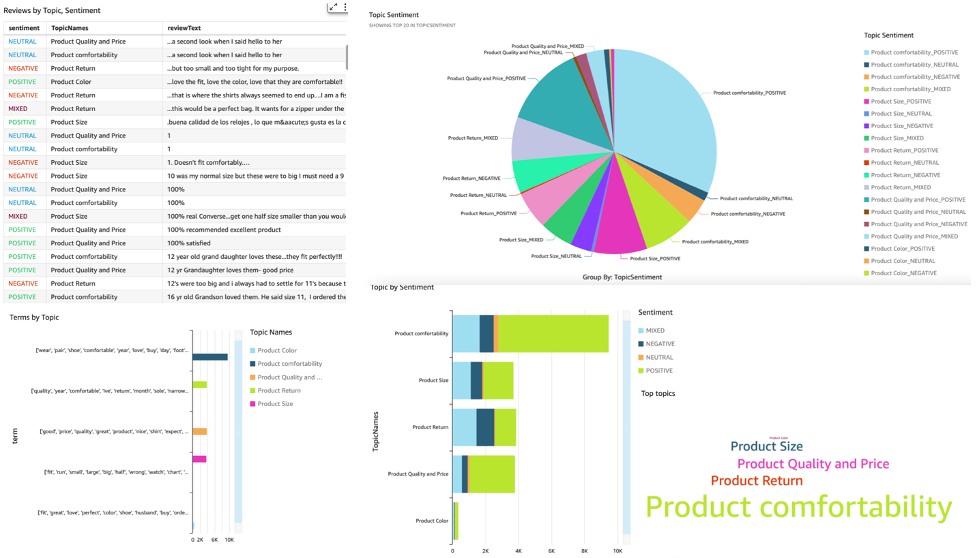
I got familiar with Amazon Comprehend the first time an engineering team told me about its sentiment analysis. Amazon Comprehend is a developer-first sentiment analysis API built for scale. You feed it text, and it returns sentiment labels (positive, negative, neutral, mixed), confidence scores, and extra NLP outputs like key phrases, entities, and language detection.
This tool shines when you want sentiment analysis embedded directly into your product workflows. Think: auto-tagging support tickets, routing angry feedback to escalation queues, or running daily sentiment reports across reviews and surveys without relying on a SaaS interface.
Best For: Developer teams that want scalable sentiment analysis via API, especially if they’re already in the AWS ecosystem.
Pros:
- AI-powered sentiment analysis with confidence scoring.
- Handles mixed sentiment (not just positive or negative).
- Entity and key phrase extraction helps you connect sentiment to topics.
- Easy to scale for high-volume workflows.
- Fits cleanly into AWS infrastructure.
Cons:
- Requires technical setup and engineering ownership.
- UI and reporting are not strong compared to SaaS platforms.
- Generic sentiment can be less accurate for industry-specific language unless you build training layers around it.
User Rating: 4.2/5 (G2)
Pricing: Pay-per-use (usage-based AWS pricing).
9. Google Cloud Natural Language
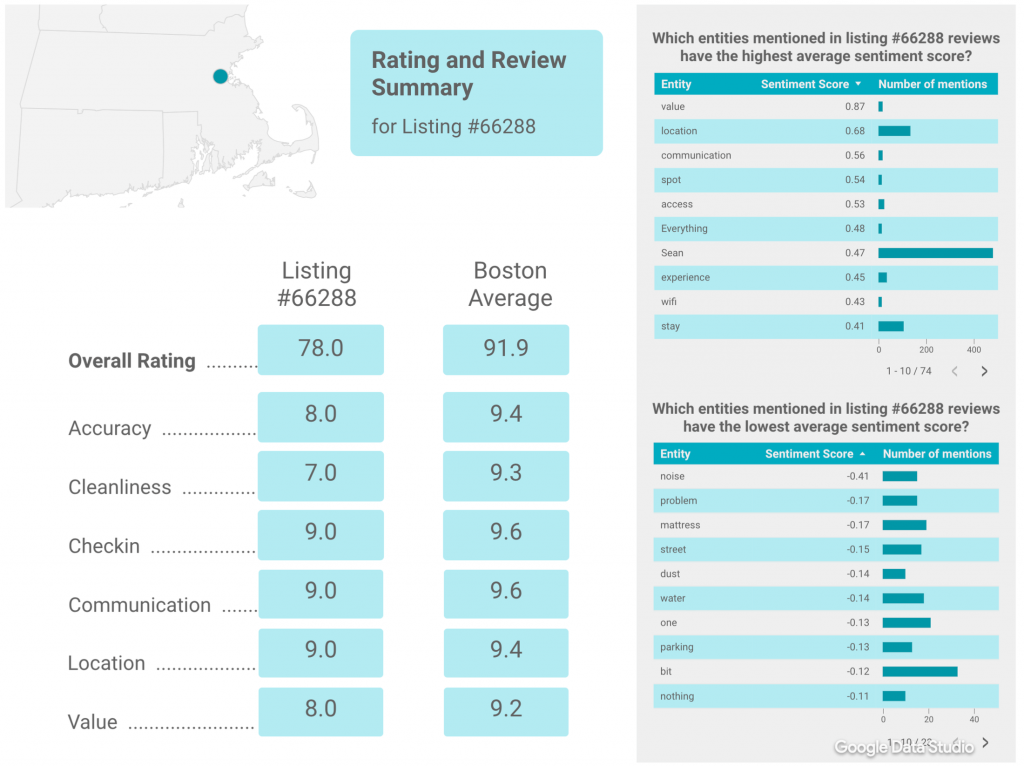
I got to know about Google Cloud Natural Language when a team needed sentiment analysis inside an existing GCP pipeline and didn’t want to bolt on another SaaS tool. This is a solid pick when you want sentiment analysis as an infrastructure layer, not a separate dashboard. You send text through the API, and it returns sentiment scores along with useful NLP extras like entity analysis and syntax parsing.
If you already live in Google Cloud, this is one of the fastest ways to run sentiment analysis at scale without adding new tools for your team to learn. The trade-off is simple: this is developer-owned. You’ll need engineering time to build reports, dashboards, and workflows on top of it.
Best For: Teams building in Google Cloud that want scalable sentiment analysis through an API.
Pros:
- AI-driven sentiment analysis via API with reliable performance.
- Entity analysis helps you connect sentiment to specific topics (features, pricing, onboarding).
- Syntax analysis adds structure when you’re parsing messy, unformatted feedback.
- Easy to plug into broader GCP workflows for automation and reporting.
- Works well for large-scale processing of reviews, tickets, and surveys.
Cons:
- Requires engineering setup and maintenance.
- No built-in dashboard for non-technical teams.
- Generic sentiment can miss context-heavy edge cases unless you tune workflows around it.
User Rating: 4.3/5 (G2)
Pricing: Price per 1000 char units: $0.0010/month
10. Azure AI Language
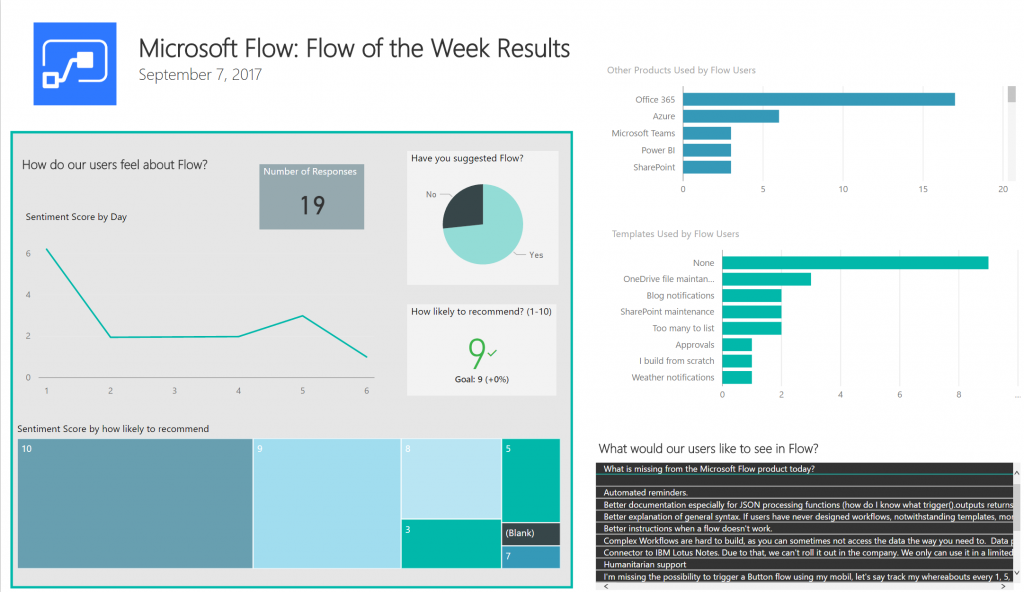
I got to know about Azure AI Language when a product team inside a Microsoft-heavy organization needed sentiment analysis that could plug into existing Azure and Power BI reporting without extra tooling. You send in feedback, and it returns sentiment labels plus “opinion mining,” which helps break down what exactly users like or dislike within a comment.
This is a strong option when your data lives in Azure, and you want sentiment analysis embedded into customer support analytics, product feedback pipelines, or reporting dashboards. Like the other APIs, the trade-off is you’re buying infrastructure, not a ready-to-use product UX. Your team needs to build the workflows around it.
Best For: Microsoft-first orgs that want sentiment analysis and opinion mining inside Azure workflows.
Pros:
- AI-powered sentiment analysis with opinion mining for deeper insight.
- Works well inside Microsoft’s ecosystem (Azure, Power BI, Dynamics, etc.).
- Scales cleanly for large datasets like tickets, chats, and reviews.
- Good for teams building automated classification and reporting pipelines.
- Useful for structured VoC programs when paired with reporting tools.
Cons:
- Developer setup required. Not plug-and-play for product teams.
- Reporting and visualization depend on what you build outside the API.
- Pricing can get expensive at very high volumes without careful usage control.
User Rating: 4.3/5 (G2)
Pricing: $700 per 1M text records/month
My Top 3 Picks (If You Want To Choose Fast)
If you do not want to overthink this, these are the three tools I’d shortlist first, depending on what you’re solving for.
1. Qualaroo (Best Overall For Product Teams)
If your goal is product and UX improvement, this is the one. You can trigger micro-surveys at the exact moment of friction (onboarding failure, cancellation intent, error state), then use AI sentiment analysis to turn open-text into themes and trends fast. This is how you fix real problems before they become churn.
2. Thematic (Best For Driver And Theme Analysis At Scale)
If you already have a lot of feedback pouring in and you need to know what’s driving sentiment, Thematic is built for that. This is the tool you use when you want clear “top reasons for dissatisfaction” without manually tagging thousands of responses.
3. Brand24 (Best For Real-Time Alerts And Reputation Monitoring)
If you need to catch negative spikes early (especially public complaints), Brand24 is the practical choice. It is simple, fast, and works as an early warning system so you can respond before issues snowball.
What to Look for Before You Pay for Sentiment Analysis
Most people pick sentiment tools based on features. That’s the wrong filter.
Use these criteria instead. They map directly to whether you’ll actually use the tool after week two.
1) Feedback Capture Quality (Not Just Analysis)
Sentiment tools fail when your input data is vague.
Pick tools that help you collect feedback in context (especially in-product), not just analyze text after the fact.
What to look for:
- In-the-moment triggers (onboarding drop-off, errors, cancellation intent)
- Segmentation (new vs paid vs power users)
- Micro-survey support (fast answers, high response rates)
2) Depth Of Insight (Polarity Vs Drivers)
Basic tools give you positive or negative.
Better tools tell you what’s driving that sentiment.
What to look for:
- Theme clustering
- Aspect-level sentiment
- Ability to connect sentiment to topics (pricing, onboarding, performance)
3) Speed To Action
If it takes two weeks to set up and interpret, you won’t use it.
What to look for:
- Dashboards that highlight top problems immediately
- Real-time alerting for spikes
- Exports or workflows that help you move fast
4) Scalability And Cost Control
Sentiment analysis gets expensive when volume grows.
What to look for:
- Predictable pricing for your expected volume
- Ability to batch process
- Usage controls and limits so you do not get surprise bills
5) Accuracy On Real Feedback (Not Clean Demo Text)
Your feedback will include slang, typos, mixed sentiment, and sarcasm.
What to look for:
- Ability to customize models or categories
- Confidence scoring
- Support for mixed sentiment and multi-topic responses
Select the tool your team will actually use, not the one that looks the most impressive in a demo.
FREE. All Features. FOREVER!
Try our Forever FREE account with all premium features!
Choose the Right Tool (Based on Your Feedback Workflow)
Most teams pick sentiment tools backwards. They compare dashboards, model types, and features. But they skip the one thing that decides whether sentiment analysis is useful or useless: How you collect feedback.
If your feedback is vague, delayed, or out of context, sentiment analysis just tells you “users are unhappy,” without telling you what triggered it.
So start with your workflow first. Then pick the tool that matches it.
1. If You Need Product and UX Insights, Prioritize in-the-Moment Feedback
If your goal is to improve onboarding, adoption, or retention, you need feedback when the experience is fresh.
That means collecting feedback right after a trigger, like:
- Onboarding failure
- Error message
- Rage click
- Feature usage drop
- Cancellation intent
- Billing confusion
This is where Qualaroo stands out because you can target micro-surveys to specific segments and moments, then use AI sentiment analysis to quickly understand what people are frustrated about and why.
2. If You Have Large Volumes of Text, Choose Theme and Driver Analysis
If you’re analyzing thousands of reviews, tickets, and long-form feedback, you need tools that do more than label sentiment.
You want tools that can:
- Group feedback into themes
- Show what’s driving negative sentiment
- Surface what’s trending worse over time
This is where Thematic and Lexalytics work best. They are built for structured insight across big datasets.
3. If Your Risk Is Public, Use Social Sentiment Monitoring
Public sentiment moves fast. A single complaint thread, influencer post, or downtime event can swing perception in a day.
Social listening tools help you monitor:
- Brand mentions
- Sentiment trends
- Negative spikes
- Emerging topics
This is where Brand24, Talkwalker, and Brandwatch fit. They are designed for external reputation monitoring, not product micro-surveys.
4. If Engineering Owns the Workflow, Use a Sentiment API
If you want sentiment analysis inside your existing pipeline, you do not need another SaaS dashboard.
You need a scalable API that can tag sentiment across millions of records.
This is the right move when you want to:
- Auto-tag support tickets
- Route negative feedback for escalation
- Run daily sentiment reports at scale
This is where Amazon Comprehend, Google Cloud Natural Language, and Azure AI Language fit.
Quick Tool Selection Shortcut
Use this when you want to decide in under 30 seconds:
- If you want actionable product feedback fast: Qualaroo
- If you want theme-level drivers behind sentiment: Thematic or Lexalytics
- If you want real-time public sentiment alerts: Brand24, Talkwalker, Brandwatch
- If you want sentiment built into your product pipeline: Comprehend, Google, Azure
How AI Sentiment Analysis Works
AI sentiment analysis is basically three steps: collect text, run it through a model, and turn the output into decisions you can ship.
The fancy part is the model. The useful part is everything around it.
Here’s the simple breakdown.
Step 1: Collect the Right Text (Context Matters More Than Volume)
Sentiment analysis is only as good as the feedback you feed it.
If you collect generic comments like “Any feedback?” you’ll get generic sentiment, such as “it’s fine.”
Instead, collect feedback right after a meaningful moment.
Examples that work:
- After onboarding completion or failure
- After someone makes an error
- After a key feature is used for the first time
- When someone tries to cancel
- After a support interaction
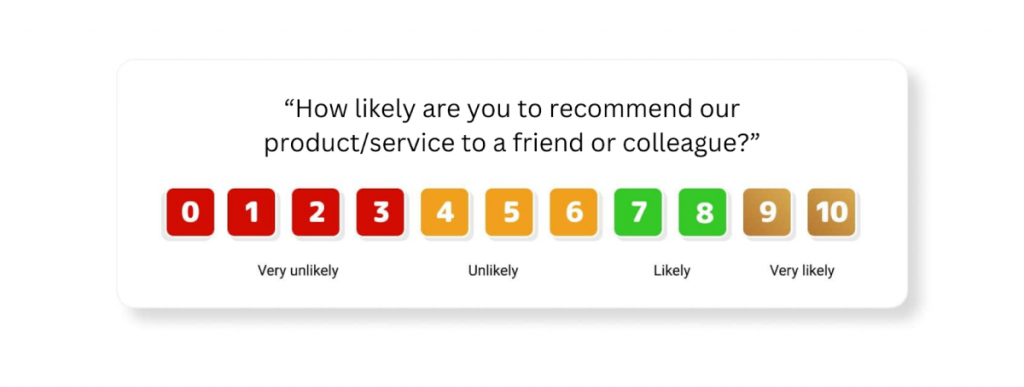
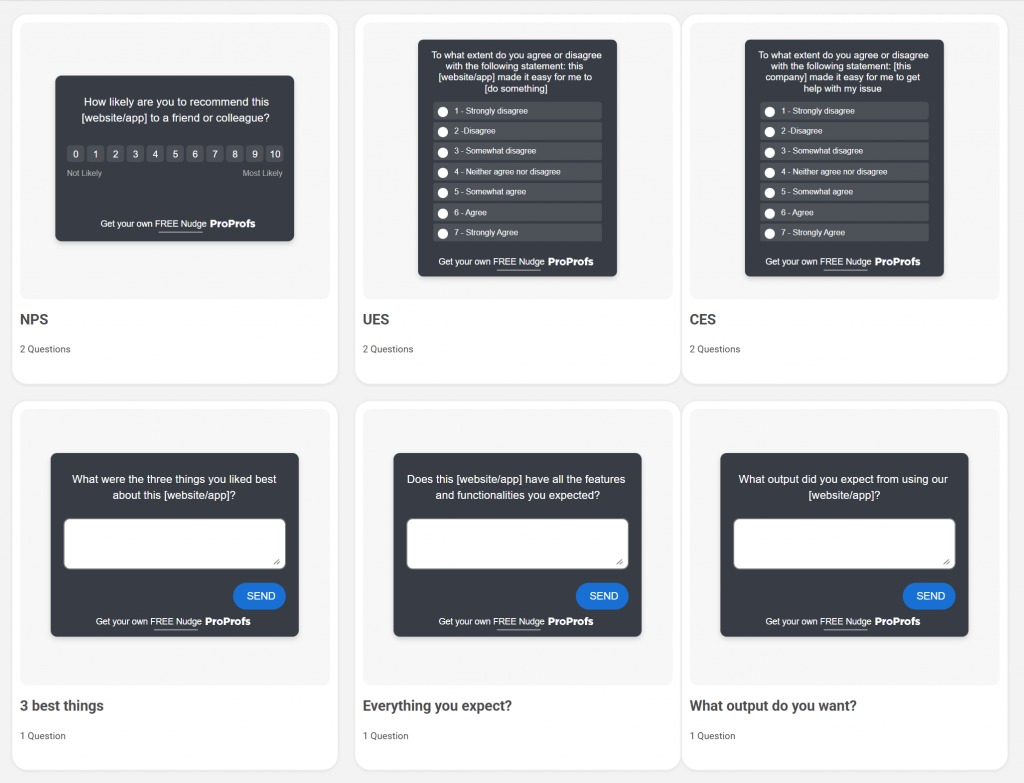
This is why in-product tools like Qualaroo perform well. You can trigger feedback in the exact moment the sentiment is formed. Here are a few sentiment analysis survey templates you can use:
Step 2: The Model Classifies Sentiment (and Sometimes More)
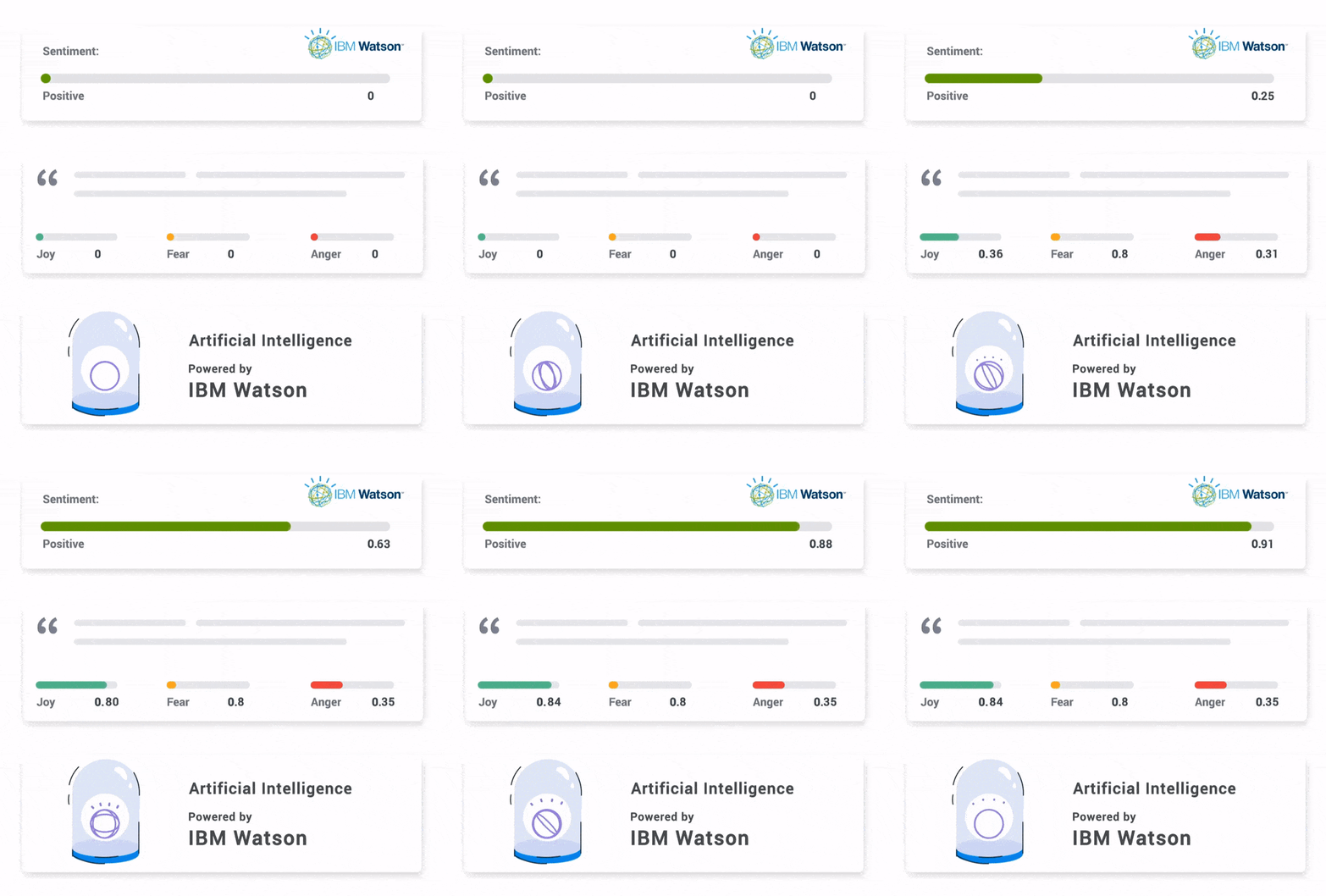
Once text is collected, the model processes it and returns sentiment labels like:
- Positive
- Negative
- Neutral
- Mixed (common in real feedback)
Here’s how it looks:
Some tools also extract:
- Themes (what the comment is about)
- Entities (product features, pricing, competitors)
- Emotions (frustration, anger, excitement)
- Urgency or intent (“I’m cancelling,” “I need help now”)
This is where sentiment becomes useful. Sentiment alone is a mood. Themes and entities tell you what caused it.
Step 3: Results Get Aggregated Into Patterns You Can Act On
Raw sentiment labels are not the output you want.
You want trends and drivers, like:
- “Negative sentiment spiked after the new pricing page launched.”
- “Most onboarding frustration is coming from step 2.”
- “Feature X gets praise, but speed is the consistent complaint.”
The best tools help you:
- Cluster feedback automatically
- Show sentiment by theme
- Track changes over time
- Filter sentiment by user segment (new vs paid vs power users)
That’s how you turn thousands of comments into a roadmap decision.
Step 4: What “Good Output” Looks Like (so You Don’t Waste Time)
You know sentiment analysis is working when you can answer these quickly:
- What are the top 3 reasons for negative feedback this week?
- Which user segment is most unhappy, and why?
- What’s trending worse after a release?
- What should we fix first to improve CSAT?
If your tool cannot answer those questions, it’s sentiment tagging, not sentiment intelligence.
BERT vs LLMs: The Quick Decision Guide
You’ll hear a lot of noise about model choice, but the decision is pretty simple.
- If you’re doing high-volume sentiment tagging, BERT-style models still win.
- If you need explanations and summaries, LLMs win.
- If you want the best outcome, you combine both.
| If You Need… | Go With BERT-Style Models | Go With LLMs |
|---|---|---|
| Fast Sentiment Tagging at Scale | ✅ Best choice. Low latency and reliable classification. | ❌ Slower and more expensive for simple tagging. |
| High-Volume Pipelines (Tickets, Reviews, Surveys) | ✅ Built for production workloads and large datasets. | ⚠️ Works, but costs stack up quickly at volume. |
| Consistent, Repeatable Sentiment Scoring | ✅ Very stable once fine-tuned. | ⚠️ Can vary depending on prompt and model drift. |
| Explaining “Why” Behind Sentiment | ⚠️ Limited. You’ll need themes or rules layered on top. | ✅ Strong. Great for summaries and root-cause extraction. |
| Handling Messy, Unstructured Feedback | ⚠️ Works, but needs training and preprocessing. | ✅ Better at understanding long and complex text. |
| Extracting Specific Complaints and Action Items | ❌ Not designed for this. | ✅ Excellent for “pull out what’s broken and why.” |
| Budget Control | ✅ Cheaper per classification. | ❌ Can get expensive fast. |
| Lowest Risk of Hallucinations | ✅ No hallucinations. It classifies only. | ⚠️ Hallucination risk exists, especially for summaries. |
| Best Real-World Setup | ✅ Use for classification and tagging at scale. | ✅ Use for summarizing themes and generating insights. |
Pick The Tool You’ll Actually Use Weekly
AI sentiment analysis is only valuable if it shortens the distance between feedback and action. A polarity score alone will not fix onboarding, a dashboard alone will not reduce churn, and a tool you check once a month is basically a subscription you forgot to cancel.
If you want actionable product and UX insights, start with a tool like Qualaroo because it captures feedback in the moment, segments the right users, and turns open-text into sentiment insights fast.
If you’re building a product, my advice is simple: Start by collecting feedback at the right moment. Then use sentiment analysis to scale what you learn.
That’s how you stop guessing and start shipping fixes your users actually care about.
Frequently Asked Questions

Can ChatGPT do sentiment analysis?
Yes, ChatGPT can analyze sentiment from text and even summarize the reasons behind it. It works well for small batches, exploratory analysis, or extracting themes from messy feedback. But it is not ideal for large-scale, repeatable workflows where you need consistent scoring, automation, dashboards, and cost control.
What are the three types of sentiment analysis?
The three common types are polarity-based sentiment analysis, emotion detection, and aspect-based sentiment analysis. Polarity labels feedback as positive, negative, or neutral. Emotion detection identifies feelings like frustration or joy. Aspect-based sentiment ties sentiment to specific topics like onboarding, pricing, or support.
How does AI sentiment analysis help you understand the “why” behind CSAT or NPS scores?
Scores like CSAT and NPS tell you the outcome, but not the reason. AI sentiment analysis reads open-text comments and surfaces what users liked, what confused them, and what felt missing. This turns a low score into clear fixes, like improving onboarding steps or clarifying pricing expectations.
Why do teams use AI sentiment analysis instead of manual review?
Manual review breaks the moment feedback volume grows. When you have hundreds or thousands of comments, sampling leads to bias and tagging takes weeks. AI sentiment analysis processes all feedback quickly, highlights recurring themes, and tracks sentiment shifts over time so you can react faster and prioritize better.
FREE. All Features. FOREVER!
Try our Forever FREE account with all premium features!

 We'd love your feedback!
What did you like & how can we make it even better?
 Thanks for your feedback!
 Ask Your Question
Have a question? Get expert help to make your decision easier.