Ranking survey questions ask respondents to order a list of items from most to least preferred instead of scoring each one on its own. That single design choice changes everything about the data you get back.
A rating scale lets every option score high, so you never really learn which option a customer would choose first.
A ranking question forces that choice, which is exactly why product teams, CX leads, and researchers reach for it when they need to know what actually matters most to their audience.
You’ll run into ranking questions constantly: rank these features, rank these onboarding steps, rank these reasons you’d consider canceling.
This guide covers what a ranking question is, the types available, real examples by category, how to build one with AI in minutes, how to analyze the results correctly, and how to write one your readers will actually finish.
What Are Ranking Survey Questions?
A ranking survey question is a closed-ended survey question type in which respondents order a list of items from most to least preferred rather than scoring each item independently. It reveals relative priorities and trade-offs that a rating scale can’t show, since every item directly competes with the others on the list.
Ranking survey questions show up across product feedback, HR surveys, and market research whenever you need a clear hierarchy instead of a set of disconnected scores.
The format itself is simple: give respondents a list, ask them to put it in order, and the resulting data tells you which option would win if two of them were competing for the same budget, roadmap slot, or moment of attention.
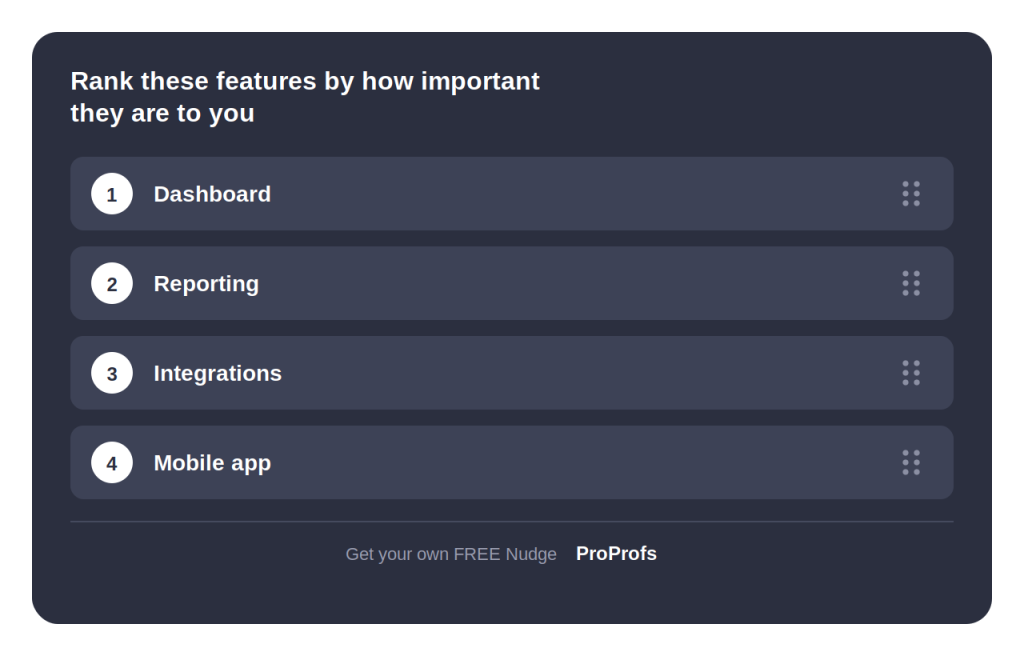
What Is the Difference Between Ranking and Rating Questions?
A rating question scores each item independently. A ranking question forces respondents to order items, so if one moves up, another has to move down.
Here’s the practical difference:
“Rate how important free shipping is to you” is a rating question, and every respondent could answer “very important.”
“Rank free shipping, price, and delivery speed in order of importance” is a rank-order survey question that forces respondents to decide what matters most when they can’t have everything.
| Question Type | What It Measures | Best Use Case |
| Rating question | Absolute value of one item, independent of others | Measuring satisfaction, agreement, or performance on a single attribute |
| Ranking question | Relative preference across multiple items | Understanding trade-offs and true priorities among competing options |
Rating scales are faster to answer and easier to build into a matrix, which is why NPS and CSAT surveys rely on them.
But when two features both score a 5 out of 5, a rating scale can’t tell you which one your customer would choose first. That’s the gap ranking questions in survey design are built to close.
What Are the Types of Ranking Survey Questions?
Not every ranking question needs to work the same way. The right format depends on your list length and where your respondent is answering from.
| Format | How It Works | Best For |
| Drag and drop ranking | Respondent reorders items by dragging them into sequence | Short lists (5 to 7 items) for desktop-heavy audiences |
| Numbered dropdown or radio grid | Respondent assigns a rank number to each item from a list | Mobile and accessibility-friendly surveys avoid drag and drop |
| Text box ranking | Respondent types their preferred rank number into a field | Simple builds work on almost any device, but are more error-prone |
| Pairwise comparison | Respondent chooses between two items at a time until a full order emerges | Complex or similar items where a direct list would be hard to judge |
If most of your audience answers on a phone, a drag-and-drop list of even 6 items can be frustrating to reorder with a thumb. A dropdown grid or arrow-based select box avoids that friction entirely.
20 Survey Ranking Questions Examples by Category
Different goals call for different ranking questions. Here are survey ranking questions examples grouped by the most common categories, along with what each one is actually designed to gauge.
Product and Feature Prioritization Questions
| Ranking Survey Question | What It Gauges |
| Rank the following features by how important they are to you: Dashboard, Reporting, Integrations, Mobile App | Product roadmap priority |
| Rank these upcoming releases by how excited you are to use them: Dark mode, Offline access, Custom alerts, Team workspaces | Feature launch demand |
| Rank these product areas by how much they need improvement: Speed, Design, Onboarding, Support documentation | Investment priority for the next quarter |
| Rank these integrations by how much they’d improve your workflow: Slack, Salesforce, Zapier, Google Analytics | Integration roadmap priority |
Customer Experience and Churn Questions
| Ranking Survey Question | What It Gauges |
| Rank these reasons in order of what would make you consider canceling: Price, Missing features, Poor support, Better competitor option | Churn risk drivers |
| Rank these support channels by preference: Live chat, Email, Phone, Help center articles | Support channel investment |
| Rank these factors by how much they affect your loyalty to a brand: Price, Product quality, Customer service, Rewards program | Loyalty drivers |
| Rank these aspects of a recent support interaction by how much they shaped your experience: Response time, Agent knowledge, Resolution speed, Follow-up communication | Support quality drivers |
Onboarding and Product Experience Questions
| Ranking Survey Question | What It Gauges |
| Rank these onboarding steps by how helpful they were: Welcome email, Product tour, Setup checklist, Live demo call | Onboarding flow effectiveness |
| Rank these resources by how much they helped you get started: Help docs, Video tutorials, Live chat support, Community forum | Self-serve content priority |
| Rank these first-week actions by how much they helped you see the product’s value: Completing setup, Inviting a teammate, Connecting an integration, Exploring templates | Activation driver priority |
| Rank these onboarding formats by preference: Self-guided walkthrough, Video tutorial, Live onboarding call, Written documentation | Preferred onboarding format |
Market Research and Purchase Decision Questions
| Ranking Survey Question | What It Gauges |
| Rank these factors by importance when choosing this type of product: Price, Ease of use, Customer support, and Integrations | Purchase decision drivers |
| Rank these communication channels by how you’d like to hear from us: Email, In-app notification, SMS, Push notification | Channel preference for retention campaigns |
| Rank these benefits of a loyalty program by what matters most: Discounts, Early access, Free shipping, Points redemption | Loyalty program design priorities |
| Rank these vendor qualities by importance during your evaluation: Product fit, Pricing transparency, Customer support, Ease of implementation | Vendor evaluation criteria |
Website and UX Feedback Questions
| Ranking Survey Question | What It Gauges |
| Rank these page elements by how much they affect your decision to stay on this page: Page load speed, Navigation clarity, Content relevance, Visual design | On-page friction points |
| Rank these reasons you almost left this page without completing your purchase: Price wasn’t clear, Too many steps, Couldn’t find information, Design felt untrustworthy | Exit-intent drivers |
| Rank these homepage sections by how useful they were in your decision: Hero message, Product demo video, Customer testimonials, Pricing table | Homepage content priority |
| Rank these checkout factors by importance: Shipping cost, Payment options, Delivery speed, Security badges | Checkout friction points |
Each of these follows the same rule: The items being compared sit on the same conceptual level, so the ranking actually means something.
Ranking “price” against “a specific employee’s helpfulness” would produce noise rather than insight.
FREE. All Features. FOREVER!
Try our Forever FREE account with all premium features!
How Do You Create Ranking Questions Using Qualaroo’s AI Survey Maker?
You don’t have to start from a blank page to build one of these.
Qualaroo’s AI survey maker lets you describe your goal, hand it existing content to work from, or start from a template, and it drafts a complete ranking question along with a relevant item list in return.
Here’s exactly how to walk through it.
Step 1: State Your Goal
Open the AI survey maker and type what you’re trying to learn, in plain language, such as “which features matter most to my users” or “why customers consider canceling.”
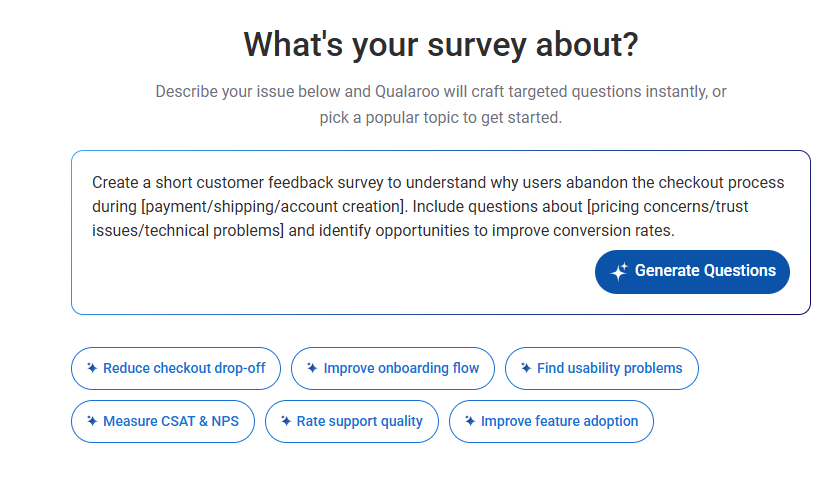
The more specific your goal, the more usable your first draft will be.
If you already have a feature list, a churn report, or customer call notes sitting in a document, you don’t need to retype anything.
Qualaroo’s AI survey maker accepts TXT and PDF file uploads, so it can pull real items straight out of your own content and turn them into ranking options for you.
Prefer not to generate from scratch? Pick from Qualaroo’s library of pre-built survey templates for common use cases like feature prioritization, onboarding feedback, or churn research, and simply edit the wording to match your product and audience.
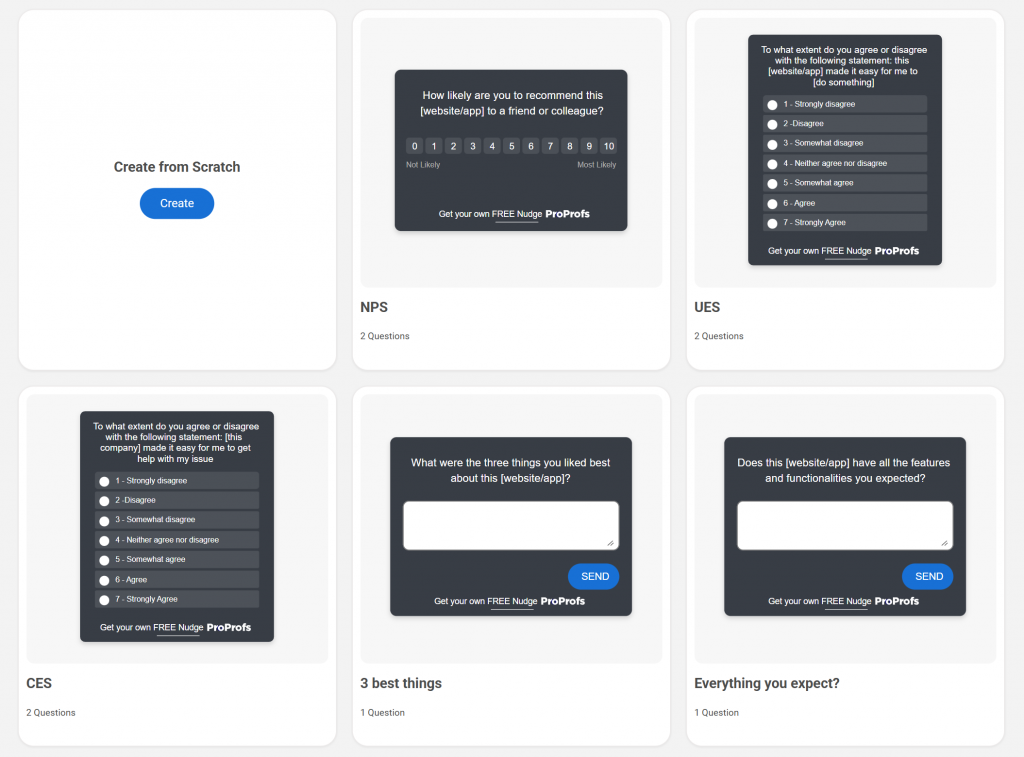
Step 2: Review the Generated Item List
Whichever path you took, read through the draft list the AI hands back before you move on. Edit it using AI.
Ask it to trim it down to 5 to 7 options, and remove anything that isn’t truly comparable to the rest of the list.
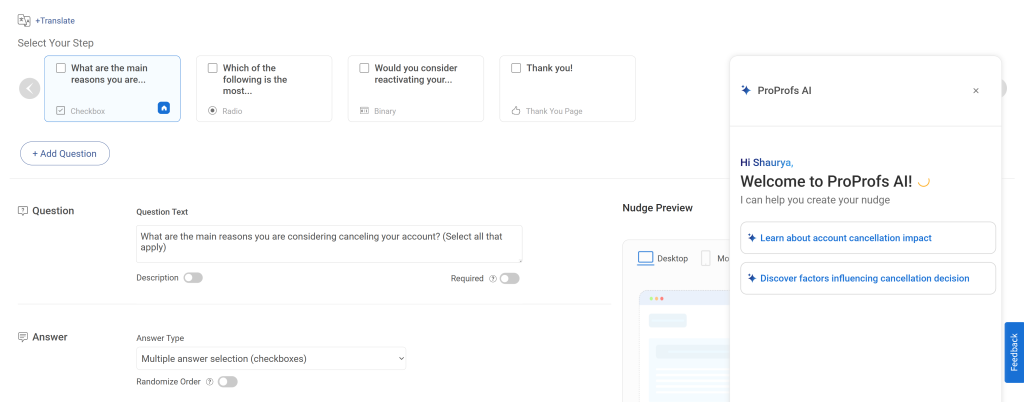
Choose your ranking format. Switch between drag-and-drop, a numbered grid, or pairwise comparison based on your audience’s device mix.
If a third or more of your respondents are on mobile, lean toward the grid format over drag-and-drop.
Step 3: Set Your Targeting
Decide who sees the survey and where, whether that’s a specific page, a logged-in user segment, or an exit-intent trigger.
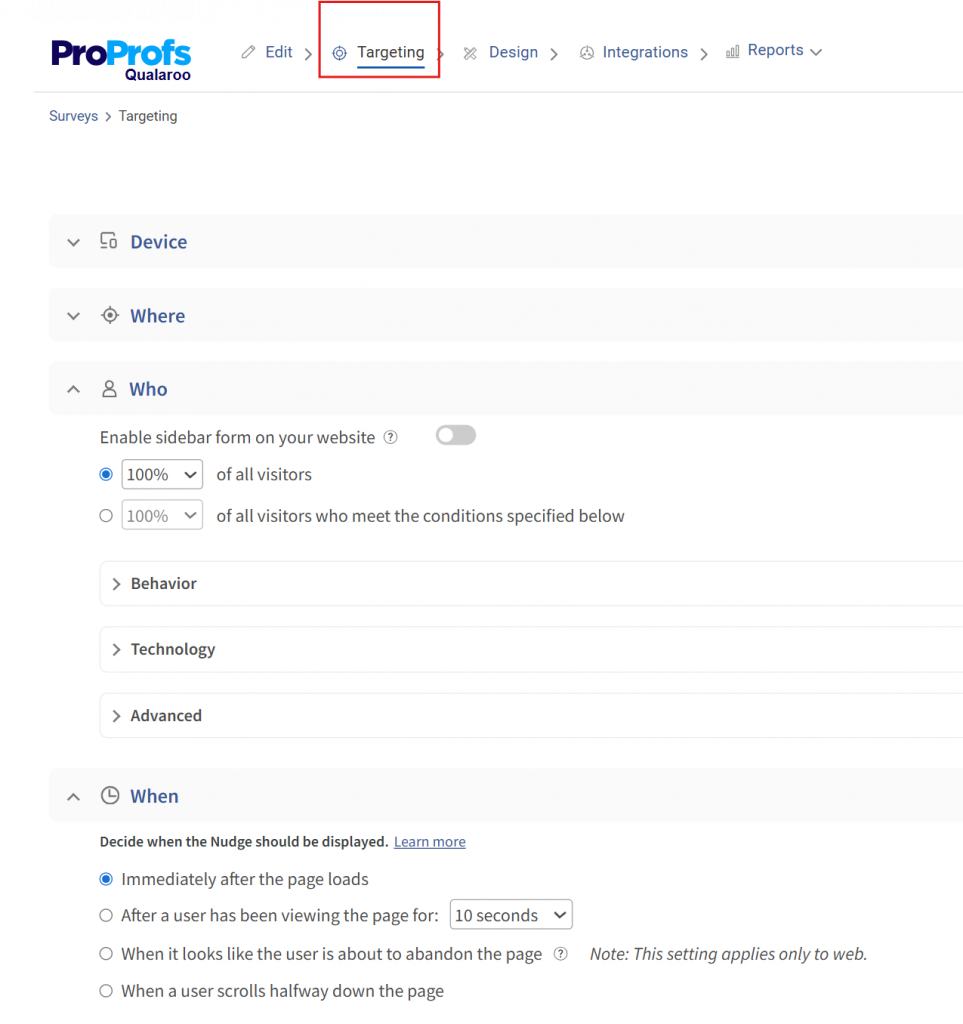
This is also where you’ll confirm that the survey reaches only the audience this question is meant for.
Step 4: Launch It
Deploy the finished survey on-site, in-app, or by email, and start collecting responses right away, with no developer work required on your end.
This turns what used to be a blank-page writing task into a few-minute review and launch, which matters most when you’re running these surveys often enough that writing each ranking survey question one from scratch adds up.
How Do You Analyze Ranking Survey Questions?
This is where most teams get it wrong. Ranking data is ordinal: the gap between rank 1 and rank 2 isn’t necessarily the same size as the gap between rank 4 and rank 5.
Averaging the numbers as if they were a rating scale is the single most common mistake in ranking analysis. Here’s what to use instead.
Calculate the Median Rank
For each item, find the middle value across all responses. This is less skewed by outliers than a mean, and it’s the safest default when you just need a clean, defensible order.
Run a Borda Count
Assign points based on position, so the highest rank gets the most points and the lowest gets the fewest, then sum the points across all respondents. This is useful when you want one clean overall order across the full list, not just the top pick.
Check Top Rank Frequency
Simply count how often each item was chosen as the number one pick. It’s easy to explain to stakeholders in a meeting and works well for a quick, directional read when you don’t need full statistical rigor.
Visualize With a Bump Chart or Ranked Bar Chart
For visualizing results, a bump chart works well if you’re comparing ranks across time periods or segments, and a simple ranked bar chart works for a single point-in-time read.
Read the Why Behind the Ranking
The ranked order alone still leaves a gap: it tells you what people chose, not why.
If you add an optional comment field to your ranking question, asking why they placed an item first or last, Qualaroo’s native AI Sentiment Analysis reads those open-text responses and surfaces the themes and emotional tone behind the ranking.
Word Cloud feature surfaces the most common words and phrases across those same open-text responses, so a recurring theme like “too slow” or “confusing setup” is visible at a glance before you even read individual comments.
This way, you’re not left guessing why “poor support” landed above “price” for a chunk of your respondents.
Here’s how it works:
How Do You Write Rank Order Survey Questions People Actually Finish?
A ranking question only gives you good data if the person answering it actually finishes it.
Get the list too long, the instructions too vague, or the timing wrong, and you’ll end up with a pile of half-completed responses instead of a clear priority order.
Here’s how to write one that holds up:
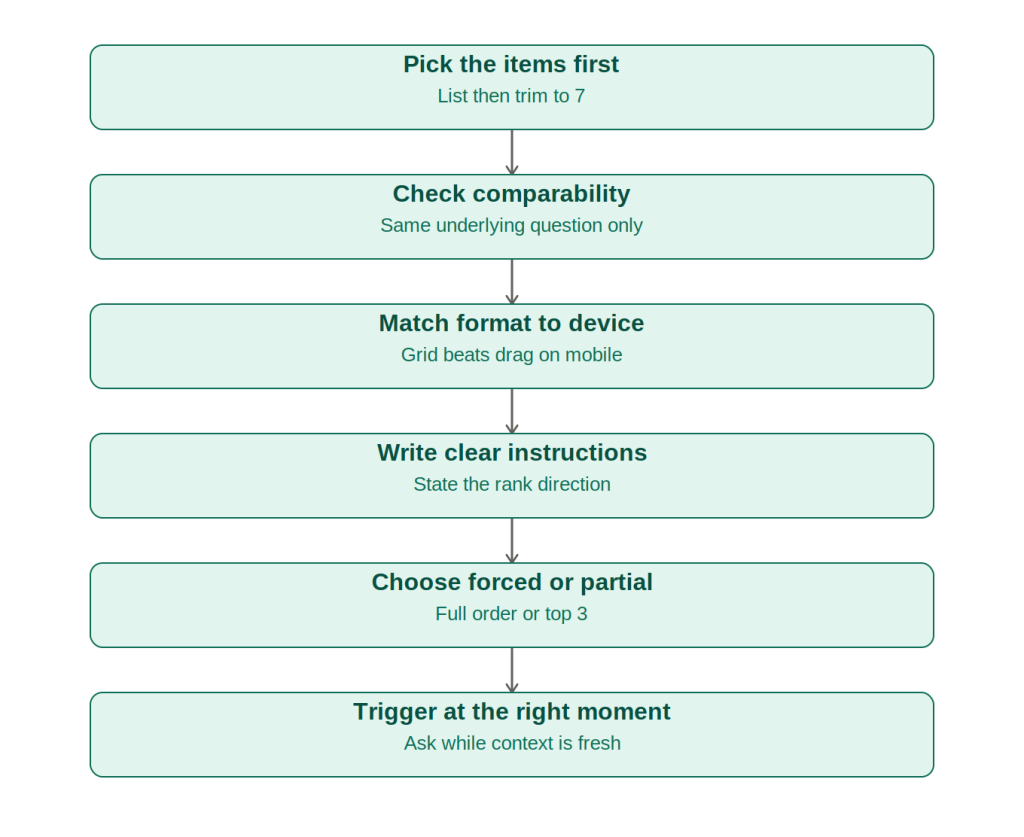
1. Pick the Items First: List every option you’re considering, then cut it down. If you have more than 7 items, split the question or pre-filter with a screener question.
2. Check Comparability: Make sure every item answers the same underlying question, like “which of these matters most to you,” not a mix of unrelated concepts.
3. Choose Your Format by Device: If more than a third of your audience answers on mobile, default to a numbered grid or arrow-based select box instead of drag and drop.
4. Write the Instruction Plainly: State the direction clearly: “Rank from 1 (most important) to 5 (least important).” Ambiguous instructions are one of the fastest ways to get inconsistent data.
5. Decide Between Forced or Partial Ranking: You don’t always need a full order. Asking respondents to rank only their top 3 out of 8 options is often just as useful and far less taxing to answer.
6. Place It Where the Answer Is Fresh: A ranking question about a feature you just used, or a support interaction you just had, gets a more accurate answer in that moment than the same question emailed a week later.
That last point matters more than most teams realize.
A long ranking question sitting in a passive email survey often gets abandoned halfway through, because the respondent has already moved past the context that would make their answer meaningful.
Triggering that same question inside your product or website while the experience is still fresh, through a Nudge™, tends to get it finished and answered with more accuracy than the same question mailed out later.
Turn Ranked Priorities Into Your Next Decision
Every ranked list you run is a bet on where to spend the next sprint, budget, or retention push.
Guess wrong, and you end up investing in the option your users actually placed fourth.
Qualaroo takes the guesswork out of that bet: draft the question with AI, trigger it as a Nudge™ the moment it’s relevant, and read the results with native AI-powered analysis instead of a spreadsheet full of raw numbers.
Qualaroo’s free plan covers up to 50 responses a month, so you can test a ranking question on your actual audience before committing to a paid plan.
Build and launch your first ranking survey question today.
Frequently Asked Questions
What is a pairwise comparison ranking question?
A pairwise comparison ranking question shows respondents two items at a time and asks them to pick the one they prefer, repeating this across every possible pair until a full order emerges. It works especially well when a list is long or when items are close enough in value that a straight list would be hard to judge accurately.
Can two items share the same rank in a survey?
Most survey tools require a strict order with no ties, since ties make the resulting data harder to analyze cleanly. If ties genuinely matter for your research question, consider using a rating question instead, or try a points-allocation format that lets respondents split value across items without forcing a single winner.
Should I use a ranking question or a matrix question?
Use a matrix question when you want an independent score for every item on the same scale, since each one can score high or low without affecting the others. Use a ranking question when you specifically need to know which item wins over another, not just how each one performs on its own.
How many respondents do I need for reliable ranking data?
There is no fixed minimum, but ranking data tends to be more sensitive to small sample sizes than rating data, since real trade-offs vary a lot from person to person. A larger sample gives you a more stable median rank and Borda count, and reduces the chance that outliers skew your result.
Can ranking questions work in an NPS or CSAT survey?
Yes, ranking questions pair well as a follow-up to an NPS or CSAT score, letting you ask respondents to rank the specific reasons behind their score rather than leaving it as an open-text field. This gives you a structured, prioritized list of drivers rather than a pile of comments to sort through manually.
What's the difference between forced ranking and a top 3 selection?
Forced ranking requires respondents to order every single item in the list, which gets tedious once you're past 7 or 8 options. A top-3 selection only asks them to pick and order their top choices from a longer list, which is faster to answer and still gives you a usable, directional priority signal.
When should I avoid a ranking question altogether?
Avoid ranking when your list runs long, when the items being compared aren't truly on the same conceptual level, or when you only need to know how strongly someone feels about a single thing. In those cases, a rating question answers it more quickly and asks the respondent much less.
FREE. All Features. FOREVER!
Try our Forever FREE account with all premium features!

 We'd love your feedback!
What did you like & how can we make it even better?
 Thanks for your feedback!
 Ask Your Question
Have a question? Get expert help to make your decision easier.