
AI customer experience gets interesting when you stop treating it like a tech project and start treating it like day-to-day operations.
Here’s the only question that matters: when a customer needs something, do they reach a clear outcome fast, or do they get dragged into back-and-forth?
AI helps you tilt that outcome in your favor. It pulls the right context, handles the repetitive parts cleanly, and gives your team a head start on the next best step. Done right, it makes customers feel taken care of, and it makes your internal machine run with less friction.
I’m going to show you what to implement first, what to save for later, and how to maintain high quality so the experience still feels human. You’ll get real examples from moments like onboarding, pricing, support spikes, and cancellation, plus clear ways to measure whether it’s working.
Let’s start with the basics in plain language, and then we’ll focus on what most teams miss.
What AI Customer Experience Actually Means
When I say “AI customer experience,” I’m not talking about adding a chatbot and calling it a day.
I mean, using AI to do three very practical jobs across your customer journey:
- Understand what’s happening. What the customer is trying to do, what they’re stuck on, and how serious it is.
- Decide what should happen next. Route it, prioritize it, pull the right context, and pick the right next step.
- Help execute. Either fix the issue directly (when it’s safe), or hand it to a human with the full context so nobody starts from zero.
That last part matters more than most people think.
If AI only “understands” and “talks,” it can still create a bad experience, because the customer is left with a nice conversation and no outcome.
If AI helps move the work forward, the experience feels faster, cleaner, and more personal because customers are not forced to repeat themselves, and your team is not starting from scratch every time.
How AI Improves Customer Experience In Real Life
Customers do not wake up wanting “better CX.” They want less effort to get to a real outcome. AI helps by removing the friction that makes support feel slow, repetitive, or unclear. Here is how that looks in practice:
1. Unified Context (No More “Starting Over”)
The quickest way to ruin an interaction is to make a customer repeat their story. AI eliminates this by acting as the “memory” of your organization.
What It Does: Automatically pulls plan details, recent activity, and past ticket summaries.
The Result: Whether a customer moves from a bot to a human, or from one agent to another, the “snapshot” follows them. They feel recognized, not processed.
2. Operational Speed (Resolution Over Replies)
True speed isn’t about how fast an agent types; it’s about how fast the system identifies the problem.
What It Does: AI classifies the issue (billing, bug, access) and suggests the exact next step based on what worked for similar cases.
The Result: Your team stops “hunting” for answers in internal docs and starts resolving. The customer experiences this as: “They understood me immediately.”
3. Proactive Friction Removal
The best customer experience is the one where the customer never has to reach out in the first place.
What It Does: AI spots patterns, like a spike in “how-to” searches on a specific page, and triggers a helpful tip or a status update before the user gets frustrated.
The Result: Support moves from “defending the inbox” to “clearing the path.”
4. Human Augmentation, Not Replacement
AI is at its best when it makes your team look like superheroes. It handles the “boring” parts of the job so humans can handle the emotional ones.
What It Does: It summarizes long threads, drafts accurate replies based on your knowledge base, and coaches agents on tone in real-time.
The Result: Your team stays in control, but they stop starting from scratch. They have more energy for the high-value, complex conversations that require empathy.
The 3 Layers Of AI Customer Experience: Frontstage, Backstage & Trust
There’s a massive difference between AI that only “talks” and AI that actually improves the customer journey. Without a framework, you risk building a setup that feels fragile and inconsistent.
I use a three-layer model to ensure the experience is grounded in reality. You need all three, or the system will eventually break under the weight of real customer demands.
1. Frontstage Is the Conversation
This is the interface everyone notices first: the chat window, the automated email, or the in-app help tray. Frontstage is working when customers feel two things early: “You understood what I needed” and “We are making progress.”
If the conversation is friendly and “human-like,” but the problem isn’t actually moving toward a solution, your frontstage looks good while your experience feels hollow. The goal here is clarity and momentum, not just personality.
2. Backstage Is Where Resolution Lives
Backstage is where AI either becomes useful or reveals itself as a nice interface that can’t actually do anything. This is where the system retrieves the necessary context to follow a process.
A functional Backstage means the AI can see account details, plan info, recent product activity, and past tickets. More importantly, it has the ability to complete safe, high-frequency actions—like updating a detail, resending an invoice, or resetting access.
If your backstage is disconnected from your actual tools, you get a confident conversation that ends with a frustrating “Please contact support.” Customers rarely forgive that twice.
3. Trust Is the Deal
Trust is not a “Privacy Policy” link. It is how the system behaves when the stakes are high or when it simply doesn’t know the answer. Trust is built when the AI sticks to approved facts, admits uncertainty immediately, and escalates with a handoff that carries the full story.
If you get trust right, even an escalation to a human feels like a premium, seamless experience. If you get it wrong, even the correct answers will feel risky to the customer.
Here’s a quick self-check for you:
Answer these honestly:
- Can the AI see the basics your agents need to resolve a ticket (plan, history, recent actions)?
- Can it complete at least one or two safe actions end-to-end?
- When it escalates, does the human receive a clean summary, plus what was already attempted?
If any of those are “not really,” you know exactly which layer needs work.
Why AI “Understanding” Isn’t Enough
The most common way an AI-enhanced customer experience fails is when the AI understands the problem perfectly, sounds incredibly helpful, and then… does nothing. The customer realizes that despite the polite interaction, no invoice was sent, no refund was initiated, and no account was updated. They are at a dead end.
If you are seeing this “Action Gap” in your metrics, use this diagnostic to identify which layer is failing you:
| Failure Mode | The Problem | The Fix |
|---|---|---|
| The "Hollow" Resolution | AI explains the steps but cannot execute them because it lacks system access. | Connect to one system. Start with one safe action, like resending an invoice or resetting access. |
| The Policy Guess | AI quotes a general policy but cannot see if it applies to that specific user's plan. | Verify the account first. Make the AI check eligibility before citing policy. If it can't see the data, escalate. |
| The "Start-Over" Handoff | AI sends the user to a human, but zero context is shared, forcing the user to repeat the story. | Design the handoff. Include: what the user wants, what was checked, and the recommended next step. |
| The Confidence Hallucination | AI sounds 100% sure, but gives the wrong answer by guessing instead of using your data. | Restrict the source. Limit AI to your approved help docs. If it’s not in the docs, the AI must admit it doesn't know. |
How to Choose Your Next AI Use Case
If you want AI to improve customer experience quickly, your first move matters more than your model or your tool. Start in a place where success is easy to define and verify. That’s how you get a win you can trust, not a demo that collapses in production.
1. Start With the Work You Would Never Hire For
Look at the tasks your team handles daily that should not require a human brain. Think of high-volume, low-complexity requests:
- Password resets and access issues.
- Invoice resends or order status updates.
- Basic “how-to” questions that follow a standard path.
These are perfect early wins because the finish line is obvious. The customer either regained access or they didn’t. Success is binary and measurable.
2. Save the High-Stakes Stuff for Later
There are categories where you want AI to serve as a “co-pilot” for your agents, but not take over the reins on day one. These include:
- Billing disputes and chargebacks.
- Security-related requests.
- Angry cancellations or emotional escalations.
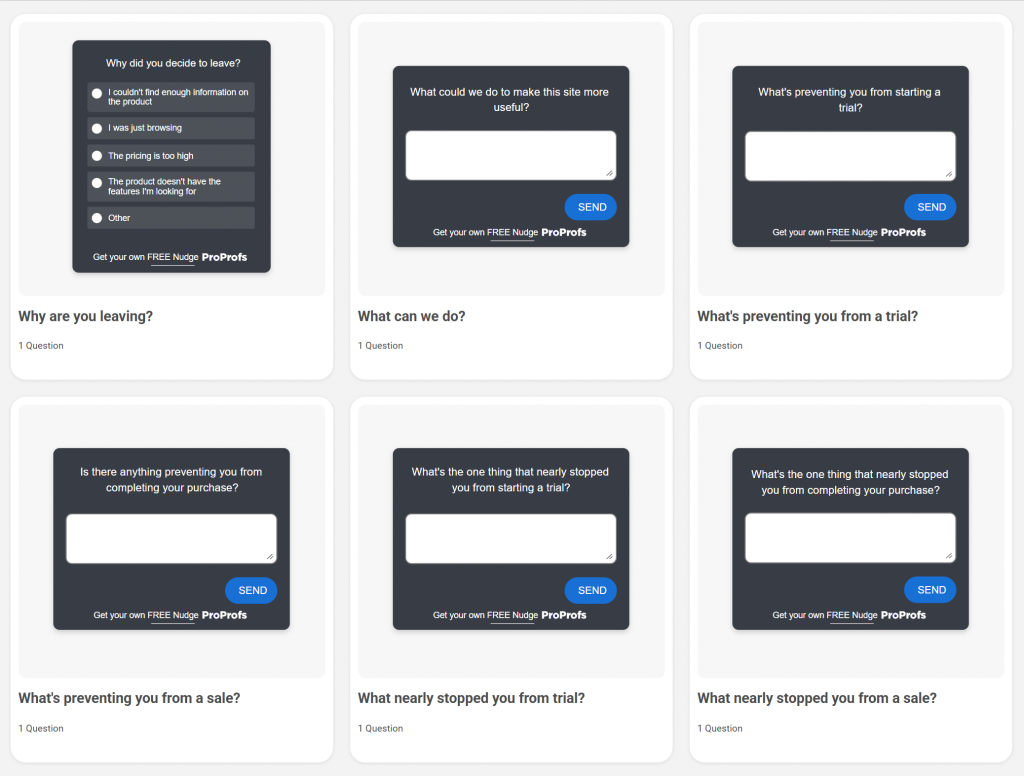
In these scenarios, use Agent Augmentation. Let the AI summarize the issue and suggest a draft, but let a human hit “send.” You still get the speed, but you protect the trust while you learn. Before you let AI do the heavy lifting, here are a few survey templates you can use to gauge high-stakes customer escalations:
Do This 15-Minute Exercise Before You Build Anything
Before you invest in a new tool or workflow, run your current support volume through this filter:
- Audit the Last 30 Days: Pull your top 20 reasons customers contact you. If you don’t have a clean list, grab the categories your support tool already uses.
- Define the Finish Line: For each reason, write the outcome in one sentence (e.g., “Customer gets the right invoice”). If you cannot write a clear finish line, it is not a good AI candidate.
- Identify the Repeatable Path: Circle the items where you can confidently say, “If X happens, the next step is always Y.”
- Pick One, Not Five: Choose the single highest-volume item from your circled list. Run it end-to-end, measure the resolution rate, fix the rough edges, and then expand.
This is how you avoid building a wide but shallow AI layer that looks impressive but resolves nothing.
FREE. All Features. FOREVER!
Try our Forever FREE account with all premium features!
A 90-Day Rollout Plan You Can Actually Run
When you’re using AI to improve customer experience, the quickest way to mess it up is to treat launch like a one-day event.
It’s not. It’s a rollout. You earn reliability in small moves, then you scale what’s proven.
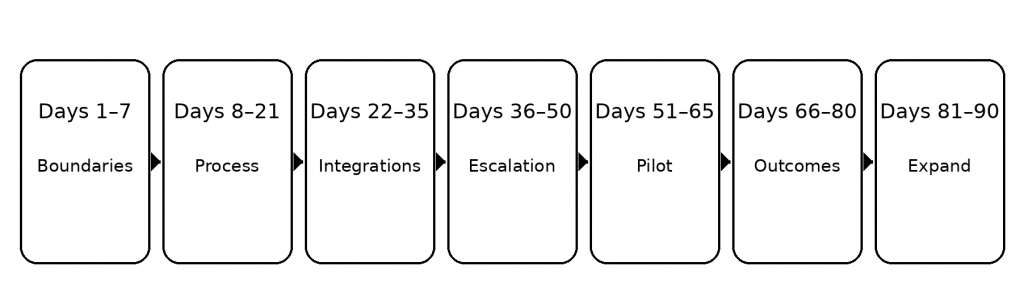
Days 1 To 7: Set the Boundaries
Take the first use case you picked and write the rules as you mean them. What can the AI do, and what is off-limits? Keep it strict. If the AI cannot move the request forward inside those rules, it escalates right away. No improvising.
Days 8 To 21: Fix the Process Before You Automate It
If the workflow is messy for your team, AI will just make the mess happen faster. Use this time to tighten the steps until a new hire could follow them without asking ten questions. That’s when you know the logic is clear enough to automate.
Days 22 To 35: Connect Only What You Need
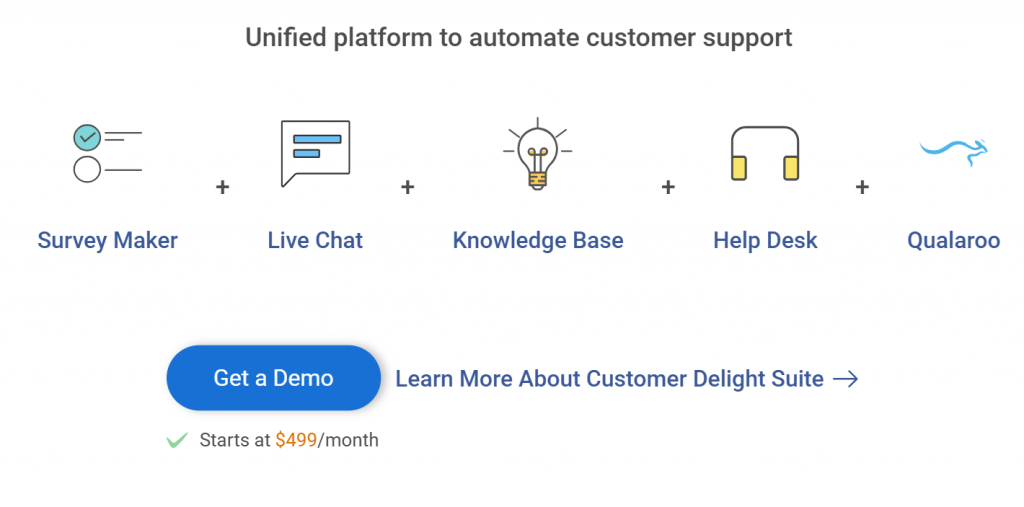
Do not integrate everything. Connect the minimum needed to reach the finish line. Usually, that means two things: the basic account facts to confirm the customer, and the one system where the action actually happens. Also, decide what the AI can only read, and what it is allowed to change. You can use a complete customer delight suite for AI customer experience.
Days 36 To 50: Design Escalation Like It’s Part of the Product
A handoff should feel smooth, not like a restart. When the AI escalates, your agent should instantly see what the customer wants, what was already checked, and what the next step should be. The customer should not have to repeat themselves.
Days 51 To 65: Pilot Small on Purpose
Start with a small slice. One channel, or one segment. This is where you catch edge cases and adjust tone without putting the whole experience at risk. When outcomes look stable, expand gradually.
Days 66 To 80: Look for Outcomes, Not Just Deflection
Do not obsess over “containment.” Check what happens after. Are customers returning the next day? Are they sounding more annoyed in replies? If you notice repeat contacts or sentiment worsening–pause, fix the logic, and then continue.
Days 81 To 90: Lock the Pattern & Add the Next Use Case
Once the first use case is steady, reuse the same playbook for the next one. That’s how you build an AI-enhanced customer experience that feels consistent across the journey, not like a bunch of disconnected experiments.
The Guardrails That Keep AI Useful & Safe
I treat AI like a new hire who is fast, confident, and occasionally a little too confident.
So I do what you would do with any new hire. I give it tight lanes, clear stop signs, and a manager it can escalate to without drama.
1. If It Cannot Verify, It Cannot Decide: Any time the answer depends on customer-specific facts, like eligibility, plan limits, refunds, or security, the AI only gets two options. Verify using your approved sources and account data, or escalate. It never “fills in the gap” with a confident guess.
2. Narrow Scope Beats Broad Freedom: Early on, I do not ask AI to handle “support.” I ask it to handle one job. One finish line. One small set of safe actions. That is how you avoid the situation where it sounds helpful but cannot complete anything.
3. The Customer Should Never Repeat The Story: This is non-negotiable. If a customer moves from chat to email, or from bot to human, the context must move with them. The practical fix is simple: every interaction produces a short summary that lives in the ticket or CRM, and the next person sees it immediately.
4. Escalation Is A First-Class Feature: I do not treat escalation like a failure. I treat it like good service. When the AI escalates, the agent should instantly see three things: what the customer wants, what was already verified, and what the system could not complete. If the agent has to dig, the handoff is broken.
5. A Weekly Reality Check Keeps You Safe: I do not wait for an incident to review quality. Every week, I scan a small sample of conversations and look for patterns: where customers got stuck, where the AI asked too many questions, where it should have escalated earlier, and where it over-promised. Then I tighten the rules, update the approved sources, and move on.
How To Know AI Is Actually Improving Customer Experience
If you only track “tickets deflected,” you can fool yourself fast.
AI might be reducing volume while quietly increasing frustration. Customers come back a day later. Escalations get angrier. Your team spends more time cleaning up.
So you should measure AI the same way you measure any operational change: outcomes first, then efficiency.
| Metric To Track | What It Tells You | How To Calculate | What Good Looks Like |
|---|---|---|---|
| Time To Resolution | How quickly customers reach an outcome | Average of (Resolution Timestamp minus First Contact Timestamp) for a period. Segment by AI-only, AI-assisted, and human-only | Trending down without CSAT drop |
| First Contact Resolution | Whether issues get solved in one go | (Tickets resolved on first interaction ÷ Total tickets) × 100. Define “first interaction” as no reopen or follow-up within X days | Trending up |
| Repeat Contact Rate | If customers come back because it didn’t work | (Customers who contact again about same issue within X days ÷ Total customers who contacted) × 100. Use tags, topic clustering, or reason codes | Trending down |
| Escalation Rate | How often AI hands off to humans | (AI conversations that hand off to a human ÷ Total AI conversations) × 100 | Stable or gradually down as you mature |
| Escalation Quality | Whether handoffs feel seamless | Agent QA score on handoff completeness, or % of escalations where agent did not ask customer to repeat key details. Track “repeat questions” flags | Agents resolve quickly without re-asking |
| Customer Effort Signals | How hard it felt for customers | CES survey average (e.g., 1–7). Also track % of chats containing phrases like “repeat,” “already told,” “again,” “human” | Less effort over time |
| CSAT By Issue Type | Where AI helps vs hurts | Average CSAT per category and per path (AI-only vs AI-assisted vs human-only). Compare deltas by issue type | Stable or rising for simple issues |
| Reopen Rate | Whether “resolved” stays resolved | (Tickets reopened within X days ÷ Tickets marked resolved) × 100 | Trending down |
| Sentiment In Open Text | Emotional trend, not just score | % positive, neutral, negative sentiment over time from comments, chat transcripts, and survey responses. Track trend lines by category | Less frustration with language over time |
| Cost Per Resolution | Efficiency after quality is stable | (Total support cost for period ÷ Total resolved cases). Optionally separate by channel and AI vs human handling | Trending down |
| Deflection Rate | Volume reduced by AI | (Issues fully resolved by self-serve or AI without human involvement ÷ Total incoming issues) × 100. Validate with repeat-contact checks | Trending up only alongside strong outcomes |
The Bottom Line: Build AI CX That Finishes The Job
AI customer experience works when customers feel one thing: progress.
If you want a simple next step, pick one moment in your journey where customers commonly get stuck, like onboarding, pricing decisions, or cancellation. Add a lightweight feedback check right there, so you can see if people are getting the outcome they wanted.
That’s also where a tool like Qualaroo fits naturally. You can trigger short, in-context questions at the moment of truth, capture the open-text “why,” and turn it into themes you can act on, not just data you store.
Run that loop for a few weeks, fix what’s broken, and then scale. That’s how you build an AI-enhanced customer experience that feels steady, trustworthy, and worth coming back to.
Frequently Asked Questions

What is AI-powered CX?
AI-powered CX is a customer experience where AI does real work, not just conversation. It understands intent, pulls the right context, recommends the next step, and either completes a safe action or escalates cleanly. The customer feels less effort, faster resolution, and fewer repeats across chat, email, and calls.
What is one way AI improves the customer experience?
One powerful way is to reduce customer effort. AI can capture the problem once, keep context attached to the account, and carry it across channels and handoffs. That prevents the “repeat your story” loop, shortens resolution time, and makes support feel organized, responsive, and genuinely personal.
Which AI is best for customer service?
The best AI is the one that stays accurate within your rules and connects to the systems that resolve requests. Prioritize grounding in your help content and policies, reliable account context, clean escalation, and strong integrations with tickets, billing, and product data. If it cannot complete outcomes, it will frustrate customers.
How do I stop doing manual analysis on NPS and open-text feedback?
Stop treating feedback like a spreadsheet project. Use AI to cluster comments into themes, score sentiment, and tag drivers like onboarding, pricing, bugs, or support quality. Then route the top themes to owners with clear actions. The goal is faster decisions, less VLOOKUP work, and tighter follow-through.
FREE. All Features. FOREVER!
Try our Forever FREE account with all premium features!

 We'd love your feedback!
What did you like & how can we make it even better?
 Thanks for your feedback!
 Ask Your Question
Have a question? Get expert help to make your decision easier.