


Training budgets keep climbing, and so does executive anxiety about whether any of it is actually working. Nearly half of L&D leaders report that their leadership teams are worried employees lack the skills to keep pace with business strategy. That is not a budget problem. That is a measurement problem.
The fix is not more training. It is smarter feedback. Specifically, asking the right training survey questions at the right moments: before a session, right after, and weeks later when behavior either changes or it does not.
The best training survey questions measure learner readiness before a session, reaction and learning gain immediately after, and behavioral change at 30, 60, and 90 days, mapped to the Kirkpatrick four-level model and Phillips ROI formula to prove real business impact.
Here is what this guide covers:
- 25+ training survey questions organized in tables with what each one measures
- Pre-training, post-training, and 30/60/90-day follow-up question banks
- The Kirkpatrick Four-Level Model and Phillips ROI Model, applied to survey design
- A step-by-step system for capturing feedback in the moment using Qualaroo nudges
- KPI mapping and a working ROI calculation template
Whether you run onboarding, compliance training, or leadership development, the goal is the same: move from collecting opinions to proving impact.
What Are the 8 Best Pre-Training Survey Questions to Set a Baseline?
Pre-training surveys are the most skipped step in most programs, and skipping them is a mistake. Without a baseline, you have no way to measure growth.
You also risk delivering content pitched at the wrong level, too basic for your audience, or too advanced for new hires.
Send these questions 24 hours before the session, or trigger them as an embedded Qualaroo nudge inside your LMS the moment a learner opens the course for the first time.
| Pre-Training Survey Question | Response Type | What It Gauges |
|---|---|---|
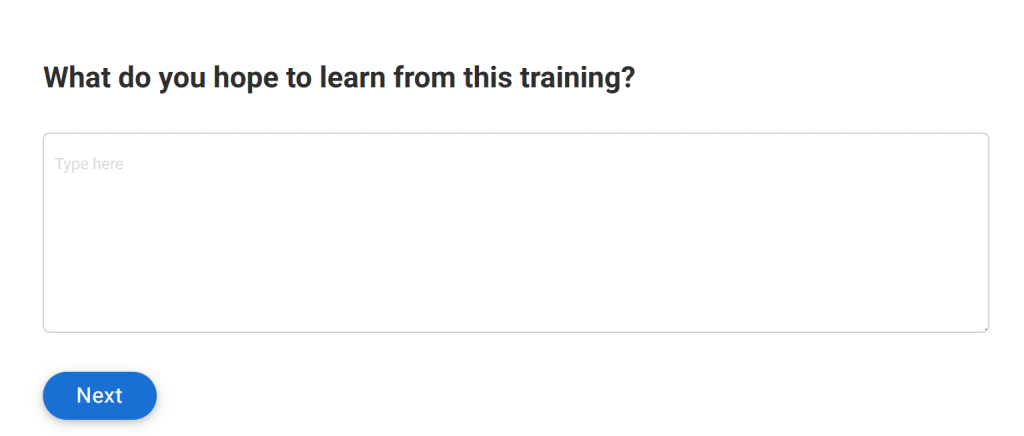
| What do you hope to learn from this training? | Open text | Learner intent and expectations |
| How confident are you in your current knowledge of this topic? | 1 to 5 scale | Baseline confidence for pre/post comparison |
| Have you completed similar training before? | Yes / No | Prior exposure and risk of redundancy |
| What specific challenges are you facing in this area right now? | Open text | Real-world pain points to anchor content |
| How relevant do you expect this training to be to your day-to-day role? | 1 to 5 scale | Perceived relevance before the session |
| How would you rate your current skill level on this topic? | Beginner / Intermediate / Advanced | Content calibration signal for facilitators |
| What outcome would make this training feel worth your time? | Open text | Success criteria from the learner's perspective |
| Is there a specific project or challenge you want this training to help with? | Open text | Application context: connects training to live work |
Why This Data Matters in Practice: If 70% of respondents rate their skill level as “Advanced,” the facilitator knows to skip the foundational hour and go straight to application. That alone saves time and lifts post-training satisfaction scores without changing a single piece of content.
What Are the 10 Most Effective Post-Training Survey Questions?
Post-training survey questions capture two things: the learner’s immediate reaction (Kirkpatrick Level 1) and their self-assessed learning gain (Level 2).
Send these within 24 hours while the employee experience is still fresh. Waiting a week compresses memory and artificially inflates satisfaction scores.
| Post-Training Survey Question | Response Type | What It Gauges |
|---|---|---|
| Did this training meet your pre-session expectations? | Yes / No + open text | Expectation alignment (Kirkpatrick Level 1) |
| How ready do you feel to apply what you just learned? | Need more support / Can apply with help / Can apply independently | Readiness and learning confidence (Level 2) |
| What was the single most valuable part of this session? | Open text | Content relevance and standout moments |
| What would you change or improve for the next cohort? | Open text | Facilitator and content improvement signal |
| Was the trainer clear and knowledgeable? | 1 to 5 scale | Instructor effectiveness |
| Were the training materials and resources helpful? | 1 to 5 scale | Resource quality and usability |
| Was the session length appropriate? | Too short / Just right / Too long | Pacing and time management |
| Would you recommend this training to a colleague? | 0 to 10 NPS scale | Overall program Net Promoter Score |
| Did you have enough opportunity to ask questions or participate? | Yes / No | Engagement and interactivity quality |
| Was the learning environment comfortable and low on distraction? | 1 to 5 scale | Environmental quality (in-person or virtual) |
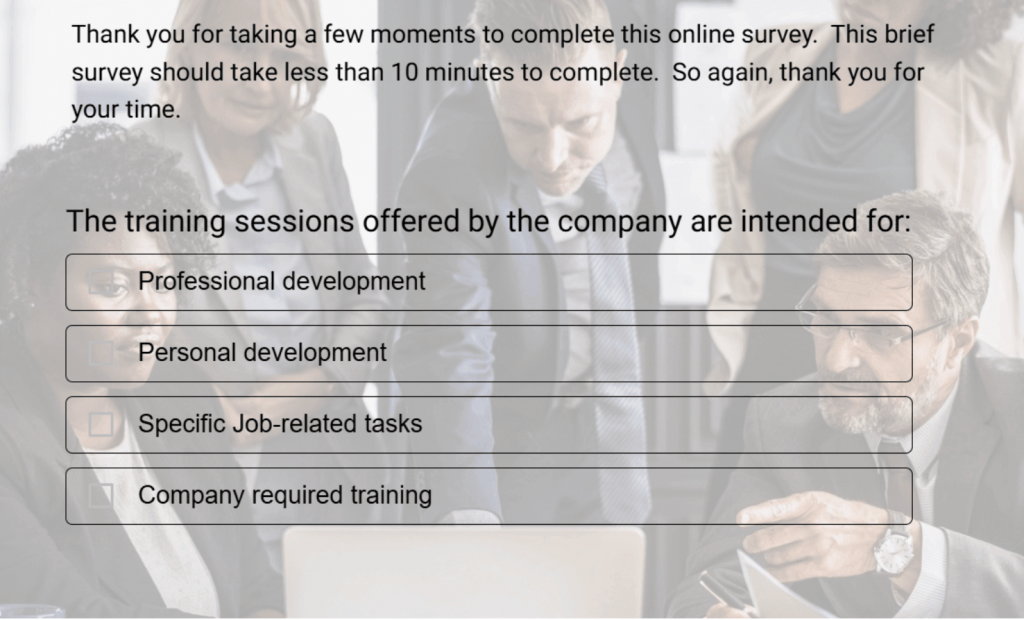
Here’s a post-training survey template you can use:
One reframe worth adopting across the board: replace generic satisfaction scales with performance-focused descriptors.
Learning researcher Dr. Will Thalheimer recommends dropping “Rate your understanding 1 to 5” in favor of: “I need more guidance before I can apply this / I can apply this with some support / I can apply this independently.”
This forces the learner to actually assess their readiness rather than clicking a number instinctively, and it gives you far more actionable data.
How Do You Measure Behavioral Change With These 10 Follow-Up Training Surveys?
This is where most programs fall apart. The 30/60/90-day follow-up is the most underused, highest-value part of the entire training evaluation cycle.
It maps directly to Kirkpatrick Level 3 (Behavior) and is the only way to confirm that skills were transferred from the session to the actual job.
Deliver these as short, in-context nudges through Qualaroo embedded in your LMS, internal tools, or project management platform.
One or two targeted questions at the right moment outperform a 20-question email form every time.
| Follow-Up Survey Question | Response Type | What It Gauges |
|---|---|---|
| Have you applied the skills from this training in your day-to-day work? | Yes / Not yet + reason | Behavioral application rate (Kirkpatrick Level 3) |
| What specific challenge has this training helped you handle better? | Open text | Real-world impact evidence |
| What barriers have you encountered when trying to apply what you learned? | Open text | Adoption blockers and support gaps |
| Has your manager supported you in putting the training into practice? | 1 to 5 scale | Manager reinforcement quality |
| Has this training affected your productivity? | More productive / No change / Less efficient while learning | Productivity impact signal |
| Have you shared or taught any of this content to a teammate? | Yes / No | Knowledge transfer and team-level spread |
| What is one skill from this training you still struggle to apply consistently? | Open text | Persistent knowledge gaps and refresher needs |
| Has this training contributed to any measurable outcome in your role? | Open text | Kirkpatrick Level 4 proxy data |
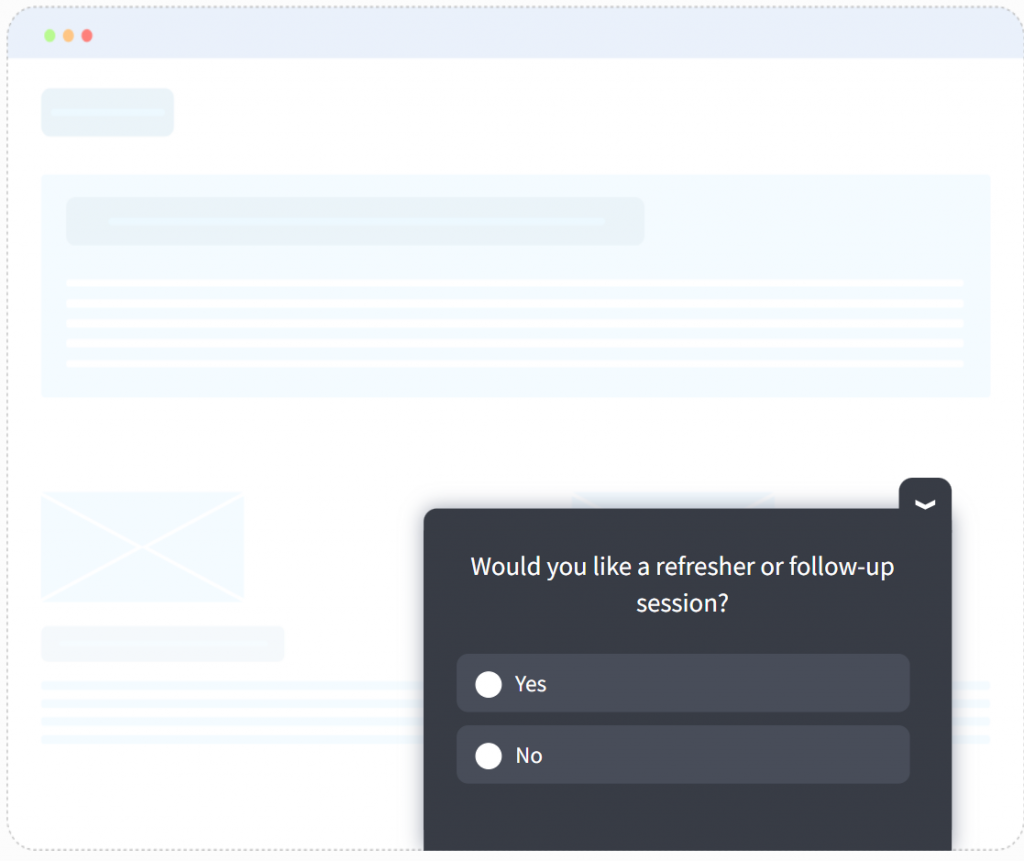
| Would you benefit from a refresher session or additional resources? | Yes / No | Future program planning signal |
| Would you recommend this training to future colleagues? Why or why not? | Open text | Program advocacy and NPS over time |
Your refresher microsurvey would look like this:
Key design principle: Replicate the same confidence question from your pre-training survey at the 60-day mark. The change between those two scores is your single clearest proof of learning gain. That comparative data is what gets L&D programs taken seriously in budget reviews.
Research from learning practitioners consistently shows that after training, the biggest barriers to application are:
- No job aids or reference materials available post-session
- Managers not reinforcing or coaching the new behavior
- Competing workload priorities that push the application aside
- Content that was too theoretical and did not map to actual work scenarios
When your 30-day survey reveals that 40% of learners cite “no manager reinforcement” as the reason they have not applied the skill, you now have specific, actionable evidence.
That is not a training problem. That is a management support problem, and you can address it directly with data behind you.
Here’s the complete training survey question bank:
How Do You Create Training Surveys That People Actually Complete?
Getting high-quality data depends entirely on getting people to fill out your surveys. And the honest reality is that employees are already drowning in requests.
A 15-question email survey sent three days after training will get ignored or clicked through randomly just to clear the notification.
Here is the system that works for teams running training at any scale.
Step 1: Build Your Nudge in Qualaroo (Takes Under 5 Minutes)
Inside the Qualaroo dashboard, training surveys are called Nudges, and building one is genuinely fast. Here is exactly how it works:
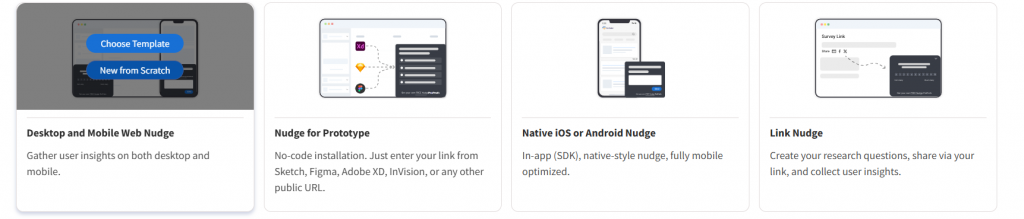
1. Choose your channel type in the dashboard and click on “Create a Nudge”.
2. Write your question and pick your answer format. Quick rating, yes or no, emoji reaction, or a free-text box when you want the full story. For training, a readiness scale or open-text prompt usually gives you the most actionable signal.
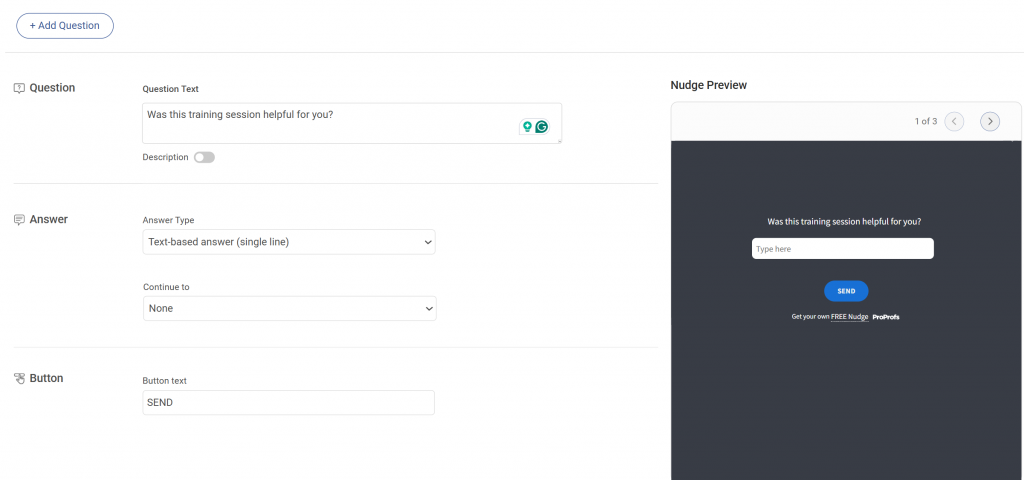
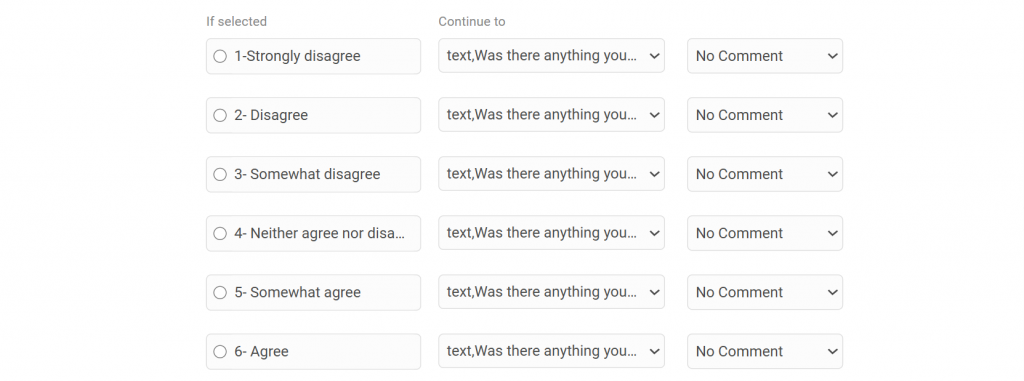
3. Turn on branching logic. This is where Qualaroo does something most survey tools cannot. The nudge actually adapts based on how someone answers. A learner who says they are struggling gets asked what went wrong.
A learner who feels confident gets asked what clicked for them. Same nudge, two completely different conversations, both relevant and personal.
4. Keep it tight. One to three questions is all it takes to collect data that genuinely moves the needle. Anything longer and completion rates drop fast.
5. Set your targeting rules. This is where it gets precise. You are not placing a survey on a page and hoping the right person sees it. Target by URL, by user behavior, by what someone just did in the LMS, or even by how many times they have visited a specific resource.
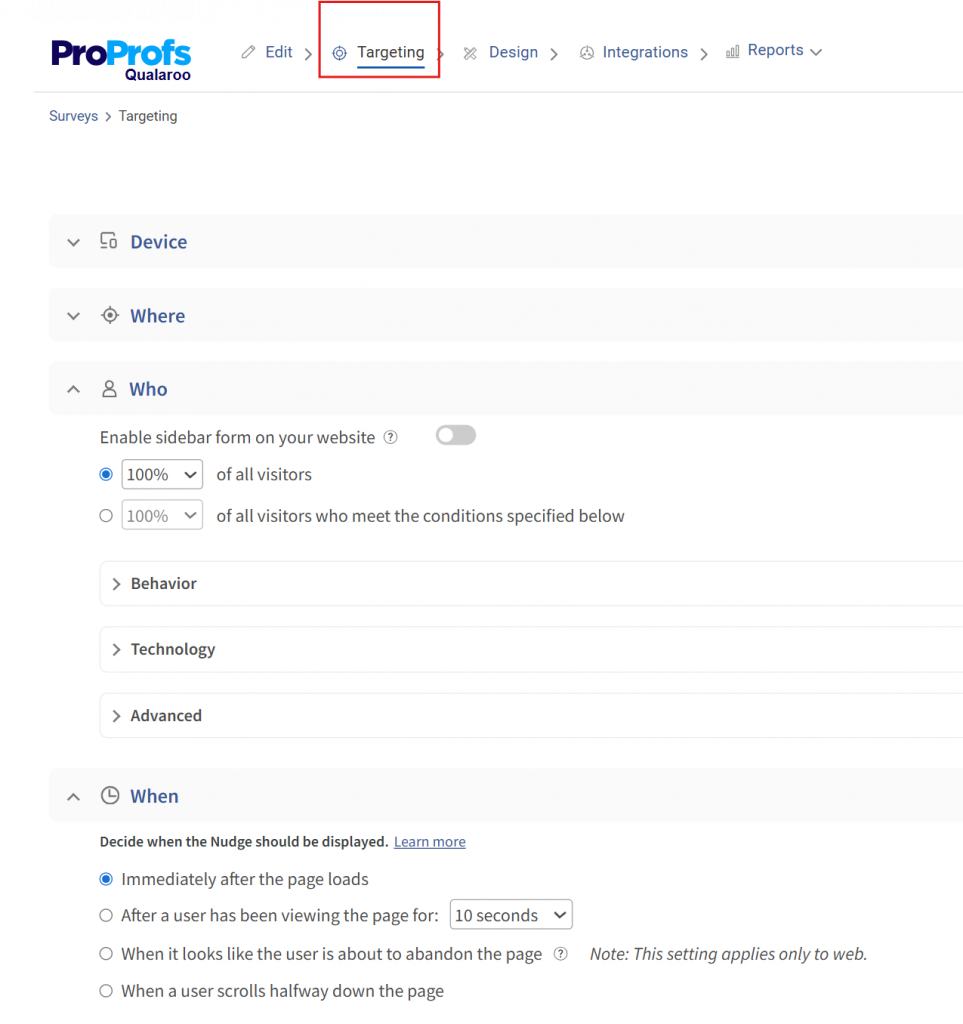
A learner who has revisited the same module three times sees a completely different question than someone breezing through their first pass. Someone heading for the exit before completing a module? They see an exit-intent nudge before they disappear.
Every response is tied to a real moment and a real behavior. That is what makes this data so much more actionable than anything you get from a traditional post-training email form. Try Qualaroo free and set up your first training nudge without any developer work.
Step 2: Build Full Evaluation Surveys With ProProfs Survey Maker
For structured pre-training and post-training surveys, you will get a template on ProProfs Survey Maker.
If you want to create a training survey from scratch, go to ProProfs Survey Maker and type a prompt like: “Employee training feedback for onboarding, focus on friction points, knowledge retention, and confidence, include NPS and open comments.” Within seconds, it generates a complete survey.
You get rating scales where they actually make sense, open-text questions where you need real detail, and answer flows that feel logical rather than mechanical.
The questions are neutral with no leading language, and the structure pulls from a library of proven survey patterns, so it is consistent across programs.
It also works in over 70 languages automatically, which matters if your training runs across global teams.
From there, do a quick scan.
Tweak a phrase or two to match your company’s tone, reorder a question if needed, and add branching logic for low scores or specific answers.
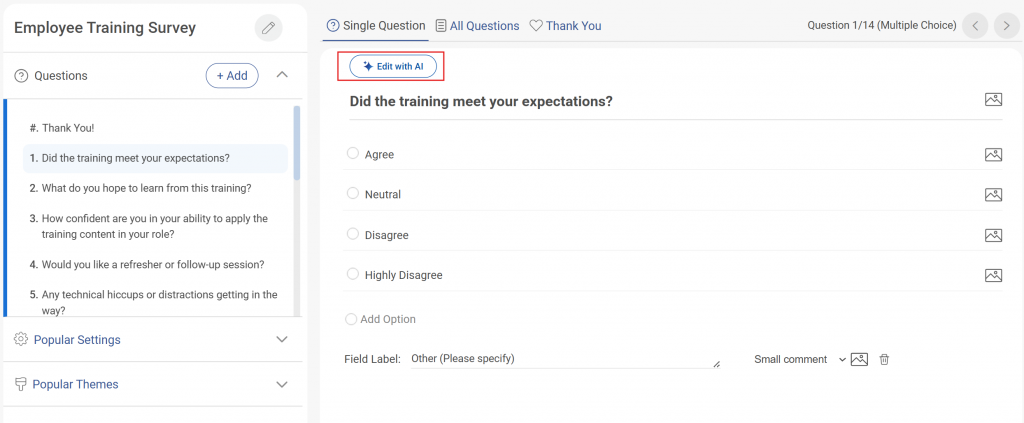
Then enable anonymity and limit your responses.
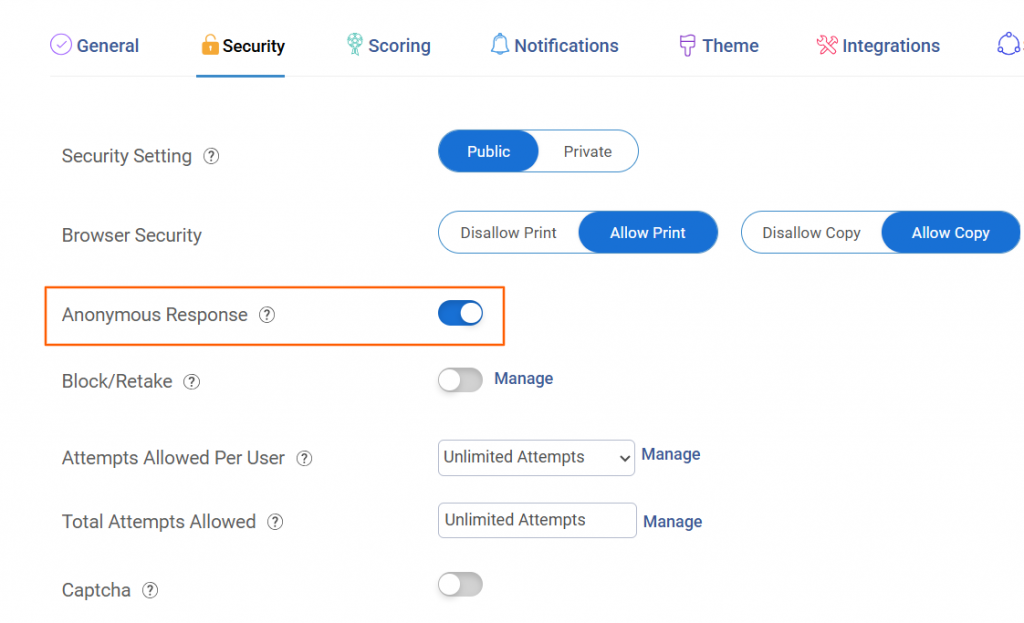
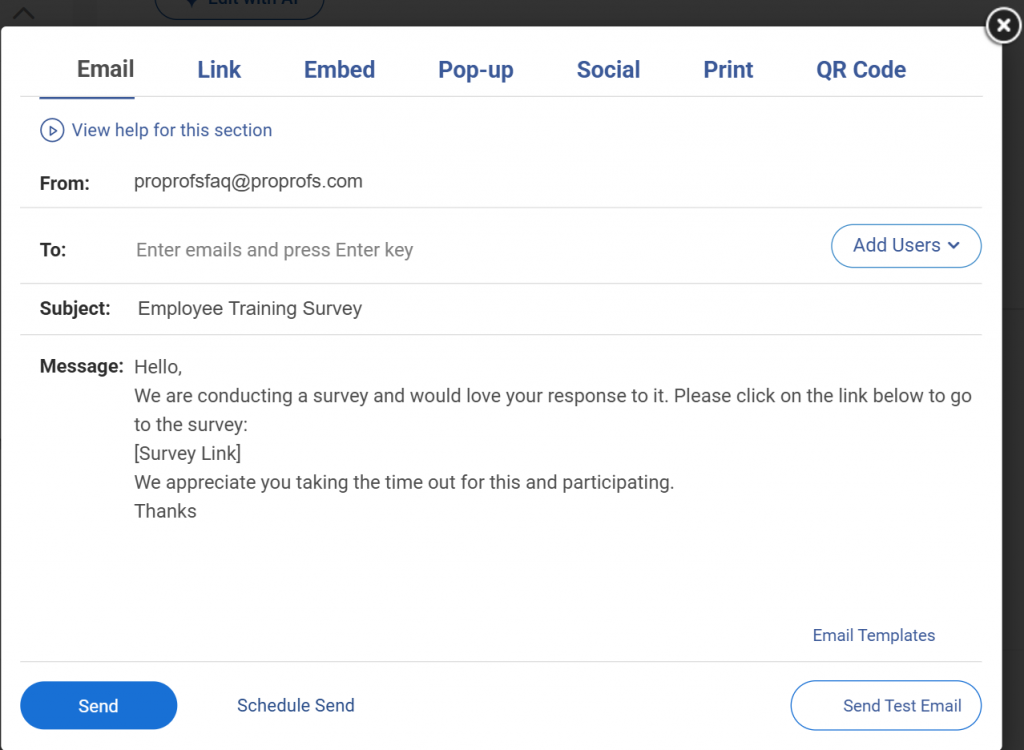
When it is ready, embed it on the LMS, trigger it as a popup after a key training milestone, send the link by email, or drop a QR code in a live session. The whole build, from prompt to live survey, takes under five minutes.
Step 3: Apply the Decision-Back Design Rule
Before adding any question to a survey, ask: “What specific decision would I make differently based on the answer?” If you cannot name a decision, cut the question. This single filter eliminates filler questions and keeps surveys under 10 items naturally.
Step 4: Follow These Completion Rate Rules
- Cap surveys at 8 to 10 questions maximum
- Add a time estimate (“This takes 3 minutes”) to the survey header
- Use skip logic so remote participants never see in-room questions, and beginners never see questions designed for advanced learners
- Always follow up with a “You said, we did” summary: “You told us the pacing was too fast, so we added a self-paced review module.” Visible action is the single biggest driver of future participation.
ProProfs Survey Maker is part of the ProProfs Smarter Employee Learning suite, which covers training creation, quizzing, and feedback collection in one ecosystem, so your survey results sit alongside your course data rather than in a separate tool.
FREE. All Features. FOREVER!
Try our Forever FREE account with all premium features!
What Evaluation Frameworks Should Anchor Your Training Survey Design?
Before you write a single question, you need a framework. Two models have stood the test of time in L&D and are consistently cited as authoritative references for training evaluation methodology.
How Does the Kirkpatrick Four-Level Model Work?
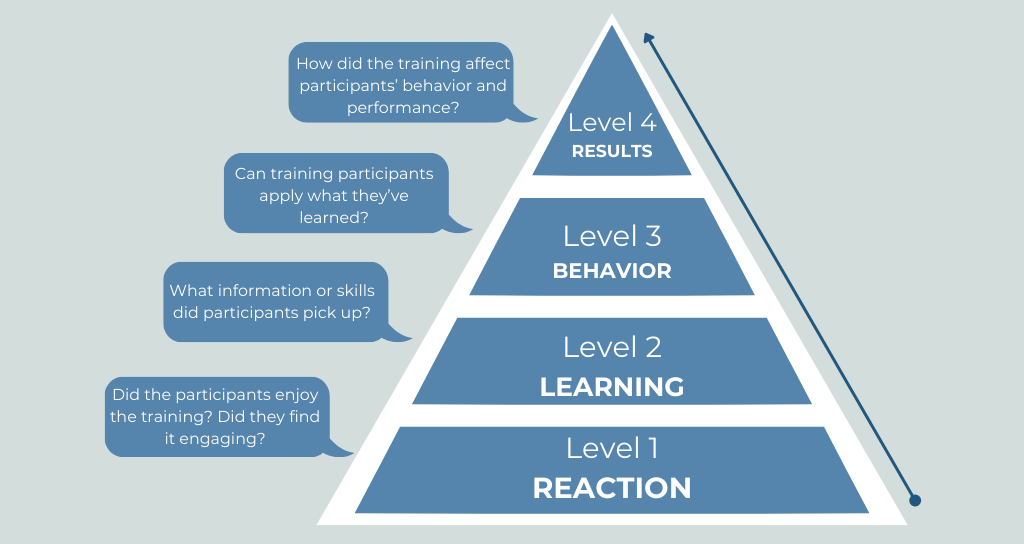
The Kirkpatrick Model, developed by Dr. Donald Kirkpatrick in 1959 and updated by James Kirkpatrick in subsequent decades, organizes training evaluation into four sequential levels. Each level builds on the one before it, and each one requires a different type of survey question.
| Level | What It Measures | When to Measure | Survey Question Format |
|---|---|---|---|
| Level 1: Reaction | Did participants find it relevant and engaging? | Immediately after training | Satisfaction ratings, NPS, open-text feedback |
| Level 2: Learning | Did they actually gain knowledge or skills? | Same day or next day | Pre vs. post confidence scores, knowledge checks |
| Level 3: Behavior | Are they applying what they learned on the job? | 30, 60, and 90 days post-training | Behavioral application questions, manager input |
| Level 4: Results | Did training improve business outcomes? | 60 to 90 days post-training | KPI comparisons, performance data, ROI proxies |
Most teams measure Level 1 religiously and ignore Levels 3 and 4 entirely. That is why training programs feel like cost centers instead of performance levers.
What Does the Phillips ROI Model Add?
Jack Phillips extended the Kirkpatrick framework by adding a fifth evaluation level: return on investment. The Phillips ROI Model converts training outcomes into financial terms using a straightforward formula.
ROI % = (Net Benefits / Training Costs) x 100
To use it, you isolate the effect of training from other variables (via control groups, trend analysis, or manager estimates), convert improvements into monetary values, and compare those gains against program costs.
When your training survey questions are designed with this model in mind from the start, you collect the data you need to run this calculation rather than scrambling for it later.
Framework Quick Reference: Use Kirkpatrick to structure what you ask and when. Use Phillips to convert your Level 4 results data into a financial return figure that your leadership team will actually care about.
What Is the Start-Stop-Continue Framework for Training Feedback?
Broad, open-ended questions like “Any other feedback?” consistently produce vague, unusable answers. The Start-Stop-Continue framework gives learners a structured lens that produces specific, actionable input without requiring more questions.
| Prompt | What You Are Asking | What You Get |
|---|---|---|
| Start | What should the training team begin doing that it currently does not? | New ideas and unmet needs |
| Stop | What should the training team stop doing because it is not adding value? | Friction points and wasted time |
| Continue | What is working well and should be kept in future sessions? | Content and delivery strengths to protect |
Add this as a single optional open-text question at the end of your post-training survey: “Using Start, Stop, Continue, what is one thing each for this training?”
You will get more actionable qualitative data from this one question than from five generic rating scales.
What Metrics Define Successful Employee Training?
Collecting data is pointless without knowing what good looks like. Most L&D teams track satisfaction scores and call it a day.
The ones that earn budget trust track response rates, behavioral application, and KPI movement across the full training lifecycle.
Here is what each of those looks like in practice.
| Training Goal | Survey Question to Ask | Business KPI to Track |
|---|---|---|
| Faster onboarding | "How quickly were you able to work independently after training?" | Time-to-productivity for new hires |
| Reduced support tickets | "Did this training reduce the number of questions you escalate?" | Support ticket volume per employee |
| Sales skill improvement | "Has this training changed how you approach discovery calls?" | Win rate, average deal size |
| Compliance adherence | "Are you applying the compliance protocols from the training?" | Audit findings, incident reports |
| Manager effectiveness | "Has your manager coached you on applying training content?" | Employee engagement and retention scores |
When you track these metrics before and after a training program, you have the raw material for the Phillips ROI calculation.
How Do You Analyze Training Feedback and Improve Program Outcomes?
Collecting responses is step one. Turning them into decisions is the actual job. Here is the analysis framework that connects survey data to program improvement.
| Analysis Move | How to Do It | What It Produces |
|---|---|---|
| Compare pre vs. post confidence scores | Use the same 1 to 5 questions before and after training | Measurable learning gain per cohort |
| Track behavioral application rate | Ask the same skill application question at 30 and 60 days | Confirms or disproves behavior change |
| Segment by role and tenure | Break results down by job function, team, and experience level | Surfaces that need support vs. those that are thriving |
| Run sentiment analysis on open text | Use Qualaroo's AI sentiment analysis to tag themes automatically | Fast pattern recognition across large cohorts |
| Tie to KPIs | Link survey results to operational data: ticket volume, deal size, error rate | The evidence base for Phillips ROI calculation |
One move that is consistently underused: segmentation. Averages hide the story. A 4.2 overall satisfaction score might mask a 2.8 from your remote team and a 5.0 from your in-office cohort.
Segmenting by cohort type helps you identify the specific problems worth fixing.
FREE. All Features. FOREVER!
Try our Forever FREE account with all premium features!
How Do You Avoid Common Roadblocks to Training Survey Success?
Even well-designed surveys fail if you do not anticipate the execution blockers.
| Roadblock | What Happens | How to Fix It |
|---|---|---|
| Survey fatigue | Employees skip surveys or click randomly to finish | Cap at 8 to 10 questions, use in-context nudges, and rotate cohorts for pulse surveys |
| No visible action | Participation drops because feedback feels ignored | Send a "You said, we did" note after every survey cycle |
| Poor timing | Email forms sent days later get low response rates | Trigger nudges at the moment of completion inside your LMS |
| Generic questions | Vague answers that cannot drive decisions | Apply Decision-Back Design: only ask questions tied to a specific action |
| Remote barriers | Distributed teams struggle with long forms | Mobile-first design, one question at a time, embedded in existing tools |
| SME resistance | Subject matter experts push back on content changes | Use quantitative data ("42% of learners found this module confusing") to support decisions |
One tactic that works particularly well against fatigue: Rotating cohorts.
Instead of sending the same 10-question pulse survey to all 200 employees every month, send a 3-question version to 50 employees on a rotating schedule. You get continuous data without over-surveying the same people, and the data stays fresh.
Why Are Training Survey Questions Essential for Employee Performance?
Training survey questions are structured prompts used before, during, or after a learning program to measure whether employees gained knowledge, changed behavior, or improved performance.
A well-designed training survey does more than capture satisfaction scores. It creates a feedback loop that tells you what to fix, what to keep, and how to justify every dollar spent on learning.
The gap most organizations fall into is relying on what learning professionals call “smile sheets”: those end-of-session ratings that mostly confirm whether people liked the format.
A participant rating a session 4.5 out of 5 tells you nothing about whether they can now close a deal faster, resolve a support ticket correctly, or onboard a new hire in half the time.
The Real Measure of Good Training Is What Happens After It Ends
Most training programs are evaluated the wrong way. The session closes, a satisfaction form goes out, scores come back positive, and the program gets marked as successful.
Six weeks later, nothing has changed on the job. No one connects those two things because the measurement stopped too early.
The L&D teams have a baseline before training starts. They check in at 30 days when the real application test begins.
They bring KPI data to budget conversations instead of survey averages. And when employees see that their feedback actually changed something, they keep giving it.
That is the system this guide is built around.
Pick two or three questions from this guide, tie them to one measurable outcome, and start there. The data will tell you what to build next.
Start collecting in-context training feedback for free with Qualaroo, and build your first pre- or post-training survey with ProProfs Survey Maker.
Frequently Asked Questions
What is a good response rate for each type of training survey?
According to Simpplr’s 2025 research, a good response rate for post-training surveys is anything above 60%, depending on company size. High response rates contribute to better data quality, whereas low rates (under 10%) may indicate survey fatigue or lack of engagement.
Why should companies measure training ROI?
Training ROI converts learning outcomes into financial terms that leadership understands. Without it, L&D budgets are cut first during downturns. The Phillips ROI formula (Net Benefits / Training Costs x 100) requires longitudinal survey data to calculate, which is why measurement must be designed in from the start.
What is the difference between reaction and behavioral evaluation in training?
Reaction evaluation (Kirkpatrick Level 1) measures how participants felt immediately after the session. Behavioral evaluation (Level 3) measures whether they changed how they actually work weeks later. High reaction scores do not predict behavioral change. The only way to confirm behavior changed is a 30 to 60-day follow-up survey.
Why does follow-up feedback improve long-term learning retention?
Asking employees to recall and describe how they applied a skill at 30 days reinforces that memory through retrieval practice, a well-documented principle in cognitive science. Follow-up surveys also surface specific barriers such as a lack of manager reinforcement or missing job aids, which immediate post-training surveys never capture.
How many questions should a training survey have?
Keep pre-training and post-training surveys to a maximum of 8 to 10 questions. Follow-up pulse checks at 30 or 60 days should be even shorter: 3 to 5 questions is the sweet spot. Beyond 10 questions, completion rates drop, and the answers you do get become less thoughtful. If you have more to ask, split it across multiple touchpoints rather than loading it all into one form.
Should training surveys be anonymous?
It depends on what you are measuring. Survey anonymity increases honest responses for sensitive topics like trainer effectiveness or program relevance. But for 30 to 90-day behavioral follow-ups, named responses let managers have targeted coaching conversations based on the data. A good middle ground: make satisfaction and feedback questions anonymous, and keep application follow-ups visible to the direct manager only, not the broader organization.
What is the best time to send a post-training survey?
Within two hours of the session ending, if possible, and no later than 24 hours. The longer you wait, the more memory is compressed, and scores skew positive. For in-person sessions, a short nudge before participants leave the room consistently outperforms any follow-up email. For virtual training, an in-platform nudge triggered at course completion beats a separate email every time.
What is the difference between a training survey and a training assessment?
A training assessment tests whether someone learned the content: quizzes, scenario-based questions, and knowledge checks. A training survey measures their experience of and reaction to the learning: how relevant it felt, how confident they are, and whether they would apply it. Both are necessary. Assessments tell you if the knowledge has been transferred. Surveys tell you why it did or did not, and what to fix in the next program.
How often should you run training surveys for ongoing programs?
For continuous learning programs, run a post-module pulse after each major milestone rather than a single big survey at the end. Add a program-level survey every quarter to track trend data across cohorts. For recurring compliance or onboarding programs, compare results cohort by cohort to spot whether satisfaction and confidence scores are improving, flat, or declining over time.
What should you do with negative training feedback?
Act on it visibly and quickly. Categorize negative open-text responses by theme (content quality, pacing, relevance, delivery) and address the top two or three before the next cohort runs. Then, in a short note to participants, communicate what changed: "You told us the module on X was unclear, so we rebuilt it with more examples." This closes the loop, builds trust, and is the single most reliable way to improve future response rates from the same employee group.
Can training surveys replace performance reviews?
No, but they should feed into them. Training surveys measure readiness and application at the program level. Performance reviews assess output and behavior over a longer period. The most useful setup is to share 60 and 90-day training survey results with managers before performance conversations, so there is a shared data point on skill development, not just a subjective impression.
FREE. All Features. FOREVER!
Try our Forever FREE account with all premium features!

 We'd love your feedback!
What did you like & how can we make it even better?
 Thanks for your feedback!
 Ask Your Question
Have a question? Get expert help to make your decision easier.